 rivet-dev/sandbox-agent
Run Coding Agents in Sandboxes. Control Them Over HTTP. Supports Claude Code, Codex, OpenCode, and Amp.

A server that runs inside your sandbox. Your app connects remotely to control Claude Code, Codex, OpenCode, Cursor, Amp, or Pi — streaming events, handling permissions, managing sessions.
Documentation — API Reference — Discord
Experimental: Gigacode — use OpenCode's TUI with any coding agent.
Running coding agents remotely is hard. Existing SDKs assume local execution, SSH breaks TTY handling and streaming, and every agent has a different API. Building from scratch means reimplementing everything for each coding agent.
Sandbox Agent solves three problems:
Coding agents need sandboxes — You can't let AI execute arbitrary code on your production servers. Coding agents need isolated environments, but existing SDKs assume local execution. Sandbox Agent is a server that runs inside the sandbox and exposes HTTP/SSE.
Every coding agent is different — Claude Code, Codex, OpenCode, Cursor, Amp, and Pi each have proprietary APIs, event formats, and behaviors. Swapping agents means rewriting your integration. Sandbox Agent provides one HTTP API — write your code once, swap agents with a config change.
Sessions are ephemeral — Agent transcripts live in the sandbox. When the process ends, you lose everything. Sandbox Agent streams events in a universal schema to your storage. Persist to Postgres, ClickHouse, or Rivet. Replay later, audit everything.
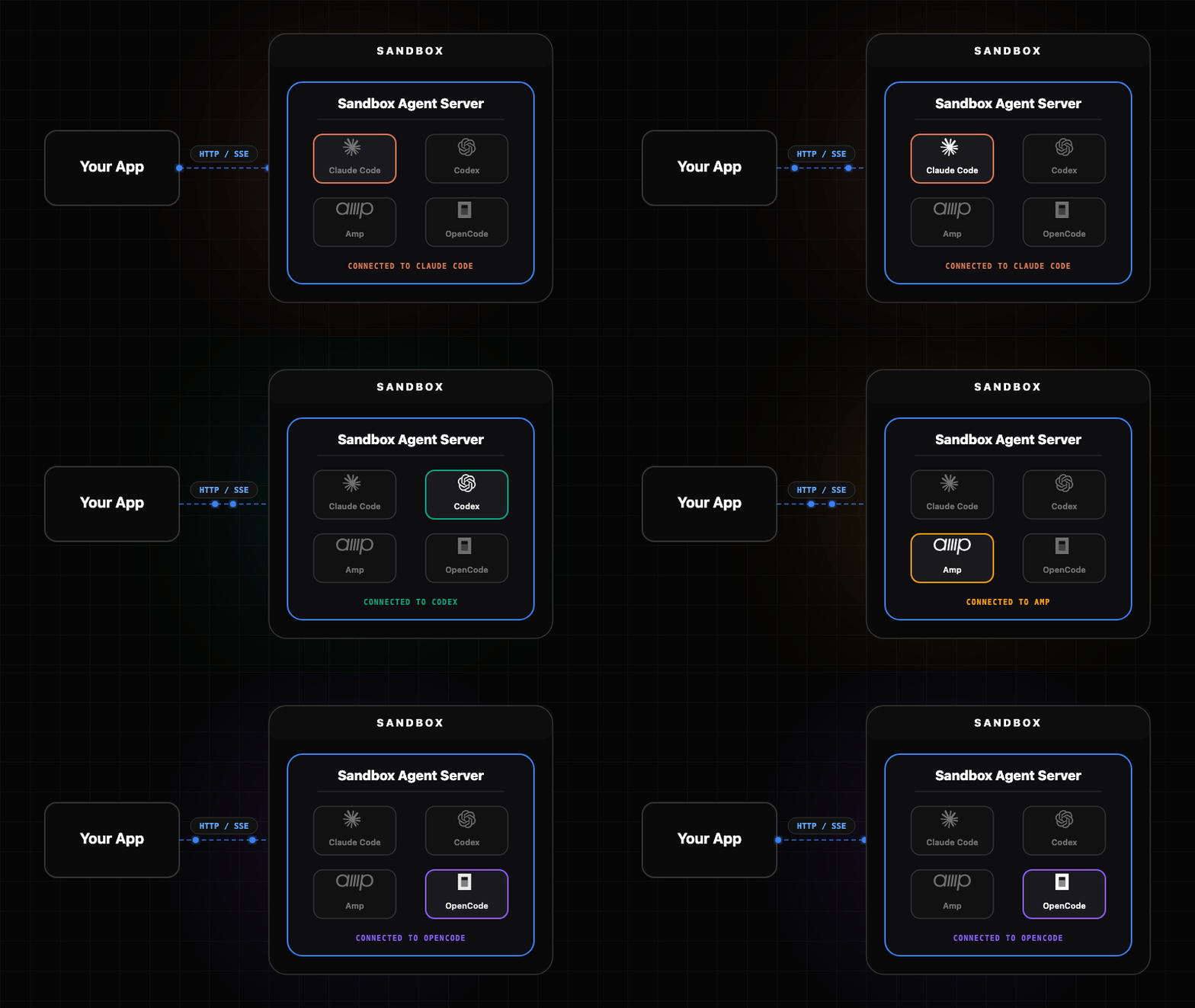
The Sandbox Agent acts as a universal adapter between your client application and various coding agents. Each agent has its own adapter that handles the translation between the universal API and the agent-specific interface.
| Component | Description |
|---|---|
| Server | Rust daemon (sandbox-agent server) exposing the HTTP + SSE API |
| SDK | TypeScript client with embedded and server modes |
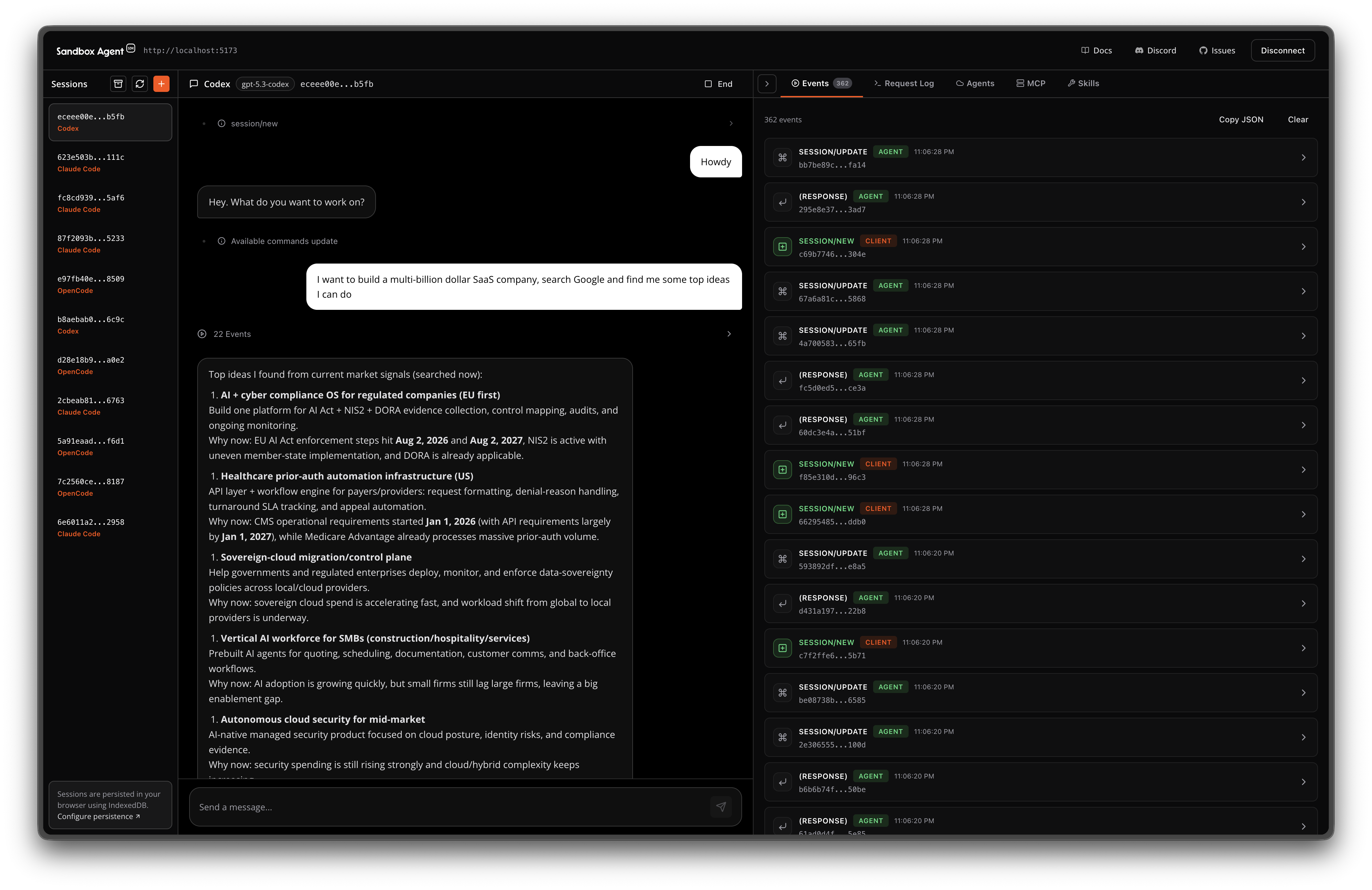
| Inspector | Built-in UI at inspecting sessions and events |
| CLI | sandbox-agent (same binary, plus npm wrapper) mirrors the HTTP endpoints |
Choose the installation method that works best for your use case.
Install skill with:
npx skills add rivet-dev/skills -s sandbox-agent
bunx skills add rivet-dev/skills -s sandbox-agent
Import the SDK directly into your Node or browser application. Full type safety and streaming support.
Install
npm install [email protected]
bun add [email protected]
# Optional: allow Bun to run postinstall scripts for native binaries (required for SandboxAgent.start()).
bun pm trust @sandbox-agent/cli-linux-x64 @sandbox-agent/cli-linux-arm64 @sandbox-agent/cli-darwin-arm64 @sandbox-agent/cli-darwin-x64 @sandbox-agent/cli-win32-x64
Setup
Local (embedded mode):
import { SandboxAgent } from "sandbox-agent";

const client = await SandboxAgent.start();
Remote (server mode):
import { SandboxAgent } from "sandbox-agent";

const client = await SandboxAgent.connect({
  baseUrl: "http://127.0.0.1:2468",
  token: process.env.SANDBOX_TOKEN,
});
API Overview
const agents = await client.listAgents();

await client.createSession("demo", {
  agent: "codex",
  agentMode: "default",
});

await client.postMessage("demo", { message: "Hello from the SDK." });

for await (const event of client.streamEvents("demo", { offset: 0 })) {
  console.log(event.type, event.data);
}
SDK documentation — Managing Sessions
Run as an HTTP server and connect from any language. Deploy to E2B, Daytona, Vercel, or your own infrastructure.
# Install it
curl -fsSL https://releases.rivet.dev/sandbox-agent/0.4.x/install.sh | sh
# Run it
sandbox-agent server --token "$SANDBOX_TOKEN" --host 127.0.0.1 --port 2468
Optional: preinstall agent binaries (no server required; they will be installed lazily on first use if you skip this):
sandbox-agent install-agent --all
To disable auth locally:
sandbox-agent server --no-token --host 127.0.0.1 --port 2468
Quickstart — Deployment guides
Install the CLI wrapper (optional but convenient):
npm install -g @sandbox-agent/[email protected]
# Allow Bun to run postinstall scripts for native binaries.
bun add -g @sandbox-agent/[email protected]
bun pm -g trust @sandbox-agent/cli-linux-x64 @sandbox-agent/cli-linux-arm64 @sandbox-agent/cli-darwin-arm64 @sandbox-agent/cli-darwin-x64 @sandbox-agent/cli-win32-x64
Create a session and send a message:
sandbox-agent api sessions create my-session --agent codex --endpoint http://127.0.0.1:2468 --token "$SANDBOX_TOKEN"
sandbox-agent api sessions send-message my-session --message "Hello" --endpoint http://127.0.0.1:2468 --token "$SANDBOX_TOKEN"
sandbox-agent api sessions send-message-stream my-session --message "Hello" --endpoint http://127.0.0.1:2468 --token "$SANDBOX_TOKEN"
You can also use npx like:
npx @sandbox-agent/[email protected] --help
bunx @sandbox-agent/[email protected] --help
Debug sessions and events with the built-in Inspector UI (e.g., http://localhost:2468/ui/).
Explore API — View Specification
Often you need to use your personal API tokens to test agents on sandboxes:
sandbox-agent credentials extract-env --export
This prints environment variables for your OpenAI/Anthropic/etc API keys to test with Sandbox Agent SDK.
