 richlegrand/bitbang-cli
Establish secure remote access to a machine with interactive shell, file transfer, and web proxy over end-to-end encrypted peer-to-peer WebRTC, using a browser or CLI without port forwarding or accounts.


bitbang is a single static binary remote-access multitool. From any browser: an interactive shell and file browser access to the remote machine. You can also reach web apps on that machine's network. Beyond the browser, it does TCP port forwarding, file copy, and terminal sharing. It requires no account or configuration -- it just works.
On the machine you want to reach:
curl -sSfL bitba.ng/install | sh
bitbang serve
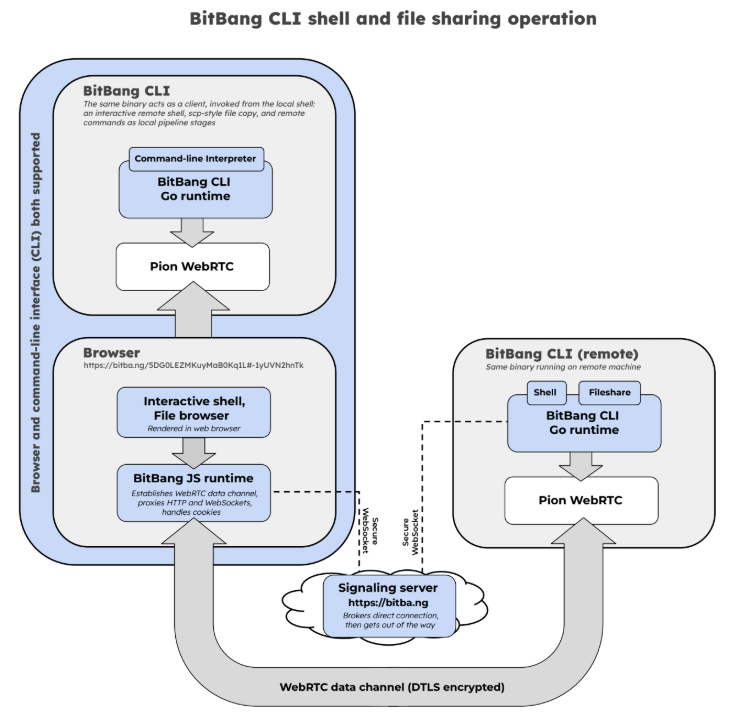
serve prints a URL. Open it in any browser and you get a terminal, a file browser, and a proxy to that machine's network -- or reach the same machine from another terminal with bitbang connect <url>, which adds port forwarding (-L) and file copy (). The connection is end-to-end encrypted and peer-to-peer; the server introduces the two ends, then steps aside.
bitbang cpbitba.ngbitbang is a single static Go binary. It's part of the BitBang project; this whitepaper covers the design in depth.
| ngrok | Tailscale | bitbang | |
|---|---|---|---|
| Setup before first use | Account + authtoken | Account + login on each device | Run one command |
| To share something, you run | a web server, plus ngrok | their client on both machines | bitbang serve |
| What a browser on the far end gets | the web server you were already running | nothing -- it needs their client | a terminal, a file browser, and web apps on the remote network |
| Data path | their servers | P2P (relay fallback) | P2P (relay fallback) |
| End-to-end encrypted | Not by default | Yes | Yes |
Reach a service at home
Get on a machine
Share with someone else
Sharing entails simply giving someone a unique URL or QR code that gives them access. Permissions can be tailored and set to expire in minutes, hours, etc.
Development and devices
Techniques
bitbangEvery connection has two ends: a listener (bitbang serve, running on the machine being reached) and a connector (a browser, or the bitbang CLI, on the machine doing the reaching). One listener URL serves both kinds of connector.
bitbang servebitbang serve # everything: shell + proxy + files + forward
bitbang serve shell # just a terminal
bitbang serve files ~/share # just a directory (-files-upload to allow uploads)
bitbang serve proxy localhost:8080 # just one web app, straight at the URL
bitbang serve proxy a.lan:80,b.lan:80 # ...or several, chosen in the browser
bitbang serve forward 127.0.0.1:22 # just TCP, for `connect -L`
bitbang serve shell files ~/share proxy nas.lan:8096 # any combination

Each prints a QR code, URL and a pairing code. The mode picks what the
listener can do at all: serve shell has no forwarding to grant, and a
forward-only listener never starts a shell, so there is nothing to escalate
to.
One default worth knowing: forwarding and the proxy reach any host:port the
listener can reach, not only the one you had in mind, so a link handed out
for a database also reaches the rest of that network. Naming targets after the
word narrows it -- forward db.internal:5432 reaches that and nothing else.
bitbang shareserve shell starts a new shell. share publishes a tmux session that is
already running:
bitbang share                    # publish the current tmux session
bitbang share --read-only        # publish without a control URL
bitbang share status|stop|rotate
The command returns after publishing, so Ctrl-Z, bitbang share, fg
works for a task already in progress. Hosting requires tmux 3.2+ on Unix or
WSL. Native Windows clients can open the URLs but cannot host a share.
By default, the command prints two bearer URLs:
--max-viewers viewers may connect at once (default 16).--read-only omits the control credential entirely. Viewer and controller
limits are held for each connection's lifetime, even before it opens a shell.
Shares run until stopped by default; --ttl sets a lifetime (e.g. --ttl 1h).
Share URLs are ephemeral and are never saved to devices.json. share stop,
TTL expiry, or removal of the source session disconnects remote peers without
stopping the source session.
Re-running bitbang share reprints the running share's URLs. If you
pass a flag that disagrees with what is running (say --read-only
against a share that has a control URL), it says so rather than
handing back the old URLs; bitbang share rotate replaces the share
with one that uses the new flags.
A background worker runs in a detached _bbshare_* tmux management session,
so there is no daemon or PID file to manage.
Sharing changes no tmux options. With tmux's default window-size latest, the
window follows the active read-write client; a lone viewer still supplies the
only available size. If window-size has been overridden, share reports it
but does not change the user's configuration.
bitbang linkOne listener, one URL, and as many access links as you need. Each is a separate code on that same URL, granting a subset of what the listener offers and optionally lapsing at a fixed time:
bitbang link edit                # add entries in $EDITOR
bitbang link ls                  # what you have handed out
bitbang link rm <label>          # revoke one
bitbang link qr <label>          # its URL and QR code
An entry is a line of JSON in ~/.bitbang/bitbang/links.json. Write one with no
code, reload the listener at its console, and it mints one:
[
  {"label": "ana",  "grant": "files", "expires": "2026-09-01T00:00:00Z"},
  {"label": "ben",  "grant": "files /srv/photos"},
  {"label": "dev",  "grant": "shell forward 127.0.0.1:5432"}
]
  0) owner  files forward proxy shell
     https://bitba.ng/8ach_I7oQk2vBb9xYzT0Lw#_vtQ0JCPe7s
  1) ana    files  expires in 6d
     https://bitba.ng/8ach_I7oQk2vBb9xYzT0Lw#T-Ty_HhvLfY
  2) ben    files /srv/photos
     https://bitba.ng/8ach_I7oQk2vBb9xYzT0Lw#L6La8OzBO74
  3) dev    forward 127.0.0.1:5432 shell
     https://bitba.ng/8ach_I7oQk2vBb9xYzT0Lw#8kmI3LYzB7E
owner is the identity's own code and grants everything the listener serves; send
one of the others instead. The console takes either the label or the number beside
it, so rm 2 and rm ben do the same thing.
A grant is written in the words serve takes, and it can only narrow what the
listener already serves. That means a link is not limited to picking capabilities:
it can name a subdirectory of the shared folder, a subset of the forward targets, or
a single command for shell. Omit grant and the link grants whatever the listener
does. Ask for something outside the listener's reach and the console refuses it with
the same message serve would give you.
The label is what identifies a link, not its terms, so two people can hold links with identical grants and expiry and you can still revoke one without touching the other.
Revocation and expiry reach sessions that are already open: the connection closes and the holder is told why, rather than going quiet. And an expired code is retired rather than paused -- renewing an entry mints a new one, so the URL you already sent stays dead.
When you can't paste a URL or scan a QR code, such as when you're on the phone, or within yelling distance, bitbang serve also prints a short pairing code. The other party opens bitba.ng/<code> (or runs bitbang connect <code>), their screen shows a second 6-digit number, and they read that one back to you. You type it in to approve. A machine-in-the-middle can't make the two numbers match, and pairing saves the device connection credentials for next time, e.g. bitbang connect nas1. If you know Magic Wormhole, the shape is similar -- a spoken code that securely introduces two machines.
Most connections go straight peer-to-peer. When both ends sit behind a NAT that
won't hole-punch, the traffic needs a relay, and by default that's ours. -ice-servers
points the listener at your own instead:
bitbang serve -ice-servers ~/turn.json
The listener hands the config to the signaling server at registration, and the server gives it to whoever connects -- so both ends use your relay and ours is never involved. Any coturn, or a hosted provider like Cloudflare or Twilio, works.
The file is JSON, in whichever of these three shapes your provider handed you:
[{"urls": ["turn:turn.example.net:3478"], "username": "user", "credential": "pass"}]
{"ice_servers": [{"urls": "stun:stun.example.net:3478"}]}
{"iceServers": [{"urls": ["turn:turn.example.net:3478"], "username": "u", "credential": "p"}]}
urls takes a string or a list; username and credential are for TURN and can be
left off a STUN-only entry. The path may be absolute, relative, or ~-rooted. A file
that doesn't parse stops the listener at startup rather than quietly falling back.
If a session ends up relayed without being asked to, bitbang connect says so
rather than leaving you to wonder why it feels slow. The listener logs it
either way (via RELAY), and -relay / -norelay force the question one way
or the other when you are diagnosing a path.
Worth saying: this is about who carries the bytes, not who can read them. A relay only ever sees DTLS ciphertext, ours included. Run your own when you need more TURN than we can provide (we currently limit the time).
Open the URL. Depending on what's served, you get:
nas.local, 192.168.1.10:8080, localhost:3000/admin) and use the app as if you were local. Logins, cookies, uploads, and streaming all work.bitbang connect <url> # interactive shell
bitbang connect <url> -- tail -f /var/log/syslog # one-shot command
bitbang connect <url> -L 15432:db.internal:5432 # local TCP forwarding
bitbang connect <url> -L 14450:nas.local:445 -L 15900:[fd00::20]:5900
bitbang cp <url>:/var/log/app.log ./app.log # copy files, scp-style
bitbang cp - <url>:/tmp/firmware.bin < firmware.bin # stdin/stdout work too
-L forwards TCP only, like ssh -L. -L binds 127.0.0.1 unless you pass
-g, which makes the forwarded port reachable from your local network -- and
anyone who reaches it gets whatever the tunnel reaches, with no BitBang
credential in front of it.
The listener needs bitbang serve forward or bitbang serve. By default a
forward link reaches any host:port the listener can reach, not only the
one you had in mind, so a link handed out for a database also reaches the rest
of that network. Narrow it by naming what it may reach:
bitbang serve forward db.internal:5432 # this link reaches one service
Every successful connect or pairing is saved to ~/.bitbang/devices.json, so from then on a short name is enough: bitbang connect nas1.
One binary per platform, no runtime dependencies. Everything works everywhere except the two rows called out below.
| Linux | macOS | Windows | |
|---|---|---|---|
Shell, files, proxy (bitbang serve) | yes | yes | yes |
TCP forwarding (-L) | yes | yes | yes |
| Access links -- grant, expiry, revocation | yes | yes | yes |
| Bring your own TURN | yes | yes | yes |
| Pairing with a 6-digit code | yes | yes | yes |
| The listener console (Enter) | yes | yes | yes |
bitbang connect, bitbang cp | yes | yes | yes |
| Viewing a shared session | yes | yes | yes |
Hosting a share (bitbang share) | yes | yes | no * |
| Terminal resize while connected | yes | yes | no ** |
* bitbang share publishes a tmux session, so hosting one needs tmux --
Linux, macOS, or WSL. Native Windows can still open share URLs with
bitbang connect.
** A Windows connector does not notice its terminal being resized, so the
remote shell keeps the size it started with until you reconnect. Unix
gets this from SIGWINCH, which Windows has no equivalent of.
bitbang generates an RSA keypair under ~/.bitbang/<program>/; the device UID is derived from the public key, so impersonating a device means finding a second preimage of its UID.#…), which browsers never send -- bitba.ng brokers the connection without ever seeing the credential that authorizes it.serve shell. Share it accordingly.--pin) for permanent or headless setups, and throwaway mode (-ephemeral) for a fresh identity each run.bitbang connect has no such dependency: it is a
binary you installed and checksummed. If that distinction matters to you,
connect with the CLI.How the two ends authenticate each other, so that the signaling server cannot insert itself into the connection, is covered in detail here: Trustless Signaling: Authentication Without a Central Authority.
Short answer: for a machine you can already SSH into, or a fleet of your own
devices you can install on, keep using what you have. bitbang is for when the
far end is a person rather than a device, or when you cannot install anything
where you are sitting. Both questions are answered at length in the
FAQ.
curl -sSfL bitba.ng/install | sh
Linux and macOS. Detects your OS and arch (amd64, arm64, and armv7 on Linux), downloads the binary from the latest GitHub release, verifies its SHA-256 against the release's checksums.txt, and installs to ~/.local/bin/bitbang.
Windows builds are published as bitbang-windows-amd64.exe and
bitbang-windows-arm64.exe. Download the appropriate binary from Releases,
rename it to bitbang.exe, and place it on your PATH.
Build from source: see below.
macOS and Gatekeeper. The install one-liner above is unaffected: curl does
not set the com.apple.quarantine attribute, so the binary it fetches runs
normally. If you instead download bitbang-darwin-arm64 from the Releases page
in a browser, macOS quarantines it and refuses to open it, because the release
binaries are not notarized. Clear it with either of:
xattr -d com.apple.quarantine ./bitbang-darwin-arm64
or right-click the file in Finder and choose Open, which offers a one-time override. Alternatively, build from source, which never quarantines.
Windows and SmartScreen. The same thing happens on Windows, for the same
reason. A browser download attaches Mark-of-the-Web, so the first run shows
"Windows protected your PC" -- choose More info, then Run anyway. The
release binaries are not code-signed, so this is expected rather than a sign
anything is wrong. Fetching the .exe with curl or PowerShell's
Invoke-WebRequest does not attach it, and neither does building from source.
Pin a version, change the location, or read the script before running it:
curl -sSfL bitba.ng/install | sh -s -- --version 0.5.0
curl -sSfL bitba.ng/install | sh -s -- --prefix /usr/local/bin

curl -sSfL bitba.ng/install -o install.sh && less install.sh && sh install.sh
Release tags have no v prefix (0.5.0, not v0.5.0).
bitba.ng/install is a redirect, not a hosted script. The chain:
curl hits https://bitba.ng/install, which 302s to install.sh in this repo (on main).https://github.com/richlegrand/bitbang-cli/releases/latest/download/bitbang-linux-<arch>.checksums.txt from the same release and verifies the binary's SHA-256.~/.local/bin (overridable).The install script lives in this repo, next to the code it installs -- so you can review it alongside the binary, and the canonical bitba.ng host owns only the short URL. Self-hosters can point their own host's /install at whatever script they ship: the signaling server's INSTALL_URL env var controls the redirect target (empty → 404).
Every subcommand and flag lives in CLI.md, and bitbang <command> --help prints the same thing at the terminal.
Requires Go 1.25+. Pure Go, statically linked (CGO_ENABLED=0) -- trivial cross-compilation, no runtime dependencies.
go build ./cmd/bitbang/

# cross-compile:
GOOS=linux   GOARCH=arm64        go build -o bitbang-arm64 ./cmd/bitbang/
GOOS=linux   GOARCH=arm GOARM=7  go build -o bitbang-armv7 ./cmd/bitbang/
GOOS=windows GOARCH=amd64        go build -o bitbang.exe   ./cmd/bitbang/
GOOS=darwin  GOARCH=arm64        go build -o bitbang-macos ./cmd/bitbang/
From Windows Command Prompt:
go build -o bitbang.exe .\cmd\bitbang
go test .\...
run_tests.cmd unit
Shell commands, file sharing, proxying, and the CLI client are supported on Windows. Interactive browser and CLI shells use Windows ConPTY, including terminal input echo, line editing, VT output, and resize events. ConPTY requires Windows 10 version 1809 or Windows Server 2019 or later.
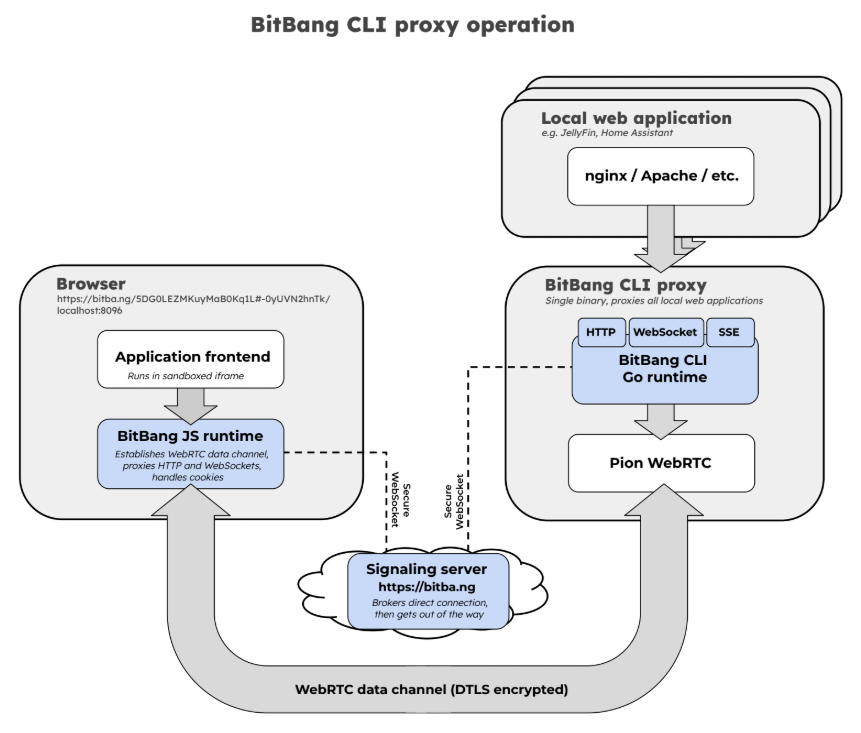
Shipping today: shell, files, and proxy, reachable from the browser or the CLI, plus TCP port forwarding, scp-style file copy, ad-hoc pairing with a saved device table, terminal sharing (bitbang share), and access links (bitbang link) that narrow and expire what a URL grants. Designed and on the way:
/dev/ttyUSB0 from a local virtual port (e.g. run Arduino IDE over the internet). An issue has been opened here.MIT -- see LICENSE.
Issues and PRs welcome.
Recipes are different: they live in the cookbook, in the bitbang repo, because they span every project rather than this one. Adding a recipe is a PR there.
Getting it listed is a second, small PR per project whose README should surface it -- the Recipes list above is maintained here by hand. That is deliberate: each project decides which recipes are worth putting in front of its own readers, rather than every README growing every recipe.

