
Skip to content
KitploitKITPLOIT
ToolsBlog
Submit
ToolsBlog
Submit

Hacking, PenTest, and Cybersecurity Tools for Your Security Arsenal!

Kitploit is a directory of hacking, cybersecurity, and pentesting tools. Discover the latest project updates to find vulnerabilities, analyze systems, automate testing, and strengthen your security.

··Feeds·Contact·Privacy·© 2026 Kitploit

Tool Directory

Categories

View all categories
Loading categories
ccat — Cloud Container Attack Tool (CCAT) is a tool for testing security of container environments. | Kitploit
Tools/GitHubGitHub/rhinosecuritylabs/ccat
Container SecurityExploitationPenetration TestingCloud Security
GitHubrhinosecuritylabs/ccat

ccat

Cloud Container Attack Tool (CCAT) is a tool for testing security of container environments.

View Repository
6521096 years agoReviewed by Kitploit

Most Popular

View all →

Discover the most used tools by our community.

Explore all tools

Browse our collection of tools

View all tools →
Share
Website

Cloud Container Attack Tool (CCAT ☁️🐈)

Rhino PyPI GitHub license PRs Welcome

Cloud Container Attack Tool (CCAT) is a tool for testing security of container environments.

Quick reference

  • Where to get help: the Pacu/CloudGoat/CCAT Community Slack, or Stack Overflow

  • Where to file issues: https://github.com/RhinoSecurityLabs/ccat/issues

  • Maintained by: the Rhino Assessment Team

Requirements

  • Python 3.5+ is required.
  • Docker is required. Note: CCAT is tested with Docker Engine 19.03.1 version.
  • Named profile is required for using AWS functionality.
  • A service account or access token is required for using GCP functionality.

Installation

We recommend using the provided Docker image to run CCAT, so that you will not face any difficulty with the required dependencies on your own system.

Install CCAT from source

root@kitploit:~
  $ git clone https://github.com/RhinoSecurityLabs/ccat.git
  $ cd ccat
  $ python3 setup.py install
  $ python3 ccat.py

Use CCAT's Docker Image

Warning: Running this command will mount your local AWS configuration files into the Docker container when it is launched. This means that any user with access to the container will have access to your host computer's AWS credentials.

Warning: Running this command will mount your local Unix socket that Docker daemon listens on by default into the Docker container when it is launched. This means that users with access to the container will have access to your Docker daemon, meaning they could escape to your host computer with ease.

root@kitploit:~
  $ docker run -it -v ~/.aws:/root/.aws/ -v /var/run/docker.sock:/var/run/docker.sock -v ${PWD}:/app/ rhinosecuritylabs/ccat:latest

Getting Started

Example Usage

Below is an example scenario to demonstrate the usage of CCAT.

Starting with compromised AWS credentials, the attacker enumerates and explores ECR repositories. Then, the attacker found that they use NGINX Docker image and pulled that Docker image from ECR. Furthermore, the attacker creates a reverse shell backdoor into the target Docker image. Finally, the attacker pushes the backdoored Docker image to ECR.

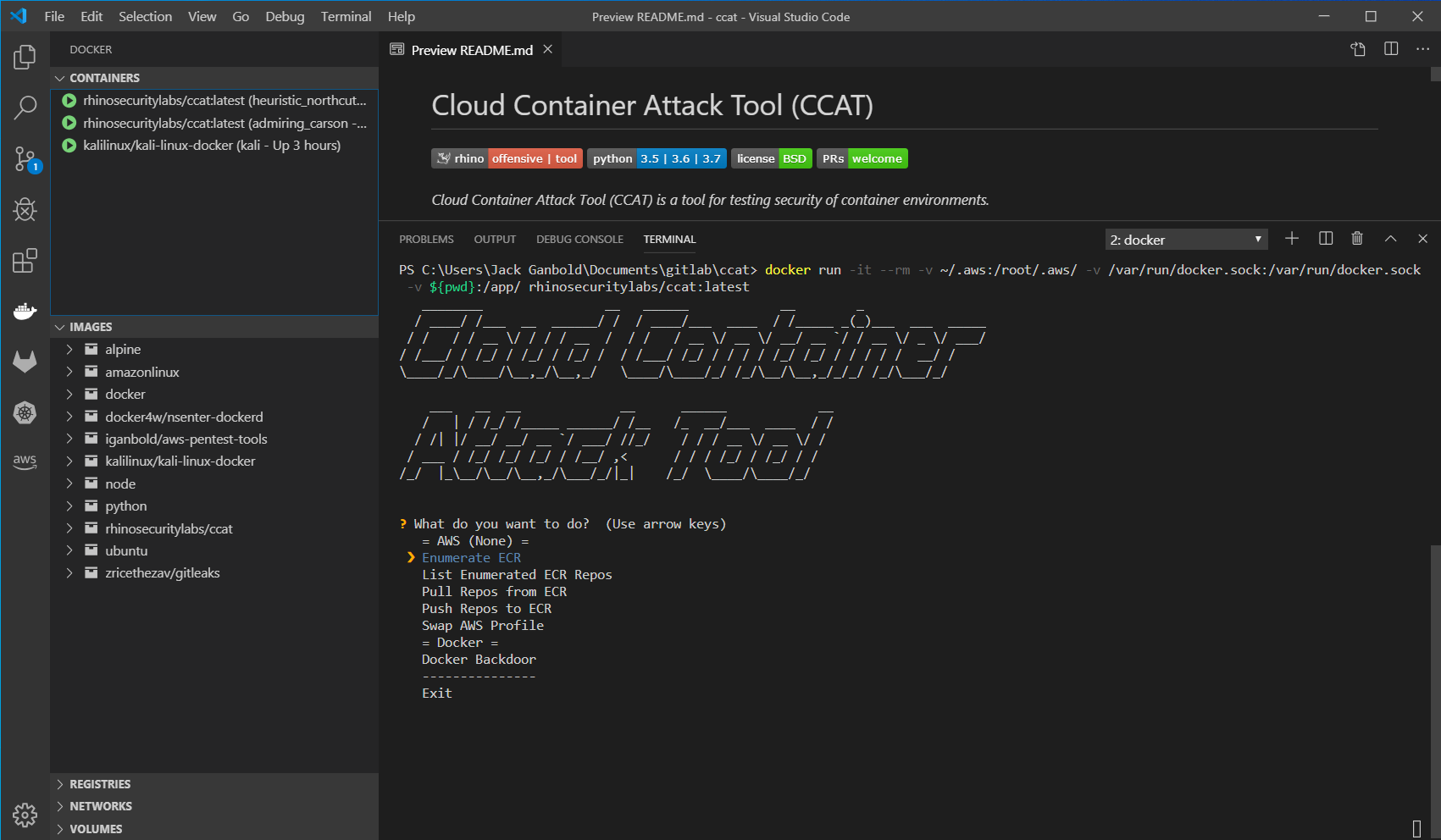
Exploitation Route:

  • VIDEO Exploitation Route Walkthrough with CCAT:

  • Exploitation Route Walkthrough with CCAT:

    Visit Step by Step Scenario Page.

Roadmap

  • Container Escape Features
  • Amazon ECS Attack Features
  • Amazon EKS Attack Features
  • Azure Container Related Attack Features
  • GCP Container Related Attack Features
  • OpenShift Container Related Attack Features
  • IBM Cloud Container Related Attack Features
  • Alibaba Cloud Container Related Attack Features

Disclaimer

  • CCAT is tool that comes with absolutely no warranties whatsoever. By using CCAT, you take full responsibility for any and all outcomes that result.
Download Tool