

Skip to content
KitploitKITPLOIT
ToolsBlog
Submit
ToolsBlog
Submit

Hacking, PenTest, and Cybersecurity Tools for Your Security Arsenal!

Kitploit is a directory of hacking, cybersecurity, and pentesting tools. Discover the latest project updates to find vulnerabilities, analyze systems, automate testing, and strengthen your security.

··Feeds·Contact·Privacy·© 2026 Kitploit

Tool Directory

Categories

View all categories
Loading categories
Tools/GitHubGitHub/rfunix/tengu
OSINT (Open Source Intelligence)Penetration Testing FrameworksReconnaissanceVulnerability ScannersExploit FrameworksWeb SecurityNetwork SecurityCloud SecurityLearning & EducationRed TeamingAI Security
5885 months agoReviewed by Kitploit

Most Popular

View all →

Discover the most used tools by our community.

Explore all tools

Browse our collection of tools

View all tools →
Share
tengu — AI-powered penetration testing MCP server | Kitploit

GitHub
rfunix/tengu

tengu

AI-powered penetration testing MCP server

View Repository

Tengu — Pentesting MCP Server

Tengu

"In Japanese mythology, the Tengu is a fierce mountain spirit — master strategist, warrior, and trainer of samurai. In cybersecurity, it guides you through every phase of the hunt."

From recon to report — AI-assisted pentesting in one command.

CI License Python MCP Tools Version Agent


Tengu is an MCP server that turns Claude into a penetration testing copilot. It orchestrates 80 security tools — from Nmap to Metasploit — with built-in safety controls, audit logging, and professional reporting.

  • What is it? An MCP server that connects Claude to industry-standard pentest tools
  • Why use it? Automates recon and scanning while keeping the human in control of exploits
  • Who is it for? Pentesters, red teamers, security students, and consulting firms

Key Features

  • 80 Tools — Nmap, Metasploit, SQLMap, Nuclei, Hydra, Burp-compatible ZAP, and more
  • AI-Orchestrated — Claude decides the next tool based on previous findings
  • Safety First — Allowlist, rate limiting, audit logs, and human-in-the-loop for destructive actions
  • Auto Reports — Correlate findings and generate professional pentest reports (MD/HTML/PDF)
  • 35 Workflows — Pre-built prompts for full pentest, web app, AD, cloud, and more
  • 20 Resources — Built-in OWASP Top 10, MITRE ATT&CK, PTES, and pentest checklists
  • Stealth Layer — Optional Tor/SOCKS5 proxy routing, UA rotation, and timing jitter

MCP Server Mode (Copilot)

Use Claude as an interactive pentest copilot — you direct the engagement, Claude picks the right tools and chains them together automatically.
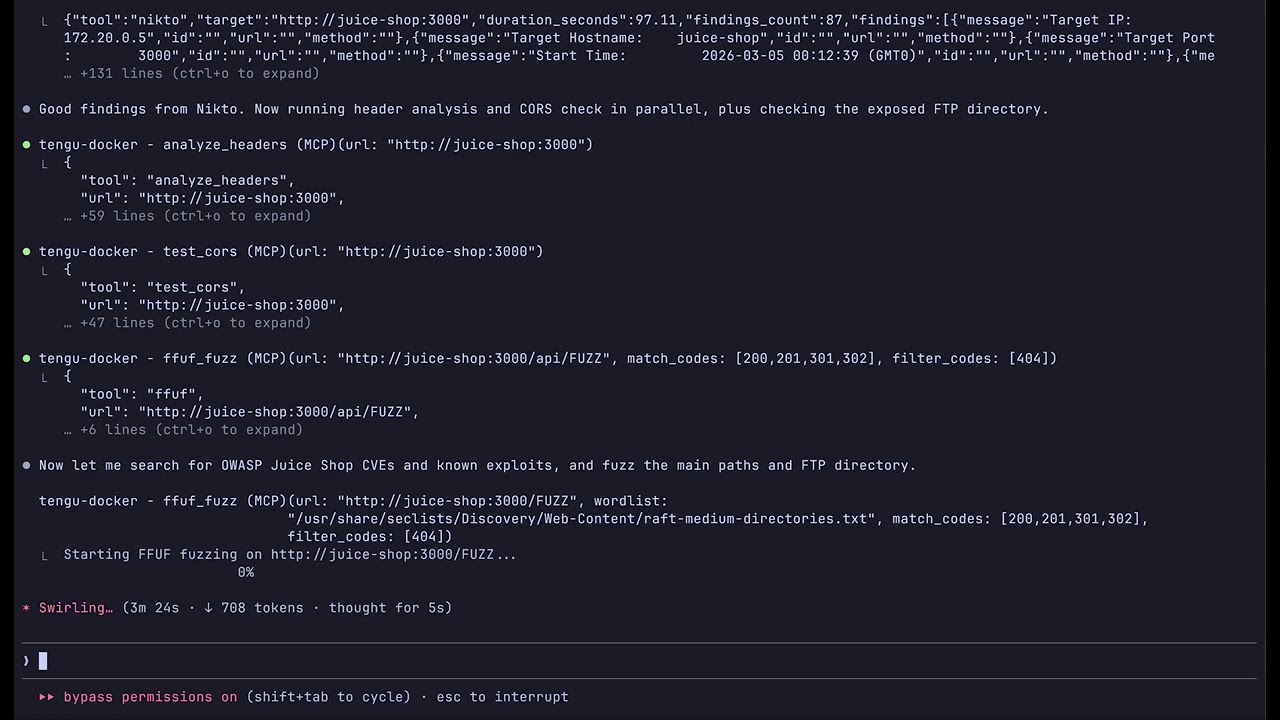
Tengu copilot demo

Quick Start

root@kitploit:~
git clone https://github.com/rfunix/tengu.git && cd tengu
make docker-build
make docker-up

Connect Claude Code to the running server:

root@kitploit:~
claude mcp add --transport sse tengu http://localhost:8000/sse

Then ask Claude: Do a full pentest on http://192.168.1.100

Claude chains tools automatically: validate_target → whatweb → nmap → nikto → nuclei → sqlmap → correlate_findings → generate_report

Docker Profiles

CommandWhat it starts

Scan custom targets without editing files:

root@kitploit:~
TENGU_ALLOWED_HOSTS="192.168.1.0/24,10.0.0.0/8" make docker-up

Image Tiers

Choose the right size for your use case:

root@kitploit:~
TENGU_TIER=minimal make docker-build   # lightweight
TENGU_TIER=core    make docker-build   # default
TENGU_TIER=full    make docker-build   # everything

All tiers include all 35 prompts and 20 resources — only the binary tools differ.

Manual Install (without Docker)

Prerequisites: Python 3.12+, uv, Kali Linux (recommended)

root@kitploit:~
git clone https://github.com/rfunix/tengu.git && cd tengu

# Install Python dependencies
uv sync

# Install external pentesting tools (Kali/Debian)
make install-tools

# Run the MCP server (stdio transport)
uv run tengu

Connect Claude Code:

root@kitploit:~
claude mcp add --scope user tengu -- uv run --directory /path/to/tengu tengu

Configure allowed targets in tengu.toml:

root@kitploit:~
[targets]
allowed_hosts = ["192.168.1.0/24", "example.com"]

For Claude Desktop, VM/SSE remote setup, and advanced configurations, see docs/deployment-guide.md.

Configuration Reference

root@kitploit:~
[targets]
# REQUIRED: Only these hosts will be scanned
allowed_hosts = ["192.168.1.0/24", "example.com"]
blocked_hosts = []  # Always blocked, even if in allowed_hosts

[stealth]
enabled = false  # Route traffic through Tor/proxy

[stealth.proxy]
enabled = false
type = "socks5h"
host = "127.0.0.1"
port = 9050

[osint]
shodan_api_key = ""  # Required for shodan_lookup

[tools.defaults]
scan_timeout = 300   # seconds

See docs/configuration-reference.md for the full reference.


Autonomous Agent Mode

Run a fully autonomous pentest without manual tool invocation. The agent uses Claude as its strategic brain and Tengu as its execution toolset, following the PTES methodology from recon through reporting.
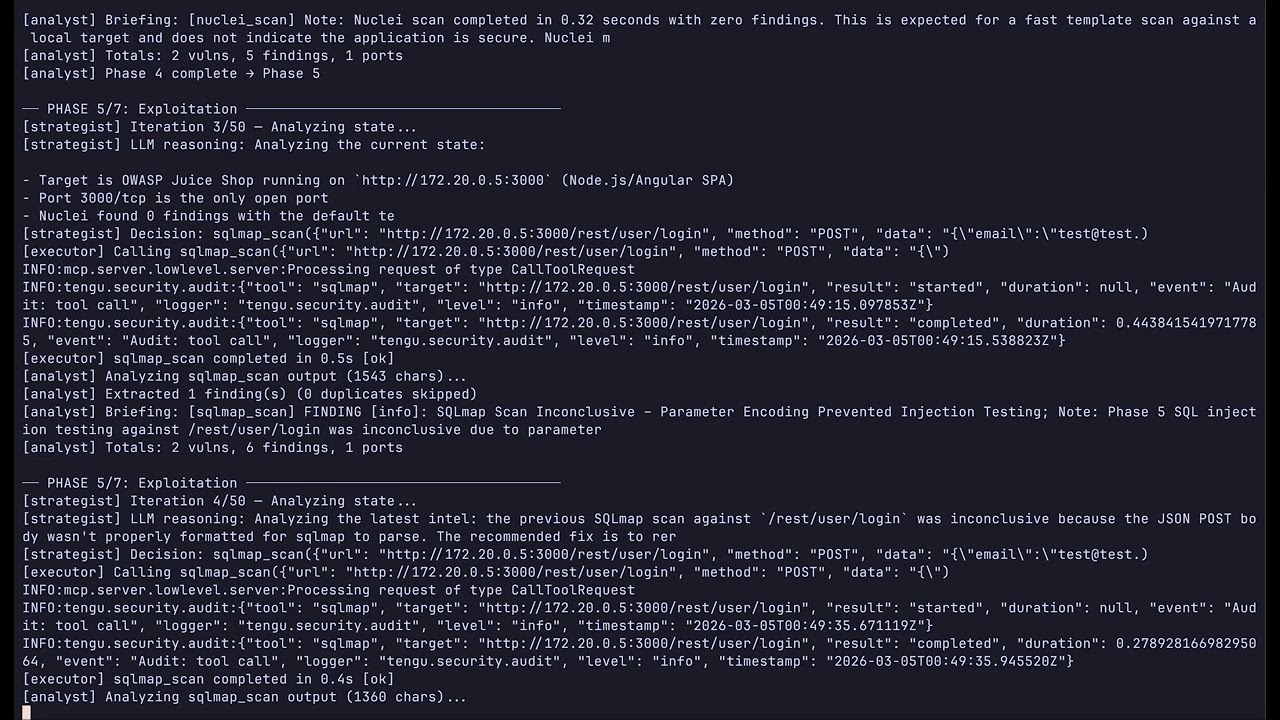
Tengu autonomous agent demo

Quick Start

root@kitploit:~
cp .env.example .env
# Edit .env: set ANTHROPIC_API_KEY and TENGU_AGENT_TARGET

Lab targets (Juice Shop, DVWA):

root@kitploit:~
make docker-lab
make docker-agent          # default model (sonnet)
make docker-agent-haiku    # cheaper — claude-haiku-4-5, max_tokens=1024
make docker-agent-sonnet   # balanced — claude-sonnet-4-6, max_tokens=4096

Real-world pentests (Tengu + MSF + ZAP, no lab containers):

root@kitploit:~
make docker-pentest
make docker-agent

View reports in browser:

root@kitploit:~
make docker-report-view          # http://localhost:8888 — styled HTML, all reports
make docker-report-browse        # same, auto-opens browser
REPORT_PORT=9999 make docker-report-view   # custom port
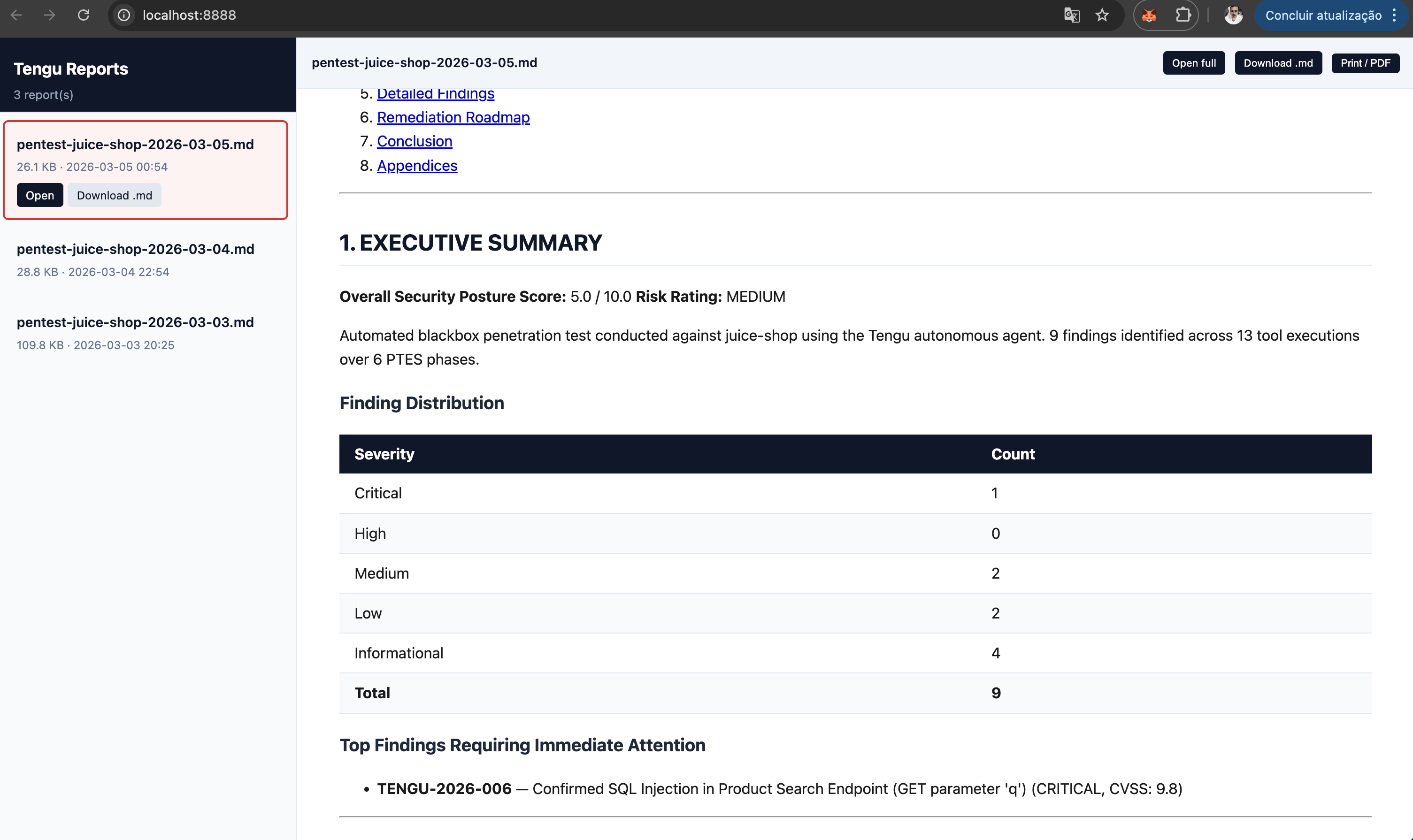
Tengu report viewer

Without Docker:

root@kitploit:~
uv sync --extra agent
python autonomous_tengu.py 192.168.1.100 --scope 192.168.1.0/24 --type blackbox

# Cost-optimised run
python autonomous_tengu.py 192.168.1.100 --model claude-haiku-4-5 --max-tokens 1024 --timeout 30

Cost control — three env vars / CLI flags:

How It Works

root@kitploit:~
START → initializer → strategist ─┬─→ executor → analyst ─┬─→ strategist (loop)
                                   │                        └─→ reporter → END
                                   ├─→ human_gate → executor
                                   └─→ reporter → END

Key behaviors:

  • Strategist (Claude) reads the current PTES phase and accumulated state to decide each action
  • Executor calls exactly one Tengu MCP tool per iteration
  • Analyst (Claude) extracts structured data from tool output and advances phases
  • Human gate interrupts execution before destructive tools (msf_run_module, hydra_attack, impacket_kerberoast, sqlmap_scan with level≥3)
  • Runs until all 7 PTES phases are covered or --max-iterations is reached
  • Final Reporter calls correlate_findings + score_risk + generate_report

PTES Methodology — 7 Phases


Tool Catalog

minimal (17 tools, ~480MB) · core (47 tools, ~7GB, default) · full (80 tools, ~8GB) Build with: TENGU_TIER=<tier> make docker-build. All tiers include all 35 prompts and 20 resources.

Full tool list (80 tools)

Reconnaissance


Workflows & Prompts (35)

Pre-built workflow templates that guide Claude through complete engagements.


Built-in Resources (20)

Static reference data loaded by Claude during engagements.


Architecture

root@kitploit:~
┌─────────────┐     MCP      ┌─────────────────┐    subprocess    ┌─────────────────┐
│   Claude    │◄────────────►│     Tengu        │─────────────────►│  Nmap, SQLMap,  │
│  (Desktop / │  stdio/SSE   │   MCP Server     │  (never shell=T) │  Metasploit...  │
│   Code)     │              │                  │                  └─────────────────┘
└─────────────┘              └────────┬─────────┘
                                      │
                               Every tool call passes through:
                                      │
                             ┌────────▼─────────┐
                             │  Safety Pipeline  │
                             │                  │
                             │  1. sanitizer    │  ← strip metacharacters, validate format
                             │  2. allowlist    │  ← check target against tengu.toml
                             │  3. rate_limiter │  ← sliding window + concurrent slots
                             │  4. audit logger │  ← JSON log to ./logs/tengu-audit.log
                             └──────────────────┘

Configuration Files

Tengu uses three configuration files. Editing the wrong one is the most common source of confusion when switching between local and Docker workflows.

Quick config for copilot mode (local): edit tengu.toml at the project root — add your target to [targets] allowed_hosts.

Quick config for agent mode (Docker): edit docker/tengu.toml, then run make docker-rebuild-tengu before make docker-agent.

Common pitfall: if scans fail with TargetNotAllowedError inside Docker, you probably edited tengu.toml (root) instead of docker/tengu.toml. Docker uses its own copy baked into the image. After editing, run make docker-rebuild-tengu.


Safety by Design

Tengu is built as a force multiplier for human pentesters, not an autonomous attack tool.


Development

root@kitploit:~
make install-dev    # Install Python deps + dev extras
make test           # Run unit + security tests
make lint           # ruff check
make typecheck      # mypy strict
make check          # lint + typecheck
make coverage       # pytest --cov
make inspect        # Open MCP Inspector
make doctor         # Check which pentest tools are installed

Tengu has 2643+ tests covering unit logic, security (command injection, input validation), and integration scenarios. See CLAUDE.md for the full contributor guide.


Legal Notice

Tengu is designed for authorized security testing only. Only scan systems you own or have explicit written permission to test. Unauthorized scanning is illegal in most jurisdictions. The authors accept no liability for misuse.

Download Tool
make docker-upTengu MCP server (:8000)
make docker-lab+ Juice Shop, DVWA (safe practice targets)
make docker-pentest+ Metasploit, OWASP ZAP (real-world targets)
make docker-full+ Metasploit, ZAP, and lab targets
TierSizeMCP ToolsUse case
minimal~480MB17Lightweight analysis, CVE research, reporting
core~7GB47Full pentest toolkit (default)
full~8GB80Everything + AD, wireless, stealth/OPSEC
FlagEnv varDefault
--modelTENGU_AGENT_MODELclaude-sonnet-4-6
--max-tokensTENGU_AGENT_MAX_TOKENS2048
--timeoutTENGU_AGENT_TIMEOUT60 (minutes, 0=unlimited)
PhaseNameWhat Tengu DoesKey Tools
1Pre-Engagementvalidate_target confirms scope, check_tools verifies readinessvalidate_target, check_tools
2Intelligence GatheringOSINT, DNS recon, subdomain enumeration, technology fingerprintingnmap, subfinder, amass, shodan, whatweb
3Threat ModelingClaude analyzes gathered intel, prioritizes attack surface, builds threat scenarios(AI-driven — no external tool)
4Vulnerability AnalysisTemplate scanning, web app testing, SSL/TLS analysis, parameter fuzzingnuclei, nikto, ffuf, sqlmap, testssl
5ExploitationControlled exploitation of confirmed vulnerabilities with human-in-the-loopmsf_run_module, sqlmap, hydra, searchsploit
6Post-ExploitationCredential harvesting, lateral movement assessment, privilege escalationimpacket_kerberoast, nxc_enum, enum4linux
7ReportingCorrelate all findings, calculate risk scores, generate professional reportcorrelate_findings, score_risk, generate_report
CategoryToolsCount
ReconnaissanceNmap, Masscan, Amass, Subfinder, Gowitness, HTTrack, Katana, httpx, SNMPwalk, RustScan10
Web ScanningNikto, Nuclei, FFUF, Gobuster, WPScan, Feroxbuster, OWASP ZAP, wafw00f8
SSL / TLSsslyze, testssl.sh, HTTP headers analysis, CORS tester4
DNSDNS Enumerate, DNSRecon, Subjack, WHOIS4
OSINTtheHarvester, Shodan, WhatWeb, DNStwist4
Injection TestingSQLMap, Dalfox (XSS), Commix, CRLFuzz, GraphQL Security Check, Arjun6
Brute ForceHydra, John the Ripper, Hashcat, CeWL4
ExploitationMetasploit (search, info, run, sessions, cmd), SearchSploit6
Social EngineeringSET credential harvester, QR code attack, payload generator3
Secrets & CodeTruffleHog, Gitleaks2
Container & CloudTrivy, Checkov, ScoutSuite, Prowler4
Active DirectoryNetExec, Enum4linux, Impacket (Kerberoast, secretsdump, psexec, wmiexec, smbclient), BloodHound, Responder, SMBMap10
Wirelessaircrack-ng / airodump-ng1
Anonymity & StealthTor check/rotate, proxy check, identity rotation5
Analysis & ReportingFinding correlation, CVSS risk scoring, report generation3
CVE IntelligenceCVE lookup (NVD), CVE search by keyword/product/severity2
UtilityTool checker, target validator2
ToolDescription
nmap_scanPort scanning and service/OS detection
masscan_scanHigh-speed port scanner for large networks
subfinder_enumPassive subdomain enumeration
amass_enumAttack surface mapping and DNS brute-force
dnsrecon_scanDNS recon (zone transfer, brute-force, PTR)
dns_enumerateDNS record enumeration (A, MX, NS, TXT, SOA…)
whois_lookupWHOIS domain and IP lookup
subjack_checkSubdomain takeover detection
gowitness_screenshotWeb screenshot capture for documentation
httrack_mirrorFull website mirror for offline analysis and forensics
katana_crawlFast web crawler for link discovery and endpoint mapping
httpx_probeHTTP probe — status codes, tech stack, redirects
snmpwalk_scanSNMP enumeration and MIB walking
rustscan_scanUltra-fast port scanning (finds open ports for Nmap follow-up)

Web Scanning

ToolDescription
nuclei_scanTemplate-based vulnerability scanner (CVEs, misconfigs)
nikto_scanWeb server misconfiguration and outdated software scanner
ffuf_fuzzDirectory, parameter, and vhost fuzzing
gobuster_scanDirectory, DNS, and vhost brute-force
wpscan_scanWordPress vulnerability scanner
testssl_checkComprehensive SSL/TLS configuration analysis
analyze_headersHTTP security headers analysis and grading
test_corsCORS misconfiguration detection
ssl_tls_checkSSL/TLS certificate and cipher check (sslyze)
wafw00f_scanWeb Application Firewall detection and fingerprinting
feroxbuster_scanFast, recursive content discovery via brute-force

OSINT

ToolDescription
theharvester_scanEmail, subdomain, and host enumeration from public sources
shodan_lookupShodan host and asset search
whatweb_scanWeb technology fingerprinting (CMS, WAF, frameworks)
dnstwist_scanDomain permutation and typosquatting detection

Injection Testing

ToolDescription
sqlmap_scanAutomated SQL injection detection and exploitation
xss_scanXSS detection via Dalfox
commix_scanAutomated command injection detection and exploitation
crlfuzz_scanCRLF injection fuzzing for header injection vulnerabilities
graphql_security_checkGraphQL introspection, batching, depth limit, field suggestions
arjun_discoverHidden HTTP parameter discovery

Exploitation

ToolDescription
msf_searchSearch Metasploit modules
msf_module_infoGet detailed Metasploit module information
msf_run_moduleExecute a Metasploit module (requires explicit confirmation)
msf_sessions_listList active Metasploit sessions
msf_session_cmdExecute a command on an active session (shell/Meterpreter)
searchsploit_querySearch Exploit-DB offline database

Social Engineering

ToolDescription
set_credential_harvesterClone a website and capture submitted credentials (authorized phishing simulations)
set_qrcode_attackGenerate QR code pointing to a URL for physical social engineering assessments
set_payload_generatorGenerate social engineering payloads (PowerShell, HTA) for authorized campaigns

Brute Force

ToolDescription
hydra_attackNetwork login brute-force (SSH, FTP, HTTP, SMB…)
hash_crackDictionary hash cracking (Hashcat / John the Ripper)
hash_identifyHash type identification
cewl_generateCustom wordlist generation from a target website

Proxy / DAST

ToolDescription
zap_spiderOWASP ZAP web spider
zap_active_scanOWASP ZAP active vulnerability scan
zap_get_alertsRetrieve ZAP scan findings

Secrets & Code Analysis

ToolDescription
trufflehog_scanLeaked secrets detection in git repositories
gitleaks_scanCredential scanning in git history

Container Security

ToolDescription
trivy_scanVulnerability scanning for Docker images, IaC, and SBOM

Cloud Security

ToolDescription
scoutsuite_scanCloud security audit (AWS, Azure, GCP)
prowler_scanAWS/GCP/Azure security best practices and compliance audit

Active Directory

ToolDescription
enum4linux_scanSMB/NetBIOS enumeration
nxc_enumActive Directory enumeration via NetExec
impacket_kerberoastKerberoasting with Impacket GetUserSPNs
impacket_secretsdumpRemote SAM/LSA/NTDS secrets dump via Impacket
impacket_psexecRemote command execution via SMB (PsExec-style)
impacket_wmiexecRemote command execution via WMI
impacket_smbclientSMB share enumeration and file access
bloodhound_collectBloodHound AD data collection (SharpHound/bloodhound-python)
responder_captureLLMNR/NBT-NS/MDNS poisoning for credential capture
smbmap_scanSMB share enumeration and access testing

Wireless

ToolDescription
aircrack_scanPassive wireless network scan (airodump-ng)

IaC Security

ToolDescription
checkov_scanIaC misconfiguration scan (Terraform, K8s, Dockerfile)

Stealth / OPSEC

ToolDescription
tor_checkVerify Tor connectivity and exit node IP
tor_new_identityRequest new Tor circuit (NEWNYM)
check_anonymityCheck exposed IP, DNS leaks, and anonymity level
proxy_checkValidate proxy latency, exit IP, and anonymity type
rotate_identityRotate Tor circuit and User-Agent simultaneously

Analysis & Utility

ToolDescription
check_toolsVerify which external tools are installed
validate_targetValidate target against allowlist
correlate_findingsCorrelate findings across multiple scans
score_riskCVSS-based risk scoring
cve_lookupCVE details from NVD (CVSS, CWE, affected products)
cve_searchSearch CVEs by keyword, product, or severity
generate_reportGenerate Markdown/HTML/PDF pentest report
CategoryPrompts
Pentest workflowsfull_pentest, quick_recon, web_app_assessment
Vulnerability assessmentassess_injection, assess_access_control, assess_crypto, assess_misconfig
OSINTosint_investigation
Reportsexecutive_report, technical_report, full_pentest_report, finding_detail, risk_matrix, remediation_plan, retest_report, save_report
Stealth/OPSECstealth_assessment, opsec_checklist
Specializedad_assessment, api_security_assessment, container_assessment, cloud_assessment, wireless_assessment, bug_bounty_workflow, compliance_assessment
Quick actionsexplore_url, map_network, hunt_subdomains, find_vulns, find_secrets, go_stealth, crack_wifi, pwn_target, msf_exploit_workflow
Social Engineeringsocial_engineering_assessment
URIContent
owasp://top10/2025OWASP Top 10:2025 full list
owasp://top10/2025/{A01..A10}Per-category details + testing checklist
owasp://api-security/top10OWASP API Security Top 10 (2023)
owasp://api-security/top10/{API1..API10}Per-category details
ptes://phasesPTES 7-phase methodology overview
ptes://phase/{1..7}Phase details (objectives, tools, deliverables)
checklist://web-applicationWeb app pentest checklist (OWASP Testing Guide)
checklist://apiAPI pentest checklist
checklist://networkNetwork infrastructure checklist
mitre://attack/tacticsMITRE ATT&CK Enterprise tactics + techniques
mitre://attack/technique/{T1xxx}Technique detail by ID
creds://defaults/{product}Default credentials database
payloads://{type}Curated payload lists by type (xss, sqli, lfi, ssti, etc.)
stealth://techniquesReference guide for operational security techniques
stealth://proxy-guideStep-by-step proxy and Tor configuration guide
tools://catalogLive tool availability status
tools://{tool}/usageUsage guide for nmap, nuclei, sqlmap, metasploit, trivy, amass
prompts://listList of all available prompts with descriptions
prompts://category/{category}Prompts filtered by category
FileWhen to useWhat it controls
tengu.toml (root)Running locally: uv run tengu, uv run python autonomous_tengu.pyMCP server config: allowed_hosts, tool paths, rate limits, stealth
docker/tengu.tomlRunning via Docker: make docker-up, make docker-agentSame settings as root, but pre-configured for Docker networking (172.16.0.0/12, service DNS aliases). Baked into the image at build time — rebuild required after changes (make docker-rebuild-tengu)
.envBoth local and DockerSecrets and runtime vars: ANTHROPIC_API_KEY, TENGU_AGENT_TARGET, TENGU_AGENT_MODEL, TENGU_AGENT_MAX_TOKENS, etc. Read by docker compose and load_dotenv()
.env.exampleReference onlyTemplate listing all available environment variables
ControlDescription
Target AllowlistOnly pre-approved targets in tengu.toml are ever scanned
Input SanitizationAll inputs are validated against strict patterns before reaching any tool
Rate LimitingSliding window + concurrent slot limits prevent accidental DoS
Audit LoggingEvery tool invocation logged to ./logs/tengu-audit.log in JSON format
Human-in-the-Loopmsf_run_module, hydra_attack, and impacket_kerberoast require explicit confirmation
No shell=True — everAll subprocess calls use asyncio.create_subprocess_exec

