A tool for logging data/testing devices with a Wiegand Interface. Can be used to create a portable RFID reader or installed directly into an existing installation. Provides access to a web based interface using WiFi in AP or Client mode. Will work with nearly all devices that contain a standard 5V Wiegand interface. Primary target group is 26-37bit HID Cards. Similar to the Tastic RFID Thief, Blekey, and ESPKey.


By Corey Harding

Official website:
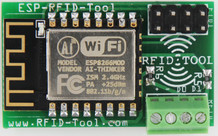
April Brother is currently manufacturing this hardware and it can be purchased direct from China from their
Third Party Distributors:
Video Demos of Capturing Credentials using various technologies that utilize a Wiegand Interface:
Firmware:
A universal data logger that captures the raw binary data from a standard 5V Wiegand Interface. The device is capable of logging the credentials for access control systems or nearly any device that utilizes a Wiegand Interface such as RFID card readers, pin pads, magnetic stripe systems, barcode, and even some biometric readers. Wiegand Interfaces also do not have to be limited to just access control systems. The main target group for this device is 26-37bit HID cards. For known card types both the binary and hexadecimal data is displayed directly in the log file for easy badge identification and also in case a clone of a card may be needed. For unknown card types only the raw binary data is shown.
The device may be installed directly into an existing system drawing its power from the preexisting wiring or it can also be used to turn a reader into a standalone portable unit for data logging when a battery is added. Wiring is simple and consists of 4 wires, (+), (-), D0(Green), and D1(White). The device is capable of operating on voltages ranging from around 4.5V up to a maximum of 12v. Commonly found voltages are 12V and 5V. **(See Installation Notes Below)
Access to the log files and various settings is provided via a web based interface. The device has WiFi capabilities and can be set up to spawn its own access point or set to connect to an existing network. In the event you get locked out of the web interface you can bridge the J3 jumper on power up or while resetting the device to regain access without losing your log files.
The hardware is based on an ESP12 WiFi chip with a full TCP/IP stack and Microcontroller Unit. The software is open source licensed under the MIT License and will be released the day the product is launched. The software will reside in this GitHub repo so it may be reviewed by the community. We will accept various pull requests from the community after being reviewed if it improves the value of the device for others. The software was written in the Arduino IDE so both hobbyist and professionals will have no issue modifying the code if they so choose. A Wiegand Interface operates using 3 wires, a ground, Data0, and Data1. A zero is sent when D0 goes low and a one is sent when D1 goes low, the other line remains high during this time. The timing is 40uS from low to high on a line with 2mS between bits. The software logs this binary output to a file and if the device thinks it is a known card format the preamble is guessed(not sent by card reader but it is the same for all cards of a specific format, our primary target is 26-37bit HID cards) and both the raw binary and hexadecimal data is logged. For unkown card formats only the raw binary output is logged with no guess at the preamble and without showing the data in hexadecimal format to prevent confusion. If you know what kind of card was captured, simply look up the preamble and add it to the beginning of the binary then typically convert it to hexadecimal format to make a clone of a card. It is possible the card is actually an unknown format and the preamble was guessed incorrectly with the device thinking it was a known card format(the guess is based on the bit count output by the reader), if this is the case in the log file there is a literal space in the binary between the preamble and the card data, simply ignore the preamble. When replaying a captured credential*(see note below) you do not include the preamble as that is not output by the card reader but instead you only replay*(see note below) the actual card data as output from the reader. You only need to worry about the preamble if making a clone of a card. The primary function of this device is for logging the raw binary data as output from a Wiegand Interface. You can read from 1 bit all the way up to 4,096 bits. The default buffer setting only allows 52 bits and must be manually increased from the settings page accessible from the web interface.
