




rep+
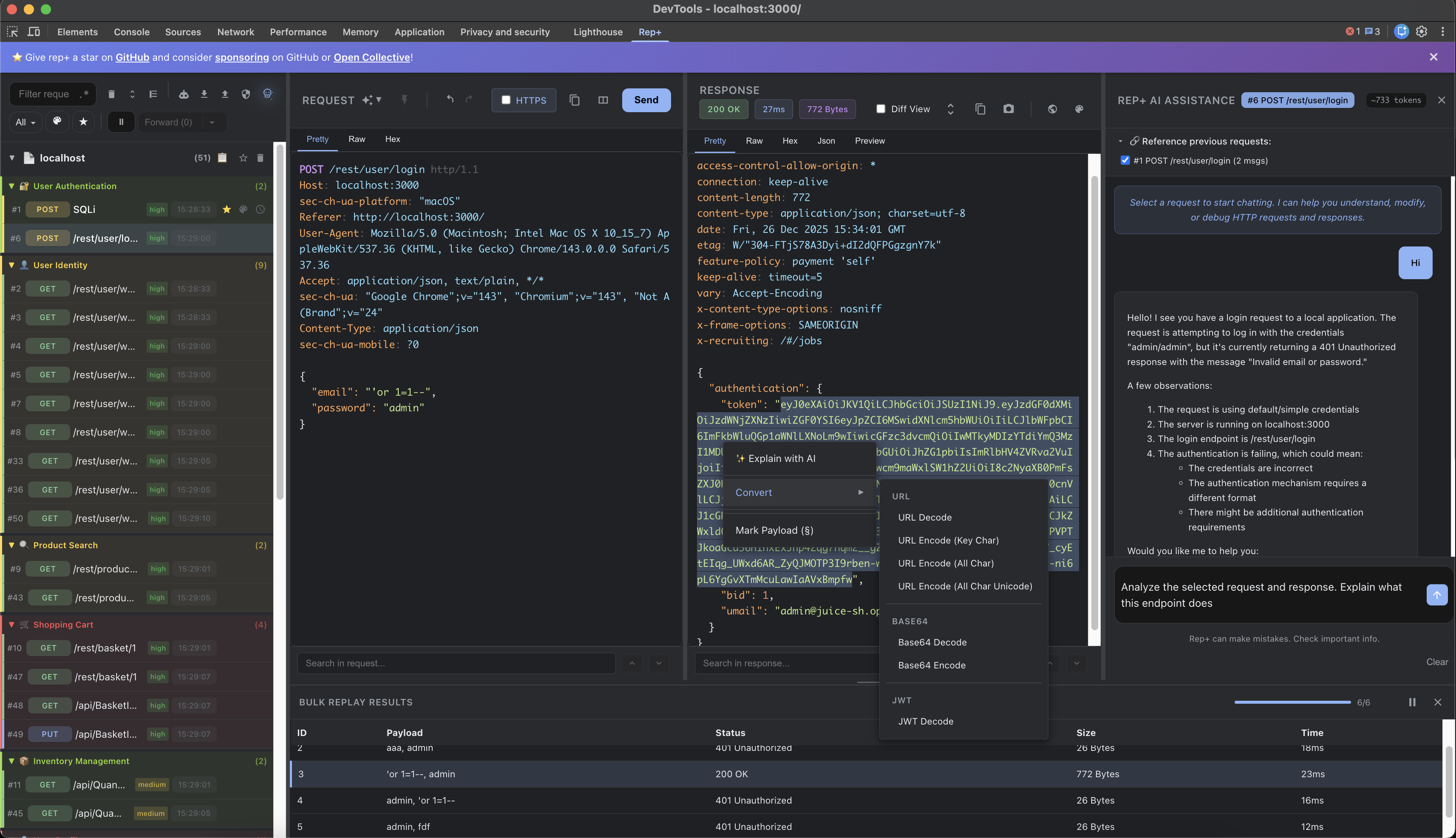
rep+ is a lightweight Chrome DevTools extension inspired by Burp Suite's Repeater, now supercharged with AI. I often need to poke at a few requests without spinning up the full Burp stack, so I built this extension to keep my workflow fast, focused, and intelligent with integrated LLM support.

🚀 Install rep+ Chrome Extension

Table of Contents
Features
Capture & Replay
- No proxy setup; works directly in Chrome (no CA certs needed).
- Capture every HTTP request and replay with modified method, headers, or body.
- Multi-tab capture (optional permission) with visual indicators 🌍 and deduplication.
- Clear workspace quickly; export/import requests as JSON for sharing or later reuse.
Organization & Filtering
- Hierarchical grouping by page and domain (first-party prioritized).
- Third-party detection and collapsible groups; domain badges for quick context.
- Starring for requests, pages, and domains (auto-star for new matches).
- Timeline view (flat, chronological) to see what loaded before a request.
- Filters: method, domain, color tags, text search, regex mode.
Views & Editing
- Pretty / Raw / Hex views; layout toggle (horizontal/vertical).
- Converters: Base64, URL encode/decode, JWT decode, Hex/UTF-8.
- History, undo/redo, and syntax highlighting for requests/responses.
- Context menu helpers on the request editor:
- Convert selected text (Base64, URL encode/decode, JWT decode).
- Copy as full HTTP request in multiple languages:
curl, PowerShell (Invoke-WebRequest), Python (requests), and JavaScript fetch.
- Screenshot editor for request/response pairs: full-content capture, side‑by‑side or stacked layout, zoom, highlight and black-box redaction, resizable/movable annotations, keyboard delete, and undo/redo for all edits.
Bulk & Automation
- Bulk replay with 4 attack modes: Sniper, Battering Ram, Pitchfork, Cluster Bomb.
- Mark positions with
§, configure payloads, pause/resume long runs.
- Response diff view to spot changes between baseline and attempts.
- Unified Extractor: secrets, endpoints, and parameters from captured JS.
- Secret Scanner: entropy + patterns with confidence scores; pagination and domain filter.
- Powered by Kingfisher rules for comprehensive secret detection
- Supports AWS, GitHub, Google, Slack, Stripe, Twilio, Azure, and many more service providers
- Rules stored locally in
rules/ directory for offline use
- Note: Secret scanning only analyzes JavaScript files from the current inspected tab.
- Export: Export all secrets to CSV for analysis and reporting
- Endpoint Extractor: full URLs, relative paths, GraphQL; method detection; one-click copy (rebuilds base URL).
- Export: Export all endpoints to CSV with method, endpoint path, confidence, and source file
- Parameter Extractor: passive JavaScript parameter discovery with intelligent grouping and risk assessment.
- Parameter Types: Extracts query, body, header, and path parameters from JavaScript files
- Grouped by Endpoint: Parameters are organized by endpoint with expandable/collapsible groups
- Risk Classification: Automatically identifies high-risk parameters (auth, admin, debug flags, IDOR, feature flags)
- Confidence Scoring: Stricter confidence model than endpoints to reduce false positives
- Smart Filtering: Suppresses common false positives (webpack, React, jQuery, DOM events, telemetry)
- Copy as cURL: One-click copy generates curl commands with all parameters properly formatted
- Location Badges: Visual indicators for parameter location (query/body/header/path)
- Domain Filtering: Filter parameters by source domain with accurate counts
- Column Sorting: Sort by parameter name, location, endpoint, method, risk level, or confidence
- Export Options:
- CSV Export: Export all parameters with location, endpoint, method, risk level, and confidence
- Postman Collection Export: Generate ready-to-import Postman collection JSON with all endpoints and parameters
- Automatically groups parameters by endpoint
- Includes query, body, and header parameters
- Uses Postman variable syntax (
{{paramName}}) for easy testing
- Perfect for security testers who want to quickly import discovered APIs into Postman
- Response Search: regex support, match preview, pagination, domain filter.
AI Assistance
 repplus/rep-chrome
