 renatus-cartesius/reconswarm
Extend your recon with cloud power

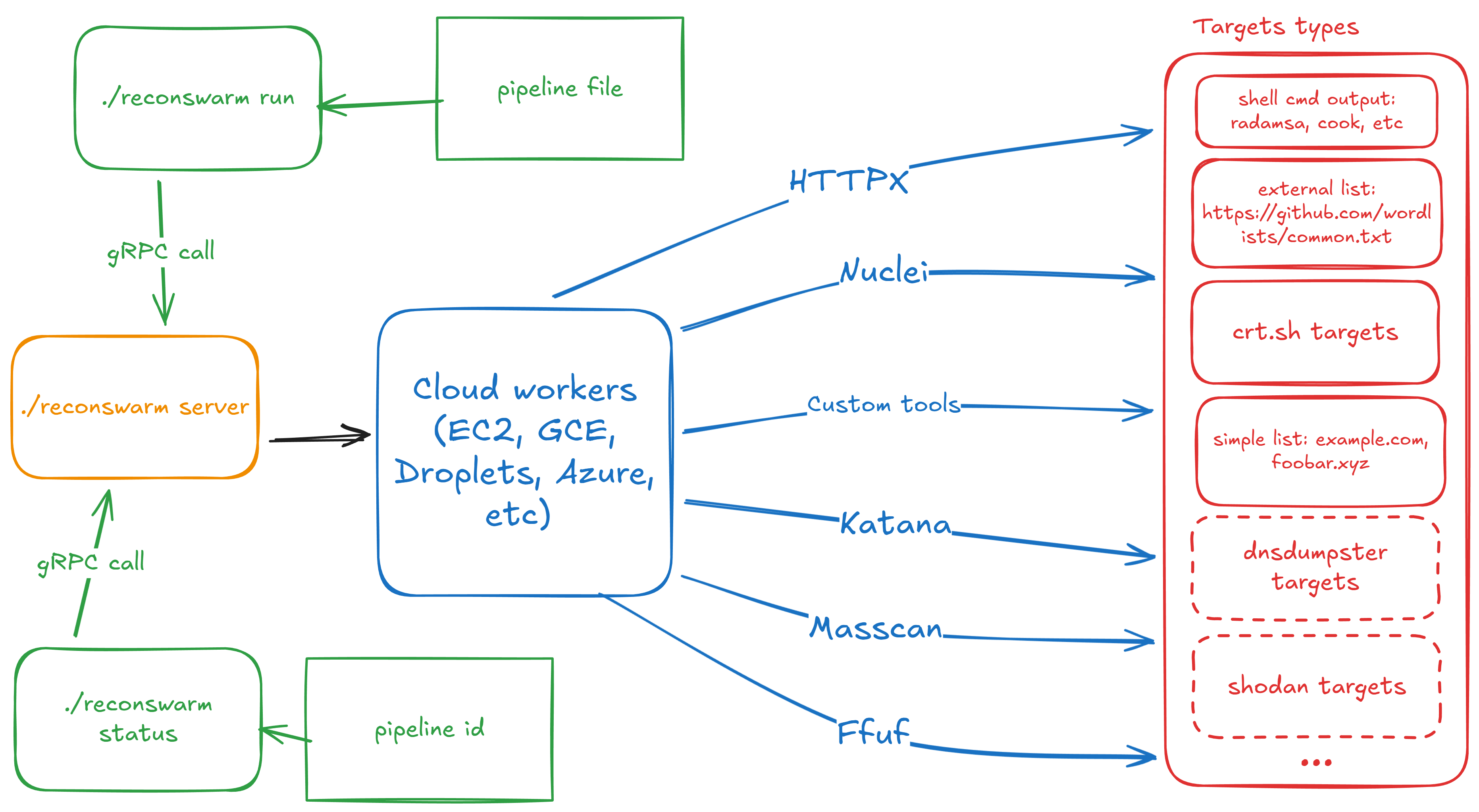
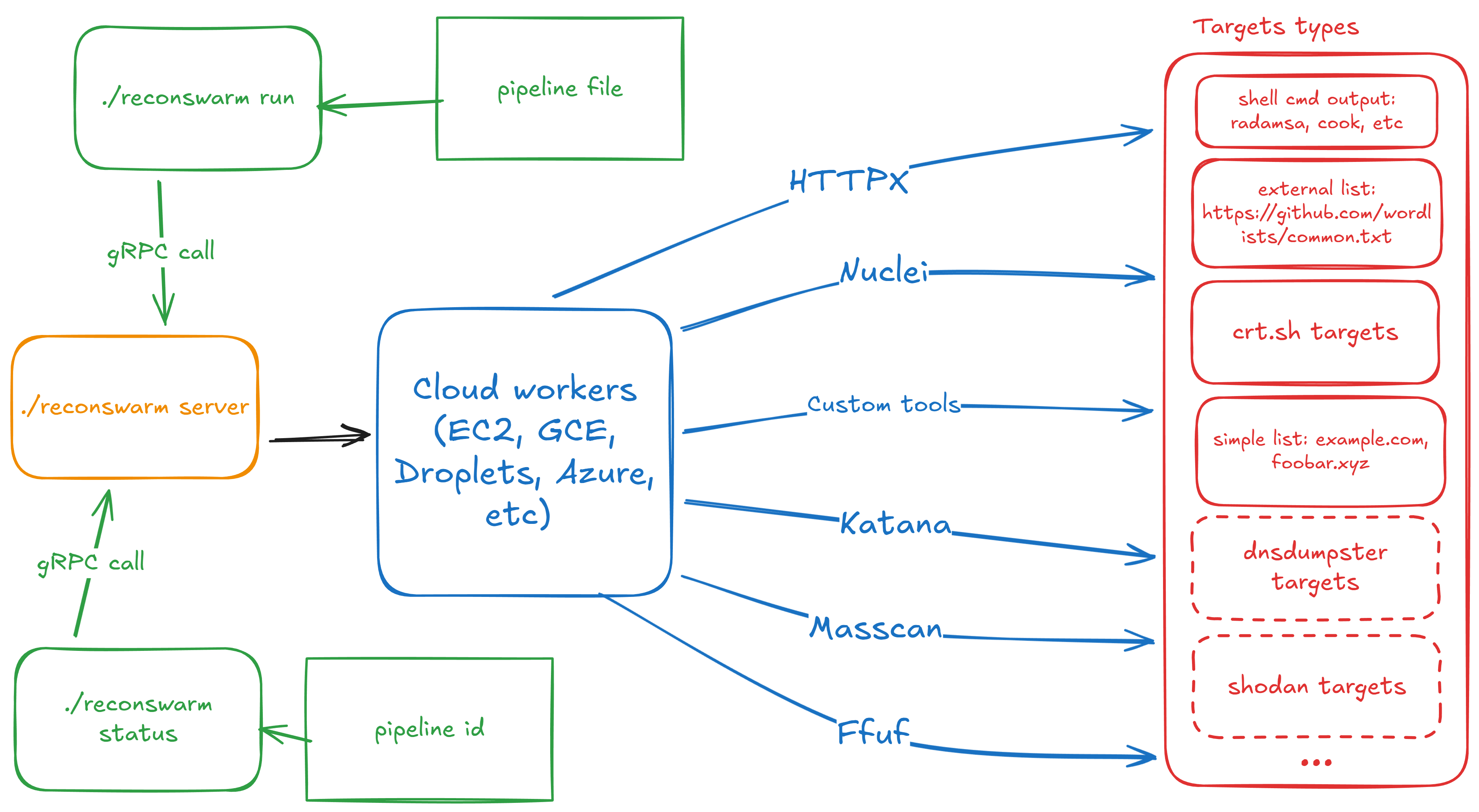
ReconSwarm is a modular reconnaissance automation framework designed for distributed security testing. It provisions cloud infrastructure, executes parallel reconnaissance pipelines, and collects results with minimal configuration overhead.
ReconSwarm is suitable for bug bounty hunters, penetration testers, DevSecOps engineers, and security researchers who need scalable, automated reconnaissance workflows without manual infrastructure management.
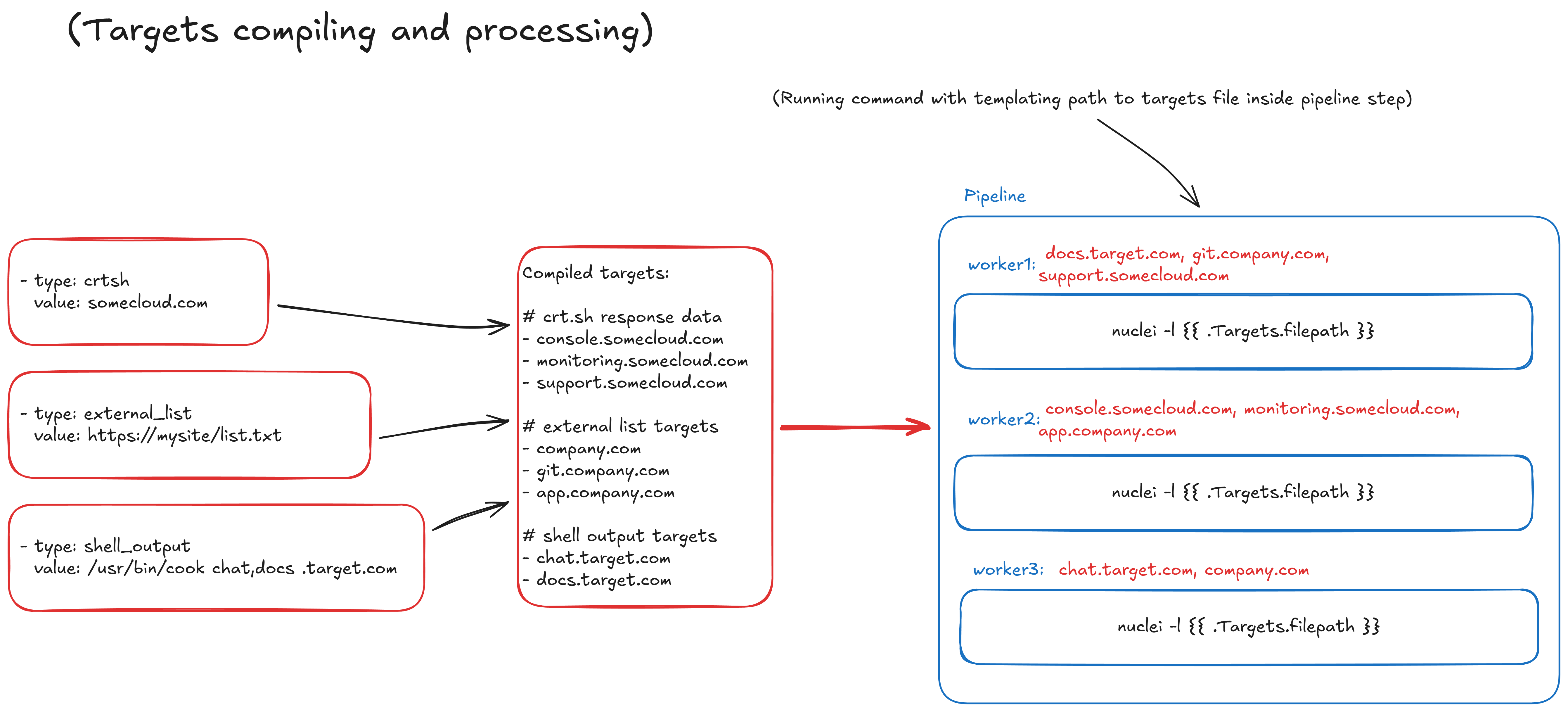
ReconSwarm follows a modular architecture with clear separation of concerns between cloud provisioning, remote system control, pipeline execution, and configuration management.
ReconSwarm uses a discriminated union pattern for cloud provisioners. The provisioner.type field determines which provider configuration is active:
provisioner:
  type: yandex_cloud  # Discriminator field
  yandex_cloud:       # Active when type: yandex_cloud
    iam_token: "${YC_TOKEN}"
    # key_path: "./sa_auth_key.json"
    folder_id: "${YC_FOLDER_ID}"
    # ... provider-specific settings
Additional cloud providers can be integrated by implementing the Provisioner interface and adding a new type to the factory.
Stages are extensible components that execute operations on worker VMs:
All stage fields support template rendering. New stage types can be added to extend functionality.
ReconSwarm server is completely stateless — all state is persisted in etcd:
This architecture enables:
| Capability | Description |
|---|---|
| Horizontal scaling | Run multiple server instances behind a load balancer |
| Zero-downtime restarts | Restart server without losing pipeline state |
| Crash recovery | New server instance picks up where the previous one left off |
| State inspection | Query etcd directly for debugging and monitoring |
High Availability Setup:
                    ┌─────────────┐
                    │   Client    │
                    └──────┬──────┘
                           │
                    ┌──────▼──────┐
                    │Load Balancer│
                    └──────┬──────┘
              ┌────────────┼────────────┐
              │            │            │
       ┌──────▼──────┐ ┌───▼───┐ ┌──────▼──────┐
       │  Server 1   │ │Server2│ │  Server 3   │
       └──────┬──────┘ └───┬───┘ └──────┬──────┘
              │            │            │
              └────────────┼────────────┘
                           │
                    ┌──────▼──────┐
                    │ etcd cluster│
                    └─────────────┘
All servers share the same etcd cluster and can handle any request. If a server crashes mid-pipeline, another server can continue execution after reading state from etcd.
Note: Current implementation executes pipelines in-memory after loading from etcd. Full crash recovery with pipeline resumption is planned for future releases.
git clone <repository>
cd reconswarm
go mod download
task build
ReconSwarm separates server configuration from pipeline configuration:
| Config Type | File | Description |
|---|---|---|
| Server | reconswarm.yaml | Cloud provider, etcd, worker pool settings |
| Pipeline | Separate YAML file | Targets and stages, passed via -f flag |
Server configuration is stored in reconswarm.yaml (configurable via CONFIG_PATH environment variable). All string values support environment variable expansion using ${VAR} or $VAR syntax.
# Server settings
server:
  port: 50051

# Etcd connection for state management
etcd:
  endpoints:
    - "localhost:2379"
  dial_timeout: 5  # seconds
  username: ""     # optional, supports ${ETCD_USER}
  password: ""     # optional, supports ${ETCD_PASSWORD}

# Cloud provisioner (discriminated union)
provisioner:
  type: yandex_cloud  # Provider selector

  # Yandex Cloud configuration (active when type: yandex_cloud)
  yandex_cloud:
    iam_token: "${YC_TOKEN}"
    # key_path: "./sa_auth_key.json"
    folder_id: "${YC_FOLDER_ID}"
    default_zone: "ru-central1-b"
    default_image: "fd8b1cmhmncn7lt4tqn4"
    default_username: "root"
    default_cores: 2
    default_memory: 2      # GB
    default_disk_size: 20  # GB

# Worker pool settings
workers:
  max_workers: 5
  setup_commands:
    - "apt update"
    - "apt install -y docker.io"
Pipeline configuration is stored in a separate YAML file and passed via the -f flag. Both wrapped and unwrapped formats are supported:
Wrapped format (recommended):
# pipeline.yaml
pipeline:
  targets:
    - value: "example.com"
      type: crtsh
    - value: ["sub1.example.com", "sub2.example.com"]
      type: list
  stages:
    - name: "Run scanner"
      type: exec
      steps:
        - "nmap -sC -sV -iL {{.Targets.filepath}} -oN /opt/recon/scan.txt"
    - name: "Collect results"
      type: sync
      src: "/opt/recon/scan.txt"
      dest: "./results/{{.Worker.Name}}.txt"
Unwrapped format (also supported):
# pipeline.yaml
targets:
  - value: "example.com"
    type: crtsh
stages:
  - name: "Run scanner"
    type: exec
    steps:
      - "nmap -iL {{.Targets.filepath}} -oN /opt/recon/scan.txt"
Configuration values support environment variable substitution in two formats:
${VAR} — Full variable name in braces$VAR — Simple variable nameIf an environment variable is not set, the literal string (including ${VAR} or $VAR) will be used.
For Yandex Cloud integration, use the provided setup script:
# Follow official Yandex Cloud documentation for CLI installation
