 redsiege/graphstrike
Cobalt Strike HTTPS beaconing over Microsoft Graph API

Release blog: GraphStrike: Using Microsoft Graph API to Make Beacon Traffic Disappear
Developer blog: GraphStrike: Anatomy of Offensive Tool Development
GraphStrike is a suite of tools that enables Cobalt Strike's HTTPS Beacon to use Microsoft Graph API for C2 communications. All Beacon traffic will be transmitted via two files created in the attacker's SharePoint site, and all communications from Beacon will route to https://graph.microsoft.com:

GraphStrike includes a provisioner to create the required Azure assets for Cobalt Strike HTTPS over Graph API:
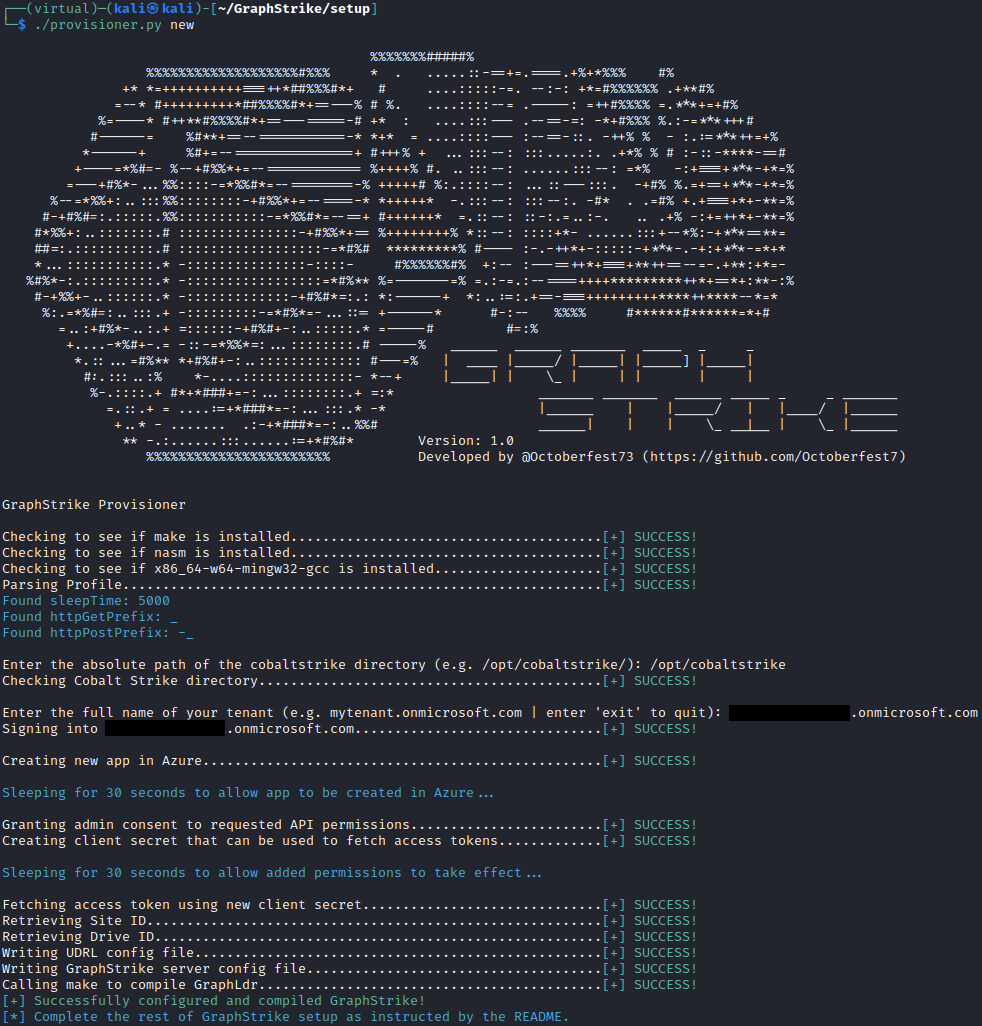
GraphStrike does not create any paid assets in Azure, so no additional cost is incurred by the use of GraphStrike or it's provisioner.
Threat intelligence has been released regarding several different APTs leveraging Microsoft Graph API and other Microsoft services for offensive campaigns:
Threat actors continue to leverage legitimate services for illegitimate purposes. Utilizing a high-reputation domain like graph.microsoft.com for C2 communications is extremely effective and desirable, but often complicated and prohibitive from a time and effort standpoint. Most C2 frameworks do not support methods to fetch or rotate access tokens, which makes them unable to use Graph API. This can make it difficult for red teams to replicate these techniques, and deprives defenders of a chance to observe and develop signatures for this kind of activity. GraphStrike seeks to ease that burden and provide a reliable and repeatable process to leverage Microsoft Graph API while keeping the familiarity and reliability of the Cobalt Strike user experience.
Not technically, no. Having previously built a true External C2 using Graph API (which sent Beacon traffic as Microsoft Teams messages), the burden of having to develop, maintain, and integrate a custom implant that meets the External C2 specification and gets the job done is all too familiar. GraphStrike instead leverages an open source User Defined Reflective Loader(UDRL) called AceLdr by Kyle Avery (adapted as 'GraphLdr' in this project) to hook the WinINet library calls that Beacon normally makes and manipulate them as neccessary in order to use Graph API. There is no custom implant or additional process to speak of, just the Beacon process with a couple of hooked Windows API's. On the server side there is a Python3 program that translates Cobalt Strike Team Server traffic into Graph API traffic and vice-versa.
GraphStrike supports almost all normal Cobalt Strike activities to include:
This also includes GraphStrike integration of the sleep, exit, and remove commands to match GraphStrike Server sleep times with Beacon as well as delete files in SharePoint when a Beacon is exited or removed.
GraphStrike additionally incorporates all of the features and functionality of the original AceLdr, with some additional API's made to utilize call stack spoofing as well.
GraphStrike requires the following before you get started:
Make note of the following before proceeding with the setup process:
1. Certain components utilize relative paths to locate other assets. Please change directories as instructed below.
2. The Cobalt Strike profile may only be edited BEFORE step 5 in the below setup processNote #1.
sudo setup/install_dependencies.sh to install required system dependencies.python3 -m venv virtual and then source virtual/bin/activate to create and then enter the virtual environment.pip3 install -r requirements.txt../provisioner.py new and complete the setup process.graph.microsoft.com as the HTTPS Hosts and HTTPS Host(Stager) fields../GraphStrike.py.Due to the size of GraphLdr, users of the Artifact Kit will need to re-compile it with specific options in order for GraphStrike to be compatible with Artifact Kit generated payloads. Specifically, the 'Stage Size' and 'RDLL Size' fields need to be specified so as to use the 100K RDLL size. Two examples of working syntax are provided below:
./build.sh pipe VirtualAlloc 505029 100 false false none /opt/cobaltstrike/artifacts
./build.sh peek HeapAlloc 492376 100 false true indirect /opt/cobaltstrike/artifacts
./provisioner.py delete to remove created Azure assets.