
Skip to content
KitploitKITPLOIT
ToolsBlog
Submit
ToolsBlog
Submit

Hacking, PenTest, and Cybersecurity Tools for Your Security Arsenal!

Kitploit is a directory of hacking, cybersecurity, and pentesting tools. Discover the latest project updates to find vulnerabilities, analyze systems, automate testing, and strengthen your security.

··Feeds·Contact·Privacy·© 2026 Kitploit

Tool Directory

Categories

View all categories
Loading categories
Tools/GitHubGitHub/redrum0381/ataboy
Embedded Systems SecurityForensicsData RecoveryDigital ForensicsHardware HackingHardware SecurityHardware & IoT Security
GitHubredrum0381/ataboy

ATAboy

ATAboy is a user-friendly bridge that allows legacy CHS only style IDE (PATA) hard drives to be connected to a modern computer as a standard USB Mass Storage device.

View Repository
202773 months agoReviewed by Kitploit

Most Popular

View all →

Discover the most used tools by our community.

Explore all tools

Browse our collection of tools

View all tools →
Share

If you don't want to build your own, the hardware can be purchased here: https://obsoletetech.us/products/ataboy-an-open-source-legacy-ide-usb-bridge


image

ATAboy is designed for retro computing enthusiasts, data recovery experts, and archivists. Read and write the oldest of IDE hard drives, without the need for an "in-between" vintage computer!

ATAboy is a user-friendly bridge that allows classic IDE (PATA) hard drives to be connected to a modern computer over USB as a standard USB Mass Storage device. While cheap, modern adapters usually only work with newer "LBA" type drives, ATAboy works all the way back to the earliest CHS only, PIO Mode 0, ATA disks. (It will also work with newer LBA type IDE disks, but that's not really what it's designed for.) ATAboy features an "Award BIOS inspired" user friendly UI for drive configuration and setup.


When connected:

  • The IDE drive appears to your computer like a normal USB Mass Storage Device
  • No special drivers are required (Windows, Linux, macOS supported)
  • The device translates USB Mass Storage commands into IDE read/write operations

Hardware Requirements

To get started, you will also need:

  • Any 40‑pin IDE (PATA) hard drive. It may be jumpered master, slave, or cable select.
  • An external PSU to power the drive.
  • A USB-C cable to connect ATAboy to the host computer.
  • Any standard ANSI compatible serial terminal emulator (e.g. PuTTY, Tera Term, minicom, screen, etc.)

Basic drive mount using ATABoy

  1. Connect the IDE ribbon cable to the drive and ATAboy (Note Pin 1 orientation, usually marked by a stripe on the cable)
  2. Connect ATAboy to your computer via USB
  3. Power the drive using external supply
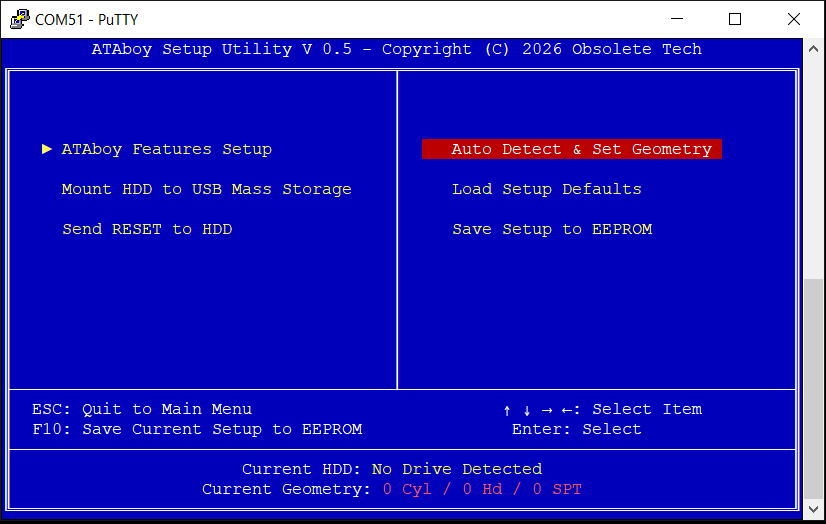
  4. Connect to serial console with terminal of choice (PuTTY shown). 9600 8N1, no flow control. You should see an Award BIOS "inspired" text-based UI appear in the terminal.
  5. Enter the "Auto Detect & Set Geometry" menu
  6. Choose default, or enter geometry manually if needed
  7. Choose "Mount HDD to USB Mass Storage"
  8. That's it! You can now read the drive from your modern OS!

image

You can save the current ATAboy settings, geometry, etc to EEPROM, which will be restored the next time the device is booted. (This allows auto-mounting also.)

IMPORTANT! If you are working with valuable or irreplaceable data, ensure write protection is enabled before mounting. It is enabled by default for safety. You do NOT want the host OS to touch or bless the disk! Windows VDS/RPC services can often crash if it is unable to write to a drive with damaged/legacy MBR and/or partition tables. This can result in various Windows errors, unable to mount the drive, etc. However, raw data can usually still be accessed via dd, or other raw disk backup software. Regardless, it is STRONGLY recommended the entire drive be dumped to an image file BEFORE disabling write protection, then mounting the drive in Explorer.


Safe Removal

Always use your operating system’s Safely Remove / Eject feature before:

  • Unplugging the USB cable
  • Powering off the IDE drive

This helps prevent:

  • File system corruption
  • Incomplete writes
  • OS-side errors

Known Limitations

ATAboy is a hobbyist and experimental project. You should be aware that:

  • Performance is significantly slower than modern USB to IDE bridges. We're working over USB 1.1 for now. This can cause long mount times, especially in Windows if the disk has file system weirdness.
  • Many legacy disks use unusual geometry, and may require experimentation.
  • Not all OS disk utilities behave the same way

PLEASE NOTE!

Some of the firmware code was written with AI assistance. It has been tested with dozens of drives, and does function well with most. But may be buggy, slow, or unresponsive with certain drives. Please let us know if you find a drive that does or doesn't work right. We'll build a compatibilty list soon.

Use at your own risk!

  • Firmware written in VS Code with Raspberry Pi Pico Extension
  • PCB designed in Kicad
  • Case designed in Freecad

ATAboy is meant to be hacked, learned from, and improved. Have fun, and thank you for trying ATAboy!

Licensing

"ATAboy" is a trademark of JJ Dasher. The open source licenses do not grant rights to use these trademarks.

Firmware

Licensed under GNU GPLv3. See /firmware/LICENSE.

Hardware

Licensed under CERN-OHL-W v2. See /PCB/LICENSE.

Download Tool