 rebrowser/rebrowser-patches
Collection of patches for puppeteer and playwright to avoid automation detection and leaks. Helps to avoid Cloudflare and DataDome CAPTCHA pages. Easy to patch/unpatch, can be enabled/disabled on demand.

This repo contains patches to enhance popular web automation libraries. Specifically, it targets the puppeteer and playwright packages.
Some aspects of automation libraries or browser behavior cannot be adjusted through settings or command-line switches. Therefore, we fix these issues by patching the library's source code. While this approach is fragile and may break as the libraries' source code changes over time, the goal is to maintain this repo with community help to keep the patches up to date.
Out of the box Puppeteer and Playwright come with some significant leaks that are easy to detect. It doesn't matter how good your proxies, fingeprints, and behaviour scripts, if you don't have it patched, you're just a big red flag for any major website.
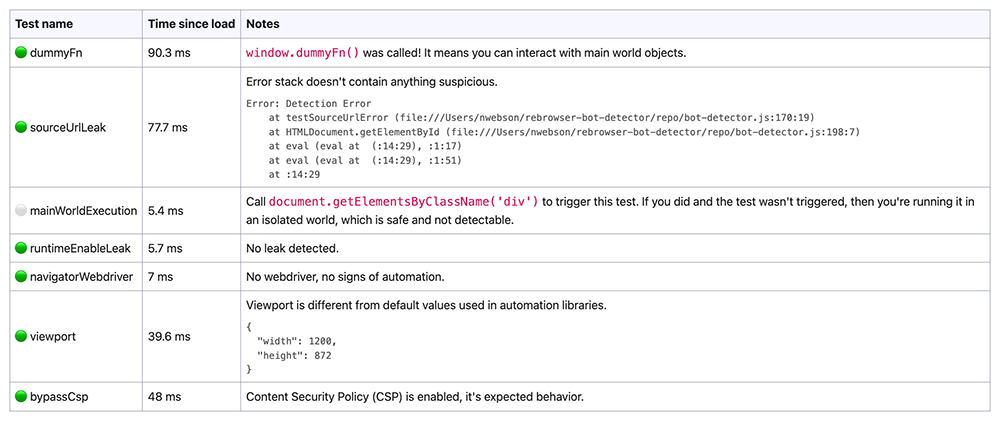
🕵️ You can easily test your automation setup for major modern detections with rebrowser-bot-detector (sources and details)
| Before the patches 👎 | After the patches 👍 |
|---|---|
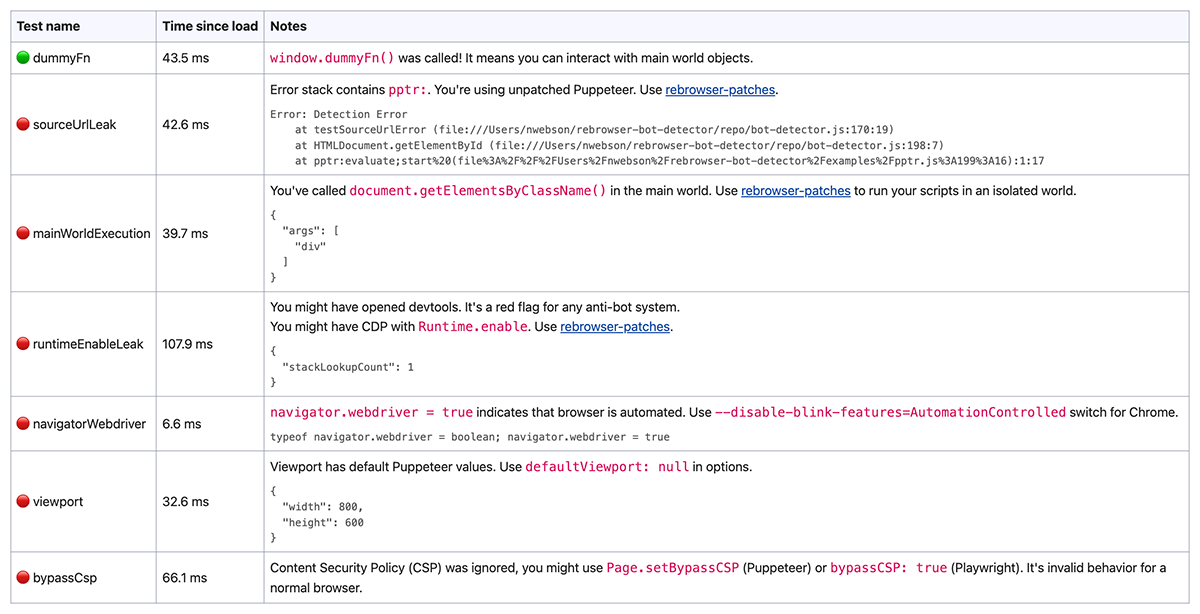 | 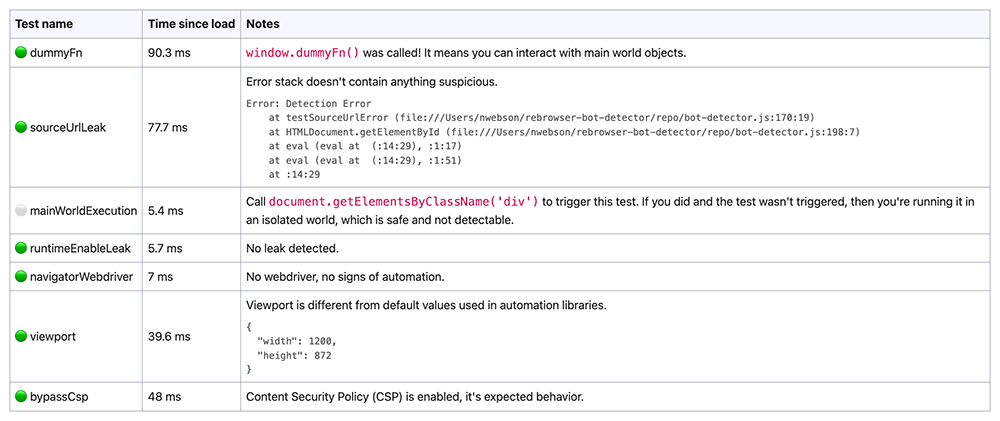 |
If you don't want to mess with the patches and all possible errors, there is a drop-in solution for you. These packages have simply applied rebrowser-patches on top of the original code, nothing more.
Puppeteer: rebrowser-puppeteer (src) and rebrowser-puppeteer-core (src)
Playwright (Node.js): rebrowser-playwright (src) and rebrowser-playwright-core (src)
Playwright (Python): rebrowser-playwright (src)
The easiest way to start using it is to fix your package.json to use new packages but keep the old name as an alias. This way, you don't need to change any source code of your automation. Here is how to do that:
package.json and replace "puppeteer": "^23.3.1" and "puppeteer-core": "^23.3.1" with "puppeteer": "npm:rebrowser-puppeteer@^23.3.1" and "puppeteer-core": "npm:rebrowser-puppeteer-core@^23.3.1". Note: 23.3.1 is just an example, check the latest version on npm.npm install (or yarn install)Another way is to actually use new packages instead of the original one. Here are the steps you need to follow:
package.json and replace puppeteer and puppeteer-core packages with rebrowser-puppeteer and rebrowser-puppeteer-core. Don't change versions of the packages, just replace the names.npm install (or yarn install)puppeteer and puppeteer-core with rebrowser-puppeteer and rebrowser-puppeteer-core🚀 That's it! Just visit the rebrowser-bot-detector page and test your patched browser.
Our goal is to maintain and support these drop-in replacement packages with the latest versions, but we mainly focus on fresh versions, so if you're still using puppeteer 13.3.7 from the early 90s, it might be a good time to upgrade. There's a high chance that it won't really break anything as the API is quite stable over time.
Runtime.Enable leakPopular automation libraries rely on the CDP command Runtime.Enable, which allows receiving events from the Runtime. domain. This is crucial for managing execution contexts used to evaluate JavaScript on pages, a key feature for any automation process.
However, there's a technique that detects the usage of this command, revealing that the browser is controlled by automation software like Puppeteer or Playwright. This technique is used by all major anti-bot software such as Cloudflare, DataDome, and others.
We've prepared a full article about our investigation on this leak, which you can read in our blog.
For more details on this technique, read DataDome's blog post: How New Headless Chrome & the CDP Signal Are Impacting Bot Detection.
In brief, it's a few lines of JavaScript on the page that are automatically called if Runtime.Enable was used.
Our fix disables the automatic Runtime.Enable command on every frame. Instead, we manually create contexts with unknown IDs when a frame is created. Then, when code needs to be executed, there are multiple ways to get the context ID.
🟢 Pros: The ultimate approach that keeps access to the main world and works with web workers and iframes. You don't need to change any of your existing codebase.
🔴 Cons: None are discovered so far.
Page.createIsolatedWorld and save its ID.🟢 Pros: All your code will be executed in a separate isolated world, preventing page scripts from detecting your changes via MutationObserver and other techniques.
🔴 Cons: You won't be able to access main context variables and code. While this is necessary for some use cases, the isolated context generally works fine for most scenarios. Also, web workers don't allow creating new worlds, so you can't execute your code inside a worker. This is a niche use case but may matter in some situations. There is a workaround for this issue, please read How to Access Main Context Objects from Isolated Context in Puppeteer & Playwright.
Runtime.Enable and then immediately call Runtime.Disable.This triggers Runtime.executionContextCreated events, allowing us to catch the proper context ID.
🟢 Pros: You will have full access to the main context.
🔴 Cons: There's a slight chance that during this short timeframe, the page will call code that leads to the leak. The risk is low, as detection code is usually called during specific actions like CAPTCHA pages or login/registration forms, typically right after the page loads. Your business logic is usually called a bit later.
🎉 Our tests show that all these approaches are currently undetectable by Cloudflare or DataDome.
Note: you can change settings for this patch on the fly using an environment variable. This allows you to easily switch between patched and non-patched versions based on your business logic.
