 rebrowser/rebrowser-patches
Collection of patches for puppeteer and playwright to avoid automation detection and leaks. Helps to avoid Cloudflare and DataDome CAPTCHA pages. Easy to patch/unpatch, can be enabled/disabled on demand.

This repo contains patches to enhance popular web automation libraries. Specifically, it targets the puppeteer and playwright packages.
Some aspects of automation libraries or browser behavior cannot be adjusted through settings or command-line switches. Therefore, we fix these issues by patching the library's source code. While this approach is fragile and may break as the libraries' source code changes over time, the goal is to maintain this repo with community help to keep the patches up to date.
Out of the box Puppeteer and Playwright come with some significant leaks that are easy to detect. It doesn't matter how good your proxies, fingeprints, and behaviour scripts, if you don't have it patched, you're just a big red flag for any major website.
🕵️ You can easily test your automation setup for major modern detections with rebrowser-bot-detector (sources and details)
| Before the patches 👎 | After the patches 👍 |
|---|---|
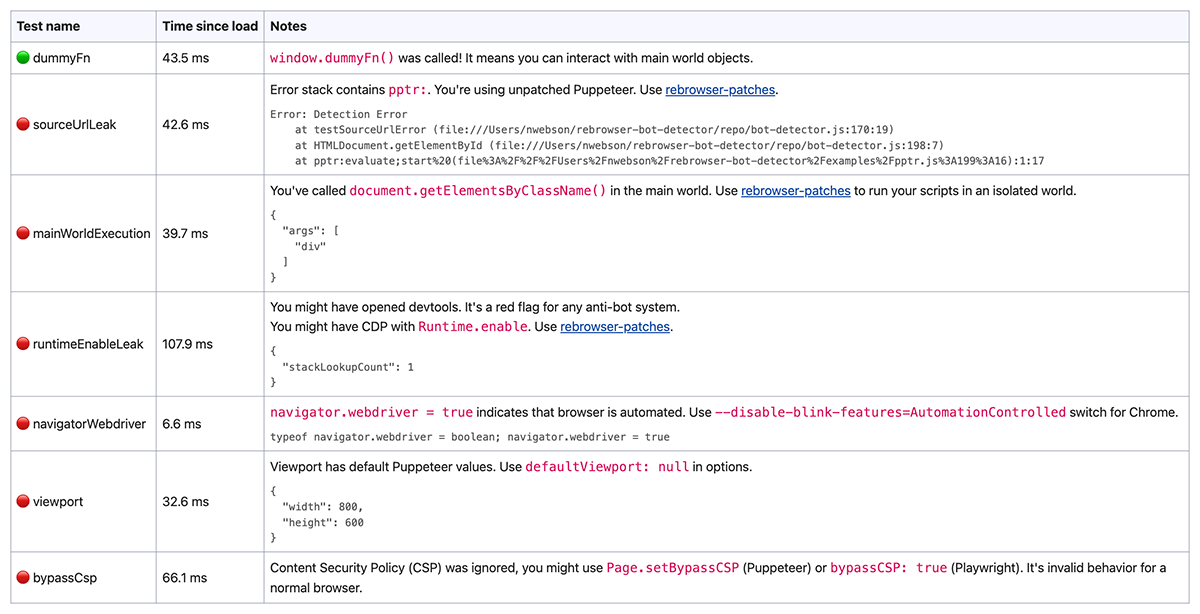 | 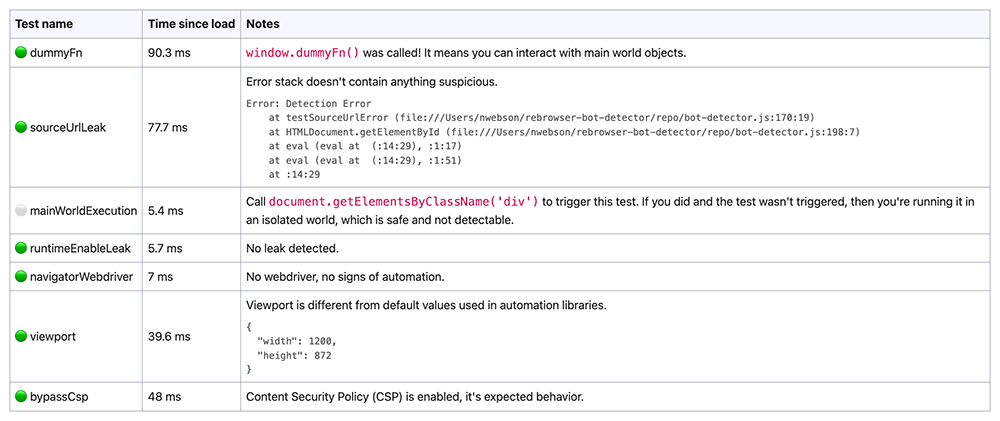 |
If you don't want to mess with the patches and all possible errors, there is a drop-in solution for you. These packages have simply applied rebrowser-patches on top of the original code, nothing more.
Puppeteer: rebrowser-puppeteer (source mirror) and rebrowser-puppeteer-core (source mirror)
Playwright (Node.js): rebrowser-playwright (source mirror) and rebrowser-playwright-core (source mirror)
Playwright (Python): rebrowser-playwright (source mirror)
The easiest way to start using them is to install them under the original package names (an npm alias). This way, you don't need to change any source code of your automation. Install only the packages your project already uses:
# Puppeteer
npm install puppeteer@npm:rebrowser-puppeteer puppeteer-core@npm:rebrowser-puppeteer-core

# Playwright
npm install playwright@npm:rebrowser-playwright playwright-core@npm:rebrowser-playwright-core
npm installs the latest version and saves it in package.json as "puppeteer": "npm:rebrowser-puppeteer@^…". With yarn or pnpm, run yarn add or pnpm add with the same arguments.
Another way is to use the new package names directly: install rebrowser-puppeteer and rebrowser-puppeteer-core (or rebrowser-playwright and rebrowser-playwright-core) instead of the original packages, then replace puppeteer with rebrowser-puppeteer (and so on) in your imports.
For Python, run pip install rebrowser-playwright and import from rebrowser_playwright instead of playwright, e.g. from rebrowser_playwright.sync_api import sync_playwright.
The packages follow the version numbers of the original libraries. A fix for a version that is already out ships as X.Y.100, X.Y.101 and so on, so always install the latest version instead of matching the version of the original package.
🚀 That's it! Just visit the rebrowser-bot-detector page and test your patched browser.
Notes:
rebrowser-puppeteer downloads Chrome on install, rebrowser-playwright needs npx playwright install chromium (or use executablePath / channel: 'chrome' with a Chrome you already have).rebrowser-puppeteer and rebrowser-playwright depend on rebrowser-puppeteer-core / rebrowser-playwright-core under their real names. Earlier versions used an npm alias, and when the original puppeteer / playwright of the same version was installed in the same project, npm quietly gave the drop-in the unpatched core (#74).Our goal is to maintain and support these drop-in replacement packages with the latest versions, but we mainly focus on fresh versions, so if you're still using puppeteer 13.3.7 from the early 90s, it might be a good time to upgrade. There's a high chance that it won't really break anything as the API is quite stable over time.
Runtime.Enable leakPopular automation libraries rely on the CDP command Runtime.Enable, which allows receiving events from the Runtime. domain. This is crucial for managing execution contexts used to evaluate JavaScript on pages, a key feature for any automation process.
However, there's a technique that detects the usage of this command, revealing that the browser is controlled by automation software like Puppeteer or Playwright. This technique is used by all major anti-bot software such as Cloudflare, DataDome, and others.
We've prepared a full article about our investigation on this leak, which you can read in our blog.
For more details on this technique, read DataDome's blog post: How New Headless Chrome & the CDP Signal Are Impacting Bot Detection.
In brief, it's a few lines of JavaScript on the page that are automatically called if Runtime.Enable was used.
Our fix disables the automatic Runtime.Enable command on every frame. Instead, we manually create contexts with unknown IDs when a frame is created. Then, when code needs to be executed, there are multiple ways to get the context ID.
addBinding, the default).The patch reads the frame's document in an isolated world, resolves that node again in the frame's main world and takes the context ID from the result. Nothing runs in the page, and nothing is added to it. Only if that lookup fails does it fall back to the original technique: create a binding in the main world, call it and save its context ID. The fallback cleans up after itself, but a page could briefly see a global with a random name.
🟢 Pros: The ultimate approach that keeps access to the main world and works with web workers and iframes. You don't need to change any of your existing codebase.
🔴 Cons: None are discovered so far.
