Skip to content
KitploitKITPLOIT
ToolsBlog
Submit
ToolsBlog
Submit

Hacking, PenTest, and Cybersecurity Tools for Your Security Arsenal!

Kitploit is a directory of hacking, cybersecurity, and pentesting tools. Discover the latest project updates to find vulnerabilities, analyze systems, automate testing, and strengthen your security.

··Feeds·Contact·Privacy·© 2026 Kitploit

Tool Directory

Categories

View all categories
Loading categories
capsulecorp-pentest — Vagrant VirtualBox environment for conducting an internal network penetration test | Kitploit
Tools/GitHubGitHub/r3dy/capsulecorp-pentest
Penetration Testing FrameworksVulnerability ScannersExploit FrameworksNetwork SecurityPenetration TestingLearning & EducationLabs & Practice
GitHubr3dy/capsulecorp-pentest

capsulecorp-pentest

Vagrant VirtualBox environment for conducting an internal network penetration test

View Repository
1.0k179383 years agoReviewed by Kitploit
Website

Most Popular

View all →

Discover the most used tools by our community.

Explore all tools

Browse our collection of tools
View all tools →
Share

Blog        

Twitter:  

Discord:

Book:     

1. Capsulecorp Pentest

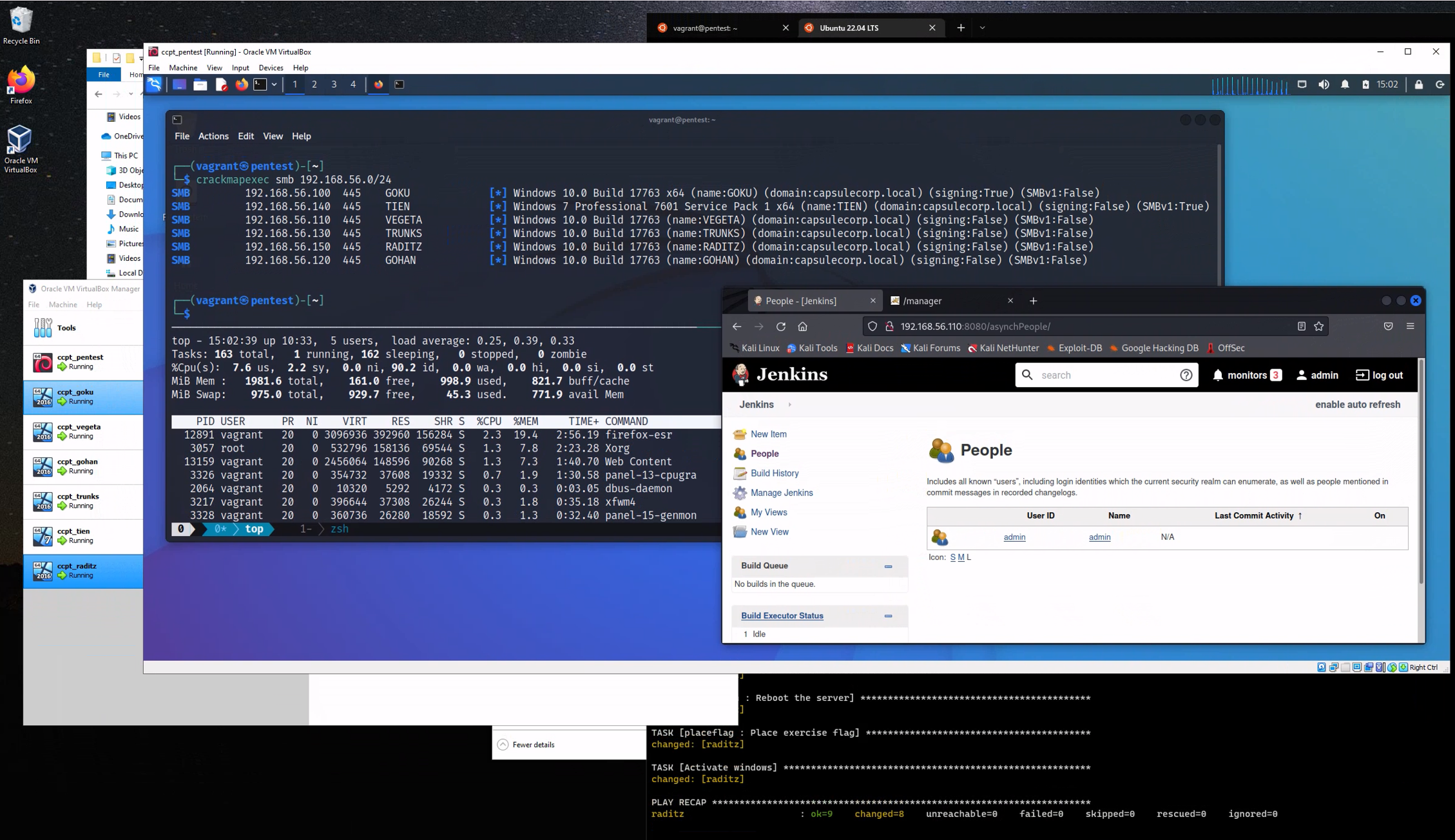
The Capsulecorp Pentest is a small virtual network managed by Vagrant and Ansible. It contains five virtual machines, including one Linux attacking system running Xubuntu and 4 Windows 2019 servers configured with various vulnerable services. This project can be used to learn network penetration testing as a stand-alone environment but is ultimatly designed to complement my book The Art of Network Penetration Testing.

Why is this cool?

Setting up a virtual network to learn penetration testing can be tedious as well as time/resource consuming. Everything in the capsulecorp environment is pretty much done for you already. Once you get Vagrant, Ansible and VirtualBox installed on your machine you only need to run a couple of commands to have a fully functioning Active Directory domain that you can use for hacking/learning/pentesting etc.

vagrant

1.1. Requirements

In order to use the Capsulecorp Pentest network you must have the following:

  • VirtualBox

    • https://www.virtualbox.org/wiki/Downloads
  • Vagrant

    • https://www.vagrantup.com/downloads.html
  • Ansible

    • https://docs.ansible.com/ansible/latest/installation_guide/index.html
  • Quad-core CPU with 16GB RAM is recommended.

    • With 8GB or less you could still use the project but only run 2 or 3 VMs at a time.
    • For All VMs running at once 16GB is required.

1.2. Current Functionality

  • Active directory domain with one DC and 3 server members. All windows server have evaluation licenses, which are activated on installation (for 180 days)
    • Domain Controler: goku.capsulecorp.local
    • Server 01: vegeta.capsulecorp.local
    • Server 02: gohan.capsulecorp.local
    • Server 03: trunks.capsulecorp.local
    • Wrkstn 01: tien.capsulecorp.local
  • Vulnerable Jenkins server on vegeta
  • Vulnerable Apache Tomcat server on trunks
  • Vulnerable MSSQL server on gohan
  • Vulnerable MS17-010 on tien
  • Xubuntu pentest system running XRDP.
    • Metasploit
    • CrackMapExec
    • Nmap
    • Remmina RDP client
    • RVM
    • Python/Pip/Pipenv
    • Impacket

1.3. OSX Configuration

In order to manage Windows hosts you'll have to install pywinrm with pip inside the ansible virtual environment

root@kitploit:~
source ~/ansible/bin/activate
pip install pywinrm
deactivate

2. Installation

YouTube Setup Tutorial

For a detailed installation walkthrough check out

  • MacOS Setup Guide

  • Windows Setup Guide

2.1. Configure the windows hosts

The first thing you should do is bring up and provision Goku the domain controller. This system will likely take the longest to bring up because the dcpromo stuff just takes a while.

Note: if you are running vagrant with sudo. use sudo -E vagrant option to run vagrant

Bring up the VM

root@kitploit:~
vagrant up goku

Provision the VM

root@kitploit:~
vagrant provision goku

Repeat the above two commands for gohan, vegeta and trunks.

...WARNING...

This section of the provision is expected to take a while because after a dcpromo it takes a long time for the system to reboot.

root@kitploit:~
TASK [promotedc : Set a static address to 172.28.128.100] **********************
changed: [goku]

TASK [promotedc : Change hostname to goku] *************************************
ok: [goku]

TASK [promotedc : Install Active Directory Services] ***************************
ok: [goku]

TASK [promotedc : Promote goku to domain controller] ***************************
changed: [goku]

TASK [promotedc : Reboot after promotion] **************************************

2.2. Configure your pentest platform

Bring up the virtual machines using Vagrant. First cd into the project directory, for example: cd ~/capsulecorp-pentest. Take note of the RDP port that gets forwarded to your localhost.

root@kitploit:~
vagrant up pentest

Provision the pentest machine.

root@kitploit:~
vagrant provision pentest

You can access your pentest machine either using your preferred RDP client to connect to the xrdp listener or via SSH with.

root@kitploit:~
vagrant ssh pentest
Download Tool
