 r3drun3/magnet
Purple-team telemetry & simulation toolkit.




Draw the Signals, Detect the Threats.
Magnet is Purple-team telemetry & simulation toolkit.
Purpose: modular, cross-platform (eventually) generator for telemetry and malicious activity.
Why the name?
Because this attracts SOC analysts and detection rules! 😜
As a secondary use case, Magnet can also be used as a decoy during red team engagements, to generate false positive noise and distract defenders 😈
From an architectural standpoint, Magnet is modular, allowing you to create as many modules as you like and modify existing ones without necessarily affecting the others.
[!CAUTION]
The project is still in its early stages of development and may contain bugs: contributions are very welcome!
The tool is best suited for on-the-fly demonstration/detection testing and does not replace fully fledged purple-team exercises conducted by experienced red teamers.
What better way to assess the utility of this tool than by directly examining one of its modules?
Consider, for example, the Ransomware Simulation for Windows action:
It generates thousands of files and encrypts them, attempts to delete shadow copies with older timestamps, and finally places a ransom note on the desktop.
This module demonstrates its value for testing detection rules and behavioral analytics specifically designed to identify ransomware activity.
Download the release you need from github, for example:
curl -L -o magnet.zip https://github.com/R3DRUN3/magnet/releases/download/v0.10.0/magnet-v0.10.0-windows-x86_64.zip
Extract the archive, and you are ready to go!
Or compile locally:
For Windows:
cargo build --target x86_64-pc-windows-msvc --release
For Linux (coming in the future):
cargo build --target x86_64-unknown-linux-gnu --release
Each binary only includes the modules for that platform.
[!WARNING]
First compilation will take some minutes.
As of now, this tool has been tested on the following OS:
Windows 11 Pro Education 10.0.22631 22631Magnet modules are mapped to the MITRE ATT&CK framework.
list modules
magnet list
Run all Windows modules:
magnet run windows all
Run some of the Windows modules:
magnet run windows discovery_sim ransomware_sim high_cpu_miner_sim
[!CAUTION]
Some modules require administrative privileges to run.
Magnet prioritizes non-intrusive modules that only aim to simulate suspicious or malicious activity, but EDRs may still detect some of the modules:
USE WITH CAUTION AND RUN ONLY ON AUTHORIZED SYSTEMS !!
[!TIP] To add a module/action, follow these instructions:
For each execution, Magnet writes detailed activity logs (in various formats) to a fixed path, for example, on Windows:
%USERPROFILE%\Documents\MagnetTelemetry.
Activity artifacts may also be created in that directory or in other locations, depending on the module:
For example, in the ransomware simulation, the encrypted files are stored in the MagnetTelemetry folder, while the ransom note is placed on the user's Desktop.
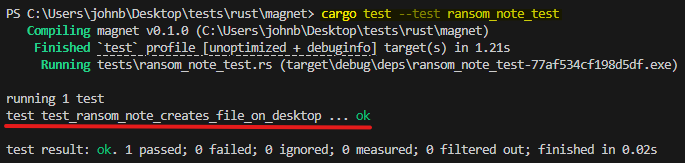
Some modules already implement unit testing, for example:
cargo test --test ransom_note_test
https://github.com/user-attachments/assets/3d9aa7a9-6a22-4e4b-86cd-f1761756b241


