 pvharmo2/gha-lab-e8902eccd3
Security research lab: reproduction of CVE-2025-52467 (pgai pull_request_target workflow code execution / GITHUB_TOKEN exfiltration) — snapshot of timescale/pgai

Automated research artifact — not the upstream project.
This repository is a disposable lab built by an automated harness for a master's thesis at Université Laval on reproducing published GitHub Actions workflow vulnerabilities. It is a verbatim snapshot of
timescale/pgaiat commit2a209b058c60823b57e8b7775b10244ff340eb8b(2025-05-14), redistributed under that project's own licence, whose file is included unchanged in this snapshot.The upstream project is not involved, is never targeted, and the vulnerability studied here is already public. Every secret and variable in this repository is a randomly generated dummy value — no real credential is present. Action references and runner images are pinned to what they resolved to on 2025-05-14; see
pinning.mdin the harness output for every change made to the snapshot.Questions or objections: [email protected]


A Python library that transforms PostgreSQL into a robust, production-ready retrieval engine for RAG and Agentic applications.
🔄 Automatically create and synchronize vector embeddings from PostgreSQL data and S3 documents. Embeddings update automatically as data changes.
🔍 Powerful vector and semantic search with pgvector and pgvectorscale.
🛡️ Production-ready out-of-the-box: Supports batch processing for efficient embedding generation, with built-in handling for model failures, rate limits, and latency spikes.
🐘 Works with any PostgreSQL database, including Timescale Cloud, Amazon RDS, Supabase and more.
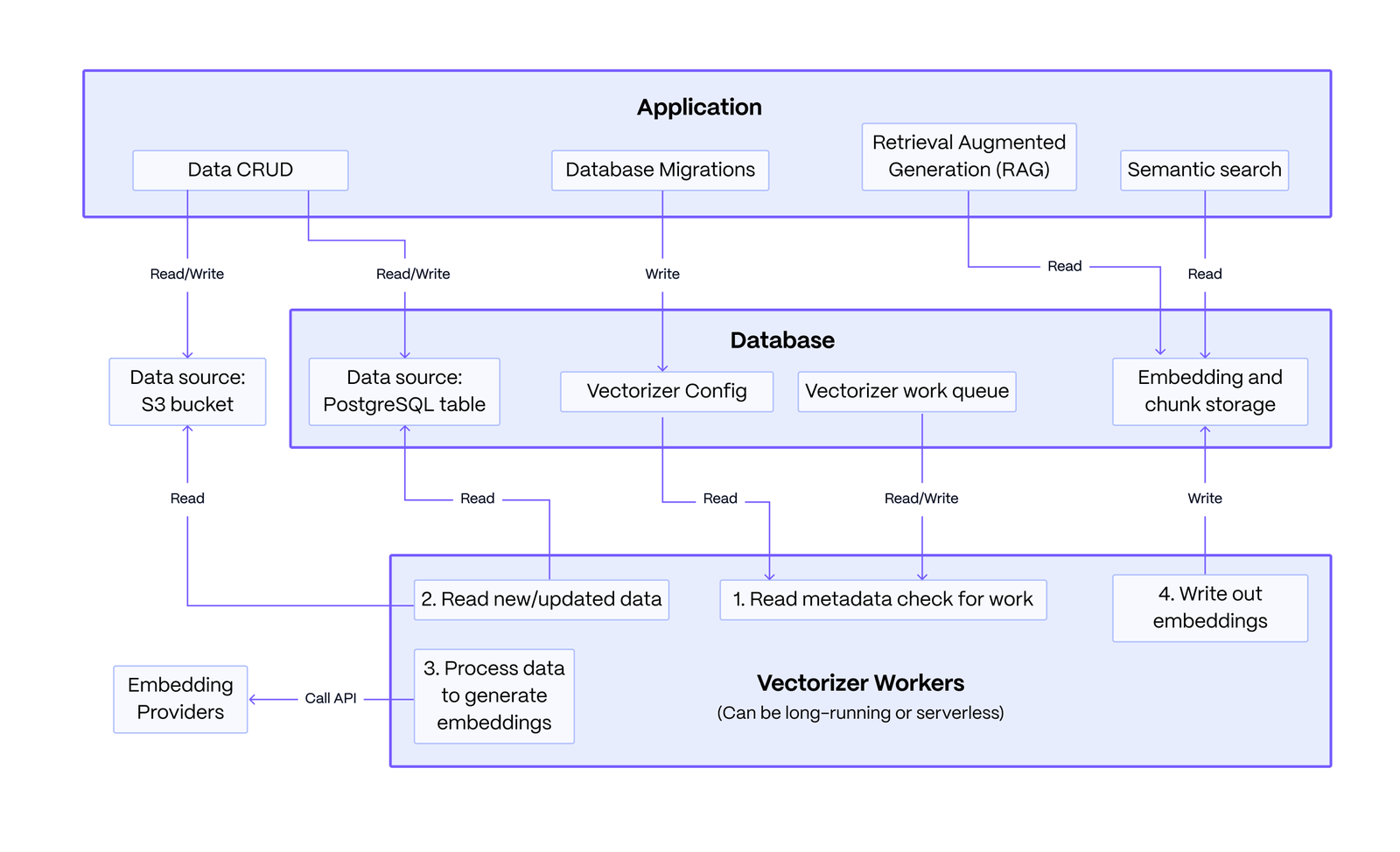
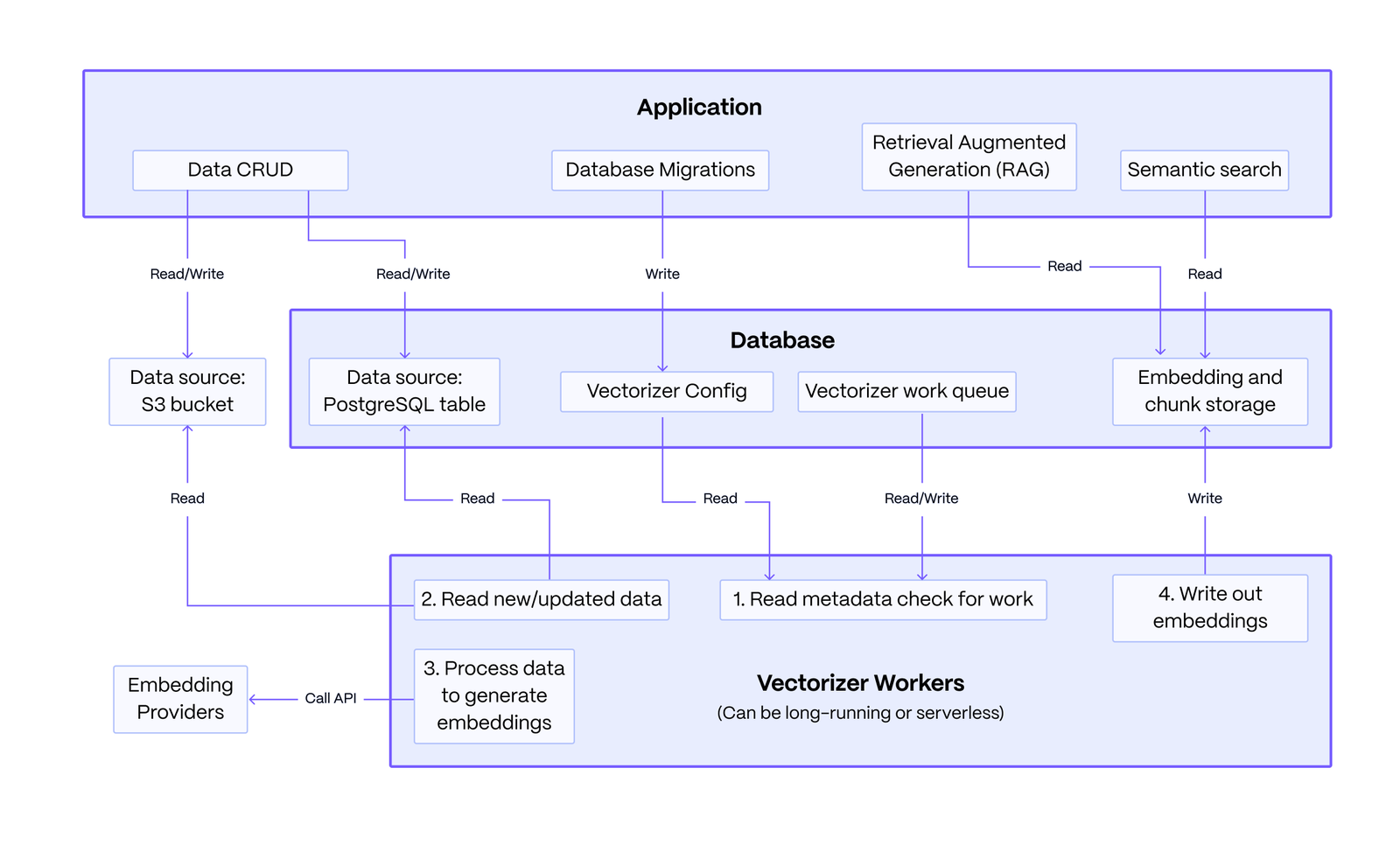
Basic Architecture: The system consists of an application you write, a PostgreSQL database, and stateless vectorizer workers. The application defines a vectorizer configuration to embed data from sources like PostgreSQL or S3. The workers read this configuration, processes the data queue into embeddings and chunked text, and writes the results back. The application then queries this data to power RAG and semantic search.
The key strength of this architecture lies in its resilience: data modifications made by the application are decoupled from the embedding process, ensuring that failures in the embedding service do not affect the core data operations.
First, install the pgai package.
pip install pgai
Then, install the pgai database components. You can do this from the terminal using the CLI or in your Python application code using the pgai python package.
# from the cli
pgai install -d <database-url>

# or from the python package, often done as part of your application setup
import pgai
pgai.install(DB_URL)
This quickstart demonstrates how pgai Vectorizer enables semantic search and RAG over PostgreSQL data by automatically creating and synchronizing embeddings as data changes.
The key "secret sauce" of pgai Vectorizer is its declarative approach to embedding generation. Simply define your pipeline and let Vectorizer handle the operational complexity of keeping embeddings in sync, even when embedding endpoints are unreliable. You can define a simple version of the pipeline as follows:
CREATE TABLE IF NOT EXISTS wiki (
    id INTEGER PRIMARY KEY GENERATED ALWAYS AS IDENTITY,
    url TEXT NOT NULL,
    title TEXT NOT NULL,
    text TEXT NOT NULL
)

SELECT ai.create_vectorizer(
     'wiki'::regclass,
     loading => ai.loading_column(column_name=>'text'),
     destination => ai.destination_table(target_table=>'wiki_embedding_storage'),
     embedding => ai.embedding_openai(model=>'text-embedding-ada-002', dimensions=>'1536')
    )
The vectorizer will automatically create embeddings for all the rows in the
wiki table, and, more importantly, will keep the embeddings synced with the
underlying data as it changes. Think of it almost like declaring an index on
the wiki table, but instead of the database managing the index datastructure
for you, the Vectorizer is managing the embeddings.
Prerequisites:
Create a .env file with the following:
OPENAI_API_KEY=<your-openai-api-key>
DB_URL=<your-database-url>
You can download the full python code and requirements.txt from the quickstart example and run it in the same directory as the .env file.
curl -O https://raw.githubusercontent.com/timescale/pgai/main/examples/quickstart/main.py
curl -O https://raw.githubusercontent.com/timescale/pgai/main/examples/quickstart/requirements.txt
python -m venv venv
source venv/bin/activate
pip install -r requirements.txt
python main.py
Search results 1:
[WikiSearchResult(id=7,
                  url='https://en.wikipedia.org/wiki/Aristotle',
                  title='Aristotle',
                  text='Aristotle (;  Aristotélēs, ; 384–322\xa0BC) was an '
                       'Ancient Greek philosopher and polymath. His writings '
                       'cover a broad range of subjects spanning the natural '
                       'sciences, philosophy, linguistics, economics, '
                       'politics, psychology and the arts. As the founder of '
                       'the Peripatetic school of philosophy in the Lyceum in '
                       'Athens, he began the wider Aristotelian tradition that '
                       'followed, which set the groundwork for the development '
                       'of modern science.\n'
                       '\n'
                       "Little is known about Aristotle's life. He was born in "
                       'the city of Stagira in northern Greece during the '
                       'Classical period. His father, Nicomachus, died when '
                       'Aristotle was a child, and he was brought up by a '
                       "guardian. At 17 or 18 he joined Plato's Academy in "
                       'Athens and remained there till the age of 37 (). '
                       'Shortly after Plato died, Aristotle left Athens and, '
                       'at the request of Philip II of Macedon, tutored his '
                       'son Alexander the Great beginning in 343 BC. He '
                       'established a library in the Lyceum which helped him '
                       'to produce many of his hundreds of books on papyru',
                  chunk='Aristotle (;  Aristotélēs, ; 384–322\xa0BC) was an '
                        'Ancient Greek philosopher and polymath. His writings '
                        'cover a broad range of subjects spanning the natural '
                        'sciences, philosophy, linguistics, economics, '
                        'politics, psychology and the arts. As the founder of '
                        'the Peripatetic school of philosophy in the Lyceum in '
                        'Athens, he began the wider Aristotelian tradition '
                        'that followed, which set the groundwork for the '
                        'development of modern science.',
                  distance=0.22242502364217387)]
Search results 2:
[WikiSearchResult(id=41,
                  url='https://en.wikipedia.org/wiki/pgai',
                  title='pgai',
                  text='pgai is a Python library that turns PostgreSQL into '
                       'the retrieval engine behind robust, production-ready '
                       'RAG and Agentic applications. It does this by '
                       'automatically creating vector embeddings for your data '
                       'based on the vectorizer you define.',
                  chunk='pgai is a Python library that turns PostgreSQL into '
                        'the retrieval engine behind robust, production-ready '
                        'RAG and Agentic applications. It does this by '
                        'automatically creating vector embeddings for your '
                        'data based on the vectorizer you define.',
                  distance=0.13639101792546204)]
RAG response:
The main thing pgai does right now is generating vector embeddings for data in PostgreSQL databases based on the vectorizer defined by the user, enabling the creation of robust RAG and Agentic applications.
Pgai requires a few catalog tables and functions to be installed into the database. This is done using the pgai.install function, which will install the necessary components into the ai schema of the database.
pgai.install(DB_URL)
This defines the vectorizer, which tells the system how to create the embeddings from the text column in the wiki table. The vectorizer creates a view wiki_embedding that we can query for the embeddings (as we'll see below).
async def create_vectorizer(conn: psycopg.AsyncConnection):
    async with conn.cursor() as cur:
        await cur.execute("""
            SELECT ai.create_vectorizer(
                'wiki'::regclass,
                if_not_exists => true,
                loading => ai.loading_column(column_name=>'text'),
                embedding => ai.embedding_openai(model=>'text-embedding-ada-002', dimensions=>'1536'),
                destination => ai.destination_table(view_name=>'wiki_embedding')
            )
        """)
    await conn.commit()
In this example, we run the vectorizer worker once to create the embeddings for the existing data.
worker = Worker(DB_URL, once=True)
worker.run()
In a real application, we would not call the worker manually like this every time we want to create the embeddings. Instead, we would run the worker in the background and it would run continuously, polling for work from the vectorizer.
You can run the worker in the background from the application, the cli, or docker. See the vectorizer worker documentation for more details.
This is standard pgvector semantic search in PostgreSQL. The search is performed against the wiki_embedding view, which is created by the vectorizer and includes all the columns from the wiki table plus the embedding column and the chunk text. This function returns both the entire text column from the wiki table and smaller chunks of the text that are most relevant to the query.
@dataclass
class WikiSearchResult:
    id: int
    url: str
    title: str
    text: str
    chunk: str
    distance: float

async def _find_relevant_chunks(client: AsyncOpenAI, query: str, limit: int = 1) -> List[WikiSearchResult]:
    # Generate embedding for the query using OpenAI's API
    response = await client.embeddings.create(
        model="text-embedding-ada-002",
        input=query,
        encoding_format="float",
    )

    embedding = np.array(response.data[0].embedding)

    # Query the database for the most similar chunks using pgvector's cosine distance operator (<=>)
    async with pool.connection() as conn:
        async with conn.cursor(row_factory=class_row(WikiSearchResult)) as cur:
            await cur.execute("""
                SELECT w.id, w.url, w.title, w.text, w.chunk, w.embedding <=> %s as distance
                FROM wiki_embedding w
                ORDER BY distance
                LIMIT %s
            """, (embedding, limit))

            return await cur.fetchall()
This code is notable for what it is not doing. This is a simple insert of a new article into the wiki table. We did not need to do anything different to create the embeddings, the vectorizer worker will take care of updating the embeddings as the data changes.
def insert_article_about_pgai(conn: psycopg.AsyncConnection):
    async with conn.cursor(row_factory=class_row(WikiSearchResult)) as cur:
        await cur.execute("""
            INSERT INTO wiki (url, title, text) VALUES
            ('https://en.wikipedia.org/wiki/pgai', 'pgai', 'pgai is a Python library that turns PostgreSQL into the retrieval engine behind robust, production-ready RAG and Agentic applications. It does this by automatically creating vector embeddings for your data based on the vectorizer you define.')
        """)
    await conn.commit()
This code performs RAG with the LLM. It uses the _find_relevant_chunks function defined above to find the most relevant chunks of text from the wiki table and then uses the LLM to generate a response.
    query = "What is the main thing pgai does right now?"
    relevant_chunks = await _find_relevant_chunks(client, query)
    context = "\n\n".join(
        f"{chunk.title}:\n{chunk.text}"
        for chunk in relevant_chunks
    )
    prompt = f"""Question: {query}

Please use the following context to provide an accurate response:

{context}

Answer:"""

    response = await client.chat.completions.create({
        model: "gpt-3.5-turbo",
        messages: [{ role: "user", content: prompt }],
    })
    print("RAG response:")
    print(response.choices[0].message.content)
Look for other quickstarts:
Explore more about the vectorizer:
Our pgai Python library lets you work with embeddings generated from your data:
You can use the vector embeddings to:
We also offer a PostgreSQL extension that can perform LLM model calling directly from SQL. This is often useful for use cases like classification, summarization, and data enrichment on your existing data.
The vectorizer is designed to be flexible and customizable. Each vectorizer defines a pipeline for creating embeddings from your data. The pipeline is defined by a series of components that are applied in sequence to the data:
The following models are supported for embedding:
Simply creating vector embeddings is easy and straightforward. The challenge is that LLMs are somewhat unreliable and the endpoints exhibit intermittent failures and/or degraded performance. A critical part of properly handling failures is that your primary data-modification operations (INSERT, UPDATE, DELETE) should not be dependent on the embedding operation. Otherwise, your application will be down every time the endpoint is slow or fails and your user experience will suffer.
Normally, you would need to implement a custom MLops pipeline to properly handle endpoint failures. This commonly involves queuing system like Kafka, specialized workers, and other infrastructure for handling the queue and retrying failed requests. This is a lot of work and it is easy to get wrong.
With pgai, you can skip all that and focus on building your application because the vectorizer is managing the embeddings for you. We have built in queueing and retry logic to handle the various failure modes you can encounter. Because we do this work in the background, the primary data modification operations are not dependent on the embedding operation. This is why pgai is production-ready out of the box.
Many specialized vector databases create embeddings for you. However, they typically fail when embedding endpoints are down or degraded, placing the burden of error handling and retries back on you.
We welcome contributions to pgai! See the Contributing page for more information.
pgai is still at an early stage. Now is a great time to help shape the direction of this project; we are currently deciding priorities. Have a look at the list of features we're thinking of working on. Feel free to comment, expand the list, or hop on the Discussions forum.
To get started, take a look at how to contribute and how to set up a dev/test environment.
Timescale is a PostgreSQL database company. To learn more visit the timescale.com.
Timescale Cloud is a high-performance, developer focused, cloud platform that provides PostgreSQL services for the most demanding AI, time-series, analytics, and event workloads. Timescale Cloud is ideal for production applications and provides high availability, streaming backups, upgrades over time, roles and permissions, and great security.
