 pvharmo2/gha-lab-e8902eccd3
Security research lab: reproduction of CVE-2025-52467 (pgai pull_request_target workflow code execution / GITHUB_TOKEN exfiltration) — snapshot of timescale/pgai

Automated research artifact — not the upstream project.
This repository is a disposable lab built by an automated harness for a master's thesis at Université Laval on reproducing published GitHub Actions workflow vulnerabilities. It is a verbatim snapshot of
timescale/pgaiat commit2a209b058c60823b57e8b7775b10244ff340eb8b(2025-05-14), redistributed under that project's own licence, whose file is included unchanged in this snapshot.The upstream project is not involved, is never targeted, and the vulnerability studied here is already public. Every secret and variable in this repository is a randomly generated dummy value — no real credential is present. Action references and runner images are pinned to what they resolved to on 2025-05-14; see
pinning.mdin the harness output for every change made to the snapshot.Questions or objections: [email protected]


A Python library that transforms PostgreSQL into a robust, production-ready retrieval engine for RAG and Agentic applications.
🔄 Automatically create and synchronize vector embeddings from PostgreSQL data and S3 documents. Embeddings update automatically as data changes.
🔍 Powerful vector and semantic search with pgvector and pgvectorscale.
🛡️ Production-ready out-of-the-box: Supports batch processing for efficient embedding generation, with built-in handling for model failures, rate limits, and latency spikes.
🐘 Works with any PostgreSQL database, including Timescale Cloud, Amazon RDS, Supabase and more.
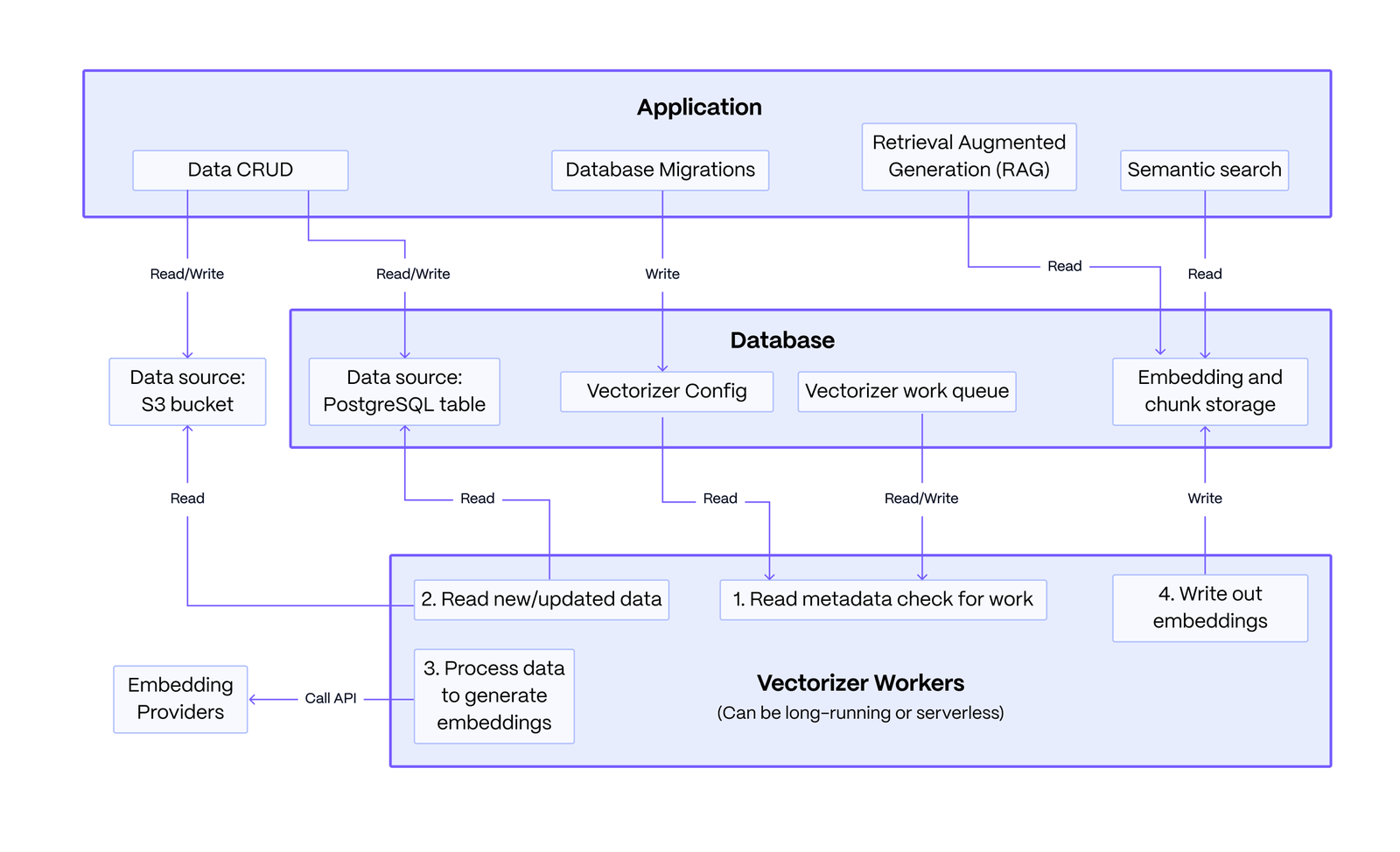
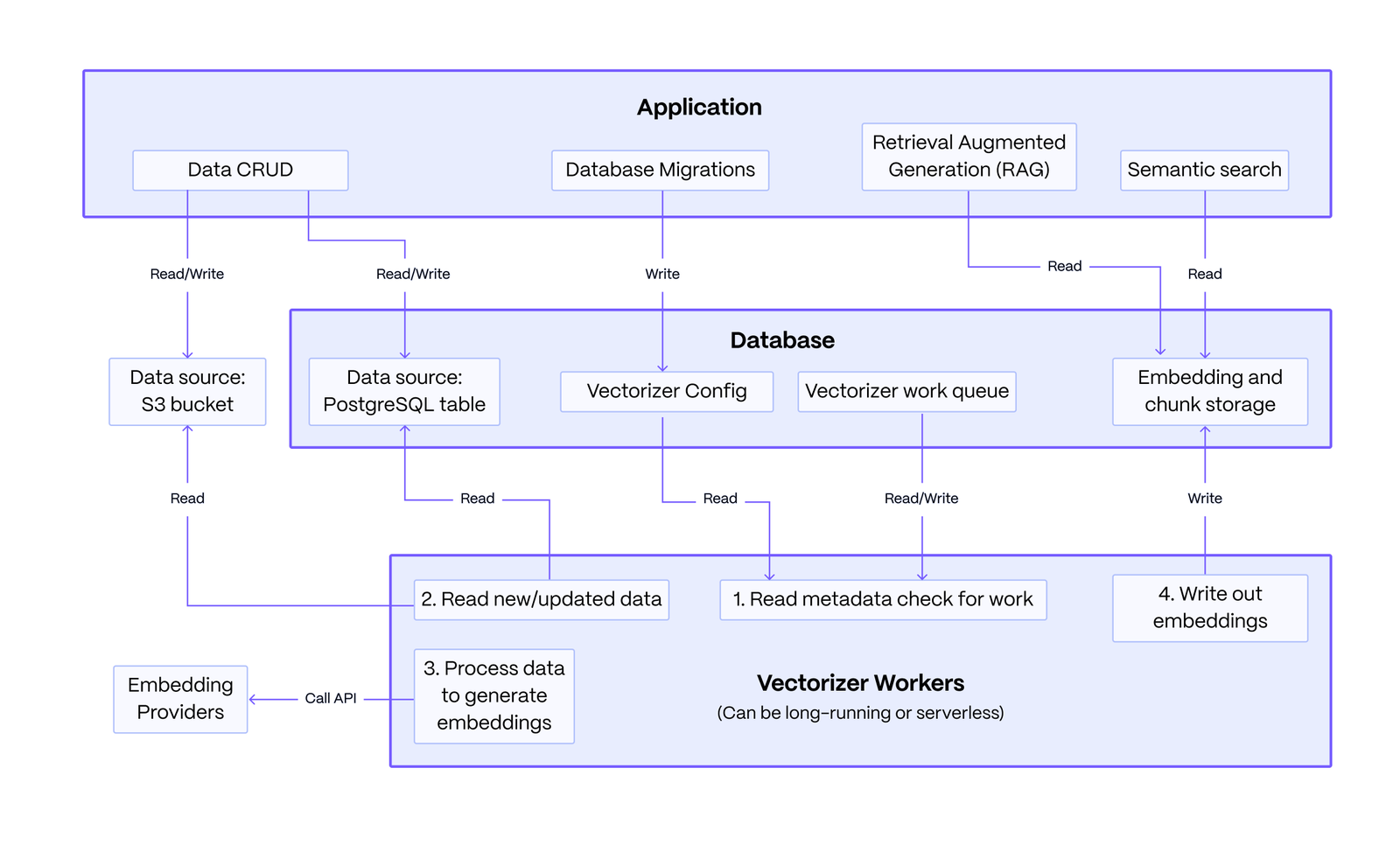
Basic Architecture: The system consists of an application you write, a PostgreSQL database, and stateless vectorizer workers. The application defines a vectorizer configuration to embed data from sources like PostgreSQL or S3. The workers read this configuration, processes the data queue into embeddings and chunked text, and writes the results back. The application then queries this data to power RAG and semantic search.
The key strength of this architecture lies in its resilience: data modifications made by the application are decoupled from the embedding process, ensuring that failures in the embedding service do not affect the core data operations.
First, install the pgai package.
pip install pgai
Then, install the pgai database components. You can do this from the terminal using the CLI or in your Python application code using the pgai python package.
# from the cli
pgai install -d <database-url>

# or from the python package, often done as part of your application setup
import pgai
pgai.install(DB_URL)
This quickstart demonstrates how pgai Vectorizer enables semantic search and RAG over PostgreSQL data by automatically creating and synchronizing embeddings as data changes.
The key "secret sauce" of pgai Vectorizer is its declarative approach to embedding generation. Simply define your pipeline and let Vectorizer handle the operational complexity of keeping embeddings in sync, even when embedding endpoints are unreliable. You can define a simple version of the pipeline as follows:
CREATE TABLE IF NOT EXISTS wiki (
    id INTEGER PRIMARY KEY GENERATED ALWAYS AS IDENTITY,
    url TEXT NOT NULL,
    title TEXT NOT NULL,
    text TEXT NOT NULL
)

SELECT ai.create_vectorizer(
     'wiki'::regclass,
     loading => ai.loading_column(column_name=>'text'),
     destination => ai.destination_table(target_table=>'wiki_embedding_storage'),
     embedding => ai.embedding_openai(model=>'text-embedding-ada-002', dimensions=>'1536')
    )
The vectorizer will automatically create embeddings for all the rows in the
wiki table, and, more importantly, will keep the embeddings synced with the
underlying data as it changes. Think of it almost like declaring an index on
the wiki table, but instead of the database managing the index datastructure
for you, the Vectorizer is managing the embeddings.
Prerequisites:
Create a .env file with the following:
OPENAI_API_KEY=<your-openai-api-key>
DB_URL=<your-database-url>
You can download the full python code and requirements.txt from the quickstart example and run it in the same directory as the .env file.
curl -O https://raw.githubusercontent.com/timescale/pgai/main/examples/quickstart/main.py
curl -O https://raw.githubusercontent.com/timescale/pgai/main/examples/quickstart/requirements.txt
python -m venv venv
source venv/bin/activate
pip install -r requirements.txt
python main.py
