 ptechpl/macos_security_audit
macOS script for auditing

A Bash-based security auditing toolkit for macOS that checks system hardening settings against CIS Benchmark recommendations and generates JSON/HTML reports.
Created by Bartłomiej Pogwizd · https://www.youtube.com/@pTech-pl
This toolkit consists of two scripts:
auditMAC.sh — runs the full security audit and outputs results to the terminal and a TSV data filegenerate_reports.sh — converts the TSV data file into a JSON report and a styled HTML report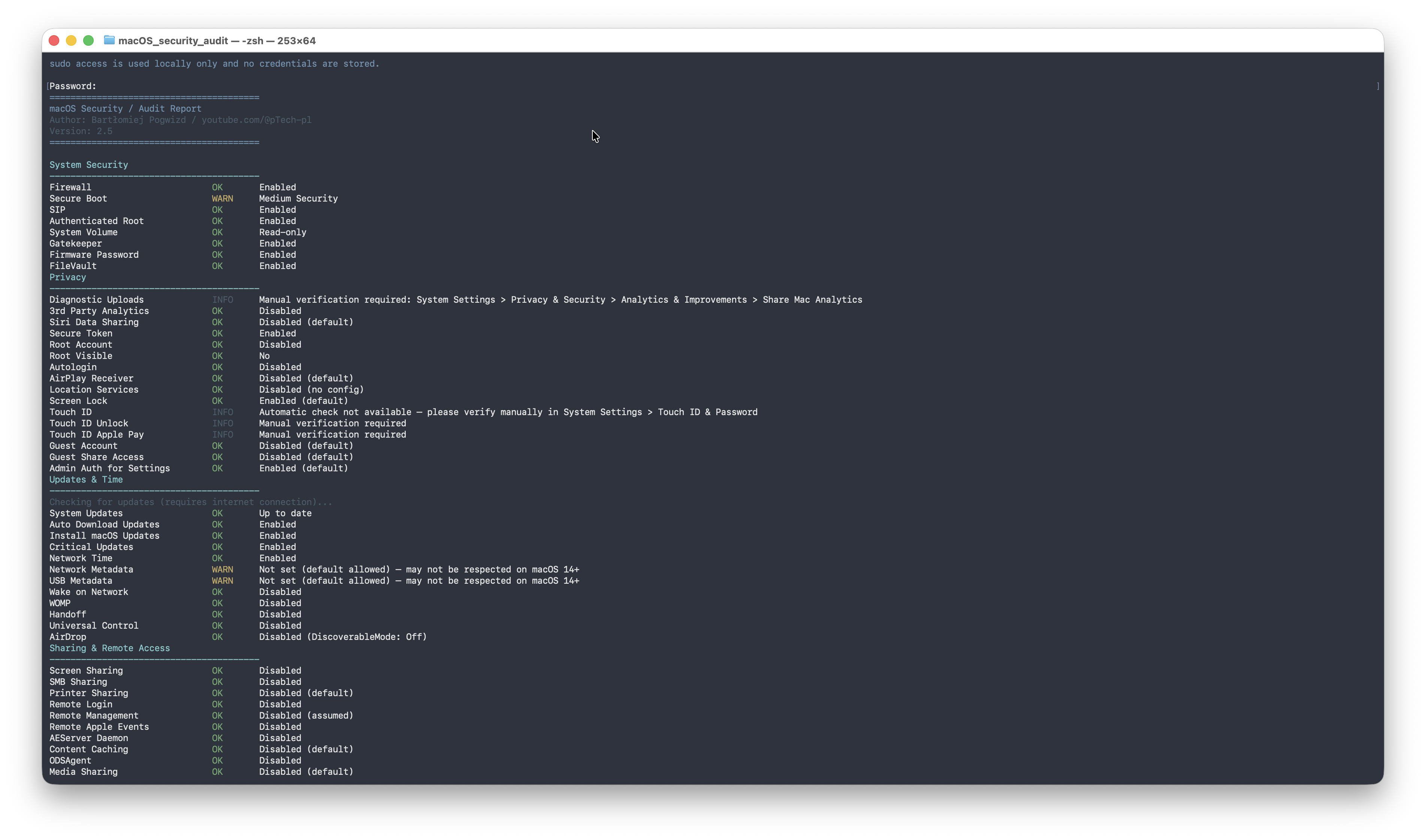
sudo access (required for several checks)chmod +x auditMAC.sh
./auditMAC.sh
The script will:
sudo password (used locally only, never stored)Put files ( auditMAC.sh and generate_reports.sh ) in same folder json and html files will show in the folder, they are generate automatically
This produces two files in the current directory:
macos_security_report.jsonmacos_security_report.html| Category | Checks |
|---|---|
| System Security | Firewall, SIP, Secure Boot, Gatekeeper, FileVault, Firmware Password, Authenticated Root |
| Privacy | Diagnostic uploads, Siri data sharing, Location Services, AirPlay Receiver, Screen Lock, Guest Account, Autologin |
| Updates & Time | Pending updates, Auto-download, Critical updates, Network Time, Wake-on-Network |
| Sharing & Remote Access | Screen Sharing, SMB, Printer Sharing, Remote Login, Remote Management, AirDrop, Handoff |
| System Services | tftpd, nfsd, httpd, uucp, sshd |
| Users & Privileges | Admin accounts, current user role, Root account status |
| Network & Ports | Open listening ports (IPv4/IPv6) |
| Startup Items | LaunchAgents and LaunchDaemons (system and user) |
| SSH Hardening | PermitRootLogin, PasswordAuthentication, PubkeyAuthentication, AllowUsers |
| System Extensions | Active/waiting/terminated kernel extensions |
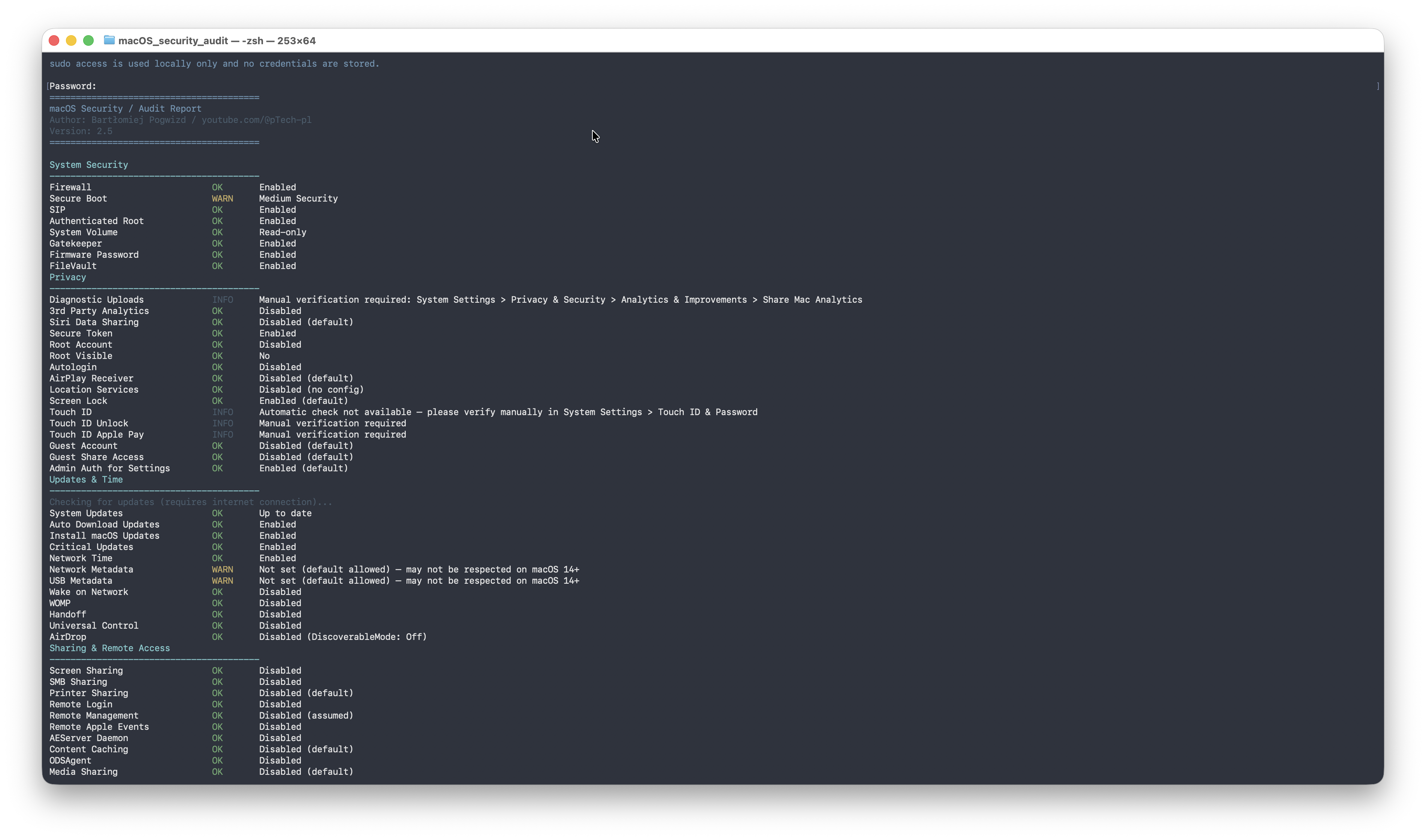
========================================
macOS Security / Audit Report
Author: Bartłomiej Pogwizd / youtube.com/pTech
Version: 2.5
========================================

System Security
----------------------------------------
Firewall                       OK       Enabled
SIP                            OK       Enabled
FileVault                      FAIL     Disabled
Gatekeeper                     OK       Enabled
...

Security Score                 72/100
Risk Level:       Medium
Passed                         31
Warnings                       4
Failures                       8
Status legend:
| Status | Meaning |
|---|---|
OK | Setting meets the recommended value |
WARN | Setting could not be determined or is a grey area |
FAIL | Setting does not meet the recommendation |
INFO | Informational only, no pass/fail judgement |
The score is calculated as:
score = (passed × 100 + warnings × 50) / total_checks
| Score | Risk Level |
|---|---|
| 80–100 | 🟢 Low |
| 50–79 | 🟡 Medium |
| 0–49 | 🔴 High |
Every check in the HTML/JSON report is tagged with a CIS macOS Benchmark ID (e.g. 2.1.1 for Firewall, 2.2.1 for FileVault). This makes it easy to cross-reference the official CIS documentation for remediation guidance.
sudo is used only for commands that require elevated privileges (e.g. fdesetup, systemsetup, launchctl)/tmp with umask 077 and are always cleaned up on exit, even on error or Ctrl+CINFO with instructions to verify manuallyMIT — feel free to use, modify, and share.
Pull requests and issues are welcome. If a check produces incorrect results on your macOS version, please open an issue and include the output of sw_vers.
