
High-performance secrets scanner. CLI, Go library, Burp Suite extension, and Chrome extension. 487 detection rules with live credential validation.
Titus is a high-performance secrets scanner that detects credentials, API keys, and tokens in source code, files, and git history. It ships with 487 detection rules covering hundreds of services and credential types, drawn from NoseyParker and Kingfisher. Titus runs as a CLI, a Go library, a Burp Suite extension, and a Chrome browser extension — all sharing the same detection engine and rule set.
Built for security engineers, penetration testers, and DevSecOps teams, Titus combines Hyperscan/Vectorscan-accelerated regex matching with live credential validation to find and verify leaked secrets across your entire codebase.
Download a prebuilt binary from the Releases page, or build from source:
make build
The binary will be at dist/titus.
# Scan a file for secrets
titus scan path/to/file.txt
# Scan a directory for leaked credentials
titus scan path/to/directory
# Scan a public GitHub repository (no token needed)
titus scan github.com/org/repo
# Scan a public GitLab project (no token needed)
titus scan gitlab.com/namespace/project
# Scan git history for secrets in past commits
titus scan --git path/to/repo
# Scan a Docker / OCI image (pulled from a registry — no docker daemon required)
titus scan --docker alpine:latest
# Validate detected secrets against source APIs
titus scan path/to/code --validate
Results are written to a datastore (titus.ds by default) and printed to the console.
Scan public repositories directly by URL — no API token required:
# Scan a GitHub repository
titus scan github.com/kubernetes/kubernetes
# Scan a GitLab project
titus scan gitlab.com/gitlab-org/cli
# Full URLs work too
titus scan https://github.com/org/repo
titus scan https://gitlab.com/namespace/project.git
For organization-wide or user-wide scanning, use the dedicated subcommands:
# Scan all public repos in a GitHub org
titus github --org kubernetes
# Scan all repos in a GitHub org with a token (private repos + higher rate limits)
titus github --org kubernetes --token $GITHUB_TOKEN
# Scan all repos for a GitHub user
titus github --user octocat
# Scan all projects in a GitLab group
titus gitlab scan --group mygroup --token $GITLAB_TOKEN
# Scan a single repo with git history (finds deleted secrets)
titus github owner/repo --git
Tokens are optional for public repositories. Set GITHUB_TOKEN or GITLAB_TOKEN (or use --token) for private repository access and higher API rate limits.
Scan container images directly — no docker daemon, no docker binary required. Titus pulls images straight from any OCI registry over HTTPS (using credentials from ~/.docker/config.json), or reads images from a local docker save tarball or OCI image layout directory. It then scans image manifest/config metadata and every regular file in every layer, including lower-layer files deleted by later layers (since secrets can remain recoverable from image history).
# Pull from a registry and scan
titus scan --docker alpine:latest
titus scan docker://ghcr.io/owner/repo:tag
# Scan an image saved to a tarball:
# docker save my-app:latest -o my-app.tar
# podman save my-app:latest -o my-app.tar
titus scan --docker ./my-app.tar
# Scan an OCI image layout directory:
# docker buildx build --output type=oci,dest=./img/ .
# skopeo copy docker://my-app:latest oci:./img:latest
titus scan --docker ./img/
Authentication uses your existing Docker / Podman config (~/.docker/config.json, ${XDG_RUNTIME_DIR}/containers/auth.json). Private registries that need a fresh login should first be authenticated with docker login (or podman login, or crane auth login) — titus does not prompt for credentials.
Use report to re-read findings from a previous scan:
# Human-readable summary of detected secrets
titus report
# JSON output for programmatic processing
titus report --format json
# SARIF output for CI/CD integration with GitHub Advanced Security
titus report --format sarif
# Report from a specific datastore
titus report --datastore path/to/titus.ds
You can also control the output format at scan time with --format:
titus scan path/to/code --format json
Pass --validate during a scan to check detected secrets against their source APIs:
titus scan path/to/code --validate
Validation runs concurrently (4 workers by default, configurable with --validate-workers) and marks each finding as confirmed, denied, or unknown.
# List all available detection rules
titus rules list
# Scan with only specific rules (e.g., AWS and GCP credentials)
titus scan path/to/code --rules-include "aws,gcp"
# Exclude rules by pattern
titus scan path/to/code --rules-exclude "kingfisher.generic"
# Use a custom rules file for organization-specific secrets
titus scan path/to/code --rules path/to/custom-rules.yaml
# Opt in to rules marked noisy: true (high false-positive rate, off by default)
titus scan path/to/code --include-noisy
Titus can extract text from binary file formats and scan the contents for secrets:
# Extract and scan all supported binary formats
titus scan path/to/files --extract=all
# Target specific formats
titus scan path/to/files --extract=xlsx,docx,pdf,zip
Supported formats include Office documents (xlsx, docx, pptx, odp, ods, odt), PDFs, Jupyter notebooks, SQLite databases, email (eml, rtf), and archives (zip, tar, tar.gz, jar, war, ear, apk, ipa, crx, xpi, 7z). Archives are recursively extracted up to configurable depth and size limits.
# Tune extraction limits for large codebases
titus scan path/to/files --extract=all \
--extract-max-size 10MB \
--extract-max-total 100MB \
--extract-max-depth 5
For SQLite databases, Titus extracts text from all tables (1000 rows per table by default). Use --sqlite-row-limit to adjust:
# Full dump of all SQLite tables (no row limit)
titus scan path/to/files --extract=all --sqlite-row-limit 0
# Custom row limit per table
titus scan path/to/files --extract=all --sqlite-row-limit 5000
Every finding Titus produces carries a numeric score from 0–100 and a severity tier:
| Score | Severity |
|---|---|
| 0–20 | info |
| 21–40 | low |
| 41–60 | medium |
| 61–80 | high |
| 81–100 | critical |
Scores start from the rule's base_score and are adjusted by modifiers — conditions that raise or lower the score based on what is known about the credential:
# Score findings using static rule metadata only (no network calls)
titus scan path/to/code
# Score findings AND make live API calls to verify credential blast radius
# (calls AWS STS/IAM and GitHub API for supported credential types)
titus scan path/to/code --score-scope
# Override the accessibility context (default: auto-detected from git remote)
titus scan path/to/code --accessibility public # no penalty for public repos
titus scan path/to/code --accessibility private # -25 penalty (default for local scans)
Titus ships with YAML scorers for AWS credentials, GitHub PATs, and Slack tokens, plus Go-based SDK scorers that perform live IAM policy enumeration (AWS) and repository permission checks (GitHub fine-grained PATs) when --score-scope is enabled.
See docs/scoring.md for the complete reference: severity tiers, modifier kinds, built-in scorer details, and how to write your own YAML or Go scorers.
Titus can be imported as a Go library to add secrets detection to your own tools and pipelines.
go get github.com/praetorian-inc/titus
package main
import (
"fmt"
"log"
"github.com/praetorian-inc/titus"
)
func main() {
// Initialize the secrets scanner with default rules
scanner, err := titus.NewScanner()
if err != nil {
log.Fatal(err)
}
defer scanner.Close()
// Scan a string for API keys, tokens, and credentials
matches, err := scanner.ScanString(`aws_access_key_id = AKIAIOSFODNN7EXAMPLE`)
if err != nil {
log.Fatal(err)
}
for _, match := range matches {
fmt.Printf("%s (rule: %s) at line %d\n",
match.RuleName, match.RuleID,
match.Location.SourceSpan.Start.Line,
)
}
}
The library also supports scanning bytes and files, validating detected secrets, and loading custom rules:
// Scan a file for leaked credentials
matches, err := scanner.ScanFile("/path/to/config.json")
// Enable validation to check if detected secrets are live
scanner, err := titus.NewScanner(titus.WithValidation())
// Load custom detection rules for organization-specific secrets
rules, err := titus.LoadRulesFromFile("/path/to/rules.yaml")
scanner, err := titus.NewScanner(titus.WithRules(rules))
See docs/library-usage.md for the full API reference, concurrency patterns, and more examples.
The Burp extension scans HTTP responses for secrets during proxy traffic and active penetration testing.
# Build the CLI and Burp extension JAR, install CLI to ~/.titus/
make install-burp
Then load dist/titus-burp-1.0.0-all.jar in Burp Suite under Extensions > Add.
titus-windows-amd64.exe and titus-burp-<version>.jar from Releasesmkdir %USERPROFILE%\.titus
copy titus-windows-amd64.exe %USERPROFILE%\.titus\titus.exe
titus-burp-<version>.jar from Releases:
titus-linux-amd64 or titus-linux-arm64 for Linuxtitus-darwin-amd64 or titus-darwin-arm64 for macOSmkdir -p ~/.titus
cp titus-<platform> ~/.titus/titus
chmod +x ~/.titus/titus
The extension launches a titus serve process in the background and communicates over stdin/stdout using NDJSON. Detection rules are loaded once at startup.
The extension adds a Titus tab to Burp with three sub-tabs:
Secrets: All detected secrets with filtering by type, host, and validation status.
Titus Burp Suite extension secrets tab showing detected API keys and credentials with validation status
Statistics: Aggregate view of secrets grouped by type and host.
Settings: Configure scanning options, validation, and severity mappings.
Titus Burp Suite extension settings tab with scan configuration options
When viewing any request in Burp, a Titus tab appears in the response inspector if secrets are detected, providing quick access to findings without switching to the main Titus tab.
Titus tab in Burp Suite response inspector highlighting detected secrets in HTTP responses
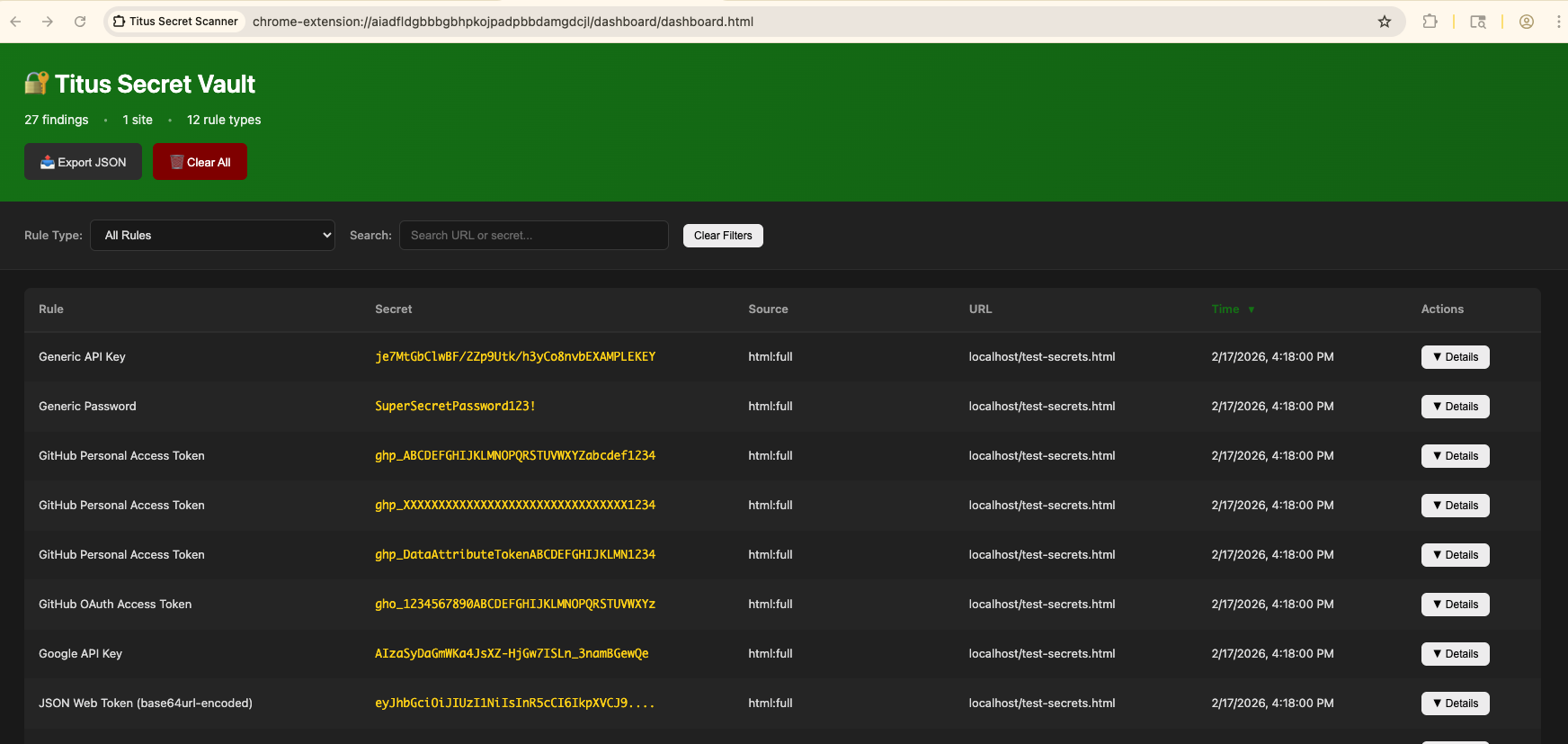
The Chrome extension scans web pages for secrets during web application security assessments.
make build-extension
chrome://extensions/extension/ directory
The browser extension removes Content Security Policy and CORS headers from visited pages to scan external resources. This weakens the security posture of sites you visit while the extension is active. Only enable during active security testing.
By default Titus compiles with Vectorscan (ARM) / Hyperscan (x86) for SIMD-accelerated regex matching. This needs CGO, the C library, and pkg-config (which cgo uses to locate the library). make build checks for these and attempts to install anything missing via Homebrew / apt / dnf:
# Build the CLI binary with vectorscan acceleration (outputs to dist/titus)
make build
# Build the Burp Suite extension JAR
make build-burp
# Build the Chrome browser extension
make build-extension
# Run unit tests
make test
# Run integration tests
make integration-test
You'll see [vectorscan] N/N rules compiled for Hyperscan on startup when the accelerated engine is active.
To install the C library yourself instead of relying on auto-install:
# macOS (Homebrew)
brew install pkg-config vectorscan
# Ubuntu/Debian
sudo apt-get install pkg-config libhyperscan-dev
# Fedora/RHEL
sudo dnf install pkgconf-pkg-config vectorscan-devel
# Or build vectorscan from source:
git clone --depth 1 --branch vectorscan/5.4.11 https://github.com/VectorCamp/vectorscan.git
cd vectorscan && cmake -B build -DCMAKE_INSTALL_PREFIX=/usr/local && cmake --build build && sudo cmake --install build
If you invoke go build directly (for example, when embedding Titus), pass the tag and enable CGO:
# macOS (Homebrew) — adjust PKG_CONFIG_PATH to your installed version
CGO_ENABLED=1 PKG_CONFIG_PATH="$(brew --prefix vectorscan)/lib/pkgconfig" \
go build -tags vectorscan -o dist/titus ./cmd/titus
# Linux (system-installed)
CGO_ENABLED=1 go build -tags vectorscan -o dist/titus ./cmd/titus
If you can't install the C library — or want a fully portable, static binary — build the pure-Go engine instead. Titus automatically falls back to it at runtime whenever vectorscan isn't compiled in:
# Portable pure-Go binary (no CGO, no vectorscan)
make build-pure
# Fully static binary
make build-static
Contributions are welcome! See CONTRIBUTING.md for guidelines on how to contribute to Titus.
Apache License 2.0 — see LICENSE.
Detection rules are derived from NoseyParker (Praetorian Security, Inc.) and Kingfisher (MongoDB, Inc.), both licensed under Apache 2.0. See NOTICE for full attribution.