 praetorian-inc/noseyparker
Nosey Parker is a command-line tool that finds secrets and sensitive information in textual data and Git history.

See our announcement post https://www.praetorian.com/blog/titus-open-source-secret-scanner/. The Titus Repo can be found at https://github.com/praetorian-inc/titus
Nosey Parker is a CLI tool that finds secrets and sensitive information in textual data.
It is essentially a special-purpose grep-like tool for detection of secrets.
It has been designed for offensive security (e.g., enabling lateral movement on red teams), but it can also be useful for defensive security testing. It has found secrets in hundreds of offensive security engagements at Praetorian.
Key features:
The typical workflow is three phases:
scan commandreport commandbrew install noseyparker
The latest release page contains prebuilt binaries for x86_64/aarch64 Linux and macOS.
docker pull ghcr.io/praetorian-inc/noseyparker:latest
The most recent commit is also available via the main tag.
docker pull ghcr.io/praetorian-inc/noseyparker-alpine:latest
The most recent commit is also available via the main tag.
https://aur.archlinux.org/packages/noseyparker
Nosey Parker does not build natively on Windows (#121). It is possible to run on Windows using WSL1 and the native Linux release.
This has been tested with several versions of Ubuntu Linux and macOS on both x86_64 and aarch64.
Required dependencies:
cargo: recommended approach: install from https://rustup.rscmake: needed for building the vectorscan-sys crate and some other dependenciesboost: needed for building the vectorscan-sys crate (supported version >=1.57)git: needed for embedding version information into the noseyparker CLIpatch: needed for building the vectorscan-sys cratepkg-config: needed for building the vectorscan-sys cratesha256sum: needed for computing digests (often provided by the coreutils package)zsh: needed for build scriptscreate-release.zsh script$ rm -rf release && ./scripts/create-release.zsh
If successful, this will produce a directory structure at release populated with release artifacts.
The command-line program will be at release/bin/noseyparker.
Running the noseyparker binary without arguments prints top-level help and exits.
You can get abbreviated help for a particular command by running noseyparker COMMAND -h.
More detailed help is available with the help command or long-form --help option.
The prebuilt releases also include manpages that collect the command-line help in one place. These manpages converted into Markdown format are also included in the repository here.
If you have a question that's not answered by this documentation, please start a discussion.
The datastore is a special directory that Nosey Parker uses to record its findings and maintain its internal state.
A datastore will be implicitly created by the scan command if needed.
Each scanned input is called a blob. Each blob has a unique blob ID, which is a SHA-1 digest computed the same way git does.
Each blob has one or more provenance entries associated with it. A provenance entry is metadata that describes how the input was discovered, such as a file on the filesystem or a file in Git repository history.
Nosey Parker is a rule-based system that uses regular expressions.
Each rule has a single pattern with at least one capture group that isolates the match content from the surrounding context.
You can list available rules with noseyparker rules list.
A collection of rules is organized into a ruleset.
Nosey Parker's default ruleset includes rules that detect things that appear to be secrets.
Other rulesets are available; you can list them with noseyparker rules list.
When a rule's pattern matches an input, it produces a match. A match is uniquely defined by a rule, blob ID, start byte offset, and end byte offset; these fields are used to compute a unique match identifier.
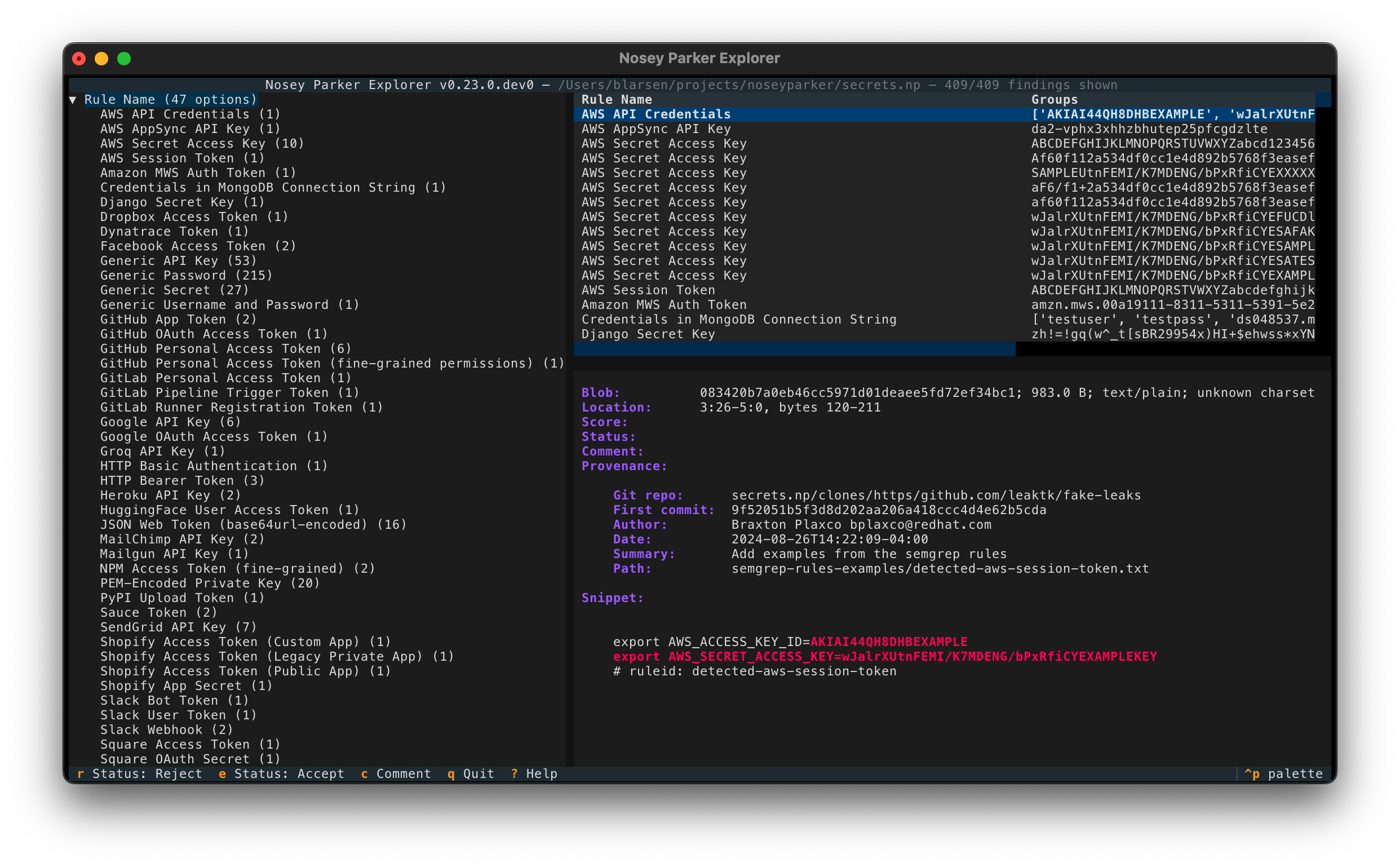
Matches that share a rule and capture groups are combined into a finding. In other words, a finding is a group of matches. This is Nosey Parker's top-level unit of reporting.
When using the Docker image, replace noseyparker in the following commands with a Docker invocation that uses a mounted volume:
docker run -v "$PWD":/scan ghcr.io/praetorian-inc/noseyparker:latest <ARGS>
The Docker container runs with /scan as its working directory, so mounting $PWD at /scan in the container will make tab completion and relative paths in your command-line invocation work.

Nosey Parker has native support for scanning files, directories, and the entire history of Git repositories.
For example, if you have a Git clone of CPython locally at cpython.git, you can scan it with the scan command.
Nosey Parker will create a new datastore at cpython.np and saves its findings there.
(The name cpython.np is innessential, and can be whatever you want.)
$ noseyparker scan -d cpython.np cpython.git
Scanned 19.19 GiB from 335,849 blobs in 17 seconds (1.11 GiB/s); 2,178/2,178 new matches

 Rule                            Findings   Matches   Accepted   Rejected   Mixed   Unlabeled
──────────────────────────────────────────────────────────────────────────────────────────────
 Generic API Key                        1         8          0          0       0           1
 Generic Password                       8     1,283          0          0       0           8
 Generic Username and Password          2        40          0          0       0           2
 HTTP Bearer Token                      1       108          0          0       0           1
 PEM-Encoded Private Key               61       151          0          0       0          61
 netrc Credentials                     27       588          0          0       0          27

Run the `report` command next to show finding details.
