
Skip to content
KitploitKITPLOIT
ToolsBlog
Submit
ToolsBlog
Submit

Hacking, PenTest, and Cybersecurity Tools for Your Security Arsenal!

Kitploit is a directory of hacking, cybersecurity, and pentesting tools. Discover the latest project updates to find vulnerabilities, analyze systems, automate testing, and strengthen your security.

··Feeds·Contact·Privacy·© 2026 Kitploit

Tool Directory

Categories

View all categories
Loading categories
DirtyPipe-Android — Dirty Pipe root exploit for Android (Pixel 6) | Kitploit
Tools/GitHubGitHub/polygraphene/dirtypipe-android
Android SecurityPrivilege EscalationExploit FrameworksVulnerability AnalysisExploitationMobile SecurityPayload DevelopmentBinary Exploitation
GitHubpolygraphene/dirtypipe-android

DirtyPipe-Android

Dirty Pipe root exploit for Android (Pixel 6)

View Repository
8531424 years agoReviewed by Kitploit

Most Popular

View all →

Discover the most used tools by our community.

Explore all tools

Browse our collection of tools

View all tools →
Share

DirtyPipe for Android

Dirty Pipe (CVE-2022-0847) temporary root PoC for Android.

Targets

Currently only run on Pixel 6 with security patch level from 2022-02-05 to 2022-04-05. Don't use on other devices or other versions. It must crash (reboot).

Dirty Pipe is finally patched on 2022 May security update on Pixel 6.

There is a port to Realme GT2 Pro by @rapperskull (https://github.com/polygraphene/DirtyPipe-Android/issues/12). link

Certain version of Galaxy S22 is also vulnerable. But not ported yet. (https://github.com/polygraphene/DirtyPipe-Android/issues/3)

WARNING

There is possiblity to brick your phone by using this tool. Use it at your own risk. Especially, don't update/install magisk from magisk app. It will cause permanent brick.

How to use

  1. Download binary from release page.
  2. Setup adb (android platform tools).
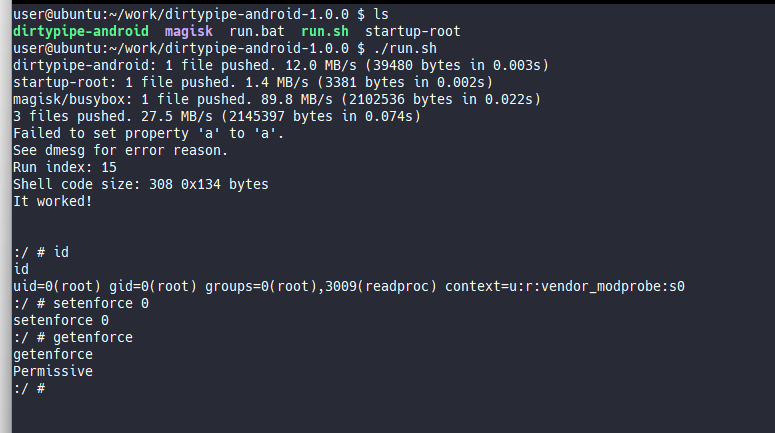
  3. Launch run.bat (For Windows) or run.sh (For Linux/Mac)
    • If you get 'adb' is not recognized ... errors, check to add adb to PATH.
  4. Wait several seconds (~30s) until Magisk app is automatically installed.
  5. Run adb shell then /dev/.magisk/su (Or simply su) to get root shell.
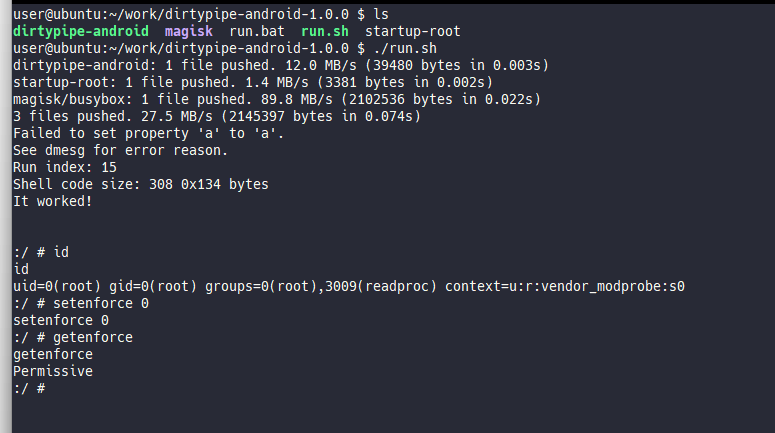
Screenshot

About Magisk

  1. Don't use install button on magisk app. It will brick your phone.
  2. Don't reboot even if magisk app request. It will lose temporary root.
  3. Only support root access. No magisk/zygisk modules support.

How to build

  1. Install Android NDK
  2. Set PATH for aarch64-linux-android31-clang
root@kitploit:~
export PATH=$PATH:$ANDROID_NDK/toolchains/llvm/prebuilt/linux-x86_64/bin
  1. Run make
root@kitploit:~
$ make

How to build kernel module

  1. Download Pixel 6 kernel source. Link
  2. Put mymod directory on kernel/private/google-modules/
  3. Apply mymod/build-script-patch.patch to kernel/private/gs-google
  4. Run build script
root@kitploit:~
# For the first build
$ LTO=thin ./build/build.sh
# For faster rebuild (skip full rebuild)
$ SKIP_MRPROPER=1 SKIP_DEFCONFIG=1 LTO=thin ./build/build.sh

Technical details

See here

Future work

  • Stop using insecure telnet
  • Make apk
  • Install Magisk
  • Add device support

Credits

  • https://dirtypipe.cm4all.com/
  • https://github.com/topjohnwu/Magisk
  • https://github.com/j4nn/CVE-2020-0041/blob/v50g8-mroot/scripts/magisk-start.sh
Download Tool