Exploitation of CVE-2024-21413 (Outlook)
Project status: On hold (incomplete practice; failed to capture NTLM hashes)
Objectives
Attempt to exploit vulnerability CVE-2024-21413, which allows leakage of NTLM hashes in Outlook when interacting with malicious links.
The goal of the practice was not to build all the tools used in the attack from scratch, but to thoroughly understand their core functionality and experiment with real errors when setting up one's own infrastructure.
I have used exploit codes and SMTP/POP3 servers developed by third parties, published by the community, to which I am deeply grateful.
Content
- Requirements
- Virtual machines
- Installation
- Exploitation flow
- Tests and results
- Lessons learned
Requirements
- Python 3.10+
- Outlook 2016
- Kali Linux
- Custom SMTP/POP3 servers
- Exploit
- Virtual machines
Virtual machines
Victim machine (Windows)
- OS: Windows 10 Home (x32)
- Outlook: Microsoft Outlook 2016 (version 16.0.4266.1001)
- Network: Adapter 1: NAT, Adapter 2: Internal network
Attacker machine (Kali)
- OS: Kali Linux 2025.1
- Tools and libraries installed:
- Python 3.10+
- smtplib
- email
- socket
- threading
- os
- aiosmtpd
- servidor-smtp.py
- servidor-pop3.py
- exploit.py
- Network: Adapter 1: NAT, Adapter 2: Internal network
Infrastructure
- The SMTP and POP3 servers were set up on the attacker machine (Kali) manually using Python scripts.
The machines were run on VirtualBox.
Installation
Installation (Kali)
Installing the SMTP server
- Venv: Virtual environment with Python 3
- Step 1: Create a directory for the server and the virtual environment (mkdir smtp-lab) and access it (cd smtp-lab)
- Step 2: Create a virtual environment inside the directory (python3 -m venv venv)
- Step 3: Activate the virtual environment (source venv/bin/activate)
- Step 4: Install aiosmtpd inside the virtual environment (pip install aiosmtpd)
- Step 5: Create the server code (nano servidor-smtp.py)
- Step 6: Run the server (python3 servidor-smtp.py)
SMTP server code
The SMTP server code is located in the file src/servidor-smtp.py.
Installing the POP3 server:
- Step 1: Create a directory for the server (mkdir pop3-server) and access it (cd pop3-server)
- Step 2: Create the server code (nano server-pop3.py)
- Step 3: Run the server (python3 server-pop3.py)
POP3 server code
The POP3 server code is located in the file src/servidor-pop3.py.
Installing the exploit
- Step 1: Create the code. This code was extracted from CMNatic, but adapted to my infrastructure (nano exploit.py)
Exploit code
The exploit code is located in the file src/exploit.py.
Installation (Windows 10)
- Step 1: Install the Microsoft Office 2016 ISO. I used the archive.org page and installed the x86 version of Microsoft Office 2016 Professional Plus
- Step 2: Once the ISO is installed, download Microsoft Office and access Outlook 2016
- Step 3: Configure Outlook correctly
Outlook 2016 configuration
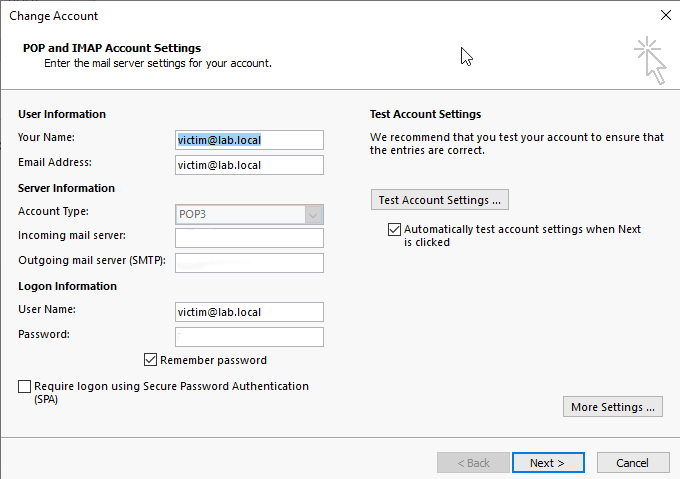
Here is how to configure Outlook to work with the test SMTP and POP3 server.
- Both in the "Incoming mail server" and "Outgoing mail server (SMTP)" fields, you must enter the IP of the internal network interface of the attacker machine (Kali).
- The password is irrelevant for the attack; you can choose any.
Exploitation flow
The goal of the exploit for CVE-2024-21413 is to make Outlook automatically send an SMB request to a resource controlled by the attacker, resulting in the victim's NTLM hash being sent, which can be captured offline for cracking.
Environment preparation
- The attacker machine (Kali) launches a custom SMTP and POP3 server.
- Outlook on the victim machine (Windows 10) is configured to receive emails from that server.
- The attacker machine (Kali) sets up a fake SMB server (In my case I used Responder)
Sending the malicious email
- An email is sent to the victim from the attacker's SMTP.
- The message body contains a malicious UNC link.
- The path is designed to trigger an automatic SMB connection if the user interacts with the link.
User interaction
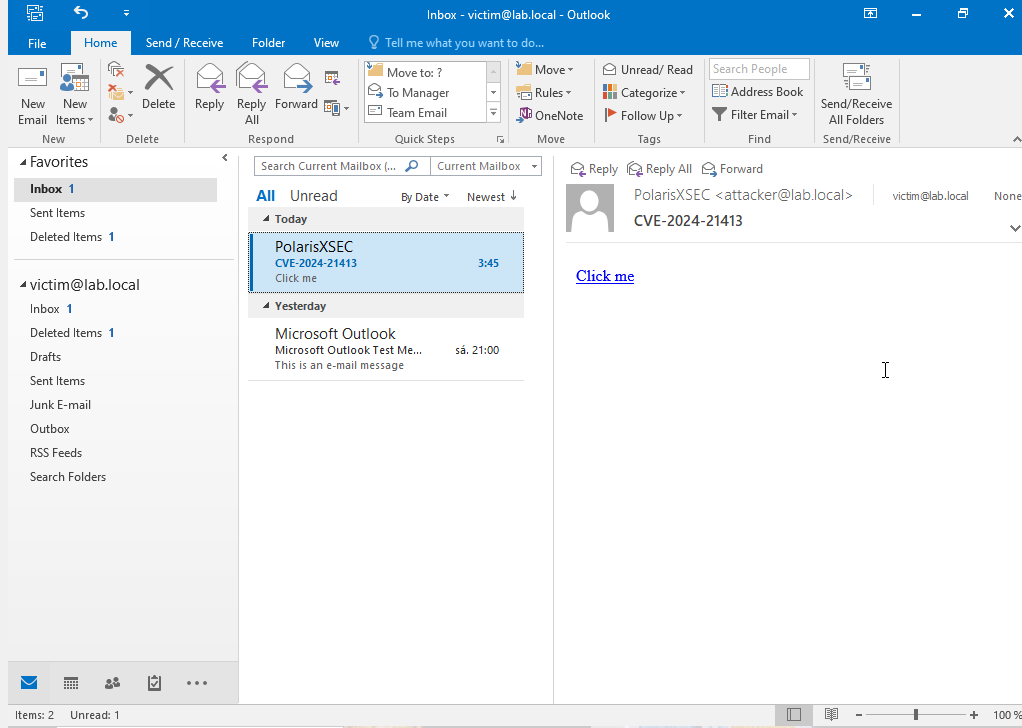
- The victim opens Outlook and sees the message.
- They are expected to click on the link.
- If Outlook tries to resolve the UNC path, an SMB request is generated to the attacker's server.
- Below is how the malicious email would look in Outlook from the victim's perspective:
Hash capture
- The attacker's SMB server receives the connection.
- Outlook, when trying to authenticate, automatically sends the user's NTLM hash.
- The attacker can save that hash for a hashcat-style attack.
Notes
- In my case, the email arrived correctly in Outlook.
- However, when clicking on the UNC link, the expected SMB connection was not generated.
- I still don't know the cause of the failure, although I suspect it may be related to network configuration, the Outlook version, or an accessibility or response issue with the SMB server.
Tests and results
Features that worked
- SMTP and POP3 were configured correctly, Outlook synced with them without errors.
- The malicious email was received by Outlook.
- The message displayed the UNC link without being blocked.
- The attacker's SMB environment was up and listening.
What did not work
- When clicking the UNC link from Outlook, no SMB traffic was visible in Wireshark.
- No NTLM authentication attempt was generated from the victim machine.
- No connections were logged on the SMB server.
Analysis with Wireshark
- Captures were taken on the Kali interface (eth1).
- SMTP and POP3 traffic was observed, but no TCP 445 or UDP 137/138 packets were seen when clicking the link.
- Also tried with Outlook run as administrator: no changes.
Lessons learned
Knowledge acquired
- How SMTP and POP3 work at a low level.
- What Outlook exactly expects when syncing accounts.
- How Outlook interprets UNC links and what conditions must be met for it to open them automatically.
- The value of Wireshark and logs as debugging tools in complex labs.
Why I decided to close it here
- After multiple attempts, the exploit did not reach the hash capture stage, which was the final goal.
- I documented all the infrastructure, tests, and results, which remains valuable as an educational lab.
- Although the final goal was not achieved, the process allowed me to gain deep knowledge of each technical component involved. It can be resumed in the future.
Credits
The code for this exploit is based on the work of CMNatic from https://github.com/CMNatic/CVE-2024-21413. I made modifications to adapt it to my environment.
 polarisxsec/cve-2024-21413
