 pirxthepilot/wtfis
Passive hostname, domain and IP lookup tool for non-robots


Passive hostname, domain and IP lookup tool for non-robots

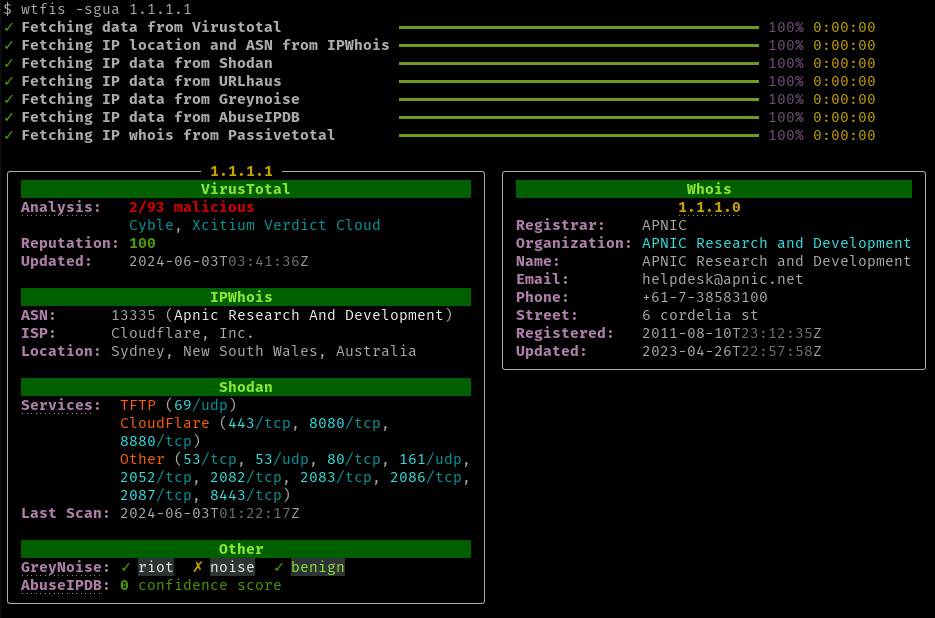
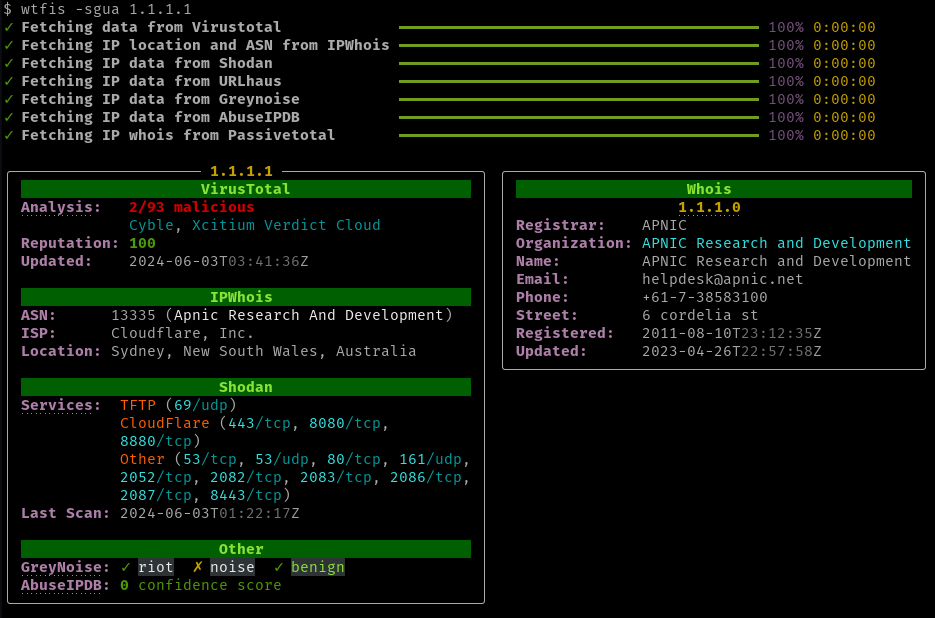
wtfis is a commandline tool that gathers information about a domain, FQDN or IP address using various OSINT services. Unlike other tools of its kind, it's built specifically for human consumption, providing results that are pretty (YMMV) and easy to read and understand.
This tool assumes that you are using free tier / community level accounts, and so makes as few API calls as possible to minimize hitting quotas and rate limits.
The project name is a play on "whois".
| Service | Used in lookup | Required | Free Tier |
|---|---|---|---|
| Virustotal | All | No | Yes |
| AbuseIPDB | IP address | No | Yes |
| Greynoise | IP address | No | Yes |
| IP2Location | IP address | No | Yes |
| IP2Whois | Domain/FQDN | No | Yes |
| IPinfo | IP Address | No | Yes (no signup) |
| IPWhois | IP address | No | Yes (no signup) |
| Shodan | IP address | No | No |
| URLhaus | All | No | Yes |
The primary source of information. Retrieves:
AbuseIPDB is a crowd-sourced database of reported malicious IP addresses. Through its API wtfis shows:
Alternative Geolocation and ASN lookup source for IP addresses (default is IPWhois). Retrieves:
IP2Whois and IP2Location are different features from the same service, so you only need to sign up once. The API key can then be used for both lookups.
Optionally used if creds are provided. Retrieves:
IP2Whois is recommended over Virustotal for whois data for a couple of reasons:
Another alternative Geolocation and ASN lookup source for IP addresses. Retrieves:
Default Geolocation and ASN lookup source for IP addresses. Retrieves:
IPWhois should not be confused with IP2Whois, which provides domain Whois data.
Using Greynoise's community API, wtfis will show whether an IP is in one of Greynoise's datasets:
More information about the datasets here.
In addition, the API also returns Greynoise's classification of an IP (if available). Possible values are benign, malicious, and unknown.
GETs data from the /shodan/host/{ip} endpoint (see doc). For each IP, retrieves:
URLhaus is a crowd-sourced database of reported malicious URLs. This enrichment provides insight on whether the queried hostname or IP is being or was used for malware distribution via HTTP or HTTPS. Data that is provided include:
$ pip install wtfis
To install via conda (from conda-forge), see wtfis-feedstock.
To install via brew:
brew install wtfis
wtfis uses these environment variables (all optional):
VT_API_KEY - Virustotal API keyABUSEIPDB_API_KEY - AbuseIPDB API keyIP2LOCATION_API_KEY - IP2Location API keyIP2WHOIS_API_KEY - IP2Whois API keyGREYNOISE_API_KEY - Greynoise API keySHODAN_API_KEY - Shodan API keyURLHAUS_API_KEY - URLhaus API keyWTFIS_DEFAULTS - Default boolean argumentsGEOLOCATION_SERVICE - Geolocation / ASN lookup service to useSet these using your own method.
Alternatively, create a file in your home directory ~/.env.wtfis with the above options. See .env.wtfis.example for a template. NOTE: Don't forget to chmod 400 the file!
usage: wtfis [-h] [-A] [-s] [-g] [-a] [-u] [-m N] [-n] [-1] [-V] [--geolocation-service {ip2location,ipinfo,ipwhois}] entity

positional arguments:
  entity                Hostname, domain or IP

options:
  -h, --help            show this help message and exit
  -A, --all             Enable all possible enrichments
  -s, --use-shodan      Use Shodan to enrich IPs
  -g, --use-greynoise   Enable Greynoise for IPs
  -a, --use-abuseipdb   Enable AbuseIPDB for IPs
  -u, --use-urlhaus     Enable URLhaus for IPs and domains
  -m N, --max-resolutions N
                        Maximum number of resolutions to show (default: 3)
  -n, --no-color        Show output without colors
  -1, --one-column      Display results in one column
  -V, --version         Print version number
  --geolocation-service {ip2location,ipinfo,ipwhois}
                        Geolocation service to use (default: ipwhois)
Basically:
$ wtfis FQDN_OR_DOMAIN_OR_IP
and you will get results organized by panel, similar to the image above.
Defanged input is accepted (e.g. api[.]google[.]com).
If the terminal supports it, certain fields and headings are clickable hyperlinks that point to the respective services' websites.

