 pho5nix/red-team-goad-lab-proxmox
Build guide for Red Teaming home lab. GOAD lab setup in Proxmox and pfSense, Operator/C2 and Redirectors.

Build in order:
Command syntax for Packer, Terraform and GOAD should be checked against your freshly cloned GOAD repo at build time. GOAD is actively maintained and variable file formats may change between releases.
Segments
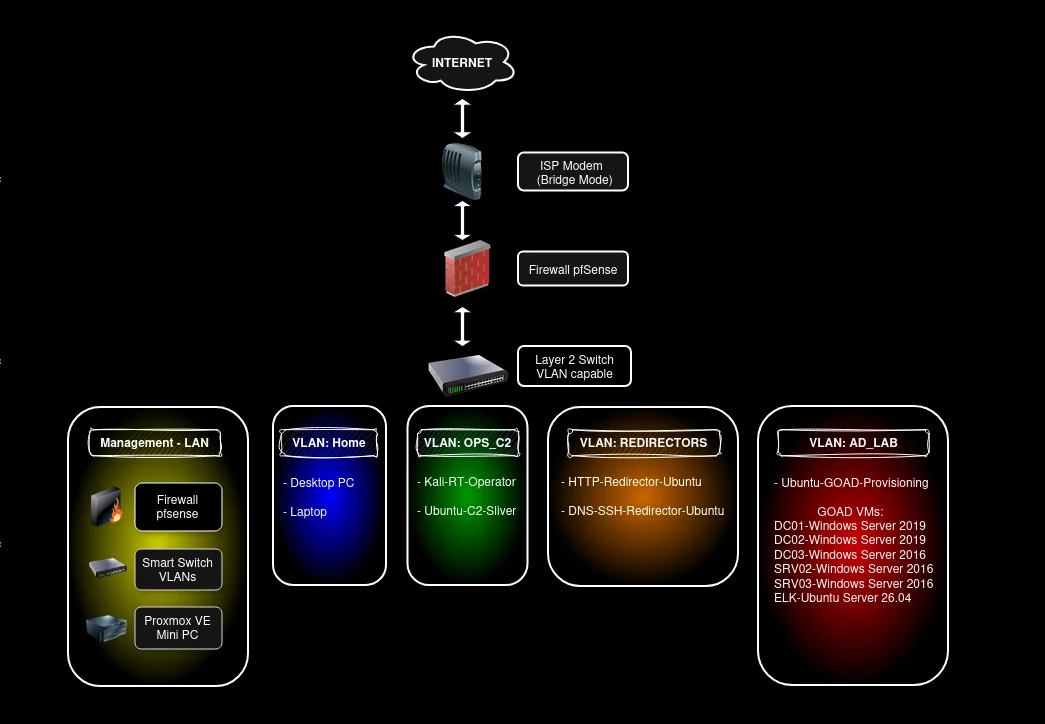
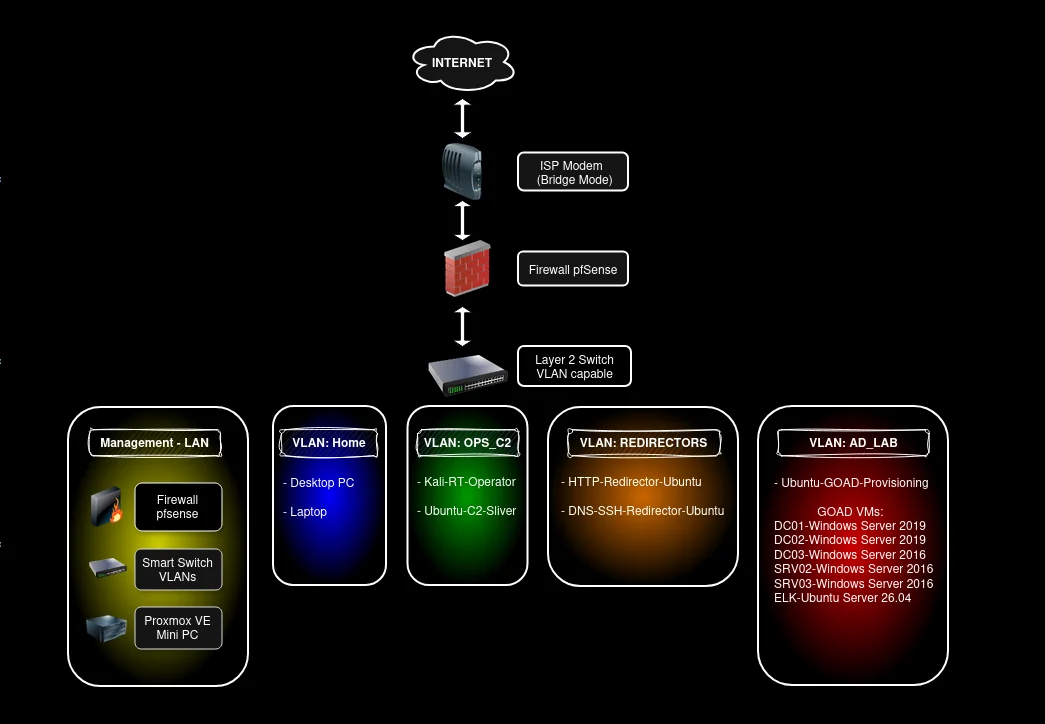
| VLAN | Subnet | Gateway (pfSense) | Purpose | IP source |
|---|
| 150 | 172.23.150.0/24 | 172.23.150.1 | Kali Operator and Ubuntu C2/Sliver | pfSense DHCP (reservations after creation) |
| 160 | 10.60.160.0/24 | 10.60.160.1 | HTTP/S Redirector and DNS/SSH Redirector (Ubuntu VMs) | pfSense DHCP (reservations after creation) |
| 56 | 192.168.56.0/24 | 192.168.56.1 | Ubuntu GOAD provisioning VM, GOAD AD lab (5 Windows VMs) plus ELK SIEM | Static (Terraform/Cloudbase-Init) |
| 100 | 10.10.100.0/24 | 10.10.100.1 | Your Desktop/Laptop | pfSense DHCP (reservations after creation) |
GOAD hosts (static, internal to VLAN 56)
| Codename | Role | OS | Domain | IP |
|---|---|---|---|---|
| kingslanding | DC01 | WS 2019 | sevenkingdoms.local | 192.168.56.10 |
| winterfell | DC02 | WS 2019 | north.sevenkingdoms.local | 192.168.56.11 |
| meereen | DC03 | WS 2016 | essos.local | 192.168.56.12 |
| castelblack | SRV02 (MSSQL/IIS) | WS 2019 | north.sevenkingdoms.local | 192.168.56.22 |
| braavos | SRV03 (MSSQL/ADCS) | WS 2016 | essos.local | 192.168.56.23 |
| GOAD-ELK | SIEM (Elasticsearch/Kibana/Logstash) | Ubuntu 26.04 | Lab Monitoring | 192.168.56.50 |
GOAD hosts use the domain controllers as their DNS (kingslanding, .10), required for AD. pfSense is their gateway only.
| Component | VLAN | vCPU | RAM | Disk |
|---|---|---|---|---|
| Kali operator | 150 | 4 | 8 GB | 60 GB |
| Ubuntu + Sliver C2 | 150 | 2 | 4 GB | 40 GB |
| HTTP/S redirector | 160 | 2 | 2 GB | 20 GB |
| DNS/SSH redirector | 160 | 2 | 2 GB | 20 GB |
| Provisioning host | 56 | 4 | 4 GB | 40 GB |
| kingslanding DC01 | 56 | 2 | 4 GB | 60 GB |
| winterfell DC02 | 56 | 2 | 4 GB | 60 GB |
| meereen DC03 | 56 | 2 | 4 GB | 60 GB |
| castelblack SRV02 | 56 | 2 | 4 GB | 60 GB |
| braavos SRV03 | 56 | 2 | 4 GB | 60 GB |
| GOAD-ELK SIEM | 56 | 4 | 8 GB | 80 GB |
Total is roughly 28 vCPU, 48 GB RAM, 620 GB thin provisioned disk for the full GOAD lab.
Against 80 GB RAM that leaves about 30 GB headroom for Proxmox itself and snapshots.
You can setup the GOAD-Light or the MINILAB instead, if limited resources.
This lab is built strictly for education and authorized security training in an isolated, self contained environment. The techniques it teaches are the same ones defenders need to understand to protect real systems. Keep it isolated, keep it local and use what you learn to make things more secure.
