 owasp/ninja-pingu
High-performance network scanner for large-scale IP and port scanning with service identification, embedded device detection, and vulnerability analysis via plugin framework.

NINJA-PingU Is Not Just a Ping Utility is a free open-source high performance network scanner tool for large scale analyses. It has been designed with performance as its primary goal and developed as a framework to allow easy plugin creation.
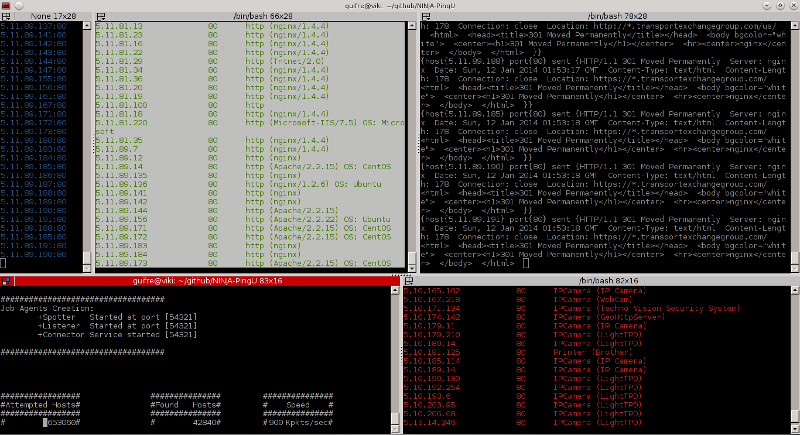
NINJA PingU comes out of the box with a set of plugins for services analysis and embedded devices identification. More information about those can be found in its home page at http://owasp.github.io/NINJA-PingU
  - gcc
  - Linux box. Will not work neither on *BSD or Windows OS.
  - Root Privileges
$ cd /tmp; wget https://github.com/OWASP/NINJA-PingU/archive/v1.0.tar.gz; tar -xvf v1.0.tar.gz; cd NINJA-PingU-1.0/; ./npingu.sh
   # sudo ./bin/npingu [OPTIONS] targets

  -t    Number of sender threads.
  -p	Port scan range. For instance, 80 or 20-80.
  -d	Delay between packages sent (in usecs).
  -s	No service identification (less bandwith load, more hosts/time).
  -m	Module to run. For instance, Service.
  -h	Show this help.
  [targets] Ip address seed. For instance, 192.168.1. or 1.1.1.1-255.0.0.0
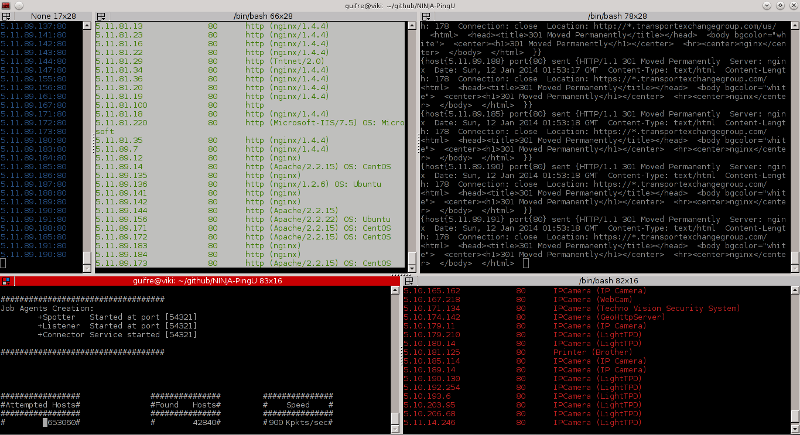
NINJA Pingu comes with a bash script to automate process compilation, operating system performance tuning, and enhanced user interface with terminator integration. It can be run by running the following command.
$ ./npingu.sh
Example to scan some OVH servers:
   # ./bin/npingu -t 3 -p 20-80 188.1.1.1-188.255.1.1 -d 1 -m Service

  -Targeted Hosts [188.165.83.148-188.255.83.148]
  -Targeted Port Range [20-80]
  -Threads [3]
  -Delay 1 usec
  -Use the Service identification Module
Example to scan several google web servers:
  # ./bin/npingu -t 5 -p 80 -s 74.125.0.0-74.125.255.255

  -Targeted Hosts [74.125.0.0-74.125.255.255]
  -Targeted Port [80]
  -Threads [5]
  -s synOnly scan
Example for scanning the 32764/TCP Backdoor
  # ./bin/npingu -t 2 1.1.1.1-255.1.1.1 -m Backdoor32764 -p 32764

  -Targeted Hosts [1.1.1.1-255.1.1.1]
  -Targeted Port [32764]
  -Threads [2]
  -Use the 32764/TCP Backdoor Module
Feel free to mail me with any problem, bug, suggestions or fixes at: Guifre Ruiz [email protected]
Visit http://owasp.github.io/NINJA-PingU for more information about NINJA PingU.
Code licensed under the GPL v3.0.
