 optiv/scarecrow
ScareCrow - Payload creation framework designed around EDR bypass.

To view the latest version of ScareCrow or to submit an issue, reference https://github.com/Tylous/ScareCrow.
If you want to learn more about the techniques utilized in this framework please take a look at Part 1 and Part 2
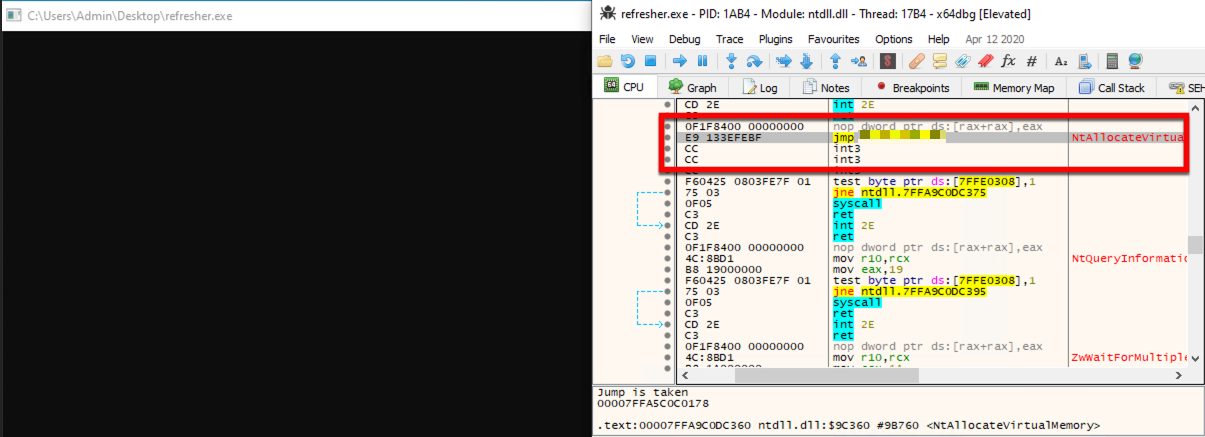
ScareCrow is a payload creation framework for side loading (not injecting) into a legitimate Windows process (bypassing Application Whitelisting controls). Once the DLL loader is loaded into memory, it utilizes a technique to flush an EDR’s hook out of the system DLLs running in the process's memory. This works because we know the EDR’s hooks are placed when a process is spawned.
ScareCrow can target these DLLs and manipulate them in memory by using the API function VirtualProtect, which changes a section of a process’ memory permissions to a different value, specifically from Execute–Read to Read-Write-Execute.
ScareCrow uses 1 of 2 methods to unhook
When executed, ScareCrow will copy the bytes of the system DLLs stored on disk in C:\Windows\System32\. These DLLs are stored on disk “clean” of EDR hooks because they are used by the system to load an unaltered copy into a new process when it’s spawned. Since EDR’s only hook these processes in memory, they remain unaltered. ScareCrow does not copy the entire DLL file, instead it only focuses on the .text section of the DLLs. This section of a DLL contains the executable assembly, and by doing this, ScareCrow helps reduce the likelihood of detection as re-reading entire files can cause an EDR to detect that there is a modification to a system resource. The data is then copied into the right region of memory by using each function’s offset. Each function has an offset which denotes the exact number of bytes from the base address where they reside, providing the function’s location on the stack.
To do this, ScareCrow changes the permissions of the .text region of memory using VirtualProtect. Even though this is a system DLL, since it has been loaded into our process (that we control), we can change the memory permissions without requiring elevated privileges.
ScareCrow loads the shellcode into memory by first decrypting the shellcode, which is encrypted by one of three encryption methods (outlined below). Once decrypted and loaded, the shellcode is then executed. Depending on the loader options specified, ScareCrow will set up different export functions for the DLL. The loaded DLL also does not contain the standard DLLMain function which all DLLs typically need to operate. The DLL will still execute without any issue because the process we load into will look for those export functions and not worry about DLLMain being there.
After
KnownDLLs is a list of DLLs that are loaded by Windows during the system startup process. Because these DLLs are considered to be essential to the functioning of the operating system, they are cached to help reduce load times and improve performance when applications start up. KnownDLLs includes DLLs such as kernel32.dll, kernelbase.dll, and ntdll.dll.
Utilizing these KnownDlls, ScareCrow maps a copy of the DLL from \KnownDlls\<dllname> using a combination of NtOpenSection and NtMapViewOfSection to load it into the process's memory. ScareCrow doesn't load the entire DLL, rather it only loads in the .text section of the DLL (as this contains all the syscalls). From there ScareCrow use indirect Syscalls to call NtProtectVirtualMemory and change the permissions of the dll's .text memory section to allow Scarecrow to overwrite the EDR’s hooks before restoring permissions.
For more information you can read modexp's detailed article
Once these the hooks are removed, ScareCrow then utilizes custom System Calls to load and run shellcode in memory. ScareCrow does this even after the EDR hooks are removed to help avoid detection by non-userland, hook-based telemetry gathering tools such as Event Tracing for Windows (ETW) or other event logging mechanisms. These custom system calls are also used to perform the VirtualProtect call to remove the hooks placed by EDRs, described above, to avoid detection by any EDR’s anti-tamper controls. This is done by calling a custom version of the VirtualProtect syscall, NtProtectVirtualMemory. ScareCrow utilizes Golang to generate these loaders and then assembly for these custom syscall functions.
During the creation process of the loader, ScareCrow utilizes a library for blending into the background after a beacon calls home. This library does two things:
Files that are signed with code signing certificates are often put under less scrutiny, making it easier to be executed without being challenged, as files signed by a trusted name are often less suspicious than others. Most antimalware products don’t have the time to validate and verify these certificates (now some do but typically the common vendor names are included in a whitelist). ScareCrow creates these certificates by using a go package version of the tool limelighter to create a pfx12 file. This package takes an inputted domain name, specified by the user, to create a code signing certificate for that domain. If needed, you can also use your own code signing certificate if you have one, using the valid command-line option.
clone command-line option, along with the path to the file you want to copy the certificate from. When signing the loader with microsoft.com, using them against WINDOWS DEFENDER ATP products may not be as effective as they can validate the cert as it belongs to them. If you are using a loader against a windows product, possibly use a different domain.
With these files and the go code, ScareCrow will cross compile them into DLLs using the c-shared library option. Once the DLL is compiled, it is obfuscated into a broken base64 string that will be embedded into a file. This allows for the file to be remotely pulled, accessed, and programmatically executed.
While ScareCrow has an extensive list of file attributes, there are some circumstances where a custom (maybe environment-specific) set of attributes is required. To accommodate this, ScareCrow allows for the inputting of a JSON file containing attributes. Using the -configfile command-line option, ScareCrow will use these attributes and filename instead of the pre-existing ones in ScareCrow. The file main.json contains a sample template of what the JSON structure needs to be to properly work. Note whatever you use as the "InternalName" will be the file name.
