Skip to content
KitploitKITPLOIT
ToolsExploitsBlog
Log in
Submit
ToolsExploitsBlog
Submit

Hacking, PenTest, and Cybersecurity Tools for Your Security Arsenal!

Kitploit is a directory of hacking, cybersecurity, and pentesting tools. Discover the latest project updates to find vulnerabilities, analyze systems, automate testing, and strengthen your security.

··Feeds·Contact·Privacy·© 2026 Kitploit

Tool Directory

Categories

View all categories
Loading categories
kubeclarity — KubeClarity is a tool for detection and management of Software Bill Of Materials (SBOM) and vulnerabilities of container images and filesystems | Kitploit
Tools/GitHubGitHub/openclarity/kubeclarity
Vulnerability ScannersContainer SecurityVulnerability AnalysisConfiguration AuditingCloud SecurityDevSecOpsSupply Chain SecurityArchived
GitHubopenclarity/kubeclarity

kubeclarity

KubeClarity is a tool for detection and management of Software Bill Of Materials (SBOM) and vulnerabilities of container images and filesystems

View Repository
456301 year agoReviewed by Kitploit

Most Popular

View all →

Discover the most used tools by our community.

Explore all tools

Browse our collection of tools

View all tools →
Share

[!IMPORTANT] KubeClarity has been deprecated and succeeded by openclarity/openclarity.

Check the release statement for more information.

This project does not receive updates. We encourage you to migrate.

KubeClarity Logo

KubeClarity is a tool for detection and management of Software Bill Of Materials (SBOM) and vulnerabilities of container images and filesystems. It scans both runtime K8s clusters and CI/CD pipelines for enhanced software supply chain security.

Table of Contents

  • Why?
    • SBOM & Vulnerability detection challenges
    • Solution
  • Features
    • Integrated SBOM generators and vulnerability scanners
  • Architecture
  • Getting Started
    • KubeClarity Backend
      • Install using Helm
      • Uninstall using Helm
      • Build and Run Locally with Demo Data
    • CLI
      • Installation
      • SBOM Generation
      • Vulnerability Scanning
      • Exporting results to KubeClarity Backend
  • Advanced Configuration
    • SBOM generation using local docker image as input
    • Vulnerability scanning using local docker image as input
    • Private Registry Support For CLI
    • Private Registry Support For K8s Runtime Scan
    • Merging of SBOM and vulnerabilities across different CI/CD stages
    • Output Different SBOM Formats
    • Remote Scanner Servers For CLI
  • Limitations
  • Roadmap
  • Contributing
  • License

Why?

SBOM & Vulnerability Detection Challenges

  • Effective vulnerability scanning requires an accurate Software Bill Of Materials (SBOM) detection:
    • Various programming languages and package managers
    • Various OS distributions
    • Package dependency information is usually stripped upon build
  • Which one is the best scanner/SBOM analyzer?
  • What should we scan: Git repos, builds, container images or runtime?
  • Each scanner/analyzer has its own format - how to compare the results?
  • How to manage the discovered SBOM and vulnerabilities?
  • How are my applications affected by a newly discovered vulnerability?

Solution

  • Separate vulnerability scanning into 2 phases:
    • Content analysis to generate SBOM
    • Scan the SBOM for vulnerabilities
  • Create a pluggable infrastructure to:
    • Run several content analyzers in parallel
    • Run several vulnerability scanners in parallel
  • Scan and merge results between different CI stages using KubeClarity CLI
  • Runtime K8s scan to detect vulnerabilities discovered post-deployment
  • Group scanned resources (images/directories) under defined applications to navigate the object tree dependencies (applications, resources, packages, vulnerabilities)

Features

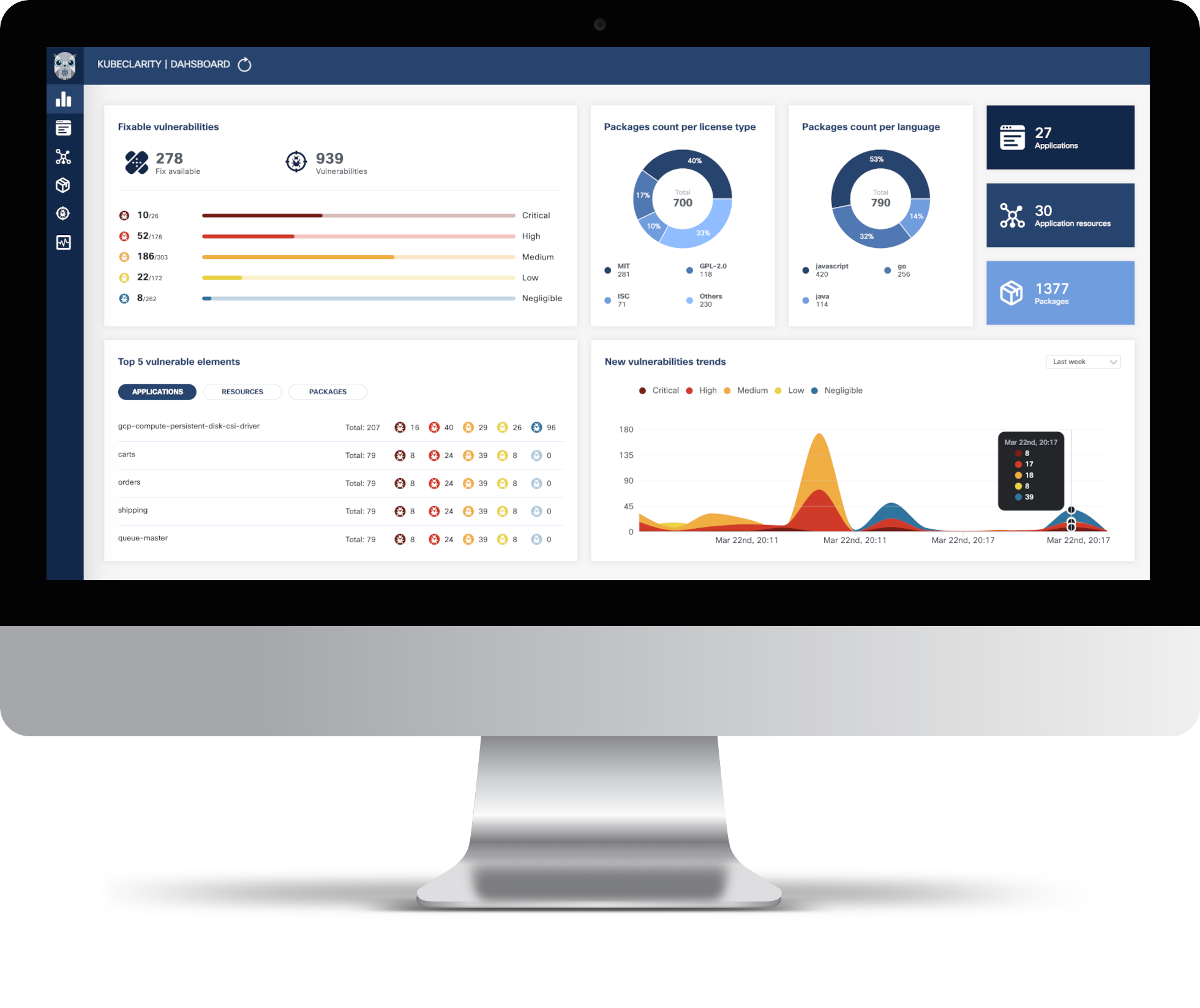
  • Dashboard
    • Fixable vulnerabilities per severity
    • Top 5 vulnerable elements (applications, resources, packages)
    • New vulnerabilities trends
    • Package count per license type
    • Package count per programming language
    • General counters
  • Applications
    • Automatic application detection in K8s runtime
    • Create/edit/delete applications
    • Per application, navigation to related:
      • Resources (images/directories)
      • Packages
      • Vulnerabilities
      • Licenses in use by the resources
  • Application Resources (images/directories)
    • Per resource, navigation to related:
      • Applications
      • Packages
      • Vulnerabilities
  • Packages
    • Per package, navigation to related:
      • Applications
      • Linkable list of resources and the detecting SBOM analyzers
      • Vulnerabilities
  • Vulnerabilities
    • Per vulnerability, navigation to related:
      • Applications
      • Resources
      • List of detecting scanners
  • K8s Runtime scan
    • On-demand or scheduled scanning
    • Automatic detection of target namespaces
    • Scan progress and result navigation per affected element (applications, resources, packages, vulnerabilities)
    • CIS Docker benchmark
  • CLI (CI/CD)
    • SBOM generation using multiple integrated content analyzers (Syft, cyclonedx-gomod)
    • SBOM/image/directory vulnerability scanning using multiple integrated scanners (Grype, Dependency-track)
    • Merging of SBOM and vulnerabilities across different CI/CD stages
    • Export results to KubeClarity backend
  • API
    • The API for KubeClarity can be found here

Integrated SBOM generators and vulnerability scanners

KubeClarity content analyzer integrates with the following SBOM generators:

  • Syft
  • Cyclonedx-gomod
  • Trivy

KubeClarity vulnerability scanner integrates with the following scanners:

  • Grype
  • Dependency-Track
  • Trivy

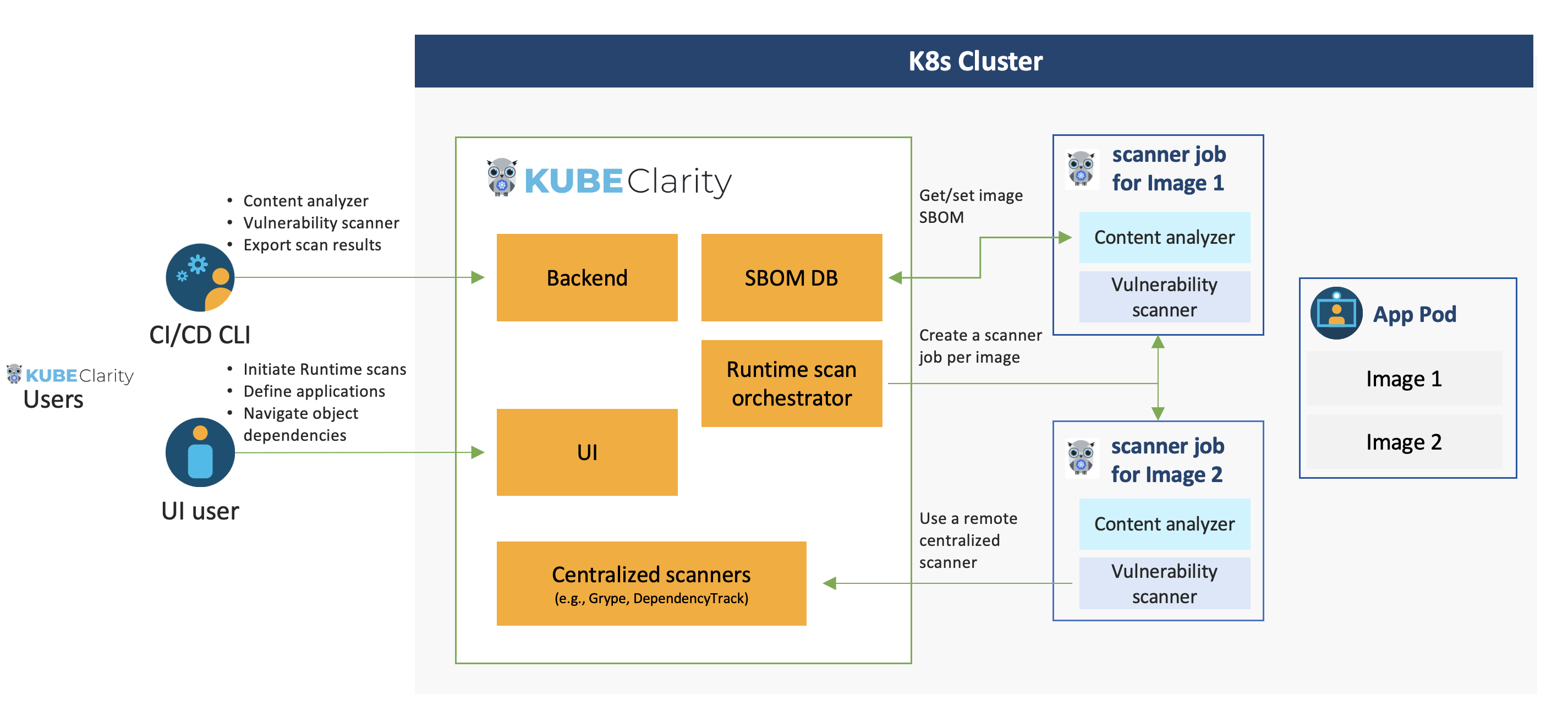
Architecture

Getting Started

KubeClarity Backend

Install using Helm:

  1. Add Helm repo

    helm repo add kubeclarity https://openclarity.github.io/kubeclarity
    
  2. Save KubeClarity default chart values

    helm show values kubeclarity/kubeclarity > values.yaml
    
  3. Check the configuration in values.yaml and update the required values if needed. To enable and configure the supported SBOM generators and vulnerability scanners, please check the "analyzer" and "scanner" config under the "vulnerability-scanner" section in Helm values.

  4. Deploy KubeClarity with Helm

    helm install --values values.yaml --create-namespace kubeclarity kubeclarity/kubeclarity -n kubeclarity
    

    or for OpenShift Restricted SCC compatible install:

    helm install --values values.yaml --create-namespace kubeclarity kubeclarity/kubeclarity -n kubeclarity --set global.openShiftRestricted=true \
      --set kubeclarity-postgresql.securityContext.enabled=false --set kubeclarity-postgresql.containerSecurityContext.enabled=false \
      --set kubeclarity-postgresql.volumePermissions.enabled=true --set kubeclarity-postgresql.volumePermissions.securityContext.runAsUser="auto" \
      --set kubeclarity-postgresql.shmVolume.chmod.enabled=false
    
  5. Port forward to KubeClarity UI:

    kubectl port-forward -n kubeclarity svc/kubeclarity-kubeclarity 9999:8080
    
  6. Open KubeClarity UI in the browser: http://localhost:9999/

Download Tool