 olizimmermann/s3dns
Passive DNS server that detects exposed cloud storage buckets (AWS S3, GCP, Azure) by resolving DNS requests, tracing CNAME chains, and flagging potential subdomain takeovers during reconnaissance.

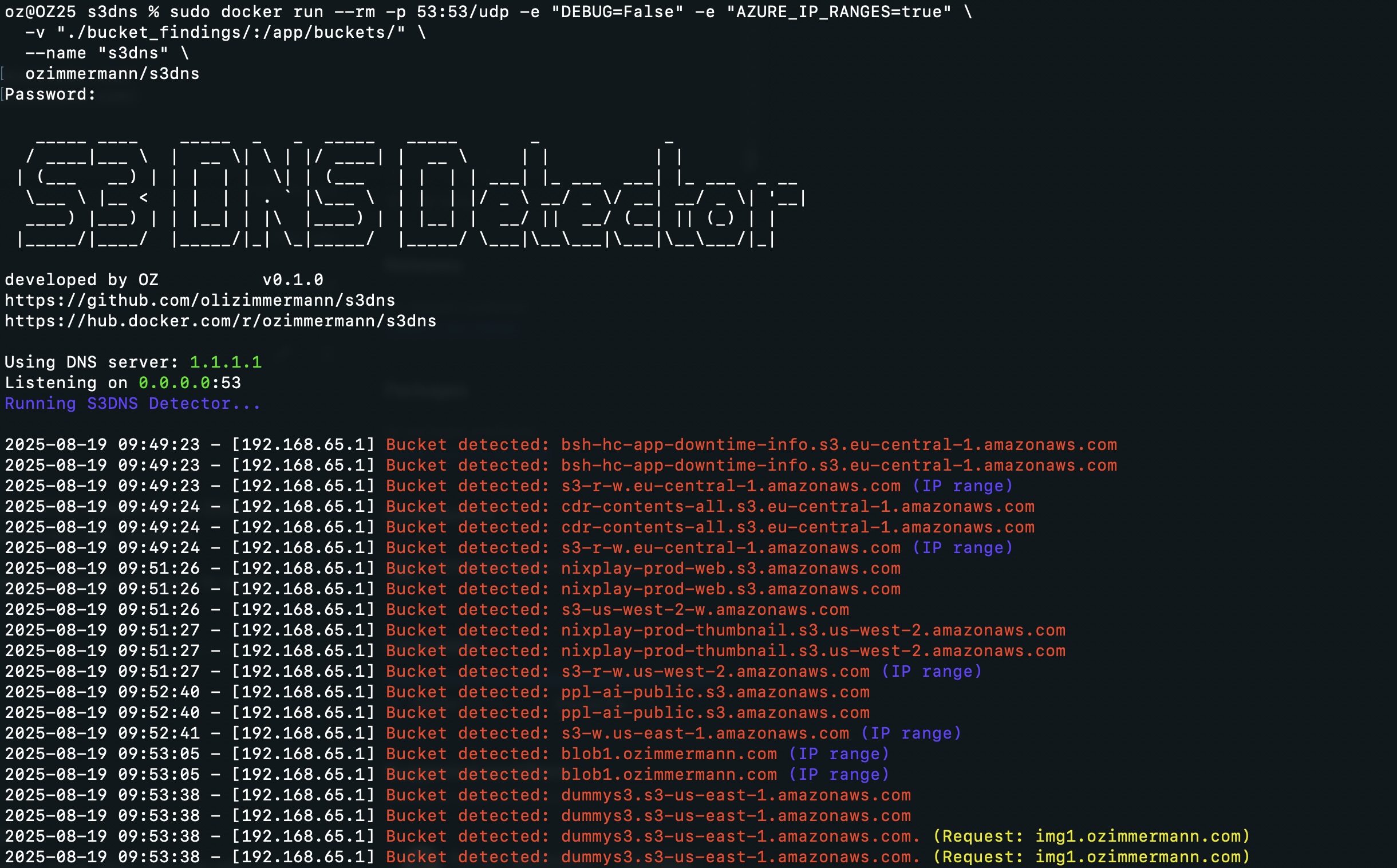
# S3DNS **s3dns** is a lightweight DNS server that helps uncover cloud storage buckets (AWS S3, Google Cloud Storage, and Azure Blob) by resolving DNS requests, tracing CNAMEs, and matching known bucket URL patterns. It's a handy companion for **pentesters**, **bug bounty hunters**, and **cloud security analysts** who want to catch exposed cloud buckets during DNS traffic analysis. If S3DNS saves you time on a recon session, consider giving it a ⭐️ — it helps others find the project. --- --- ### 🆕 Update 2026/03/06 * **TCP/53 support** — S3DNS now listens on both UDP and TCP port 53. Clients that retry over TCP after a truncated UDP response are handled correctly, with the query forwarded upstream over TCP to retrieve the full answer. * **Larger DNS buffer** — UDP receive buffer increased from 512 to 4096 bytes. EDNS0 options from the client are passed through to the upstream resolver unchanged. * **Response cache** — TTL-based LRU cache for DNS responses shared across UDP and TCP paths. Reduces upstream load and latency during active recon sessions. Configurable via `CACHE_SIZE` (default: `1000` entries, set to `0` to disable). * **Rate limiting** — Per-client-IP request rate limit to prevent abuse. Configurable via `RATE_LIMIT` (default: `100` req/s, set to `0` to disable). * **Subdomain takeover detection** — When a domain matches a cloud storage pattern but returns `NXDOMAIN`, S3DNS flags it as a **possible domain takeover**. This indicates a dangling DNS record pointing to an unclaimed bucket that an attacker could register. * **IPv6 IP-range checks** — AAAA records are now also resolved and checked against known cloud storage IP ranges. AWS IPv6 S3 prefixes are loaded alongside IPv4 ranges. * **CNAME depth limit** — Recursive CNAME chain following is now capped (default: 10 hops) to prevent infinite loops on crafted or cyclic records. Configurable via the `max_cname_depth` parameter. ### Update 2025/08/19 * Added offline AWS IP ranges as a JSON file. * Added offline Azure Storage IP ranges as a JSON file. * Added the option to disable the IP range check for either service using: * `AZURE_IP_RANGES=false` or `AWS_IP_RANGES=false` (default is true). * Moved `regex_patterns` and hardcoded patterns to the `patterns` folder as YAML files. You can add your own patterns. * **Regex patterns must start with `regex_`.** * Added multiple more cloud providers * IBM Cloud Object Storage * Oracle Object Storage * Alibaba OSS * Backblaze B2 * Linode Object Storage * Scaleway Object Storage * Vultr Object Storage * Cloudflare R2 ### Update 2025/06/21 * Added AWS GovCloud support. ### Update 2025/04/16 * Updated regex patterns. * Updated output for better visibility (displaying the original domain for CNAMEs, the client IP, and IP range indicators). * Auto-downloading of IP ranges from AWS — now checking those too! * Option to add your own IP ranges (manually adjust the patterns or IP ranges in the class). ### Update 2025/04/14 * Added regex support for **Google Cloud Storage** and **Azure Blob Storage** buckets. --- ## 🚀 Features * Runs as a DNS server on port `53` (UDP **and** TCP) * Detects potential cloud storage buckets in DNS requests: * **AWS S3** (virtual-host and path style, including GovCloud) * **GCP Buckets** * **Azure Blob Containers** * **DigitalOcean Spaces**, **Wasabi**, **IBM COS**, **Oracle Object Storage**, **Alibaba OSS**, **Backblaze B2**, **Linode**, **Scaleway**, **Vultr**, **Cloudflare R2** * Follows **CNAME chains** recursively (configurable depth limit) to catch masked cloud bucket links * Flags **potential subdomain takeovers** — cloud storage patterns that return NXDOMAIN * Checks resolved IPs (both A and AAAA) against known **AWS S3 and Azure Storage IP ranges** * **TTL-aware response cache** to reduce latency and upstream load during recon * **Per-IP rate limiting** to prevent abuse * Logs all findings to console and file * Container-friendly --- ## ⚙️ How It Works S3DNS listens on **port 53 (UDP and TCP)** for DNS queries. For every request it: 1. **Extracts the requested domain** 2. **Checks the response cache** — if a valid cached answer exists, it is returned immediately 3. **Forwards the request to a real DNS resolver** (e.g., `1.1.1.1`) — over UDP for UDP clients, over TCP for TCP clients 4. **Returns the valid DNS response to the client** In parallel, it: * **Checks for cloud storage bucket patterns** (regex and hardcoded hostname matching) * **Checks resolved IPs against known AWS S3 and Azure Storage ranges** (IPv4 and IPv6) * **Follows CNAME chains** recursively up to the configured depth * **Flags NXDOMAIN hits** on matched patterns as possible subdomain takeover candidates * **Logs all findings** to console and `s3dns.log` ⚡ Use this as your DNS during recon, and it will passively surface cloud buckets and takeover candidates for every domain your tools or browser resolve. --- ## 🧱 Prerequisites You will only need one of the following: * Python **3.11+** * Docker (optional, but recommended) --- ## 🔧 Installation *Only needed if you want to run it locally with Python* ### Clone the Repository ```bash git clone https://github.com/olizimmermann/s3dns.git cd s3dns ``` ### Install Dependencies (Using a virtual environment is recommended) ```bash python3 -m venv venv source venv/bin/activate pip install -r requirements.txt ``` --- ## 🧪 Usage ### Run with Python Port 53 requires elevated privileges: ```bash sudo python s3dns.py ``` *If `sudo` claims a missing module, try: `sudo venv/bin/python s3dns.py`* * If you build the image yourself, be sure to tag it the same as the Docker Hub version for consistency: `docker build -t ozimmermann/s3dns:latest .` ### Use Docker *The easiest way to get started with S3DNS.* ```bash docker pull ozimmermann/s3dns:latest docker run --rm -p 53:53/udp -p 53:53/tcp \ -v "./bucket_findings/:/app/buckets/" \ --name "s3dns" \ ozimmermann/s3dns:latest ``` ### Build and Run with Docker ```bash docker build -t ozimmermann/s3dns:latest . ``` ```bash docker run --rm -p 53:53/udp -p 53:53/tcp \ -v "./bucket_findings/:/app/buckets/" \ --name "s3dns" \ ozimmermann/s3dns:latest ``` Findings are saved: * In the **terminal**, and/or * In `./bucket_findings/` ### Troubleshooting When using S3DNS on the same machine where you perform analysis, it may help to set the `--network host` flag: ```bash docker run --rm -p 53:53/udp -p 53:53/tcp \ -v "./bucket_findings/:/app/buckets/" \ --network host \ --name "s3dns" \ ozimmermann/s3dns:latest ``` Since port 53 requires elevated privileges, some users (e.g., Mac users) may need `sudo`: ```bash sudo docker run --rm -p 53:53/udp -p 53:53/tcp \ -v "./bucket_findings/:/app/buckets/" \ --name "s3dns" \ ozimmermann/s3dns:latest ``` --- ## 🌐 Using S3DNS in Recon Set your system or tool's **DNS resolver** to your S3DNS instance. > While browsing or fuzzing your target, S3DNS analyzes every domain and tells you if it resolves to: > > * An **AWS S3 bucket** > * A **GCP bucket** > * An **Azure Blob container** > * Any of 13 other supported cloud storage providers > > It **follows CNAMEs**, so if a domain points to `cdn.example.com`, which in turn points to a cloud bucket, it will catch that too. > > It also **flags potential subdomain takeovers** — if a domain matches a cloud storage pattern but the target does not exist (NXDOMAIN), the dangling record is highlighted as a possible takeover candidate. Use it passively while analyzing a site to **spot exposed buckets and takeover opportunities without active probing**. --- ## ⚙️ Configuration You can tweak behavior via command-line flags, environment variables, or by modifying `s3dns.py`. Precedence for every option is: **command-line flag > environment variable > interactive prompt / default.** Running with no flags behaves exactly as before. ### Command-Line Flags Run `python s3dns.py -h` for the full list: | Flag | Equivalent env var | Description | |---|---|---| | `-h`, `--help` | – | Show help and exit | | `--version` | – | Show version and exit | | `-d`, `--debug` | `DEBUG` | Enable verbose debug output | | `-l`, `--listen IP` | `LOCAL_DNS_SERVER_IP` | Local interface to listen on | | `-u`, `--upstream IP` | `REAL_DNS_SERVER_IP` | Upstream DNS resolver to forward to | | `-b`, `--bucket-file PATH` | `BUCKET_FILE` | Path to write discovered bucket domains | | `--aws-ip-ranges` / `--no-aws-ip-ranges` | `AWS_IP_RANGES` | Toggle AWS S3 IP range checks | | `--azure-ip-ranges` / `--no-azure-ip-ranges` | `AZURE_IP_RANGES` | Toggle Azure Storage IP range checks | | `--rate-limit N` | `RATE_LIMIT` | Max DNS requests/sec per client IP (`0` = disabled) | | `--cache-size N` | `CACHE_SIZE` | Max cached DNS responses (`0` = disabled) | | `--max-cname-depth N` | – | Max CNAME chain depth to follow (default: 10) | Example: ```bash sudo python s3dns.py -l 0.0.0.0 -u 1.1.1.1 --rate-limit 200 --no-azure-ip-ranges ``` ### Environment Variables | Variable | Default | Description | |---|---|---| | `DEBUG` | `false` | Enable verbose debug output | | `AWS_IP_RANGES` | `true` | Enable AWS S3 IP range checks | | `AZURE_IP_RANGES` | `true` | Enable Azure Storage IP range checks | | `REAL_DNS_SERVER_IP` | `1.1.1.1` | Upstream DNS resolver to forward queries to | | `LOCAL_DNS_SERVER_IP` | `0.0.0.0` | Local interface to listen on | | `BUCKET_FILE` | `buckets.txt` | Path to write discovered bucket domains | | `RATE_LIMIT` | `100` | Max DNS requests per second per client IP (`0` = disabled) | | `CACHE_SIZE` | `1000` | Max cached DNS responses (`0` = disabled) | #### ⚠️ Note on Azure IP Ranges Since Microsoft does not explicitly name their Azure Blob Storage IP ranges, S3DNS uses **all publicly provided Azure Storage IP addresses**. This may lead to false positives. Consider disabling this check if you encounter issues: ```bash AZURE_IP_RANGES=false ``` ### Adding Custom Patterns Add YAML files to the `patterns/` directory. Files prefixed with `regex_` are treated as regex patterns; all others are treated as substring matches. --- ### Debug Mode **Python:** ```bash sudo su export DEBUG=true python s3dns.py ``` **Docker:** ```bash docker run --rm -p 53:53/udp -p 53:53/tcp \ -v "./bucket_findings/:/app/buckets/" \ -e "DEBUG=true" \ --name "s3dns" \ ozimmermann/s3dns:latest ``` Setting multiple environment variables in Docker: ```bash docker run --rm -p 53:53/udp -p 53:53/tcp \ -v "./bucket_findings/:/app/buckets/" \ -e "LOCAL_DNS_SERVER_IP=0.0.0.0" \ -e "REAL_DNS_SERVER_IP=1.1.1.1" \ -e "RATE_LIMIT=200" \ -e "CACHE_SIZE=2000" \ --name "s3dns" \ ozimmermann/s3dns:latest ``` --- ## Sample Output 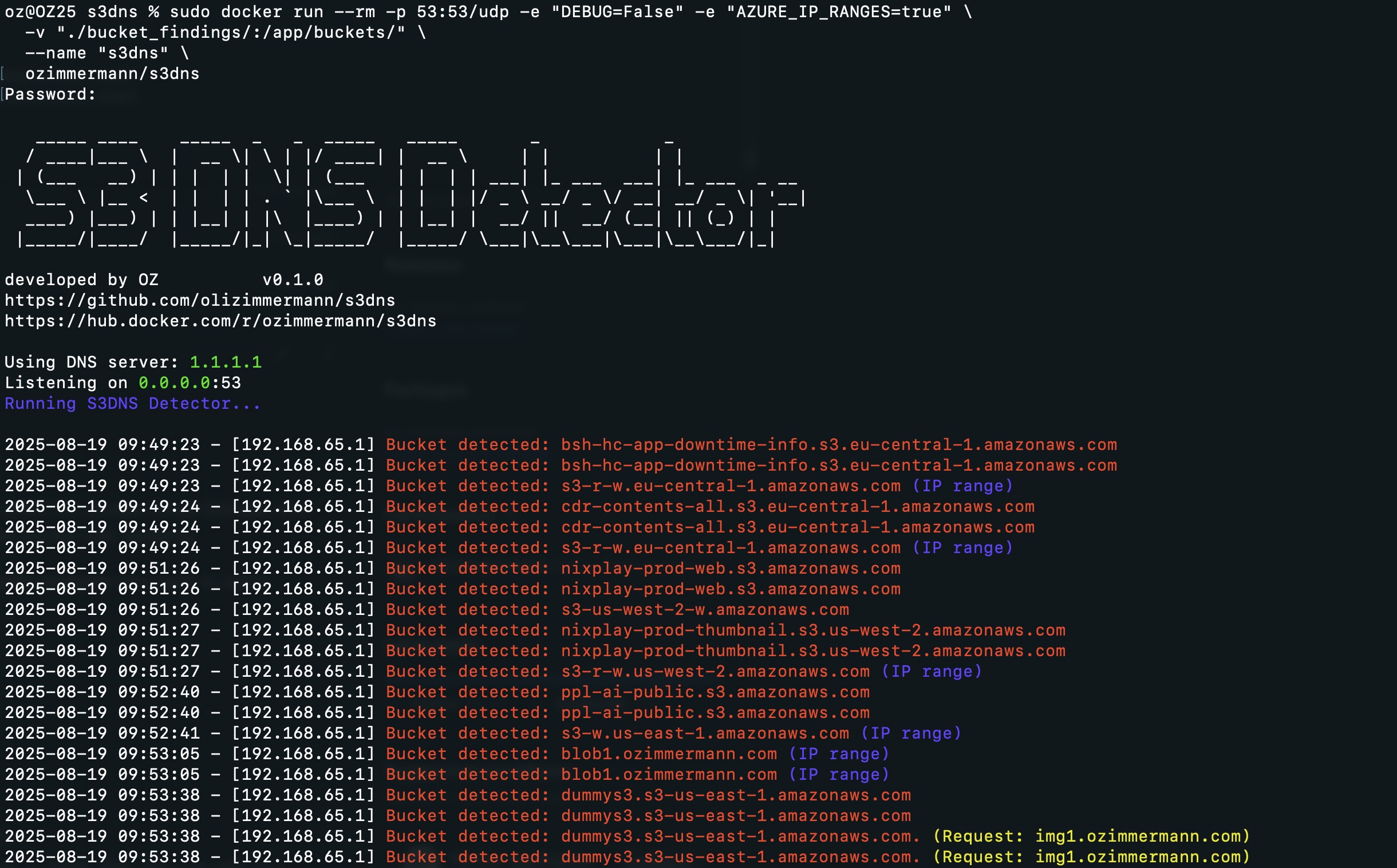 --- ## Contributing Contributions are welcome — new cloud provider patterns, bug fixes, and improvements. See [CONTRIBUTING.md](https://github.com/olizimmermann/s3dns/blob/main/CONTRIBUTING.md) for guidelines. Pattern files live in `patterns/`. Adding support for a new provider is as simple as adding a YAML entry — no Python required. --- ## 📄 License MIT License — Free to use, improve, and share. --- ## ⚠️ Disclaimer Use responsibly. Only scan domains you **own** or have **explicit permission** to analyze. Unauthorized access or probing may be illegal.
