
Skip to content
KitploitKITPLOIT
ToolsBlog
Submit
ToolsBlog
Submit

Hacking, PenTest, and Cybersecurity Tools for Your Security Arsenal!

Kitploit is a directory of hacking, cybersecurity, and pentesting tools. Discover the latest project updates to find vulnerabilities, analyze systems, automate testing, and strengthen your security.

··Feeds·Contact·Privacy·© 2026 Kitploit

Tool Directory

Categories

View all categories
Loading categories
phishcollector — PhishCollector is a research framework for collecting, analysing, and tracking phishing sites. | Kitploit
Tools/GitHubGitHub/olizimmermann/phishcollector
OSINT (Open Source Intelligence)Phishing ToolsReconnaissanceThreat Feeds & AggregatorsInformation GatheringPhishingWeb SecurityThreat IntelligencePapers & ResearchLearning & EducationCrawler
2335 months agoReviewed by Kitploit

Most Popular

View all →

Discover the most used tools by our community.

Explore all tools

Browse our collection of tools

View all tools →
Share
GitHub
olizimmermann/phishcollector

phishcollector

PhishCollector is a research framework for collecting, analysing, and tracking phishing sites.

View Repository

PhishCollector

PhishCollector is a research framework for collecting, analysing, and tracking phishing sites. It is intentionally designed as a starting point — the detection rules, technology signatures, wordlists, and plugins are all plain data structures that researchers are expected to read, extend, and adapt to their own threat landscape.

Submit a suspicious URL and PhishCollector will:

  • Load the page in a headless Chromium browser (JavaScript enabled, random User-Agent, stealth anti-bot measures)
  • Capture the fully-rendered HTML, a full-page screenshot, and every network request
  • Download all linked JavaScript and CSS assets
  • Fingerprint the site: IP/ASN/geo, TLS certificate, WHOIS, tech stack, favicon hash (Shodan-compatible mmh3), form analysis, phishing indicator detection
  • Spider discovered links, robots.txt paths, and sitemap URLs (optional wordlist fuzzing)
  • Query URLhaus and/or VirusTotal for threat reputation
  • Store everything in PostgreSQL for cross-collection searching and trend analysis

All results are accessible via a REST API, a web dashboard, and a CLI.
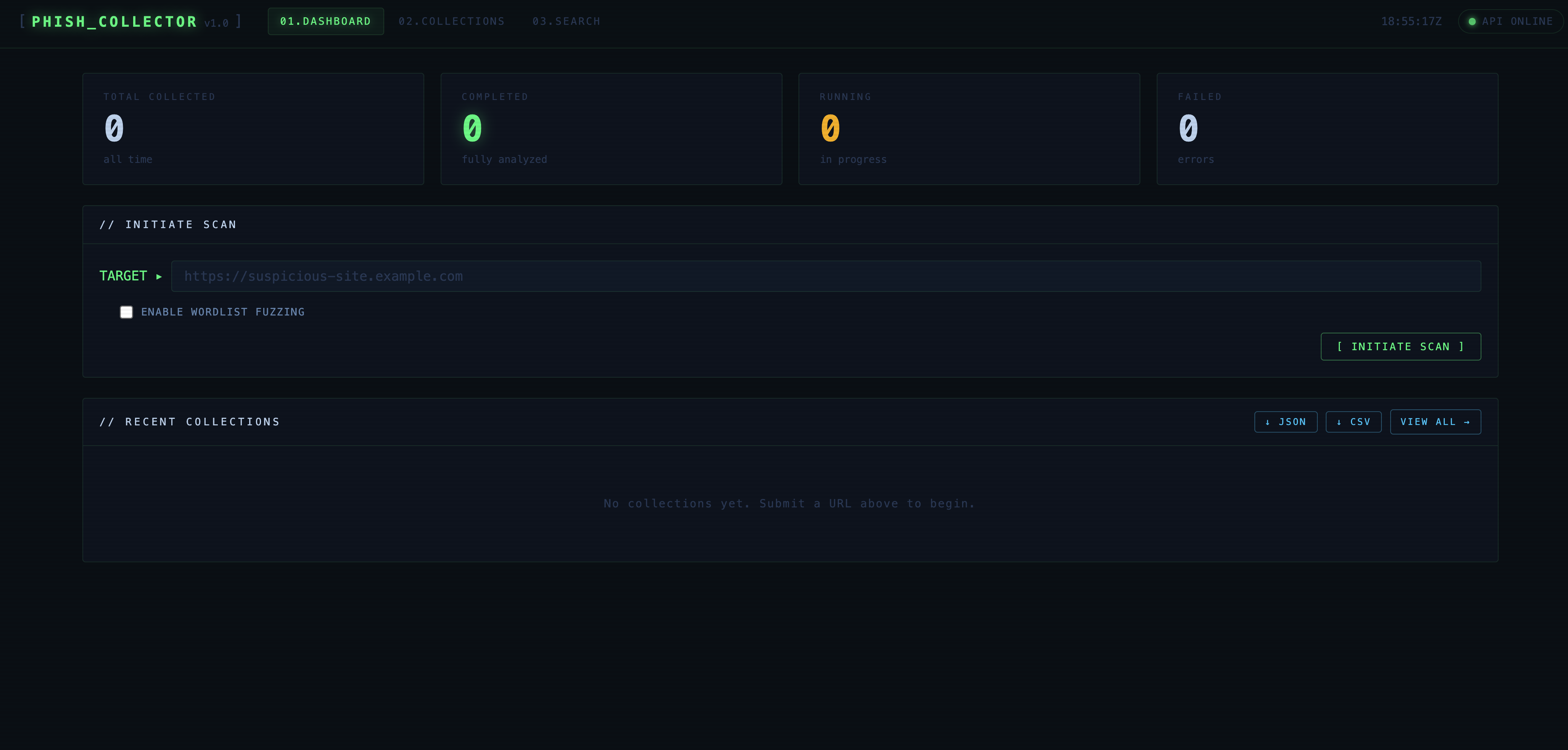

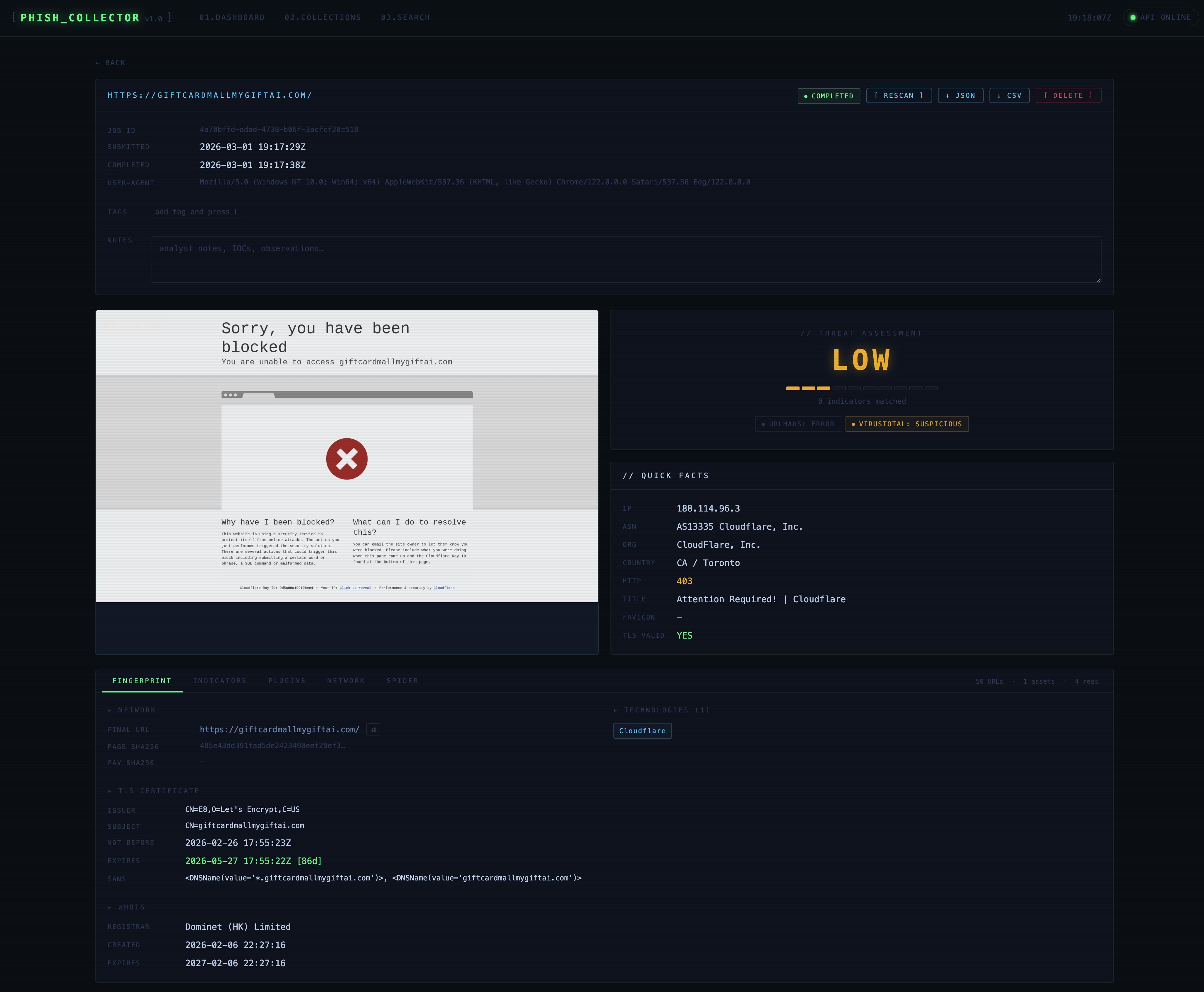
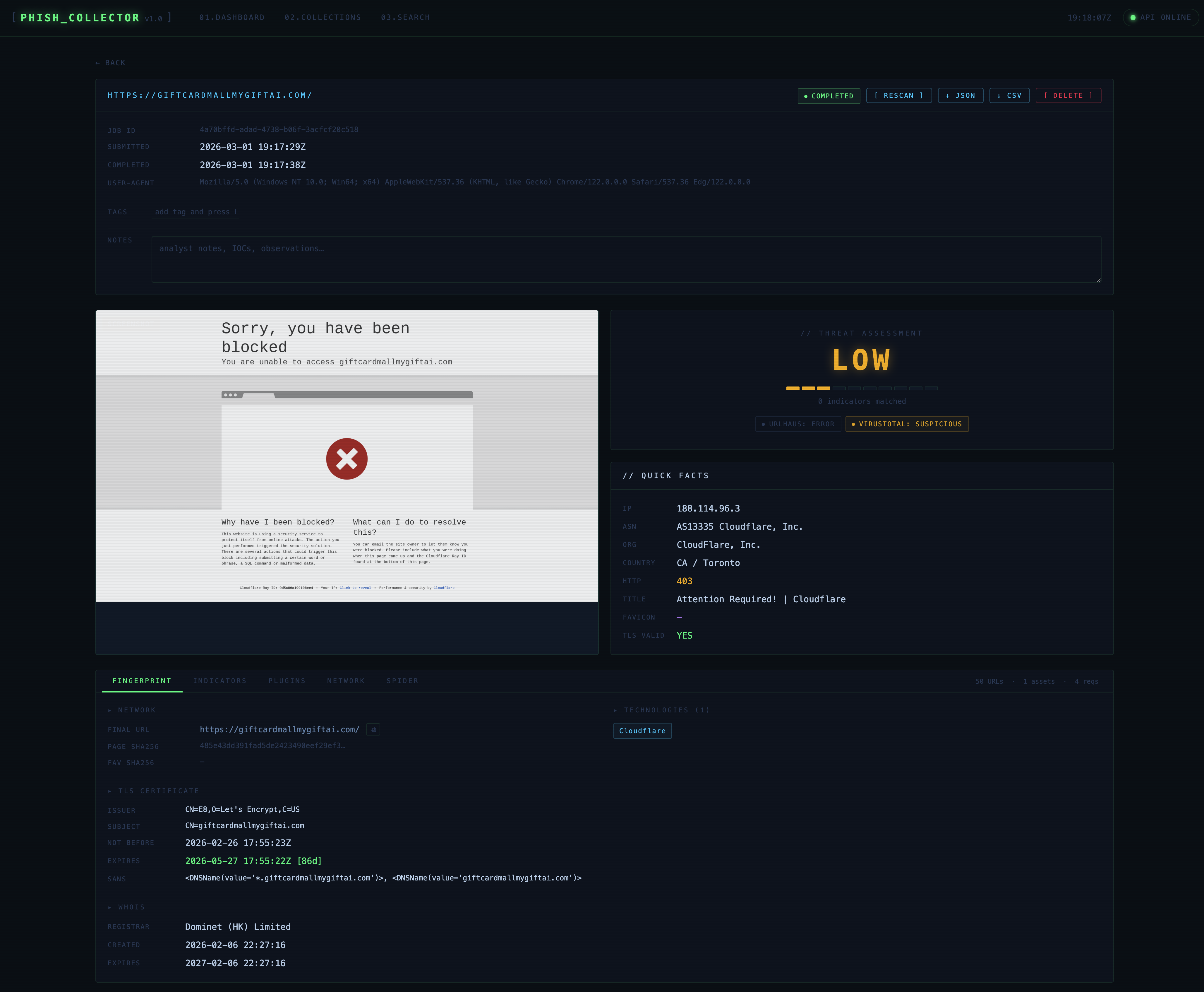
Screenshots

Dashboard

Collection detail


Quick start

root@kitploit:~
cp .env.example .env          # configure (see below)
docker compose up --build     # starts db + app + frontend
ServiceURL
GUIhttp://localhost:3000
API docshttp://localhost:8000/docs
DBlocalhost:5432

Configuration

All settings are environment variables with the PHISH_ prefix. Copy .env.example to .env and adjust.


Proxy setup

Routing all outbound traffic through a proxy keeps your analyst IP hidden from the phishing server.

Tor (anonymisation)

root@kitploit:~
PHISH_PROXY_URL=socks5://127.0.0.1:9050
PHISH_PROXY_SSL_VERIFY=true   # Tor does not intercept TLS

Burp Suite (traffic inspection)

Burp acts as a TLS man-in-the-middle and presents its own CA certificate for every HTTPS connection. Without disabling SSL verification every HTTPS request through the proxy will fail.

root@kitploit:~
PHISH_PROXY_URL=http://127.0.0.1:8080
PHISH_PROXY_SSL_VERIFY=false  # required for Burp / intercepting proxies

Note: PHISH_PROXY_SSL_VERIFY=false only affects outbound HTTPS connections made by the Python backend (plugins, fingerprinter, spider). The Playwright browser already operates with ignore_https_errors=true regardless of this setting.

Warning: Never set PHISH_PROXY_SSL_VERIFY=false without a proxy configured — it would disable certificate validation for all external API calls (URLhaus, VirusTotal).


REST API

Base path: /api/v1

Full interactive docs at /docs (Swagger UI).

Submit a scan

root@kitploit:~
curl -X POST http://localhost:8000/api/v1/collections \
  -H 'Content-Type: application/json' \
  -d '{"url": "https://suspicious-site.example.com", "use_wordlist": true}'

CLI

root@kitploit:~
# Install (inside container or local venv with requirements.txt)
pip install -e .

# Submit a URL and wait for completion
phishcollector collect https://target.example.com --wait

# With wordlist fuzzing
phishcollector collect https://target.example.com --wordlist --wait

# List recent jobs
phishcollector list

# View full detail
phishcollector detail <job-id>

# Download screenshot
phishcollector screenshot <job-id> -o capture.png

# Search by tech stack / favicon hash / country
phishcollector search --tech WordPress --country RU
phishcollector search --favicon-hash -1234567890

Threat intelligence plugins

URLhaus (abuse.ch)

Requires a free Auth-Key from auth.abuse.ch.

root@kitploit:~
PHISH_URLHAUS_ENABLED=true
PHISH_URLHAUS_API_KEY=<your-auth-key>

VirusTotal

Requires a free or paid API key from virustotal.com.

root@kitploit:~
PHISH_VIRUSTOTAL_API_KEY=<your-key>

When a URL has not yet been analysed by VT, PhishCollector submits it for scanning and automatically re-fetches the result every 30 seconds until it resolves.

Adding your own plugins

Each plugin is a single file in phishcollector/plugins/ that exposes one async function:

root@kitploit:~
# phishcollector/plugins/myplugin.py
from . import CheckResult

async def check(url: str, proxy_url=None, ssl_verify=True) -> CheckResult:
    # query your feed / API here
    return CheckResult(
        plugin_name="myplugin",
        status="malicious",   # malicious | suspicious | clean | unknown | error
        score=0.95,           # 0.0–1.0, or None
        result={"raw": ...},  # stored as JSONB, displayed in the GUI
    )

Then register it in phishcollector/plugins/runner.py:

root@kitploit:~
from .myplugin import check as myplugin_check
tasks.append(myplugin_check(url, proxy_url=settings.proxy_url, ssl_verify=settings.proxy_ssl_verify))

No other changes are needed — the result is automatically stored, displayed in the dashboard, and factored into the threat score.


Customising phishing indicators

The detection engine is intentionally kept as plain, readable data so researchers can tune it to the kits and campaigns they are tracking. Everything lives in one file:

root@kitploit:~
phishcollector/collector/fingerprint.py

PHISHING_PATTERNS — regex rules scanned against rendered HTML + JS

Each entry is a (regex, human_readable_label) tuple grouped into categories. A match in any category is surfaced in the Indicators tab and counts toward the threat score.

root@kitploit:~
PHISHING_PATTERNS: dict[str, list[tuple[str, str]]] = {

    "credential_harvest": [
        (r"document\.getElementById\(['\"]password['\"]", "JS reads password field by ID"),
        (r"btoa\s*\(.*password", "Base64-encoding a password"),
        # add your own rules here …
    ],

    "obfuscation": [
        (r"\beval\s*\(", "eval() usage"),
        (r"atob\s*\(", "Base64 decoding at runtime"),
    ],

    "exfiltration": [
        (r"api\.telegram\.org/bot", "Telegram bot exfiltration"),
        (r"@(?:gmail|yahoo|hotmail|outlook)\.com", "Freemail address in code"),
    ],

    "antibot": [
        (r"navigator\.webdriver", "WebDriver property check"),
        (r"ipqualityscore|ipqs\.com", "IPQS anti-bot service"),
    ],

    "kit_indicators": [
        (r"office365|microsoft365", "Office 365 phishing theme"),
        (r"paypal.*limit|limit.*paypal", "PayPal limitation theme"),
        # brand-new kit you spotted? add a rule here:
        (r"docusign.*sign|e.?sign.*document", "DocuSign lure"),
        (r"(?:dhl|fedex|ups).*track", "Parcel delivery lure"),
    ],
}

To add a rule: append a tuple to the relevant category list. To add a category: add a new key — the category name appears as a section header in the Indicators tab automatically.

root@kitploit:~
# Example: track a newly discovered kit's fingerprint
"my_campaign_2024": [
    (r"panel\.php\?cmd=send", "Known C2 panel path"),
    (r"X-Mailer:\s*PHPMailer\s*5\.2\.1", "Specific PHPMailer version used by kit"),
],

TECH_SIGNATURES — technology detection

Signatures matched against HTML, response headers, cookies, and the final URL. Detected technologies appear in the Technologies panel and are searchable across all collections.

root@kitploit:~
TECH_SIGNATURES: dict[str, dict] = {
    "WordPress": {
        "html":    [r"wp-content", r"wp-includes"],
        "url":     [r"/wp-login\.php"],
        "cookies": ["wordpress_"],
    },
    # Add anything you want to track:
    "GoPhish": {
        "html": [r"rid=[a-zA-Z0-9]{20}"],
        "url":  [r"/track\?rid="],
    },
    "Evilginx": {
        "url":  [r"phishlets"],
        "html": [r"__utmz.*evilginx"],
    },
}

Each signature key (the technology name) becomes a searchable string via GET /search?technology=GoPhish.

Wordlist

The default spider wordlist is at wordlists/phishing_paths.txt — one path per line, # for comments. It contains common phishing kit paths (gate.php, send.php, result.php, admin panels, etc.). Add paths for kits you encounter regularly:

root@kitploit:~
# Newly observed kit paths
/panel/send.php
/b374k.php
/uploads/gate.php

Security notes

  • Phishing URLs are never rendered as clickable links in the GUI — every URL is plain text with a copy-to-clipboard button only.
  • Captured HTML is served with Content-Type: text/plain and Content-Disposition: attachment — the browser downloads it rather than rendering it.
  • All outbound connections to phishing servers can be routed through a proxy so the analyst's real IP is never exposed.
  • The API key comparison uses hmac.compare_digest to prevent timing attacks.
  • nginx serves a Content Security Policy, X-Frame-Options: DENY, and Referrer-Policy: no-referrer.
  • Deleting a collection removes all on-disk artifacts (screenshot, HTML, assets) as well as the database records.

Data storage

Artifacts are written to PHISH_DATA_DIR (default /data, Docker-mounted volume):

root@kitploit:~
/data/
  screenshots/   <collection-id>.png
  html/          <collection-id>.html
  assets/
    <collection-id>/
      <sha256-prefix>.js
      <sha256-prefix>.css

Everything else (fingerprints, HTTP logs, spider results, plugin results, tags, notes) lives in PostgreSQL.


Project layout

root@kitploit:~
phishcollector/
  collector/
    browser.py        # Playwright capture, stealth JS, UA rotation
    fingerprint.py    # All fingerprinting probes + PHISHING_PATTERNS + TECH_SIGNATURES
    spider.py         # Link extraction, robots.txt, sitemap, wordlist fuzzing
    orchestrator.py   # Job lifecycle: ties all modules together
  plugins/
    __init__.py       # CheckResult dataclass
    urlhaus.py        # abuse.ch URLhaus plugin
    virustotal.py     # VirusTotal v3 plugin
    runner.py         # Runs enabled plugins concurrently
  api/
    routes.py         # FastAPI endpoints
  main.py             # App entry point, CORS, auth middleware
  models.py           # SQLAlchemy ORM models
  config.py           # Pydantic settings (env vars)
  database.py         # Engine, session factory, schema migrations
frontend/
  app.js              # Vanilla JS SPA
  style.css           # Cyber terminal UI
  nginx.conf          # Reverse proxy + security headers
wordlists/
  phishing_paths.txt  # Default spider wordlist

Development

root@kitploit:~
# Start only the database
docker compose up db -d

# Run the API locally
pip install -r requirements.txt
playwright install chromium
uvicorn phishcollector.main:app --reload

# Run tests (if present)
pytest
Download Tool
VariableDefaultDescription
PHISH_DATABASE_URLpostgres://…PostgreSQL DSN
PHISH_API_KEY(empty)If set, all requests require X-API-Key: <value>
PHISH_DATA_DIR/dataStorage root for screenshots, HTML, assets
PHISH_BROWSER_TIMEOUT30000Page-load timeout in ms
PHISH_REQUEST_TIMEOUT15HTTP sub-request timeout in seconds
PHISH_MAX_SPIDER_PAGES50Max URLs the spider visits per job
PHISH_MAX_ASSET_SIZE10485760Max JS/CSS file size to store (bytes)
PHISH_PROXY_URL(empty)Outbound proxy — see below
PHISH_PROXY_SSL_VERIFYtrueSet false for intercepting proxies — see below
PHISH_URLHAUS_ENABLEDfalseEnable URLhaus reputation check
PHISH_VIRUSTOTAL_API_KEY(empty)VirusTotal v3 API key (leave empty to disable)
MethodPathDescription
POST/collectionsSubmit a URL for collection
GET/collectionsList all collections
GET/collections/{id}Full detail + fingerprint
GET/collections/{id}/screenshotFull-page PNG
GET/collections/{id}/htmlCaptured HTML (downloaded as plain-text)
GET/collections/{id}/requestsNetwork request log
GET/collections/{id}/spiderSpider results
GET/collections/{id}/pluginsThreat-intel plugin results
POST/collections/{id}/plugins/refreshRe-run plugins (e.g. fetch pending VT result)
POST/collections/{id}/rescanRe-collect the same URL (original is preserved)
PATCH/collections/{id}Update tags and notes
GET/collections/{id}/export?format=json|csvExport collection data
DELETE/collections/{id}Delete a collection and all its artifacts
GET/searchSearch fingerprints by IP, favicon hash, technology, country, title