 oiehnow/oieh-router-checker
내 공유기가 Zbtlink ENDLESSDOORS 백도어(CVE-2026-66747) 대상인지 클릭 한 번으로 검사하는 Windows 프로그램

A Windows program that checks with a single click whether your router is affected by the Chinese backdoor (ENDLESSDOORS)
No installation required · No administrator rights required · No external data transmission
In August 2026, security firm VulnCheck discovered a remote-control backdoor in the official firmware of 20 router models from China's Zbtlink (Shenzhen Zbtong Electronics) / Wiflyer and its OEM (rebranded) counterparts.
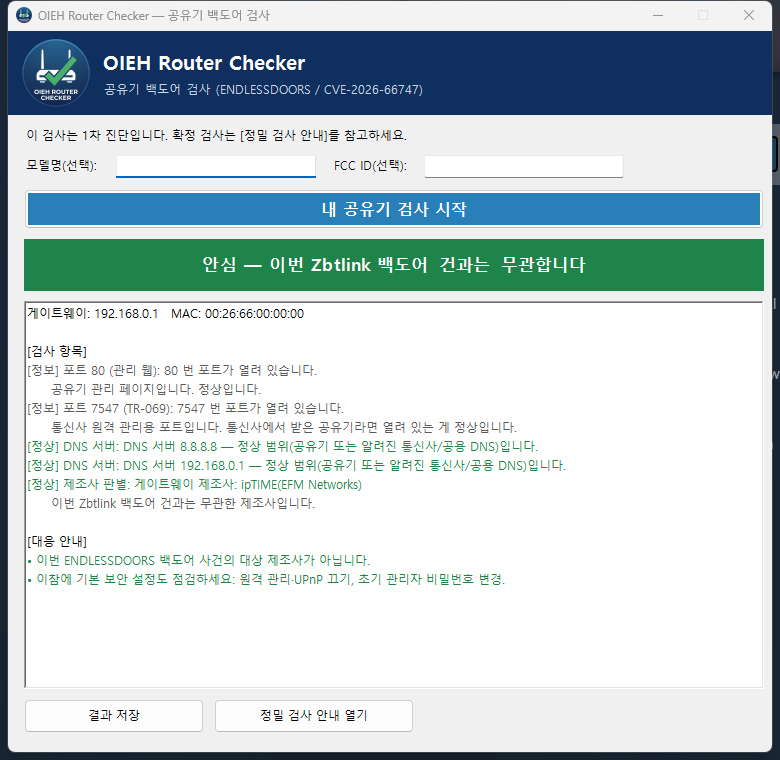
This program lets even beginners safely run a first-pass screening to check whether their router is a target of this campaign.
If you are using a router provided by your ISP (KT/SKB/LGU+) or an ipTIME router, this campaign mostly does not apply to you. If you have an unfamiliar 4G/5G or mini router bought directly from AliExpress/Amazon, it is worth checking.
This program is a first-pass risk assessment (triage), not a tool for making a definitive determination.
The backdoor's 35-second beacon is a signal the router itself makes to the outside (WAN), so it is fundamentally unobservable from an ordinary PC connected behind the router (since it is behind NAT). Therefore, this program combines what can be discovered from the PC without installing anything — manufacturer (MAC), ports, DNS, model, etc. — and renders a traffic-light verdict.
If you want a definitive inspection, follow the Wireshark interception guide generated by the [Open Advanced Inspection Guide] button in the program (a method of connecting a laptop in front of the router's WAN side to directly capture the 35-second beacon).
git clone)OIEH Router Checker.bat in the extracted folder.If a "Windows protected your PC" warning appears when running, click More info ▸ Run anyway. (This is a common warning that appears because it is an unsigned personal script.)
This program requires nothing to be installed — it only uses components built into Windows 10/11. If it doesn't run, it is usually one of the following.
OIEH Router Checker.bat from inside the extracted folder. Double-clicking it directly inside the ZIP or copying only the bat file will not work. (In this case, the program shows an explanatory popup.)%TEMP%\OiehRouterChecker.log file. If you can't resolve it, capture the contents and report it via the link below.Report issues: https://itoieh.blogspot.com/2026/08/oieh-router-checker.html (comments)
| Check | Method | Meaning |
|---|---|---|
| Manufacturer identification (core) | Matches the manufacturer code (OUI) of the gateway MAC | 🔴 if Zbtlink family; 🟢 if domestic ISP/ipTIME, etc. |
| Admin page fingerprint | Title/server/body strings of the router admin page | Detects traces of Zbtlink firmware |
| Suspicious ports | Whether major ports such as 23 (Telnet), 32764, and 7547 are open | 32764=🔴, Telnet=🟡, 7547 (TR-069)=normal for ISPs |
| DNS hijacking | Whether the DNS server assigned to the PC is within the normal range | 🟡 if it is an unidentified public DNS |
| LAN device list | Lists devices on the same network via the ARP cache | For informational purposes |
| Label match | Matches the entered model name/FCC ID against the affected list | 🔴 on match |
Verdict principle: if the manufacturer cannot be confirmed, it never gives 🟢 (Safe).
CPE2801, WE1026-5G-WD, WE1326, WE2007, WE2008-DSIM, WE2416, WE3326,
WE5927, WE5931, WE5931AC, WE826-T3-DSIM, WG108, WG209, WG259, WG1602,
WG1608-DSIM, WG2105, WG2107, WG3526, ZBT-Z8102AX-2SIM
Zbtlink openly offers OEM/ODM (rebranding). The same firmware may be present in identical hardware sold under a different brand label, so don't trust the label alone. If the FCC ID prefix (grantee code) is
2AH9Tor2AC47, the original manufacturer is Zbtlink.
OIEH Router Checker.bat        Entry point (double-click) → launches PowerShell
OiehRouterChecker.ps1          Network probe (fact collection) + WinForms GUI
OiehRouterChecker.Core.psm1    Pure verdict logic (OUI/ports/DNS/verdict/report) — test target
data/ioc.json                  Scan data (affected list · OUI · port policy · trusted DNS)
templates/advanced-guide.html  Advanced inspection (Wireshark) guide template
tests/OiehRouterChecker.Tests.ps1  Pester tests (51)
The code that touches the network (.ps1) and the code that makes decisions (.Core.psm1) are separated. Core consists of pure functions from "collected facts → verdict", so it is fully tested without a network.
