 octoberfest7/dns_tunneling
DNS tunneling tool using PowerShell and Nslookup to exfiltrate data and deliver payloads via DNS TXT/MX records, bypassing Constrained Language Mode and endpoint defenses.

Inspired by recent work I did involving Cobalt Strike DNS beacons, in conjunction with a mission statement to try and evade Microsoft Defender for Endpoint, I spent some time looking into how DNS might be used to transfer a payload to a target machine. I further wanted to challenge myself by trying to do so in a way that is possible even when powershell is in Constrained Language Mode. This research was targeted at more modern implementations of Windows (i.e. Win10+, Server 2019+) but as you see later it may be possible in lower versions.
DNS tunneling is a technique that has been around for a long time and used by a variety of attackers. At a basic level it involves using the DNS protocol as a means for data infiltration/exfiltration or as a C2 communications channel. There are many blog posts you can reference for more information on this topic.
Because this is such a old and well known technique, many organizations have detection methods in place to try and prevent it.
The DNS record type of choice for DNS tunneling has historically been TXT. This is because TXT records can hold more data than other records and they are also case-sensitive, something that the other records are not which can have an impact when we start talking about encoding.
Constrained Language Mode (CLM) is a restrictive language mode for Powershell which greatly reduces the capabilities and allowed functionality of Powershell. As a short list, .NET, COM objects, and attacker favorites like (new-object net.webclient).downloadstring... are unavailable. This link provides more information. Organizations will put this policy in force for normal users as part of attack surface reduction rules. It in effect just makes our lives harder as attackers.
Most should be at least cursorily familiar with DNS from use of tools like Nslookup. But at a basic level, the client sends a query and the DNS server returns an answer to that query. There are several different kinds of DNS records: CNAME, A, AAAA, TXT, MX, and NS just to name a few. Each of these records can store and return different information. These records are configured in a Zonefile, which is served by a DNS server.
An example zonefile is shown here:
$ORIGIN example.com.
@                      3600 SOA   ns1.p30.dynect.net. (
                              zone-admin.dyndns.com.     ; address of responsible party
                              2016072701                 ; serial number
                              3600                       ; refresh period
                              600                        ; retry period
                              604800                     ; expire time
                              1800                     ) ; minimum ttl
                      86400 NS    ns1.p30.dynect.net.
                      86400 NS    ns2.p30.dynect.net.
                      86400 NS    ns3.p30.dynect.net.
                      86400 NS    ns4.p30.dynect.net.
                       3600 MX    10 mail.example.com.
                       3600 MX    20 vpn.example.com.
                       3600 MX    30 mail.example.com.
                         60 A     204.13.248.106
                       3600 TXT   "v=spf1 includespf.dynect.net ~all"
mail                  14400 A     204.13.248.106
vpn                      60 A     216.146.45.240
webapp                   60 A     216.146.46.10
webapp                   60 A     216.146.46.11
www                   43200 CNAME example.com.
If one were to query NS records for example.com, the query would return ns1.p30.dynect.net, ns2.p30.dynect.net, ns3.p30.dynect.net, and ns4.p30.dynect.net.
Before we get started we have to talk briefly about setting up DNS records to point at an IP we control and will run a DNS server on. As shown below I purchased a domain and set up DNS records that point the subdomain "dns" at the "ns1" subdomain which is assigned the public IP of the server.

This means that any queries made for "dns.edu....com" will be directed to "ns1.edu....com" which is assigned the IP 3..86. On that IP we will set up a DNS server to serve our records. This will come around again later.
My quest began with a simple google search for "powershell dns module" which returned this link. Of particular interest was the Resolve-DnsName command. It appears to be basically a powershell implementation of the well-known Nslookup.exe binary. Note that specific types of records can be requested:

Ok, so we have a powershell module that is capable of making DNS queries and retreiving the answer. Does it work in Constrained Language Mode? The answer is kind of.
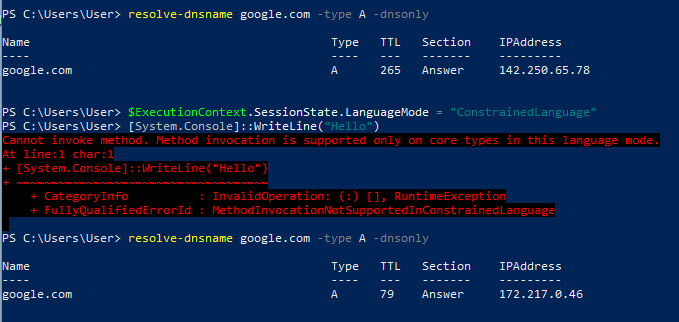
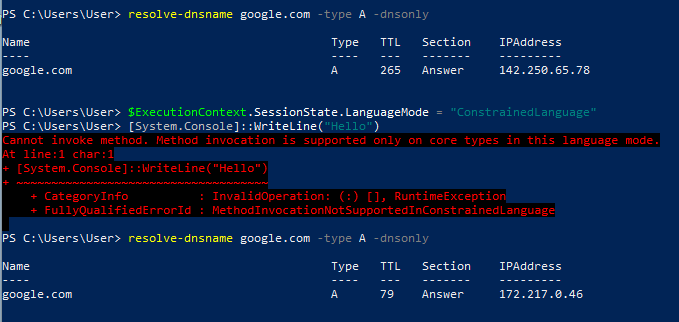
As you can see here if I open a new powershell window, run Resolve-DnsName, put powershell into CLM (and test with the simple ::WriteLine call), and then run Resolve-DnsName again, it works without issue:
However if I open a new powershell window and immediately put it into CLM and then try to run Resolve-DnsName it fails:
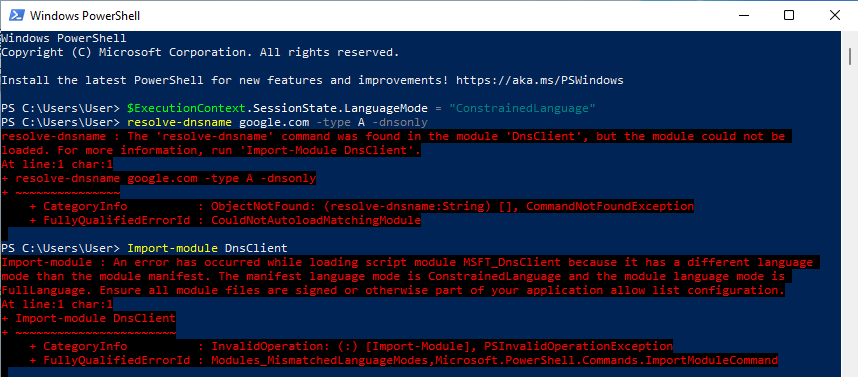
It appears that if a module has been loaded beforehand it is able to run after CLM is enforced, however CLM will prevent it from loading if it has not already done so. Thinking forward to a target environment where CLM is enforced for users by default (and with no knowledge if there are certain modules pre-loaded or if DnsClient is one of them), I chose at this point to leave Resolve-DnsName behind and turn back to good old Nslookup.exe.
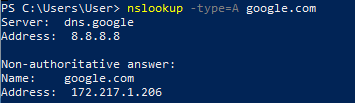
Nslookup.exe is a staple of the IT toolkit and a very well known binary used for legitimate purposes. The odds are in our favor that it will be allowed to execute even in environments where application whitelisting is a concern.
Nslookup will return much the same information as our Resolve-DnsName query, we will just have to manipulate it a little bit differently when the time comes.
Ok so we have a means by which to make DNS queries on the victim computer. How can we provide our payload in a format that Nslookup can retrieve?
Executables are of course binary files which means they aren't human readable. As a result the data must be transformed into something that we can stick into DNS records and that a tool like Nslookup can recover. There are ample encoding options available to us, but the major consideration is what can the victim box decode using only native windows tools and capabilities available in CLM? Base64 is the obvious and often reached answer.
Using Base64 we turn our executable into a giant human readable string which can then be broken up into many DNS records and recovered using Nslookup. On the client side the well known LOLBAS certutil.exe can be used to Base64 decode the aggregate DNS records back to binary format.
