 nybaywatch/agrusscanner
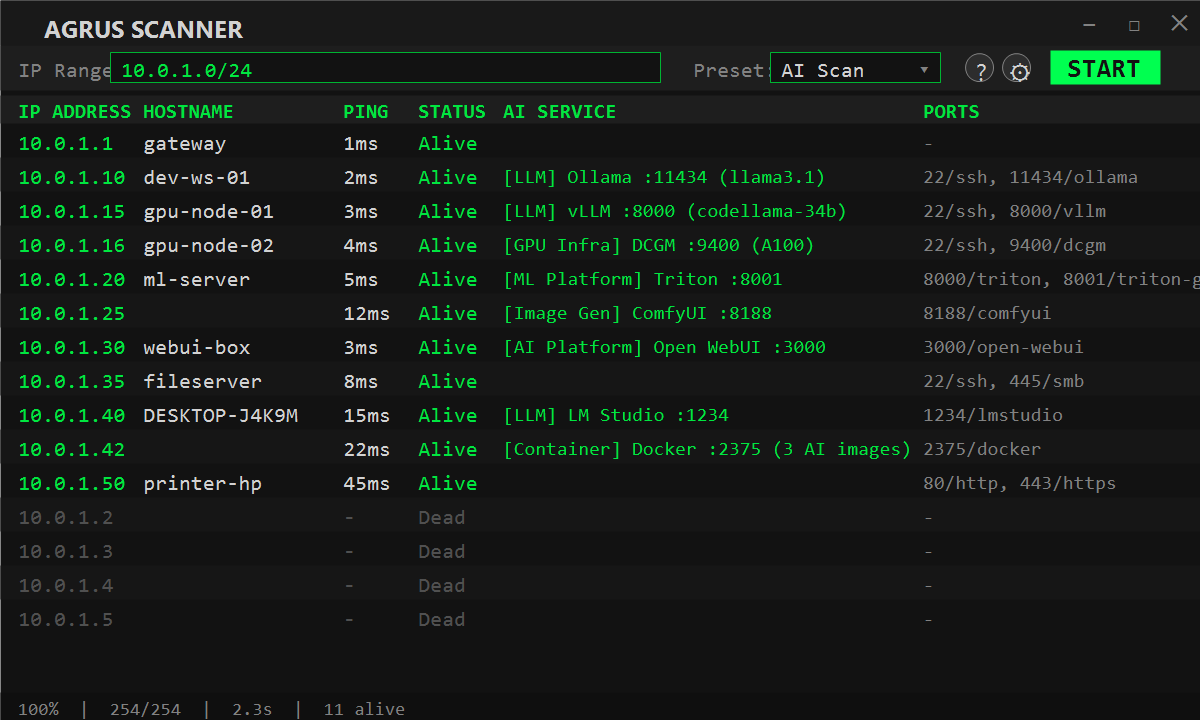
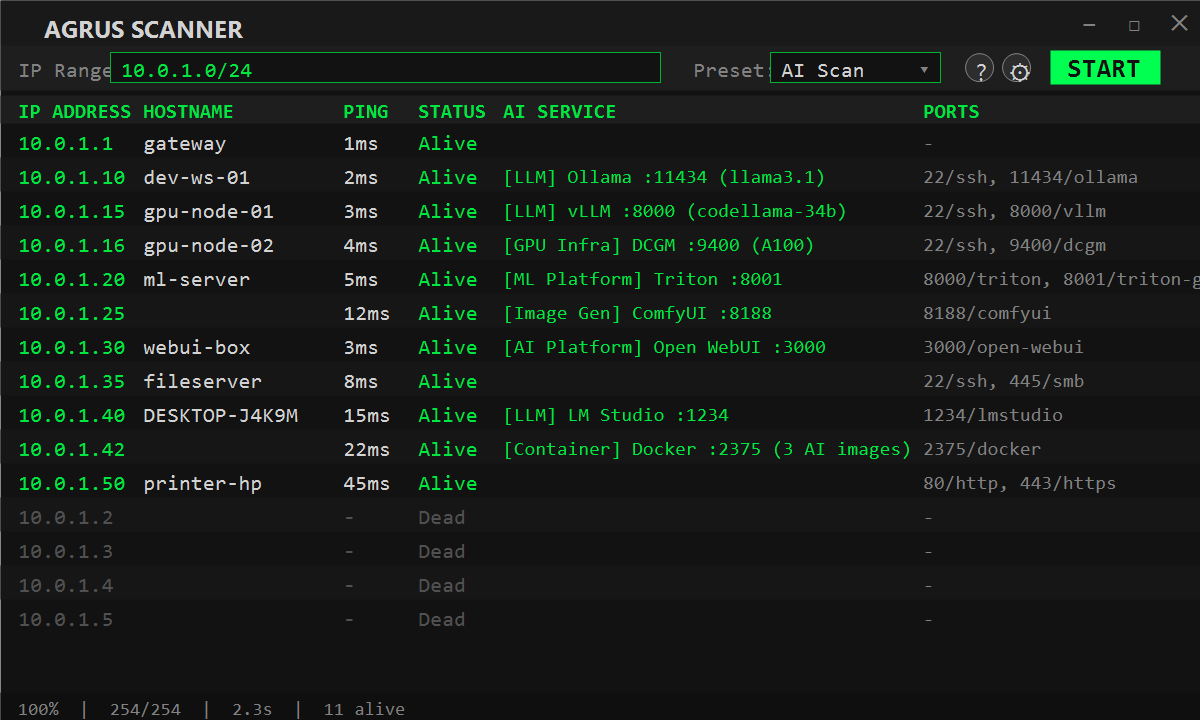
Windows network reconnaissance scanner with ping sweeps, TCP port scanning, and deep AI/ML service detection for finding shadow AI, rogue LLM deployments, and GPU infrastructure.



Network reconnaissance tool with deep AI/ML service detection. Scans your network to discover hosts, open ports, and identifies AI services running across your infrastructure.
Built for security teams, IT admins, and researchers who need visibility into shadow AI, rogue LLM deployments, and GPU infrastructure on their networks.
There is a growing concern for shadow AI, and this provides a simple way to scan networks. Also many of the typical scanning tools for windows are slow and have poorly written interfaces, specifically for anyone running a 4k+ monitor. Agrus Scanner is built in native C#/.NET with WPF — no Electron, no embedded browser — so it launches fast, scans fast, and stays light on resources. I've been tired of trying to read tiny print so when a friend/client was looking for a way to scan for shadow AI, and without any windows type tool available, it seemed like a natural fit together.
It also works as a straightforward network scanner — ping sweeps, port scanning, and hostname resolution are all built in. You don't need a separate tool for basic recon. But where Agrus really stands out is AI detection: it goes beyond port scanning by actively probing discovered services with AI-specific API calls, pulling back model names, GPU details, container info, and version data. If someone on your network is running an AI service, Agrus finds it and tells you exactly what it is.
It also runs as an MCP server, so AI agents like Claude Code and OpenClaw can use it as a tool — scan networks, probe hosts, and pull back results autonomously. Point your agent at the endpoint and it handles the rest.
Download the latest installer from Releases, or directly:
AgrusScanner-Setup-1.0.2.msi — self-contained, no .NET runtime needed.
Also available on the Microsoft Store. Or visit the Tools page for the download link, checksum, and winget install command.
Requires Windows 10/11. The installer and the installed binaries are Authenticode-signed (Azure Trusted Signing, publisher Joseph Fago). Once installed, detection signatures keep themselves current; you only need a new installer when the app itself changes.
/.well-known/voicestudio-speech discovery endpoint on its distinctive default port 3900/status endpoint on its distinctive default port 1416/health on its distinctive default port 8108| Category | Services Detected |
|---|---|
| LLM | Ollama, vLLM, HF TGI, llama.cpp, KoboldCpp, LM Studio, LiteLLM, Jan.ai, GPT4All, LocalAI, FastChat, Tabby, Xinference, SGLang, text-generation-webui, NVIDIA NIM, NVIDIA Dynamo, OpenLLM, MLX-LM, llamafile, Aphrodite Engine, llama-swap, LMDeploy, exo, TabbyAPI |
| Image Gen | Stable Diffusion (A1111), ComfyUI, InvokeAI, SD WebUI Forge, Fooocus-API |
| Video Gen | SwarmUI, HunyuanVideo |
| Voice / STT / TTS | Speaches, whisper.cpp, OpenedAI-Speech, F5-TTS, GPT-SoVITS, XTTS-API-Server, Coqui XTTS Streaming, Kokoro-FastAPI, Chatterbox-TTS-Server, VoiceStudio |
| ML Platform | NVIDIA Triton, TorchServe, TensorFlow Serving, MLflow, Ray Serve, BentoML, KServe, MindsDB |
| AI Platform | Open WebUI, AnythingLLM, LibreChat, Flowise, Dify, SillyTavern, n8n, PrivateGPT, Gradio apps |
| Agent Platform | AutoGen Studio, Letta, OpenHands, CrewAI Studio, Langflow, OpenClaw, Agent Zero |
| RAG Platform | Onyx, R2R, kotaemon, RAGFlow, Quivr, Verba, Khoj, Hayhooks (Haystack) |
| Embeddings | HF Text Embeddings Inference (TEI), Infinity |
| Vector DB | Qdrant, ChromaDB, Weaviate, Milvus, Typesense |
| MCP Server | Any MCP server over Streamable HTTP (initialize / server/discover) or legacy HTTP+SSE, plus Home Assistant MCP; reports name, version, and tools/resources/prompts |
| GPU Infra | NVIDIA DCGM Exporter, Triton Metrics, TorchServe Metrics |
| Container | Docker API with 70+ AI image pattern matches |
Detection goes beyond port scanning - the prober queries service-specific API endpoints, extracts model names, versions, GPU info, and container details.
Starting with 1.0, what Agrus can detect is separate from the app itself, the same way an antivirus separates its engine from its definitions.
How it works
signatures feed on GitHub, typically weekly as new AI services appear. The app checks the feed a few seconds after launch and once a day after that.2026.09.22.1.
