 nsmfoo/antivmdetection
Script to create templates to use with VirtualBox to make vm detection harder

A script to help you create templates, which you can use with VirtualBox to make VM detection harder.
My first post on the subject was in 2012 and have after that been updated at random times. The blog format might have not been the best way of publishing the information and some people did make nice and "easy to apply" script based on the content.
As a way to make it easier for me to add new content, I have decided to do the very same.
The purpose of this script is to use available settings without modifying the VirtualBox base. There are people who do really neat things by patching Virtualbox. But that is out of the scoop for this script. I think this approach has some merits as it does not (hopefully) break with every new release of VirtualBox. Overtime I have also included "things" that are not directly VM related, but rather things that malware is using to fingerprint installations with, I hope you don't mind..
The main script will create the following files:
sudo apt install python3-pip libcdio-utils acpica-tools mesa-utils smartmontoolssudo pip3 install -r requirements.txtwget https://download.sysinternals.com/files/VolumeId.zip https://www.nirsoft.net/utils/devmanview-x64.zip (x64 version).hostname > computer.lst, whoami > user.lst . Modify if you want to use different machine names and users for the VMs (recommended is to fill the files with a long list of user and computer names)sudo python3 antivmdetect.pysudo chmod a+x xxxxx.sh/bin/bash xxxxx.sh my-virtual-machine-nameMove the batch script (xxxx.ps1) to the newly installed guest.
Run the batch script inside the guest. Remember that most of the settings that gets modified, are reverted after each reboot. So make it run at boot if needed.
As of version 0.1.4, some applied settings will require a reboot. So run the batch script once, the guest will be rebooted. Then run the script once again to finalize the setup.
Before you apply the batch script inside the guest, please disable UAC (reboot required) otherwise you will not be able to modify the registry with the script.
For Windows 10 users: run the PS script as an administrator (right-click on the cmd.exe -> run as admin, navigate to the PS script and execute)
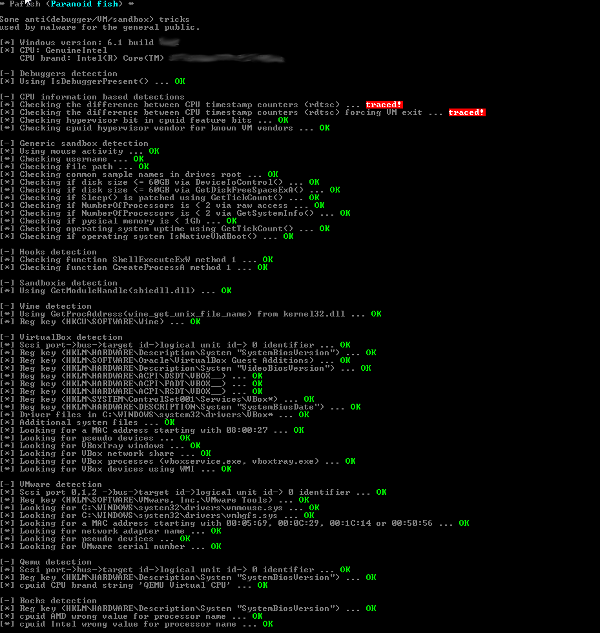
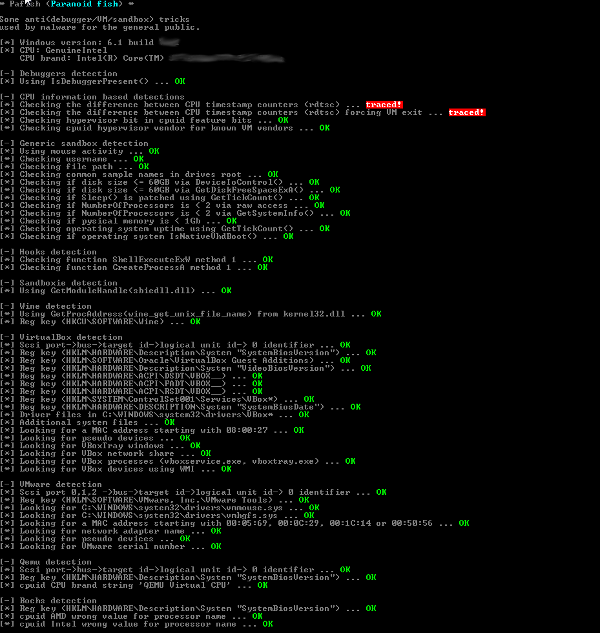
If applied correctly, a Pafish run will result in this (no need to modify Virtualbox).
Please note, that this script does other things that is not covered by Pafish (for example W10 artifacts)
0.1.9:
Python3 compatible
First stab at trying to extract the correct disk, has been a source for headache for many. (Issue #35 (and a few others old issues), thanks @oaustin)
Improved the string handing in the shell script (Issue #35 and #36 and PR #44, thanks @oaustin, @dashjuvi and @corownik)
Added a link to a online DSDT resource (Issue #37, thanks @MasterCATZ)
Updated the README to make installations instructions more clear, thanks @jorants (issue #38)
Check if the DSDT dump is really created, thanks @nov3mb3r (Issue: #42)
Added a license notice. thanks @obilodeau (issue #43)
Code clean-up: removed RAID disk support due to lack of access to server hardware.. and a lot of other small improvements
0.1.8:
Improved support for Windows 10
Merged markup fix from @bryant1410 (PR #14)
Solved an issue for people using macOS + VBox/VMWare Fusion to create the templates.
Creating the template from a virtual machine is not the best way regardless .. (issue #12 and possibly #15)
0.1.7:
Windows 10 is now supported (feedback welcome)
Several new artifacts "corrected" for W10 installations
New dependency: mesa-utils
Merged bug fix from @Fullmetal5 (#10)
Misc code fix
Updated the readme
0.1.6:
Added a pop-up after the second run, to make it more clear that you are good to go
Added a function that spawns a few instances of notepad, this feature will be extended in future versions
Reworked the RandomDate function, thanks to @Antelox for making me aware of the issue with the old one (#8)
Acpidump shipped with older versions of Ubuntu, does not support the "-s" switch. This is now handled with an error message. Thanks to @Antelox for this issue (#7)
Devmanview.exe was not removed after the second run, fixed
