
Skip to content
KitploitKITPLOIT
ToolsBlog
Submit
ToolsBlog
Submit

Hacking, PenTest, and Cybersecurity Tools for Your Security Arsenal!

Kitploit is a directory of hacking, cybersecurity, and pentesting tools. Discover the latest project updates to find vulnerabilities, analyze systems, automate testing, and strengthen your security.

··Feeds·Contact·Privacy·© 2026 Kitploit

Tool Directory

Categories

View all categories
Loading categories
archiver-MOTW-support-comparison | Kitploit
Tools/GitHubGitHub/nmantani/archiver-motw-support-comparison
Malware AnalysisLearning & EducationRed TeamingCurated ResourcesAdversarial Attack
GitHubnmantani/archiver-motw-support-comparison

archiver-MOTW-support-comparison

View Repository

Most Popular

View all →

Discover the most used tools by our community.

Explore all tools

Browse our collection of tools

View all tools →
Share
2791718 days agoReviewed by Kitploit

Comparison of MOTW (Mark of the Web) propagation support of archiver software for Windows

English | Japanese

Background

On 3 March 2022, Microsoft announced that the default behavior of Office applications on Windows will be changed to block macros in files from the internet (such as email attachment).

An excerpt from the announcement:

VBA macros are a common way for malicious actors to gain access to deploy malware and ransomware. Therefore, to help improve security in Office, we’re changing the default behavior of Office applications to block macros in files from the internet.

...

This change only affects Office on devices running Windows and only affects the following applications: Access, Excel, PowerPoint, Visio, and Word.

The change will begin rolling out in Version 2203, starting with Current Channel (Preview) in early April 2022. Later, the change will be available in the other update channels, such as Current Channel and Monthly Enterprise Channel.

This is a great improvement of defense against malicious Office document files.

According to the announcement, whether blocking macro or not is determined based on MOTW (Mark of the Web) attribute of the file. Applications such as web browsers and email clients put MOTW on downloaded files and email attachments that come from the internet. MOTW is stored in Zone.Identifier NTFS alternate data stream.

To block macro of malicious Office document files that are extracted from archive files, an archiver software has to propagate MOTW to extracted files when an archive file has MOTW. If archiver software does not propagate MOTW, malicious Office documents in archive files can circumvent blocking.

A question came up: "What archiver software can propagate MOTW to extracted files?" So I tested some archiver software and summarized the result.

Comparison table of MOTW propagation support (as of 2 August 2026)

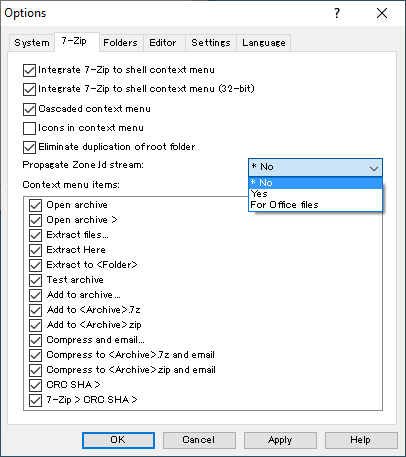
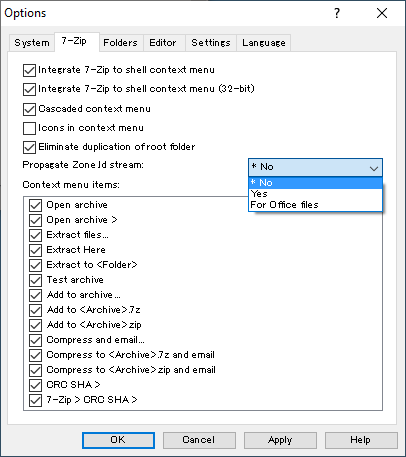
*1: Though 7-Zip has supported MOTW propagation since version 22.00, it is disabled by default. You can enable it for 7-Zip GUI with the "Propagate Zone Id stream:" option in "Tools" -> "Options" -> "7-Zip" of 7-Zip File Manager.
images/7-zip-setting.png

When you set the option to Yes, 7-Zip propagates MOTW to all extracted files. When you set it to "For Office files", 7-Zip propagates MOTW to files with the following file extensions:

  • .doc .docb .docm .docx .dot .dotm .dotx .wbk .wll .wwl
  • .pot .potm .potx .ppa .ppam .pps .ppsm .ppsx .ppt .pptm .pptx .sldm .sldx
  • .xla .xlam .xlm .xls .xlsb .xlsm .xlsx .xlt .xltm .xltx

You can also enable MOTW propagation by setting the registry HKEY_CURRENT_USER\SOFTWARE\7-Zip\Options\WriteZoneIdExtract DWORD to 1.

For 7-Zip CLI, -snz switch is required to propagate MOTW regardless of the option above.

*2: Accoring to the document of Bandizip, Bandizip propagates MOTW to files with the following file extensions:

  • .exe .com .msi .scr .bat .cmd .pif .bat .lnk
  • .zip .zipx .rar .7z .alz .egg .cab .bh
  • .iso .img .isz .udf .wim .bin .i00
  • .js .jse .vbs .vbe .wsf
  • .url .reg
  • .docx .doc .xls .xlsx .ppt .pptx .wiz

I previously tested Bandizip with a ZIP archive file that contained only text files, and I misunderstood that Bandizip does not propagate MOTW.

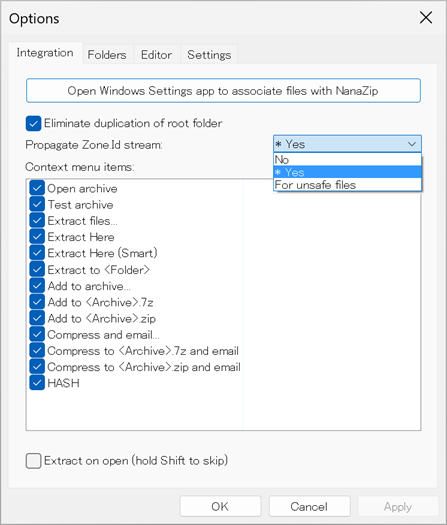
*3: NanaZip has enabled MOTW propagation by default since version 6.0 Preview 1, You can configure it with the "Propagate Zone Id stream" option in "Options" -> "Integration" of NanaZip GUI.
images/nanazip-setting.png

When you set it to "For unsafe files", NanaZip propagate MOTW to files with the following file extensions:

  • .doc .dot .wbk
  • .docx .docm .dotx .dotm .docb .wll .wwl
  • .xls .xlt .xlm
  • .xlsx .xlsm .xltx .xltm .xlsb .xla .xlam
  • .ppt .pot .pps .ppa .ppam
  • .pptx .pptm .potx .potm .ppam .ppsx .ppsm .sldx .sldm
  • .bat .cmd .com .exe .hta .js .jse .lnk .msi .pif .ps1 .scr .vbe .vbs .wsf
  • .7z .iso .rar .tar .vhd .vhdx .zip

NanaZip supports system-wide policies with registry. These policies override user settings.

*4: WinRAR 7.0 introduced the "Propagate Mark of the Web" option. You can choose the following values:

  • Never
  • For office files
  • For executable and office files
  • For all files
  • For user defined types

The option is supported only by WinRAR GUI. WinRAR CLI does not propagate MOTW regardless of the option.

images/winrar-setting.png

The default is "For executable and office files" and WinRAR propagates MOTW to files with the following file extensions:

  • .exe .bat .cmd .hta .lnk .msi .pif .ps1 .scr .vbs
  • .doc .docb .docm .docx .dot .dotm .dotx .wbk
  • .ppa .ppam .pot .potm .potx .pps .ppsm .ppsx .ppt .pptm .pptx .sldm .sldx
  • .xls .xlsb .xlsm .xlsx .xlm .xlt .xltm .xltx

When you set the option to "For office files", WinRAR propagates MOTW to files with the following file extensions:

  • .doc .docb .docm .docx .dot .dotm .dotx .wbk
  • .ppa .ppam .pot .potm .potx .pps .ppsm .ppsx .ppt .pptm .pptx .sldm .sldx
  • .xls .xlsb .xlsm .xlsx .xlm .xlt .xltm .xltx

You can specify file extensions when you set the option to "For user defined types".

*5: IZArc version 4.6 introduced the "Propagate Mark of the Web" option, and it is enabled by default. However, it seems that IZArc does not propagate MOTW regardless of the option.

Comparison table of MOTW propagation behavior (as of 2 August 2026)

MOTW propagation examples

In these examples, MOTW was manually set for a ZIP archive file motw-test.zip with Set-MOTW.ps1, then MOTW of an extracted file is displayed with Get-MOTW.ps1. Set-MOTW.ps1 and Get-MOTW.ps1 are available at my PS-MOTW repository.

  • MOTW of a file extracted with Windows Explorer or WinZip (except version 28.0): images/explorer.png

  • MOTW of a file extracted with 7-Zip, Bandizip, File Compact, NanaZip, or PeaZip: images/bandizip.png

  • MOTW of a file extracted with CubeICE, Explzh, TC4Shell, or WinRAR: images/explzh.png

  • MOTW of a file extracted with Total Commander: images/total-commander.png

FAQ

  • What is MOTW (Mark of the Web)?

    Please see these blog articles:

    • Details about the Mark-of-the-Web (MOTW) by Mike Wolfe (@NoLongerSet)
    • Downloads and the Mark-of-the-Web by Eric Lawrence (@ericlaw)
    • Mark-of-the-Web from a red team’s perspective by Stan Hegt (@stanhacked)

    They are very helpful to understand it.

  • My favorite archiver software is not listed.

    Please provide your test result from Issues or Pull requests. Because I am Japanese, the comparison table contains some Japanese archiver software that you may not know.

  • How to test my favorite archiver software?

    Please see Details about the Mark-of-the-Web (MOTW). It compares behavior of the built-in Windows unzip utility and 7-zip. You can test your favorite archiver software in a similar fashion.

    I created PS-MOTW, PowerShell scripts to manually set / show / remove MOTW. You can use it for testing archiver software.

  • Information is incorrect or outdated.

References

  • Macros from the internet will be blocked by default in Office
    https://docs.microsoft.com/en-us/deployoffice/security/internet-macros-blocked

  • Details about the Mark-of-the-Web (MOTW)
    https://nolongerset.com/mark-of-the-web-details/

  • Downloads and the Mark-of-the-Web
    https://textslashplain.com/2016/04/04/downloads-and-the-mark-of-the-web/

  • Mark-of-the-Web from a red team’s perspective
    https://outflank.nl/blog/2020/03/30/mark-of-the-web-from-a-red-teams-perspective/

  • The Dangers of VHD and VHDX Files
    https://insights.sei.cmu.edu/blog/the-dangers-of-vhd-and-vhdx-files/

  • Subvert Trust Controls: Mark-of-the-Web Bypass
    https://attack.mitre.org/techniques/T1553/005/

Author

Nobutaka Mantani (@nmantani)

Download Tool
NameTested versionLicenseMOTW propagationEnabled by defaultNote
"Extract all" built-in function of Windows ExplorerWindows 11 25H2proprietaryYes ✔️Yes ✔️
7-Zip26.02GNU LGPLYes ✔️No ❌ *1
BandizipStandard Edition 7.45freewareYes ✔️Yes ✔️Only for specific file extensions *2
CubeICE3.6.1freeware / proprietaryYes ✔️Yes ✔️
Explzh10.01proprietary for commercial useYes ✔️Yes ✔️
File Compact8.00proprietaryYes ✔️Yes ✔️
NanaZip6.5.1767.0MITYes ✔️Yes ✔️Configurable to propagate for specific file extensions *3
PeaZip11.2.0GNU LGPLYes ✔️Yes ✔️
TC4Shell21.3.0 (trial)proprietaryYes ✔️Yes ✔️
Total Commander11.58 (trial)proprietaryYes ✔️Yes ✔️
WinRAR7.23 (trial)proprietaryYes ✔️Yes ✔️Only for specific file extensions by default *4
WinZip77.0 (trial)proprietaryYes ✔️Yes ✔️
Ashampoo ZIP Free1.0.7freeware (registration required)No ❌
CAM UnZip5.25.4.0proprietary for commercial useNo ❌
Expand-Archive cmdlet of PowerShell7.6.4MITNo ❌
Express Zip11.28proprietary for commercial useNo ❌
IZArc4.6freewareNo ❌Despite the availability of the"Propagate Mark of the Web" option *5
LhaForge2.0.1MITNo ❌
Lhaplus1.74freewareNo ❌
PowerArchiver22.10.02 (trial)proprietaryNo ❌
StuffIt Expander15.0.8freewareNo ❌
tar.exe (bsdtar) of Windows 113.8.4BSD 2-clauseNo ❌
Universal Extractor 22.0.0 RC 3GNU GPLv2No ❌
ZipGenious6.3.2.3116freewareNo ❌
Zipware1.6freewareNo ❌
NameTested versionMOTW propagation behavior
"Extract all" built-in function of Windows ExplorerWindows 11 25H2
  • MOTW is propagated only if ZoneId value of the MOTW is 3 (Internet) or 4 (Untrusted sites)
  • ZoneId field of the archive file is inherited
  • The absolute path of the archive file is set for the ReferrerUrl field
  • All other fields are ignored
  • Extraction of .exe .lnk .vbs files is blocked when the ZoneId value is 4 (Untrusted sites)
7-Zip26.02
  • MOTW of the archive file is propagated without modification
  • Only for specific file extensions if the "Propagate Zone Id stream:" option is set to "For Office files" *1
BandizipStandard Edition 7.45
  • MOTW of the archive file is propagated without modification
  • Only for specific file extensions *2
CubeICE3.6.1
  • MOTW is propagated only if ZoneId value of the MOTW is 3 (Internet) or 4 (Untrusted sites)
  • Only ZoneId field of the archive file is inherited and all other fields are ignored
Explzh10.01
  • MOTW is propagated only if ZoneId value of the MOTW is 3 (Internet)
  • Only ZoneId field of the archive file is inherited and all other fields are ignored
File Compact8.00
  • MOTW of the archive file is propagated without modification
NanaZip6.5.1767.0
  • MOTW of the archive file is propagated without modification
  • Only for specific file extensions if the "Propagate Zone Id stream" option is set to "For unsafe files" *3
PeaZip11.2.0
  • MOTW of the archive file is propagated without modification
TC4Shell21.3.0 (trial)
  • Only ZoneId field of the archive file is inherited and all other fields are ignored
Total Commander11.58 (trial)
  • MOTW of the archive file is propagated except for the ReferrerUrl field
WinRAR7.23 (trial)
  • Only ZoneId field of the archive file is inherited and all other fields are ignored
  • Only for specific file extensions *4
WinZip77.0 (trial)
  • MOTW is propagated only if ZoneId value of the MOTW is 3 (Internet) or 4 (Untrusted sites)
  • ZoneId field of the archive file is inherited
  • The absolute path of the archive file is set for the ReferrerUrl field
  • All other fields are ignored
  • Extraction of .exe .lnk .vbs files is blocked when the ZoneId value is 4 (Untrusted sites)

Please provide the details from Issues or the fix from Pull requests. I am happy to fix it.

  • Can a malicious Office document in a disk image file (such as .iso and .vhd) circumvent blocking?

    Yes. If the file format of a disk image file does not support NTFS alternate data stream, MOTW is not set for the files in the disk image file. Please see also the following:

    • Mark-of-the-Web from a red team’s perspective by Stan Hegt (@stanhacked)
    • The Dangers of VHD and VHDX Files by Will Dormann (@wdormann)
    • Subvert Trust Controls: Mark-of-the-Web Bypass (an article in MITRE ATT&CK knowledge base).

    Update on 11 April 2022:
    According to the blog article .ISO Files With Office Maldocs & Protected View in Office 2019 and 2021 by Didier Stevens (@DidierStevens), Office 2019 and 2021 use protected view to open Office document stored inside an ISO file with MOTW. This behavior was introduced in August 2021.

    Update on 30 November 2022:
    According to the tweet by Bill Demirkapi (@BillDemirkapi), Microsoft fixed handling of MOTW for virtual disk container files such as ISO and VHD on Windows by the security updates released on 8 November 2022. When applications open files inside a virtual disk container file downloaded from the Internet, the files will inherit the MOTW of the virtual disk container file.