
Skip to content
KitploitKITPLOIT
ToolsBlog
Submit
ToolsBlog
Submit

Hacking, PenTest, and Cybersecurity Tools for Your Security Arsenal!

Kitploit is a directory of hacking, cybersecurity, and pentesting tools. Discover the latest project updates to find vulnerabilities, analyze systems, automate testing, and strengthen your security.

··Feeds·Contact·Privacy·© 2026 Kitploit

Tool Directory

Categories

View all categories
Loading categories
Tools/GitHubGitHub/nirvanaon/own-defender
Defensive ToolsExploitationReverse EngineeringBinary AnalysisLearning & Education
GitHubnirvanaon/own-defender

OWN-Defender

Research project reverse-engineering Windows Security Center COM interfaces to trace AV registration through ATL, vtable, WSCAPI, and RPC, with runtime verification via WMI.

View Repository
1017h 21m agoNot yet reviewed

Most Popular

View all →

Discover the most used tools by our community.

Explore all tools

Browse our collection of tools

View all tools →
Share

OWN-Defender — Windows Security Center COM Research

OWN-Defender is a Windows security research project focused on understanding how Windows Security Center (WSC) represents and manages antivirus security products through its COM interfaces.

The project began as an investigation into the behavior demonstrated by DefendNot, but rather than treating the existing implementation as a black box, I used it as a starting point for independent reverse engineering and verification.
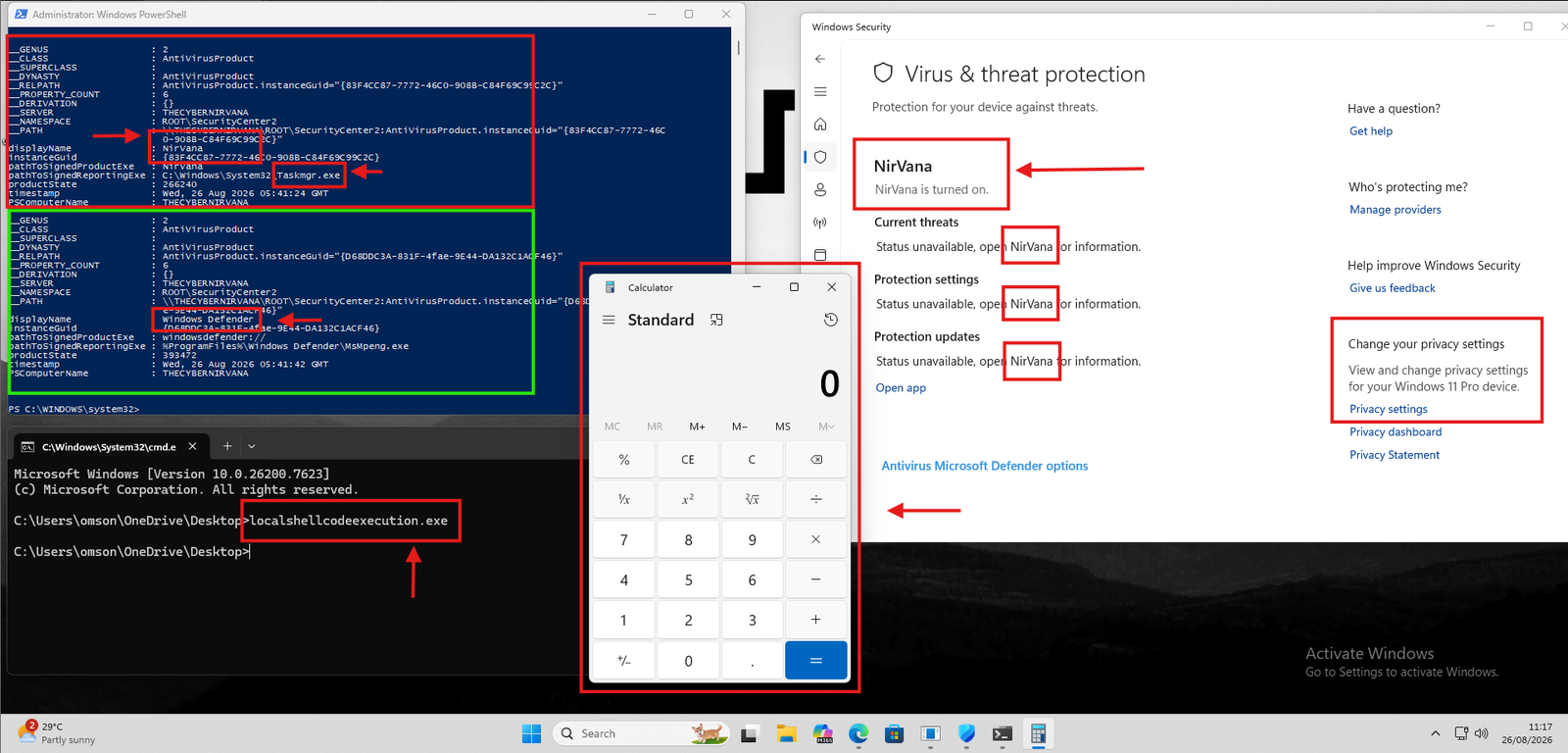
Screenshot 2026-08-26 111717

The goal of this project is to understand the complete execution path:

root@kitploit:~
COM
 ↓
CLSID / IID
 ↓
CoCreateInstance
 ↓
QueryInterface
 ↓
ATL Interface Map
 ↓
vtable
 ↓
IWscAVStatus4
 ↓
CWscIsv
 ↓
WSCAPI.dll
 ↓
RPC
 ↓
Windows Security Center

The project was developed and tested in a controlled Windows research environment.

Research / Educational Use Only

This project is intended for Windows internals research, reverse engineering, security education, and authorized security testing. Do not use it to interfere with security software on systems you do not own or have explicit permission to test.


Research Motivation

The initial question was simple:

How does Windows Security Center know that an antivirus product exists?

Instead of stopping at the public API documentation, I wanted to understand what happens underneath the API.

This led to several questions:

  • Which COM class implements the WSC functionality?
  • Which IID corresponds to the antivirus interface?
  • How does QueryInterface() resolve the interface?
  • Where is the interface stored in the ATL interface map?
  • Why does IDA sometimes show only __int64 a1 for a method?
  • Why does the reconstructed C++ interface contain additional parameters?
  • Which Register() function is actually the AV registration function?
  • How does the registration eventually reach Windows Security Center?
  • Where does the RPC boundary appear?
  • How can the result be independently verified?

Reverse Engineering Journey

1. Identifying the COM Class

The first step was identifying the Windows Security Center COM class.

The project uses the WSC COM class:

root@kitploit:~
CLSID_WscIsv
F2102C37-90C3-450C-B3F6-92BE1693BDF2

The implementation also contains logic to locate the CLSID dynamically from the Windows registry instead of relying exclusively on a hardcoded value.

Conceptually:

root@kitploit:~
HKLM
 └── SOFTWARE
     └── Classes
         └── CLSID
             └── {CLSID}
                 └── Windows Security Center ISV API

This provided the first important relationship:

root@kitploit:~
Registry
   ↓
CLSID
   ↓
Windows Security Center ISV API

2. Identifying the Correct Interface

The next challenge was determining which COM interface should be requested.

The project uses:

root@kitploit:~
IWscAVStatus4

with:

root@kitploit:~
4DCBAFAC-29BA-46B1-80FC-B8BDE3C0AE4D

One of the important lessons from the research was:

A GUID name alone is not enough evidence.

I verified the relationship through reverse engineering rather than assuming that the interface name and GUID were correct.

The investigation included:

  • GUID references
  • QueryInterface
  • ATL interface maps
  • _ATL_INTMAP_ENTRY
  • vtable locations
  • cross-references
  • function implementations
  • runtime behavior

3. Understanding QueryInterface

One of the most useful reversing steps was following the implementation of:

root@kitploit:~
CComAggObject<CWscIsv>::QueryInterface()

which eventually reaches:

root@kitploit:~
ATL::CComObjectRootBase::InternalQueryInterface()

The ATL interface map is used to compare the requested IID against registered interface entries.

Conceptually:

root@kitploit:~
Requested IID
     ↓
QueryInterface()
     ↓
InternalQueryInterface()
     ↓
ATL Interface Map
     ↓
GUID comparison
     ↓
Matching interface
     ↓
Interface pointer

This provided independent evidence that the GUID being investigated actually corresponded to the expected COM interface.


4. The Register() Confusion

One of the biggest reversing challenges was understanding why IDA/Ghidra did not always display the method signature I expected.

The reconstructed interface contains:

root@kitploit:~
virtual HRESULT __stdcall Register(
    BSTR path,
    BSTR name,
    unsigned int,
    unsigned int
) = 0;

However, the decompiler could show an implementation such as:

root@kitploit:~
_IWscAVStatus4<CWscIsv>::Register(__int64 a1)

At first this looked inconsistent.

Further investigation showed that the decompiler representation was describing a wrapper/thunk and the underlying indirect vtable call rather than presenting the complete logical interface signature.

This became an important lesson:

Decompiler output is an interpretation of machine code, not the original source-level truth.

To resolve these discrepancies, I compared:

root@kitploit:~
COM interface definition
        ↓
vtable layout
        ↓
assembly
        ↓
wrapper/thunk
        ↓
calling convention
        ↓
actual target function

5. Multiple Register() Functions

Another source of confusion was the presence of multiple functions with names such as:

root@kitploit:~
IWscAVStatus2::Register
IWscAVStatus4::Register
IWscFWStatus2::Register
RegisterAV

The important realization was that similar names do not mean identical interfaces.

For example:

root@kitploit:~
AV
 ↓
IWscAVStatus4
 ↓
AV registration

while:

root@kitploit:~
Firewall
 ↓
IWscFWStatus2
 ↓
Firewall registration

The interface number and surrounding implementation had to be verified instead of selecting a function simply because its name contained Register.

This was one of the most useful parts of the research because it forced me to correlate:

root@kitploit:~
Interface
+
IID
+
vtable
+
implementation
+
parameter layout
+
call target

6. Tracing the Registration Path

After identifying the correct interface, I traced the registration operation deeper into the binary.

The observed path was approximately:

root@kitploit:~
IWscAVStatus4::Register()
        ↓
CWscIsv
        ↓
RegisterSecurityProductFunction
        ↓
wscRegisterSecurityProduct()
        ↓
WSCAPI.dll
        ↓
s_wscRegisterSecurityProduct()
        ↓
NdrClientCall3()
        ↓
RPC
        ↓
Windows Security Center

This was particularly important because the COM method itself was not the final operation.

The call eventually crossed an RPC boundary.

That changed the way I viewed the architecture:

root@kitploit:~
COM
  ≠
final implementation

Instead:

root@kitploit:~
COM
 ↓
local implementation
 ↓
WSC API
 ↓
RPC client
 ↓
Windows component

7. Understanding WSCAPI.dll

The next layer was WSCAPI.dll.

The reverse-engineered path reached:

root@kitploit:~
wscRegisterSecurityProduct()

which eventually invoked:

root@kitploit:~
s_wscRegisterSecurityProduct()

and then:

root@kitploit:~
NdrClientCall3()

This was the point where the investigation moved from a normal COM call into Windows RPC infrastructure.

Understanding this layer helped explain why the behavior could not be fully understood by looking only at the original COM DLL.


8. Runtime Verification

Static analysis was only one part of the research.

After reconstructing the relevant interface and call path, I created my own controlled implementation and compared the resulting behavior with Windows Security Center.

I used Windows Security Center / WMI information such as:

root@kitploit:~
ROOT\SecurityCenter2
    AntiVirusProduct

to independently observe the registered product information.

The verification process was:

root@kitploit:~
Reverse engineering
       ↓
Interface reconstruction
       ↓
Own implementation
       ↓
Runtime execution
       ↓
Windows Security Center
       ↓
WMI observation
       ↓
Compare results

This allowed me to verify that the conclusions from static analysis corresponded with observable Windows behavior.


9. What I Learned

This project taught me considerably more than how to interact with one COM interface.

COM

  • CLSID vs IID
  • COM activation
  • CoCreateInstance
  • QueryInterface
  • reference counting
  • interface pointers
  • vtables
  • ATL interface maps

Reverse Engineering

  • IDA/Ghidra decompiler limitations
  • following cross-references
  • identifying GUIDs
  • reconstructing interfaces
  • analyzing compiler-generated wrappers/thunks
  • understanding indirect vtable calls
  • validating calling conventions

Windows Internals

  • Windows Security Center
  • WSC provider interfaces
  • WSCAPI.dll
  • Windows RPC
  • MIDL-generated RPC stubs
  • NdrClientCall3
  • Security Center product state

Research Methodology

Most importantly, I learned to avoid relying on a single piece of evidence.

Instead:

root@kitploit:~
Symbol
   ↓
Decompiler
   ↓
Assembly
   ↓
GUID
   ↓
Interface Map
   ↓
vtable
   ↓
Call Graph
   ↓
RPC
   ↓
Runtime Verification

Each layer increases confidence in the conclusion.


Project Architecture

The research implementation consists of two main components.

root@kitploit:~
OWN-Defender
│
├── OWN-Defender.cpp
│   ├── WSC COM interaction
│   ├── CLSID discovery
│   ├── COM initialization
│   ├── IWscAVStatus4 interaction
│   ├── registration
│   ├── status update
│   └── cleanup
│
└── dllmain.cpp
    ├── DLL entry point
    ├── research loader
    ├── controlled execution
    └── cleanup/stop handling

The repository is intentionally small so that the relationship between the reverse-engineered behavior and the implementation remains easy to follow.


Key Research Questions

This project was built around questions rather than simply reproducing functionality:

root@kitploit:~
How does WSC identify the COM class?

How is the IID mapped to the interface?

How does QueryInterface locate the interface?

Why does IDA show different function signatures?

Where is the actual vtable?

Which Register() is the AV implementation?

What happens after the COM method?

Where does WSCAPI.dll enter the call chain?

Where does RPC begin?

How can the result be independently verified?

These questions were ultimately more valuable than the final implementation itself.


Security Research Perspective

The project also provides a useful starting point for studying the security boundary between:

root@kitploit:~
Application
     ↓
COM
     ↓
Windows Security Center
     ↓
Security Provider Information

An important distinction is that registering security-product information is not automatically equivalent to disabling the Defender engine or bypassing its protection mechanisms.

Therefore, this project should be viewed primarily as:

Windows Security Center / COM reverse-engineering research

rather than as a claim that WSC registration alone constitutes a Defender vulnerability.

Any security impact requires separate investigation and validation.


Credits

This research was inspired in part by the work demonstrated in DefendNot by es3n1n.

A special thanks to the author for providing a useful starting point for understanding the WSC mechanism.

Original project: https://github.com/es3n1n/defendnot

The purpose of this repository is not to claim the original research as my own, but to document my own reverse-engineering process, independent implementation, and verification of the underlying Windows behavior.


Disclaimer

This repository is provided for:

  • Windows internals research
  • Reverse engineering education
  • Security research
  • Detection engineering
  • Authorized laboratory testing

Use this project only on systems you own or are explicitly authorized to test.

The author is not responsible for misuse, damage, data loss, security-control interference, or unauthorized deployment.


License

This project is licensed under the GNU General Public License v3.0.

See LICENSE for details.


Final Takeaway

The main goal of OWN-Defender is not simply to reproduce an AV registration technique.

It is to demonstrate a repeatable reverse-engineering methodology:

root@kitploit:~
Find
 ↓
Map
 ↓
Reverse
 ↓
Reconstruct
 ↓
Trace
 ↓
Implement
 ↓
Verify

What started with a question about Windows Security Center became a deeper exploration of COM, ATL, GUID/IID mapping, vtables, compiler-generated code, WSCAPI, RPC, and Windows security architecture.

The implementation is the result. The reverse-engineering process is the real project.

Download Tool