
Skip to content
KitploitKITPLOIT
ToolsBlog
Submit
ToolsBlog
Submit

Hacking, PenTest, and Cybersecurity Tools for Your Security Arsenal!

Kitploit is a directory of hacking, cybersecurity, and pentesting tools. Discover the latest project updates to find vulnerabilities, analyze systems, automate testing, and strengthen your security.

··Feeds·Contact·Privacy·© 2026 Kitploit

Tool Directory

Categories

View all categories
Loading categories
ConditionalAccessDocumentation — Microsoft Entra Conditional Access Documentation with PowerShell | Kitploit
Tools/GitHubGitHub/nicolonsky/conditionalaccessdocumentation
Scripting & AutomationConfiguration AuditingCloud SecurityUtilities & FrameworksIdentity & Access Management (IAM)
GitHubnicolonsky/conditionalaccessdocumentation

ConditionalAccessDocumentation

Microsoft Entra Conditional Access Documentation with PowerShell

View Repository

Most Popular

View all →

Discover the most used tools by our community.

Explore all tools

Browse our collection of tools

View all tools →
Share
168321 month agoReviewed by Kitploit

Document Conditional Access with PowerShell

PSGallery Version PSGallery Downloads GitHub GitHub Release Date

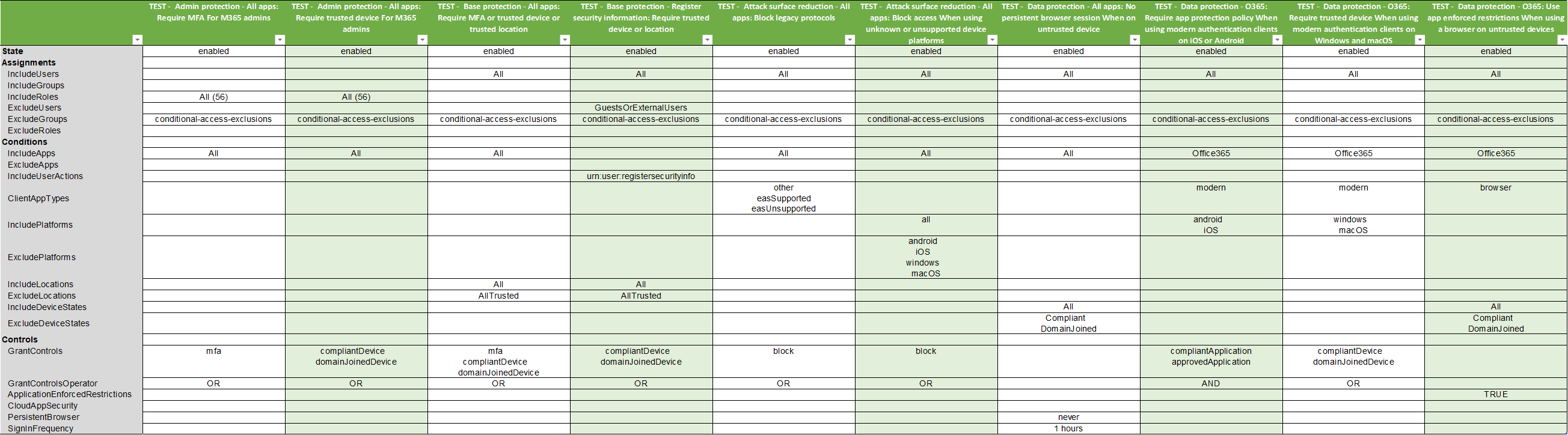
This PowerShell script documents your Microsoft Entra Conditional Access policies. The script exports all data as a csv file which can be pretty formatted as excel workbook. To ensure all policies can be retrieved and documented the script uses the Microsoft Graph Beta API endpoint.

Installation & Usage

  1. Install this script from the PowerShell gallery (dependent Microsoft.Graph.Authentication module is automatically installed):

    • Install-Script -Name Invoke-ConditionalAccessDocumentation -Scope CurrentUser
    • Script is saved to the user's default script location:
      • Windows : C:\Users\%USERNAME%\Documents\WindowsPowerShell\Scripts
      • macOS: ~/.local/share/powershell/scripts
  2. Connect to Microsoft Graph

    • Grant initial admin consent: Connect-Graph -Scopes "Application.Read.All", "Group.Read.All", "Policy.Read.All", "RoleManagement.Read.Directory", "User.Read.All", "NetworkAccess.Read.All" -ContextScope Process
    • After initial admin consent has been granted you can connect with: Connect-Graph for subsequent usage
    • If you want to connect via Bearer Token from your Browser session you can use the following snippet to connect: Connect-MgGraph -AccessToken $((Get-Clipboard -Raw).Replace("Bearer ","").Replace("`n","") | ConvertTo-SecureString -AsPlainText -Force)
  3. Run script via PowerShell dot sourcing

    • .\Invoke-ConditionalAccessDocumentation.ps1
  4. (Optional) Pretty format the csv with excel & save it as excel workbook
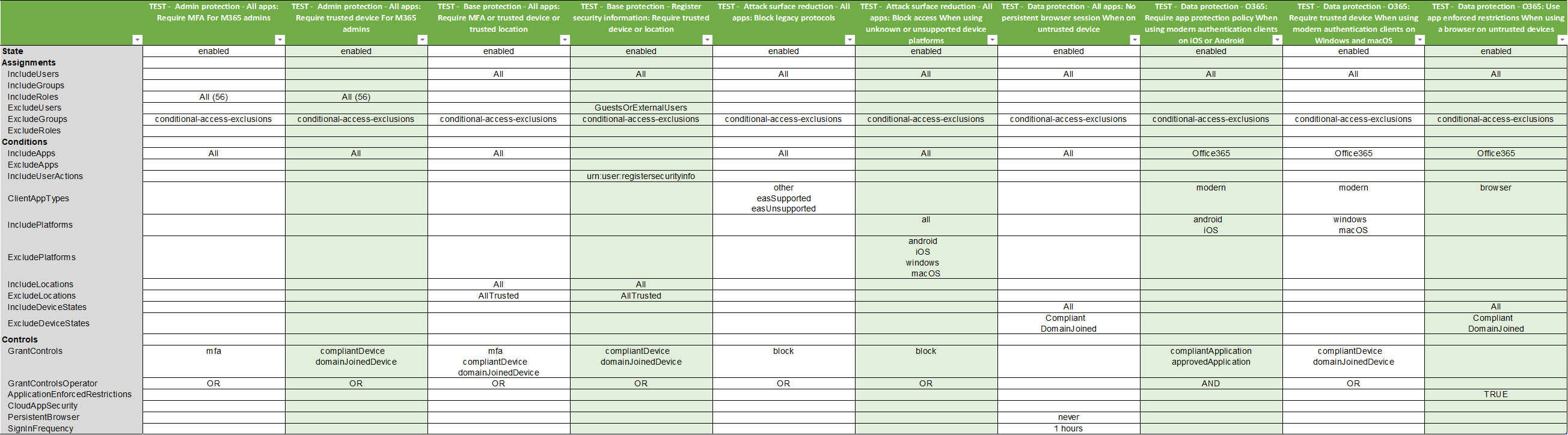
    • Example
Download Tool

