 ngalongc/openapi_security_scanner
Automated authorization security scanner for OpenAPI-based APIs. Tests GET endpoints with multiple credential sets to detect privilege escalation and broken access control bugs via differential response analysis.

Authorization security issues in modern web applications could not be easily picked up by security scanners. A few examples from Shopify, LINE, NordVPN. One of the reasons is that the security scanners mainly looking for SQLi, XSS, RCE instead of looking for authorization security bugs, and the scanners usually do not have knowledge of how the web application is supposed to behave. That's why the majority of the authorization bugs now are mainly discovered manually. OpenAPI Security Scanner is created to help to discover authorization security issues with both automation and manual review. It behaves like an external unit test tool to make sure everything is behaving the way it should be.
Watch this video to follow along or keep reading.
Fork or clone this project and follow the instructions below to get started.
The workflow to use this scanner would look something like this:
For developers, using this tool would add an extra layer of assurance that the API is behaving as expected from both internally and externally. And the scanner could be triggered upon every code deployment by triggering the pipeline https://docs.gitlab.com/ee/ci/triggers/.
For bug bounty hunters, using this tool can ensure you can always stay on top of the targeted API, because we all know, even a specific endpoint wasn't vulnerable before, it could be vulnerable in the future because of various reasons. So it's easier to have the manual part of bug hunting to be automated using this tool.
Make sure you have the permission to scan the targeted API.
You'll need an OpenAPI yaml file of the web application and replace it with the content of api.yaml in the repository.
Replace the content of api.yaml by target's OpenAPI yaml file, and go to GitLab project's Settings -> CI/CD -> Expand Variables and enter the variables in below formats.
The credentials provided here will be passed to the API calls in the form of Authorization: Bearer header format.
It is recommended to prepare access tokens for at least two user accounts with different permissions, and you can also create more than one access token per user account to test for correct behaviours for different scoped access tokens.
{
   "<user_a>":[
      {
         "scope":"<scope>",
         "access_token":"<value>",
         "name":"<name_of_access_token>"
      },
      {
         "scope":"<scope>",
         "access_token":"<value>",
         "name":"<name_of_access_token>"
      }
   ],
   "<user_b>":[
      {
         "scope":"<scope>",
         "access_token":"<value>",
         "name":"<name_of_access_token>"
      }
   ]
}
The endpoints provided here should be GET based API calls, and you can also include the query in the JSON body. In below example, the endpoint is /org/{orgs}/repos and the query for it is type=all. For the endpoint /repos/{owner}/{repo}, there'll be no query.
{
   "/orgs/{org}/repos":{
      "type":"all"
   },
   "/repos/{owner}/{repo}":{

   }
}
The path variables can be provided here, and the scanner will generate all combinations from values in the path variables.
{
   "org":[
      "test-org"
   ],
   "owner":[
      "ngalongc",
      "reconless"
   ],
   "repo":[
      "public-repo",
      "private-repo"
   ]
}
In this case, the following combination API calls are generated, and they will all be called by different set of credentials provided in OPENAPI_CREDS.
/orgs/test-org/repos?type=all
/repos/ngalongc/public-repo
/repos/ngalongc/private-repo
/repos/reconless/public-repo
/repos/reconless/private-repo
Go to https://gitlab.com/-/profile/personal_access_tokens and create an api access token and replace the value in here. This GitLab access token is used for downloading the scan results from GitLab runner.
<YOU_GITLAB_API_ACCESS_TOKEN>
This should be the value of the base url of your API server
https://example.com/api/v3
Screenshot of the slack notification when API changes are detected

Screenshot of the scanning result in artifacts
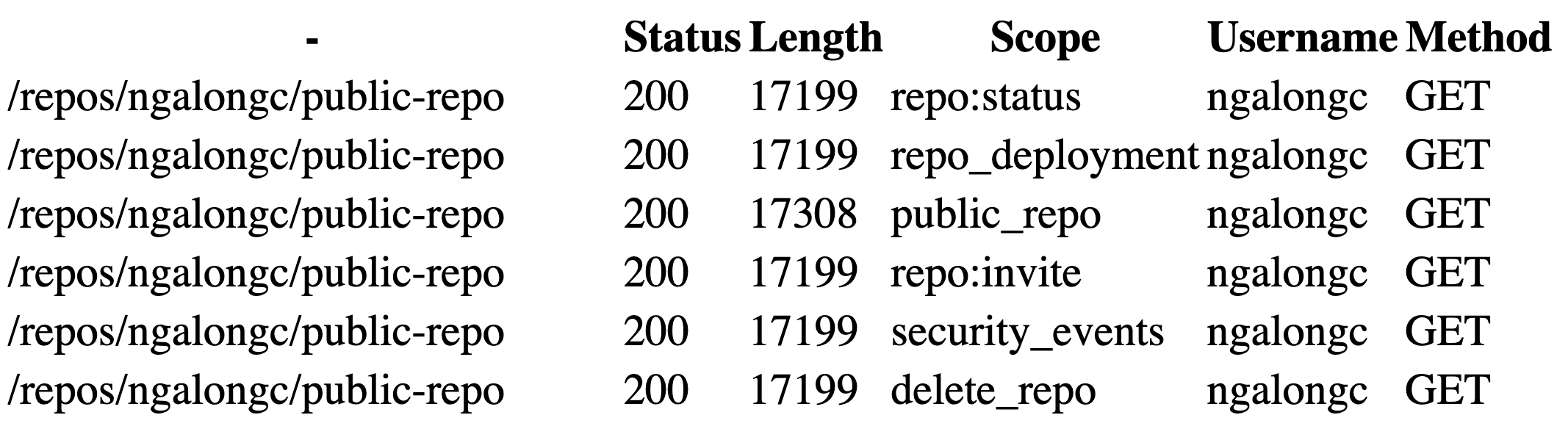
Sample report: https://ngalog-gitlab.gitlab.io/-/openapi_security_scanner/-/jobs/966841401/artifacts/sample.html
GET based endpoints/users/{user_id}/activities, the responses are different everytime they are called, so detecting the changes of this kind of API is not meaningfulContributions are what make the open source community such an amazing place to be learn, inspire, and create. Any contributions you make are greatly appreciated.
git checkout -b feature/AmazingFeature)git commit -m 'Add some AmazingFeature')git push origin feature/AmazingFeature)Distributed under the MIT License. See LICENSE for more information.
Ron Chan - @ngalongc
Project Link: https://gitlab.com/ngalog-gitlab/openapi_security_scanner
