 nextronsystems/ransomware-simulator
Safe ransomware simulation tool for testing antivirus detection. Simulates macro staging, volume shadow copy deletion, document encryption, and note dropping without harming real files.

  ____         _       __    ___              __
 / __ \ __ __ (_)____ / /__ / _ ) __ __ ____ / /__
/ /_/ // // // // __//  '_// _  |/ // // __//  '_/
\___\_\\_,_//_/ \__//_/\_\/____/ \_,_/ \__//_/\_\

Nextron Systems GmbH
The goal of this repository is to provide a simple, harmless way to check your AV's protection on ransomware.
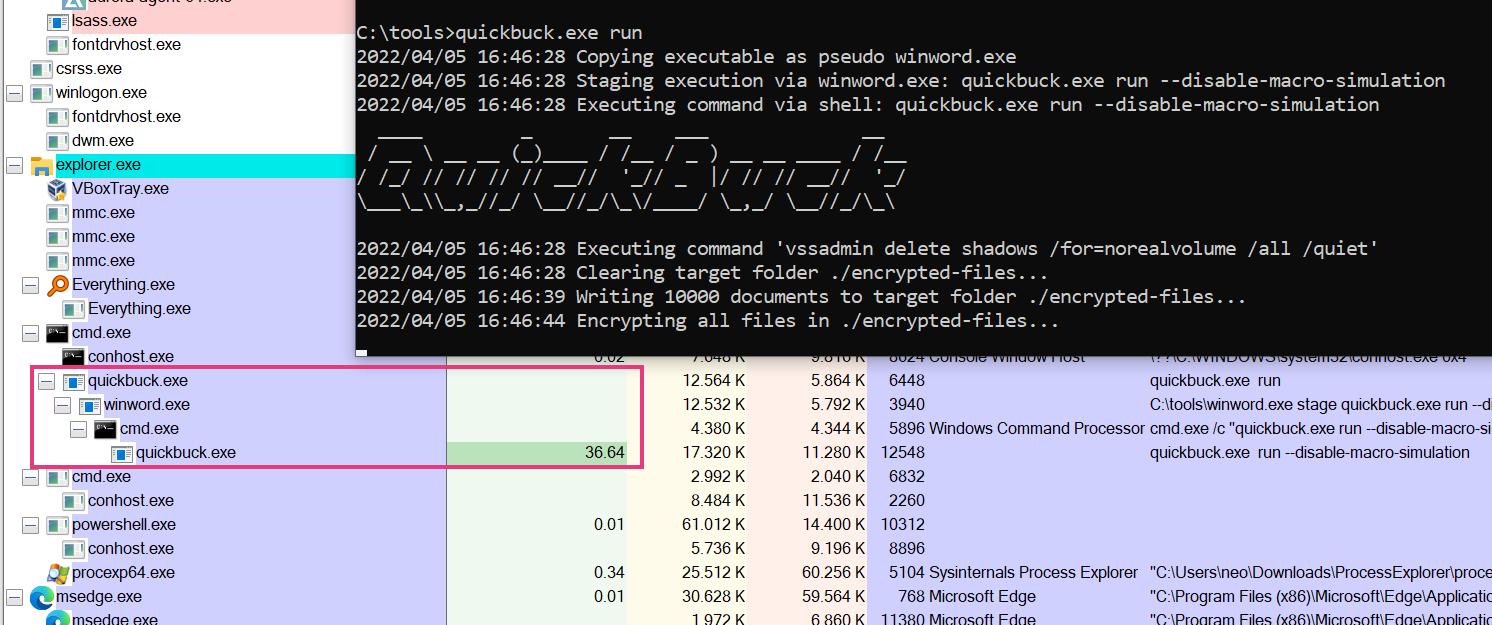
This tool simulates typical ransomware behaviour, such as:
The ransomware simulator takes no action that actually encrypts pre-existing files on the device, or deletes Volume Shadow Copies. However, any AV products looking for such behaviour should still hopefully trigger.
Each step, as listed above, can also be disabled via a command line flag. This allows you to check responses to later steps as well, even if an AV already detects earlier steps.
Ransomware Simulator

Usage:
ransomware-simulator [command]

Examples:
ransomware-simulator run

Available Commands:
help        Help about any command
run         Run ransomware simulator

Flags:
-h, --help   help for ransomware-simulator

Use "ransomware-simulator [command] --help" for more information about a command.
Run command:
Run Ransomware Simulator

Usage:
ransomware-simulator run [flags]

Flags:
    --dir string                     Directory where files that will be encrypted should be staged (default "./encrypted-files")
    --disable-file-encryption        Don't simulate document encryption
    --disable-macro-simulation       Don't simulate start from a macro by building the following process chain: winword.exe -> cmd.exe -> ransomware-simulator.exe
    --disable-note-drop              Don't drop pseudo ransomware note
    --disable-shadow-copy-deletion   Don't simulate volume shadow copy deletion
-h, --help                           help for run
    --note-location string           Ransomware note location (default "C:\\Users\\neo\\Desktop\\ransomware-simulator-note.txt")