 netspi/powerhuntshares
Audits Active Directory SMB shares to inventory, analyze, and report excessive privileges. Discovers accessible systems, enumerates share ACLs, identifies high-risk configurations, and generates HTML/CSV reports for remediation prioritization.

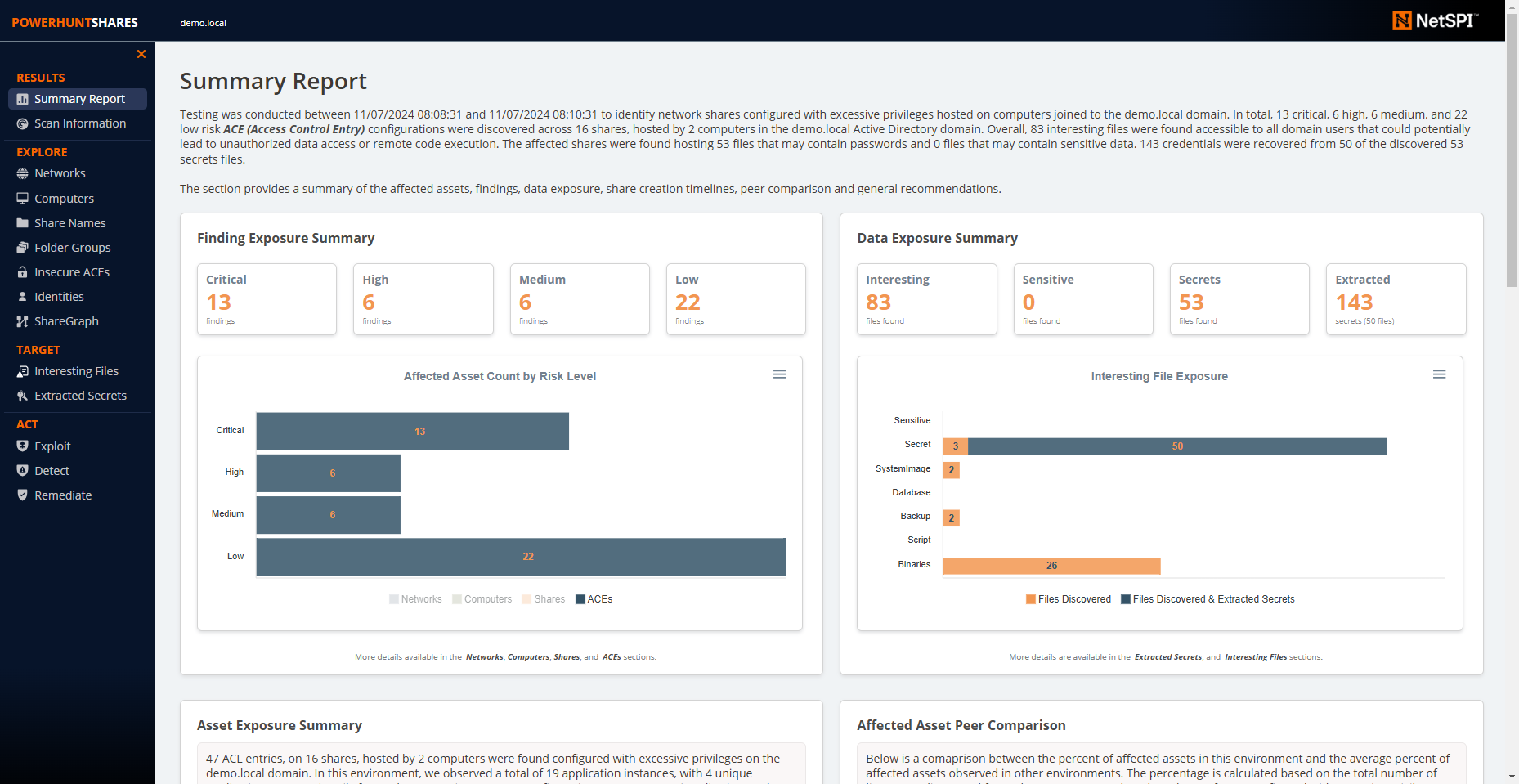
PowerHuntShares is PowerShell tool designed to help cybersecurity teams and penetration testers better identify, understand, attack, and remediate SMB shares in the Active Directory environments they protect. Every hacker has a story about abusing SMB shares, but it’s an attack surface that cybersecurity teams still struggle to defend. This project aims to provide an open proof-of-concept tool for creating a comprehensive share inventory, leveraging statistics, charts, graphs, and language models to contextualize shares, summarize relationships, assess risks, and prioritize remediation.
It supports functionality to:
Bonus Features:
PowerHuntShares v2 Resources:
PowerHuntShares v1 Resources:
PowerHuntShares will inventory SMB share ACLs configured with "excessive privileges" and highlight "high risk" ACLs. Below is how those are defined in this context.
Excessive Privileges
Excessive read and write share permissions have been defined as any network share ACL containing an explicit ACE (Access Control Entry) for the "Everyone", "Authenticated Users", "BUILTIN\Users", "Domain Users", or "Domain Computers" groups. All provide domain users access to the affected shares due to privilege inheritance issues. Note there is a parameter that allow operators to add their own target groups.
Below is some additional background:
Please Note: Share permissions can be overruled by NTFS permissions. Also, be aware that testing excluded share names containing the following keywords:
print$, prnproc$, printer, netlogon,and sysvol
High Risk Shares
In the context of this report, high risk shares have been defined as shares that provide unauthorized remote access to a system or application.
By default, that includes the shares
wwwroot, inetpub, c$, and admin$However, additional exposures may exist that are not called out beyond that.
Below is a list of commands that can be used to load PowerHuntShares into your current PowerShell session. Please note that one of these will have to be run each time you run PowerShell is run. It is not persistent.
# Bypass execution policy restrictions
Set-ExecutionPolicy -Scope Process Bypass

# Import module that exists in the current directory
Import-Module .\PowerHuntShares.psm1

or

# Reduce SSL operating level to support connection to github
[System.Net.ServicePointManager]::ServerCertificateValidationCallback = {$true}
[Net.ServicePointManager]::SecurityProtocol =[Net.SecurityProtocolType]::Tls12

# Download and load PowerHuntShares.psm1 into memory
IEX(New-Object System.Net.WebClient).DownloadString("https://raw.githubusercontent.com/NetSPI/PowerHuntShares/main/PowerHuntShares.psm1")
Important Note: All commands should be run as an unprivileged domain user.
.EXAMPLE 1: Run from a domain computer. Performs Active Directory computer discovery by default.
PS C:\temp\test> Invoke-HuntSMBShares -Threads 100 -OutputDirectory c:\temp\test

.EXAMPLE 2: Run from a domain computer with alternative domain credentials. Performs Active Directory computer discovery by default.
PS C:\temp\test> Invoke-HuntSMBShares -Threads 100 -OutputDirectory c:\temp\test -Credential domain\user

.EXAMPLE 3: Run from a domain computer as current user. Target hosts in a file. One per line.
PS C:\temp\test> Invoke-HuntSMBShares -Threads 100 -OutputDirectory c:\temp\test  -HostFile c:\temp\hosts.txt

.EXAMPLE 4: Run from a non-domain computer with credential. Performs Active Directory computer discovery by default.
C:\temp\test> runas /netonly /user:domain\user PowerShell.exe
PS C:\temp\test> Import-Module PowerHuntShares.psm1
PS C:\temp\test> Invoke-HuntSMBShares -Threads 100 -RunSpaceTimeout 10 -OutputDirectory c:\folder\ -DomainController 10.1.1.1 -Credential domain\user
===============================================================
PowerHuntShares
===============================================================
 This function automates the following tasks:

 o Determine current computer's domain
 o Enumerate domain computers
 o Filter for computers that respond to ping reqeusts
 o Filter for computers that have TCP 445 open and accessible
 o Enumerate SMB shares
 o Enumerate SMB share permissions
 o Identify shares with potentially excessive privielges
 o Identify shares that provide reads & write access
 o Identify shares thare are high risk
 o Identify common share owners, names, & directory listings
 o Generate creation, last written, & last accessed timelines
 o Generate html summary report and detailed csv files
