
Attack path mapping for Active Directory, ADCS, SCCM, and MSSQL using BloodHound CE + OpenGraph data.

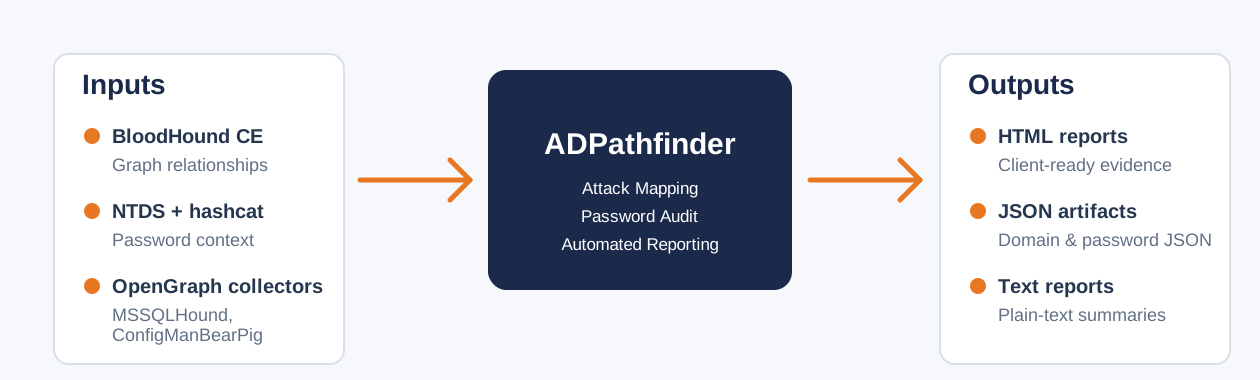
ADPathFinder is an attack mapping tool for pentesters and red teamers. It analyses SharpHound data and unifies it with OpenGraph plugins to surface attack paths to high-value targets such as Domain Admins and Domain Controllers, starting from low-privileged users and computers. MSSQLHound and ConfigManBearPig are supported natively, extending coverage across AD, ADCS, SCCM, and MSSQL.
Jump to: Quickstart · Coverage · How it works · Reports · Configuration · Contributors
| Area | Examples |
|---|---|
| Core AD | Escalation paths, delegation, admin rights, BadSuccessor, exposed high-value sessions |
| Passwords | Weak passwords, blank passwords, reuse, username similarity, LM hash use, Kerberoast and AS-REP exposure paired with weak passwords |
| ADCS | ESC-style certificate template and CA risks |
| MSSQL (MSSQLHound OpenGraph data) | Logins, linked servers, impersonation, relay, and privilege escalation paths |
| SCCM (ConfigManBearPig OpenGraph data) | Takeover and relay paths, PXE-enabled distribution points, and management point policy retrieval |
| Across domains | Trusts, shared passwords, and escalation paths between domains |
neo4j://localhost:7687.git clone https://github.com/NetSPI/AD-PathFinder.git
cd AD-PathFinder
python3 -m venv .venv
source .venv/bin/activate
pip install -e .
adpathfinder --setup-bloodhound-api
This stores the BloodHound CE API settings used for import and delete operations.
adpathfinder --import SharpHound.zip
Multiple SharpHound and OpenGraph plugin zip files can be imported in one command:
adpathfinder --import SharpHound.zip MSSQLHound.zip ConfigManBearPig.zip
adpathfinder -i SharpHound.zip MSSQLHound.zip ConfigManBearPig.zip --ad --pwd Contoso,ContosoIT --ntds ntds.txt -p hashcat.potfile
Use only the zip files you have. The --pwd value is not the AD domain; it is a comma separated list of company, brand, or organisation terms to flag in cracked passwords.
adpathfinder --ad
adpathfinder --ad --pwd Contoso,ContosoIT --ntds ntds.txt -p hashcat.potfile
Use --unsafe-report only when reports should include cleartext passwords.
adpathfinder --ad --pwd Contoso,ContosoIT --ntds ntds.txt -p hashcat.potfile --diagnostics
| Stage | What happens |
|---|---|
| Ingest | Merges SharpHound and supported OpenGraph zips into one graph. MSSQLHound and ConfigManBearPig data are supported directly |
| Map | Finds the shortest paths from users and computers to high-value targets. You can configure the edge set to remove noisy edges like HasSession |
| Group | Groups accounts that share a path, so repeated paths are reported as one finding instead of many near-duplicates |
| Pair | Compares NTDS hashes and hashcat potfiles with graph data to show which paths are usable during the assessment |
| Layer | Reports standalone findings such as SMB signing disabled or default privileged groups, and raises the severity when the same host or group also sits on a path to high-value targets |

| Render | Writes HTML reports with SVG path graphs, mitigation notes, PowerShell validation steps, and remediated state tracking, plus text, JSON, and diagnostics outputs |
ADPathFinder reads config.ini from the working directory. Values can also be set with ADPF_* environment variables.
Run this to configure BloodHound CE API access for imports and deletes:
adpathfinder --setup-bloodhound-api
See Configuration on the wiki for all options, Neo4j connection settings, file permissions, and example configs. See Excluded relationships for filtering attack path output.
Reports are written to report_<domain>/, for example report_training.local/.
| Output | Purpose |
|---|---|
<domain>_AD_report.html | HTML report for clients with grouped findings, path graphs, mitigation notes, validation steps, and remediated state tracking |
<domain>_domain_audit.txt / <domain>_domain_audit.json | Text and JSON domain audit outputs for review, automation, and later analysis |

<domain>_password_audit.html / <domain>_password_audit.txt / <domain>_password_audit.json | Password audit outputs when NTDS hashes and a hashcat potfile are provided |
<domain>_*_unsafe.* | Optional unsafe reports generated only with --unsafe-report; these may include cleartext passwords |
diagnostics.json | Optional run statistics and debugging data generated with --diagnostics |
Handle NTDS data, potfiles, and generated reports as sensitive assessment data. The --unsafe-report flag writes cleartext passwords into the output files; only use it when you specifically need cleartext in the report, and store the resulting _unsafe files accordingly.

